Free Converter for dvd to pal or avi format

Status
Not open for further replies.

belinda502

New member
Local time
4:47 AM
Messages
23
I am looking for free softwear that would convert a dvd I burned to 'PAL' or 'AVI' so I could watch it on my DVD player. I tried downloading a few such a AVC and CUDA and Realplayer but when I opened them conversion to either of these formats did not appear as an option. Any advice appreciated
 

My Computer My Computer

At a glance

Windows 7 64 bit
Computer Manufacturer/Model Number
Sony/Vaio/PCG-71911M
OS
Windows 7 64 bit

My Computer My Computer

At a glance

Win 7 Pro 64-bitIntel i5 2.4 Ghz8GB DDR3Intel HD 3000
Computer type
Laptop
Computer Manufacturer/Model Number
Sony Vaio VPCEB47GM Laptop
OS
Win 7 Pro 64-bit
CPU
Intel i5 2.4 Ghz
Memory
8GB DDR3
Graphics Card(s)
Intel HD 3000
Sound Card
IDT High Definition
Monitor(s) Displays
15.6 WGXA Anti-Glare LED
Screen Resolution
1280x800
Hard Drives
640Gb 7200rpm
Antivirus
MSE
Browser
Opera (primary) with IE9 backup
Have you tried Handbrake. It is a free utility to convert between different video formats. I use it myself. HandBrake
 

My Computer My Computer

At a glance

Windows 7 Ultimate x64FX 8350 @ 4.8ghz, turbo clocked to 5.4ghzMushkin Enhanced Blackline 16GB 1760mhz 10-10...Gigabyte-660 Windforce OC- GPU Clock 1212MHz ...
Computer type
PC/Desktop
Computer Manufacturer/Model Number
Custom Build
OS
Windows 7 Ultimate x64
CPU
FX 8350 @ 4.8ghz, turbo clocked to 5.4ghz
Motherboard
Asus Sabertooth FX990 Gen 3.0 R2.0
Memory
Mushkin Enhanced Blackline 16GB 1760mhz 10-10-9-24 T1
Graphics Card(s)
Gigabyte-660 Windforce OC- GPU Clock 1212MHz /3504MHz ram
Sound Card
Creative Sound Blaster Recon3D PCIe Sound Card
Monitor(s) Displays
Samsung SyncMaster S27B350H (HDMI)
Screen Resolution
1920x1080 60HZ
Hard Drives
1 x SSD Crucial M4 256GB (Primary OS)
3 x HDD WD 1TB
4 x HDD 2TB
1 x HDD 160GB (Secondary Backup OS)
Raid SATA III 6GB/s 4-port PCI-e Controller Card, Marvel 88SE9215 chipset
PSU
Chieftec-650-14CS (Modular) 80 Plus Gold-650 Watt
Case
Akasa Venom Toxic Gaming Big tower ( Custom Black ) Ver 2.0
Cooling
Water 2.0 PRO / GEIL Cyclone VRM / 6x120mm 2x220mm 2x140mm
Keyboard
Logitech G19
Mouse
Wireless Notebook Presenter Mouse 8000
Internet Speed
Fiber GBS
Antivirus
Don't Announce it to the world :)
Browser
Gotta have at least 1!

My Computer My Computer

At a glance

Windows 7 Ultimate 64-bitIntel Core 2 Duo E6550 @2.33GHz4GB DDR"NVIDIA GeForce 8600 GS
Computer type
PC/Desktop
Computer Manufacturer/Model Number
Dell / Lenovo g550
OS
Windows 7 Ultimate 64-bit
CPU
Intel Core 2 Duo E6550 @2.33GHz
Motherboard
foxconn g33m02
Memory
4GB DDR"
Graphics Card(s)
NVIDIA GeForce 8600 GS
Hard Drives
HDD 1 = 150GB
HDD 2 = 1.5TB
PSU
450W
Cooling
Stock fan
Internet Speed
12Mb
Antivirus
AVG Internet Security
Thanks,I will check out the handbrake link suggested. To reply to first post, the original DVD had nine files. Two of them had .BUP extensions, two of them had .IFO extensions and the other five had .VOB extensions. I can play the burned dvd on my computer by opening one of the .IFO extension files file name - 'VTS_01_0.
 

My Computer My Computer

At a glance

Windows 7 64 bit
Computer Manufacturer/Model Number
Sony/Vaio/PCG-71911M
OS
Windows 7 64 bit
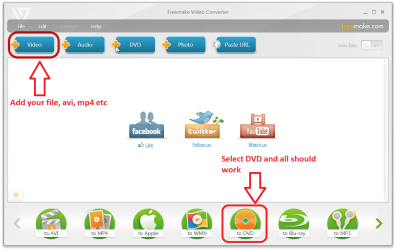
I downloaded Freemake and converted to AVI but the DVD would still not play on the dvd player. Then I just tried to burn them to a dvd on freemake which didn't recognise that a dvd was inserted (I was using a dvd-ram disk). I tried doing it through my computer and the files did not burn. The message advised me to download the latest firmware. I then just tried copying and pasting them but now the dvd disk is just started and stopping all the time
 

My Computer My Computer

At a glance

Windows 7 64 bit
Computer Manufacturer/Model Number
Sony/Vaio/PCG-71911M
OS
Windows 7 64 bit
What you need to do it this.
 

Attachments

  • Untitled.png
    Untitled.png
    74.8 KB · Views: 9

My Computer My Computer

At a glance

Windows 7 Ultimate 64-bitIntel Core 2 Duo E6550 @2.33GHz4GB DDR"NVIDIA GeForce 8600 GS
Computer type
PC/Desktop
Computer Manufacturer/Model Number
Dell / Lenovo g550
OS
Windows 7 Ultimate 64-bit
CPU
Intel Core 2 Duo E6550 @2.33GHz
Motherboard
foxconn g33m02
Memory
4GB DDR"
Graphics Card(s)
NVIDIA GeForce 8600 GS
Hard Drives
HDD 1 = 150GB
HDD 2 = 1.5TB
PSU
450W
Cooling
Stock fan
Internet Speed
12Mb
Antivirus
AVG Internet Security
Hi I did that - when I selected dvd it said there was no dvd in the drive. I had used the dvd before so maybe the dvd was corrupted (although I had erased all the stuff on it).
 

My Computer My Computer

At a glance

Windows 7 64 bit
Computer Manufacturer/Model Number
Sony/Vaio/PCG-71911M
OS
Windows 7 64 bit
Could be try a different dvd if you have one.
 

My Computer My Computer

At a glance

Windows 7 Ultimate 64-bitIntel Core 2 Duo E6550 @2.33GHz4GB DDR"NVIDIA GeForce 8600 GS
Computer type
PC/Desktop
Computer Manufacturer/Model Number
Dell / Lenovo g550
OS
Windows 7 Ultimate 64-bit
CPU
Intel Core 2 Duo E6550 @2.33GHz
Motherboard
foxconn g33m02
Memory
4GB DDR"
Graphics Card(s)
NVIDIA GeForce 8600 GS
Hard Drives
HDD 1 = 150GB
HDD 2 = 1.5TB
PSU
450W
Cooling
Stock fan
Internet Speed
12Mb
Antivirus
AVG Internet Security
Hi there
IMO the BEST piece of software (although it's paid software) is SlySoft's AnyDVD -- it will rip a standard DVD to ISO, remove all the regional encoding and encryption and then you can burn the iso (finalized) so it should play on any standard DVD player.

It can even do the same for Blu Ray DVD's.

I always keep copies of commercial DVD's in iso format on a small external portable HDD when I'm travelling. W8 mounts ISO's directly - and I just play these with VLC just like I would do with a physical DVD. W7 can do the same although you need some software for handling virtual ISO's (such as Alcohol 52% - Free - ).

Cheers
jimbo

Cheers
jimbo
 

My Computer My Computer

At a glance

Linux CENTOS 7 / various Windows OS'es and se...Intel i7 Intel i58GB, 16GBOn Motherboard
Computer type
PC/Desktop
Computer Manufacturer/Model Number
Custom built, several laptops HP/ASUS
OS
Linux CENTOS 7 / various Windows OS'es and servers
CPU
Intel i7 Intel i5
Memory
8GB, 16GB
Graphics Card(s)
On Motherboard
Sound Card
Realtek HD audio
Monitor(s) Displays
Apple Cinema display, Samsung LCD
Screen Resolution
1920 X 1080
Hard Drives
4 X 1TB SATA
Mouse
Toshiba wireless laser
Internet Speed
> 20MB up
Hi Jimbo,
I checked that out and it seems good but it is seriously expensive as I would need to get the clone dvd option.
I am a newbie at doing this. Basically I copied and pasted from the original dvd to my videos files in Windows. I got none files:-
Video_TS.bup
Video_TS.ifo
Video_TS.vob
VTS_01_0.bup
VTS_01_0.ifo
VTS_01_2.vob
VTS_01_3.vob
VTS_01_4.vob

All the files with extensions ending in .vob are to be opened with programme Windows Shell Common and there is an icon with a lock beside them so I am presuming they are encrypted.

The file VTS_01_0.ifo actually plays the video on my computer even though the file size is only 56 KB.

My question is if I got the softwear you recommend I have to copy the dvd onto my computers hard disk first I presume before cloning it and it has copied in the format above so how would I get around this? I have looked at most of the free video converters now and I think I'm stuck because some of the dvd seems to be encrypted
 

My Computer My Computer

At a glance

Windows 7 64 bit
Computer Manufacturer/Model Number
Sony/Vaio/PCG-71911M
OS
Windows 7 64 bit
If the DVD is in NTFS format, it will likely need to be converted to PAL and burned to disc for use in PAL players and visa versa.

Its not so much a region code issue as it is a format incompatability, unless you have a DVD player than can play both formats.

You need to use AnyDVD to decrypt the disc. 2 ways to do this.
1. Rip the Disc to your Hard Drive (This method will make the conversion process much faster)
2. Just start anyDVD and let it scan the disc.

Then use a authoring program to convert to PAL format, such as FreeMake, and burn to a blank disc.
If you choose option 1, choose the folder on your Hard Drive. If you chose option 2, choose your DVD drive and save to Hard drive.
Option 1 will make the conversion process go much faster.

You'll want to choose the option DVD to DVD, and make sure the Output options are set to PAL.

You can not just copy/paste the original DVD.
 

My Computer My Computer

At a glance

Windows 7 Home Premium 64bitIntel Core i7 2700k8GB Mushkin Redline Ridgebacks @1866EVGA GTX570 SC
Computer Manufacturer/Model Number
Custom (Self Build)
OS
Windows 7 Home Premium 64bit
CPU
Intel Core i7 2700k
Motherboard
eVGA P67 SLI
Memory
8GB Mushkin Redline Ridgebacks @1866
Graphics Card(s)
EVGA GTX570 SC
Sound Card
XiFi Titanium HD
Monitor(s) Displays
LG W2453V
Screen Resolution
1920x1080
Hard Drives
Intel 320 80GB -- Intel X25-V 40GB --WD Black 1TB x2 -- WD Blue 640GB
PSU
Seasonic x750
Case
Corsair 600T SE White
Cooling
eVGA Superclocked CPU Cooler
Keyboard
Saitek Cyborg
Antivirus
Kaspersky
Browser
IE
Other Info
LG BD/DVD
Hi there
Most monitors will display both NTSC / PAL without a problem - at least the ones here do - I'm using a standard LG TV LCD monitor and our TV system is PAL (and HD) but loads of NTSC DVD's are also in circulation -- NATO / US Base also not far away.

That's the advantage of cloning the DVD -- simply copy the DVD to ISO -- don't bother with rip to Disk and then mount the ISO just as you would a physical DVD and play it with VLC. (W8 mounts iso's directly, W7 use free virtual drive software like alcohol 52%).

The DVD ISO you make is an EXACT copy of the original DVD with the CSS decryption and regional restrictions removed.

If you want the DVD as a physical DVD then simply burn the iso image to a DVD. it - it will play on your commercial DVD player (complete with menus, subtitles , languages etc) but all the css encryption will br removed as well as region restrictions.

Cheers
jimbo
 

My Computer My Computer

At a glance

Linux CENTOS 7 / various Windows OS'es and se...Intel i7 Intel i58GB, 16GBOn Motherboard
Computer type
PC/Desktop
Computer Manufacturer/Model Number
Custom built, several laptops HP/ASUS
OS
Linux CENTOS 7 / various Windows OS'es and servers
CPU
Intel i7 Intel i5
Memory
8GB, 16GB
Graphics Card(s)
On Motherboard
Sound Card
Realtek HD audio
Monitor(s) Displays
Apple Cinema display, Samsung LCD
Screen Resolution
1920 X 1080
Hard Drives
4 X 1TB SATA
Mouse
Toshiba wireless laser
Internet Speed
> 20MB up
Thanks Wishmaster and Jimbo45 for your comprehensive responses - am just getting onto this now
 

My Computer My Computer

At a glance

Windows 7 64 bit
Computer Manufacturer/Model Number
Sony/Vaio/PCG-71911M
OS
Windows 7 64 bit
Status
Not open for further replies.
Back
Top