Solved Free Drive Space is Incorrect scenario ¿?

MCabZ

New member
Local time
2:53 PM
Messages
12
Location
Ibiza
Free Drive Space is Incorrect scenario ¿?

I have read a lot of posts concerning the same issue regarding the free space being incorrect and have tried numerous recommendations without any luck:

  1. > cleared free space
    > SFC OK
    > no hibernation
    > only 2 system restore points
    > automatic defraged with Raxco's PerfectDisk
    > ran CCleaner
    > checked with WInDirStat

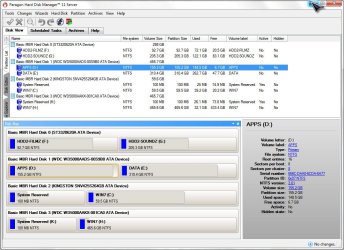
Actually using 13.45 GB on a partition with 155.2 GB. HDD shows that I am using 148.5 GB
This is a 500 GB HDD that I have in 2 partitions (D)APPS + (E)DATA
The other partitions seem to be OK.OS is installed on a SSD (C)WIN7

Attached are views of the HDD installed with stats as well as the results with WinDirStat.

TIA
 

Attachments

  • WinDirStat on D.jpg
    WinDirStat on D.jpg
    201.5 KB · Views: 4
  • Paragon disk view.jpg
    Paragon disk view.jpg
    127.8 KB · Views: 2
Last edited:

My Computer My Computer

At a glance

windows 7 ultimate x64
OS
windows 7 ultimate x64
Discovered that the partition had approximately 90% excluded files when I tried to manually defrag it. Had to perform several consolidate free space operations and a boot defrag. Also resized the partition. Problem solved and the correct used file space is displayed. :) Clueless as to what caused this scenario.
 

My Computer My Computer

At a glance

windows 7 ultimate x64
OS
windows 7 ultimate x64
I'm thinking this is a possible cause.
Raxco's PerfectDisk

Next time you defrag use the Windows 7 built in defrag and see if anything bad happens.
 

My Computer My Computer

At a glance

Windows 10 Pro. 64/ version 1709 Windows 7 Pr...Intel i7-6800K @ 4.3Corsair Platinum 16 gig @2400EVGA GTX 1070 OC
Computer type
PC/Desktop
Computer Manufacturer/Model Number
Home made Desktop
OS
Windows 10 Pro. 64/ version 1709 Windows 7 Pro/64
CPU
Intel i7-6800K @ 4.3
Motherboard
ASUS X-99 Deluxe II
Memory
Corsair Platinum 16 gig @2400
Graphics Card(s)
EVGA GTX 1070 OC
Monitor(s) Displays
Asus 27" LED LCD/VE278Q
Screen Resolution
1920-1080 or 1280-720 HDMI
Hard Drives
INTEL SSD 730-240 Gb Sata 3.0/
PSU
EVGA Platium 1200W
Case
Phanteks Luxe Tempered Glass 8 fans/ one radiator
Cooling
XSPC/ Water Cooled CPU
Keyboard
Das 4 Professional
Mouse
Logitech M705/MX Anywhere 2-S
Internet Speed
100 mbits
Antivirus
Microsoft Security Essentials/ Malwarebytes Premium 3.0/ SAS
Browser
I.E. 11 default/Firefox/ ISP Time Warner Cable/Spectrum
Other Info
LG BluRay Burner/
Sound system-KLipsch-THX/
Icy Dock ssd Hot Swap bays.
I'm thinking this is a possible cause.
Raxco's PerfectDisk

Next time you defrag use the Windows 7 built in defrag and see if anything bad happens.

Interesting that you should mention PerfectDisk. It's the updated version of this program that enabled me to sort out my problem, although I don't disregard the possibility that it might have caused it in the first place. I suspect that enabling it's VSS compatibility mode may have been the culprit. I have now disabled this option. Not too enamored with MS's built in defragger and it's limitations. Have used Raxco's PerfectDisk for many years and consider it to have done an excellent job of maintaining my HDD defragged automatically.
 

My Computer My Computer

At a glance

windows 7 ultimate x64
OS
windows 7 ultimate x64
I don't know what options Raxco's PerfectDisk has because I have never used it.
DisKeeper made Defrag for Microsoft to use on Windows 7. As far as I know it just defrags which is exactly what I want it to do.
No more No less.
 

My Computer My Computer

At a glance

Windows 10 Pro. 64/ version 1709 Windows 7 Pr...Intel i7-6800K @ 4.3Corsair Platinum 16 gig @2400EVGA GTX 1070 OC
Computer type
PC/Desktop
Computer Manufacturer/Model Number
Home made Desktop
OS
Windows 10 Pro. 64/ version 1709 Windows 7 Pro/64
CPU
Intel i7-6800K @ 4.3
Motherboard
ASUS X-99 Deluxe II
Memory
Corsair Platinum 16 gig @2400
Graphics Card(s)
EVGA GTX 1070 OC
Monitor(s) Displays
Asus 27" LED LCD/VE278Q
Screen Resolution
1920-1080 or 1280-720 HDMI
Hard Drives
INTEL SSD 730-240 Gb Sata 3.0/
PSU
EVGA Platium 1200W
Case
Phanteks Luxe Tempered Glass 8 fans/ one radiator
Cooling
XSPC/ Water Cooled CPU
Keyboard
Das 4 Professional
Mouse
Logitech M705/MX Anywhere 2-S
Internet Speed
100 mbits
Antivirus
Microsoft Security Essentials/ Malwarebytes Premium 3.0/ SAS
Browser
I.E. 11 default/Firefox/ ISP Time Warner Cable/Spectrum
Other Info
LG BluRay Burner/
Sound system-KLipsch-THX/
Icy Dock ssd Hot Swap bays.
Back
Top