
Delete partition to free up space advice

ipbr21054

New member
Member
VIP
Local time
4:36 PM
Messages
128
Morning,
I am using Windows 7 which has two partitions if thats the correct name.
Two Hard drives installed.
One hard drive is using Windows 7 & the other is using Windows 10
I mainly always use Windows 7 & hardly use the other.
Space on Windows 7 hard drive is getting low so i decided to delete the other.
This is what i did but didnt go to plan.

Right click My computer.
Select manage.
Select disc management
Right click the drive i wish to remove & select remove volume.
Now within a split second it was gone, but i thought it would of did something for a minute or two but it didnt.
Now checking my Windows 7 drive i was expecting the Gb storage to then be mush bigger but its the same.


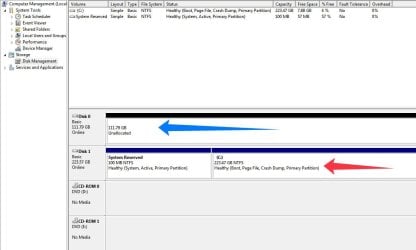
I have supplied a screenshot of the screen.
Disc 0 which shows 111.79Gb needs to be transfered to Disc 1 of which is the Windows 7 drive, Thus drive C of which is what i use

Please advise
 

Attachments
  • EaseUS_2023_08_ 4_09_56_14.jpg
    EaseUS_2023_08_ 4_09_56_14.jpg
    56.6 KB · Views: 2
  • EaseUS_2023_08_ 4_09_59_19.jpg
    EaseUS_2023_08_ 4_09_59_19.jpg
    40.6 KB · Views: 5

My Computer My Computer

At a glance

Microsoft Windows 7 Professional 64-bit 7601 ...AMD Athlon(tm) II Neo K345 Dual-Core Processor8.00 GBATI Mobility Radeon HD 4200 Series
Computer type
Laptop
Computer Manufacturer/Model Number
Dell Inspiron P07T & Pc Windows 32 / 64 bit
OS
Microsoft Windows 7 Professional 64-bit 7601 Multiprocessor Free Service Pack 1
CPU
AMD Athlon(tm) II Neo K345 Dual-Core Processor
Motherboard
Dell Inc.
Memory
8.00 GB
Graphics Card(s)
ATI Mobility Radeon HD 4200 Series
Sound Card
(1) AMD High Definition Audio Device (2) High Definition A
Monitor(s) Displays
Generic PnP Monitor
Screen Resolution
1366 x 768 x 32 bits (4294967296 colors) @ 59 Hz
Hard Drives
(1) WDC WD3200BEKT-75PVMT0 ATA Device (2) Generic- Multi-Card USB Device
PSU
Dell 65w ac adapter model no LA65NS0-00
Keyboard
Standard Ps2 keyboard
Mouse
Ps2 compatible mouse
Internet Speed
Download 38.9Mbps Upload 18.1Mbps
Antivirus
Avg internet security 19.7.3103 (build 19.7.4674.524)
Browser
Google Chrome Version 76.0.3809.132 (Official Build) (64-bit
In order to join the now formatted Windows 10 drive to your Windows 7 drive you have to convert to a dynamic disk. BUT! if you do so it appears you can't boot the drive. So your Windows 7 install will be gone. Dynamic disks are only good for data and not the operating system. You can watch this video and see how it's done, but don't do it, you'll lose your Windows 7 drive and then have to try to recover to a basic disk. You already lost your Windows 10 drive by formatting it. If you want that back you have to use a partition recovery software which there are many. I've used them with great success.

If you want more storage space I'm afraid you'll have to get a bigger hard drive and clone your current Windows 7 drive to that. There are many cloning tools out there. Perhaps the easiest is AOMEI Backupper. Others use Macrium Reflect or whatever. I personally use the more complicated Clonezilla.

Something else you need to know about. Since those are solid state drives they should have at least 10% of the drive unallocated for proper garbage collection and drive longevity. So, 10% of the first drive is ~11 GB to set aside as unallocated and drive two is ~22 GB of set aside unallocated space. You more than likely can't do that now since you indicated the drive is practically full. But if you get a new drive, make sure you do that. So if you get a 1 TB SSD, then set aside unallocated space of 100 GB.

You can use one of these adapters to send the clone of Windows 7 to the new drive. The when finished install the drive in the laptop.

If you're ever in the market for a new laptop and Windows 7 compatible, read my signature below...
 

My Computer My Computer

At a glance

Windows 7 Ultimate x64
Computer type
PC/Desktop
OS
Windows 7 Ultimate x64
Drive 0 and 1 are two separate drives. As mentioned is better tho keep this way.
Initialize and format drive 0 and use it as a data drive.
 

My Computers My Computers

  • At a glance

    Windows 7 HP 64i5 6600K - 800MHz to 4200MHz4+4G GSkill DDR4 3000IG - Intel 530
    Computer type
    PC/Desktop
    Computer Manufacturer/Model Number
    custom build
    OS
    Windows 7 HP 64
    CPU
    i5 6600K - 800MHz to 4200MHz
    Motherboard
    GA-Z170-HD3P
    Memory
    4+4G GSkill DDR4 3000
    Graphics Card(s)
    IG - Intel 530
    Monitor(s) Displays
    Samsung 226BW
    Screen Resolution
    1680x1050
    Hard Drives
    (1) -1 SM951 – 128GB M.2 AHCI PCIe SSD drive for Windows 7 and Lubuntu
    (2) -1 WD SATA 3 - 1T for Data
    (3) -1 WD SATA 3 - 1T for backup
    PSU
    Thermaltake 450W TR2 gold
    Keyboard
    Old and good Chicony mechanical keyboard
    Mouse
    Logitech mX performance - 9 buttons (had to disable some)
    Internet Speed
    500Mb/s
    Browser
    Firefox 64
    Other Info
    TinyWall firewall
  • At a glance

    Windows 7 Proi7-4500U 800MHz to 3.0GHz(4+4)G DDR3 1600IG intel 4400 + NVIDIA GeForce GT 745M
    Computer type
    Laptop
    System Manufacturer/Model Number
    Asus Q550LF
    OS
    Windows 7 Pro
    CPU
    i7-4500U 800MHz to 3.0GHz
    Motherboard
    Asus Q550LF
    Memory
    (4+4)G DDR3 1600
    Graphics Card(s)
    IG intel 4400 + NVIDIA GeForce GT 745M
    Sound Card
    Realtek
    Monitor(s) Displays
    LG Display LP156WF4-SPH1
    Screen Resolution
    1920 x 1080
    Hard Drives
    BX500 120G SSD for Windows and programs +
    1T HDD for data
    Internet Speed
    500 Mb/s
    Browser
    Firefox
    Other Info
    TinyWall firewall
Ok thanks,maybe i got a little confused.
I didnt use the other drive much which had Windows 10 on it so in reality it wasnt an issue.

Just need to look on this main drive to free up space / delete stuff.
Thanks
 

My Computer My Computer

At a glance

Microsoft Windows 7 Professional 64-bit 7601 ...AMD Athlon(tm) II Neo K345 Dual-Core Processor8.00 GBATI Mobility Radeon HD 4200 Series
Computer type
Laptop
Computer Manufacturer/Model Number
Dell Inspiron P07T & Pc Windows 32 / 64 bit
OS
Microsoft Windows 7 Professional 64-bit 7601 Multiprocessor Free Service Pack 1
CPU
AMD Athlon(tm) II Neo K345 Dual-Core Processor
Motherboard
Dell Inc.
Memory
8.00 GB
Graphics Card(s)
ATI Mobility Radeon HD 4200 Series
Sound Card
(1) AMD High Definition Audio Device (2) High Definition A
Monitor(s) Displays
Generic PnP Monitor
Screen Resolution
1366 x 768 x 32 bits (4294967296 colors) @ 59 Hz
Hard Drives
(1) WDC WD3200BEKT-75PVMT0 ATA Device (2) Generic- Multi-Card USB Device
PSU
Dell 65w ac adapter model no LA65NS0-00
Keyboard
Standard Ps2 keyboard
Mouse
Ps2 compatible mouse
Internet Speed
Download 38.9Mbps Upload 18.1Mbps
Antivirus
Avg internet security 19.7.3103 (build 19.7.4674.524)
Browser
Google Chrome Version 76.0.3809.132 (Official Build) (64-bit
Just need to look on this main drive to free up space / delete stuff.

As Megahertz07 said, use Disk 0 as a data disk. To be more specific, format Disk 0 as a single partition (e.g., drive "D") and use it as the location of some or all of your "My Documents", "My Music", "My Pictures", etc. You can do this by either moving the location of your most space-filling User Folders, or by using Libraries.

See this link to change the default location of your User Folders from C: to the D: drive. Note this will move the entirety of each folder, so they will no longer occupy space on your C: drive.

Alternatively, see this link about using libraries. That would allow, for example, your "My Pictures" to include folders on both C: and D:, and you'll pick and choose where to redistribute your "My Pictures" files between the two.

Since you want to get as much stuff as possible off your C: drive the second option is probably of limited value, but the first option should help a lot.
 

My Computer My Computer

At a glance

Windows 7/8.1/10 multibootIntel Core i7-770048GB (2x16GB Crucial DDR4-3200 + 2x8GB Hynix ...Intel HD630 + AMD Radeon R7 450 PCIe
Computer type
PC/Desktop
Computer Manufacturer/Model Number
Dell Optiplex 7050
OS
Windows 7/8.1/10 multiboot
CPU
Intel Core i7-7700
Motherboard
Dell, Intel Q270 chipset
Memory
48GB (2x16GB Crucial DDR4-3200 + 2x8GB Hynix DDR4-2400)
Graphics Card(s)
Intel HD630 + AMD Radeon R7 450 PCIe
Monitor(s) Displays
Asus VC279 (27")
Screen Resolution
1920x1080
Hard Drives
Toshiba M.2 NVMe (256GB),
Samsung 960 Evo (500GB),
WD Red Plus 80EFBX (8TB)
OK
Please advise how i Initialize and format drive 0
 

My Computer My Computer

At a glance

Microsoft Windows 7 Professional 64-bit 7601 ...AMD Athlon(tm) II Neo K345 Dual-Core Processor8.00 GBATI Mobility Radeon HD 4200 Series
Computer type
Laptop
Computer Manufacturer/Model Number
Dell Inspiron P07T & Pc Windows 32 / 64 bit
OS
Microsoft Windows 7 Professional 64-bit 7601 Multiprocessor Free Service Pack 1
CPU
AMD Athlon(tm) II Neo K345 Dual-Core Processor
Motherboard
Dell Inc.
Memory
8.00 GB
Graphics Card(s)
ATI Mobility Radeon HD 4200 Series
Sound Card
(1) AMD High Definition Audio Device (2) High Definition A
Monitor(s) Displays
Generic PnP Monitor
Screen Resolution
1366 x 768 x 32 bits (4294967296 colors) @ 59 Hz
Hard Drives
(1) WDC WD3200BEKT-75PVMT0 ATA Device (2) Generic- Multi-Card USB Device
PSU
Dell 65w ac adapter model no LA65NS0-00
Keyboard
Standard Ps2 keyboard
Mouse
Ps2 compatible mouse
Internet Speed
Download 38.9Mbps Upload 18.1Mbps
Antivirus
Avg internet security 19.7.3103 (build 19.7.4674.524)
Browser
Google Chrome Version 76.0.3809.132 (Official Build) (64-bit
OK
Please advise how i Initialize and format drive 0

Open Disk Manager, right click on drive 0, select initialize as MBR or GPT and select format as NTFS

Initialize new disks | Microsoft Learn

You can also do it under Diskpart
Open a CMD window as administrator and type:

diskpart
list disk (it will list all drives. Identify the drive number- Should be 0)
select disk n (replace n by the drive number obtained with list disk - Should be 0)
clean
convert mbr
create part primary
select part 1
format fs=ntfs quick
assign letter=D
exit (to exit diskpart)
 

My Computers My Computers

  • At a glance

    Windows 7 HP 64i5 6600K - 800MHz to 4200MHz4+4G GSkill DDR4 3000IG - Intel 530
    Computer type
    PC/Desktop
    Computer Manufacturer/Model Number
    custom build
    OS
    Windows 7 HP 64
    CPU
    i5 6600K - 800MHz to 4200MHz
    Motherboard
    GA-Z170-HD3P
    Memory
    4+4G GSkill DDR4 3000
    Graphics Card(s)
    IG - Intel 530
    Monitor(s) Displays
    Samsung 226BW
    Screen Resolution
    1680x1050
    Hard Drives
    (1) -1 SM951 – 128GB M.2 AHCI PCIe SSD drive for Windows 7 and Lubuntu
    (2) -1 WD SATA 3 - 1T for Data
    (3) -1 WD SATA 3 - 1T for backup
    PSU
    Thermaltake 450W TR2 gold
    Keyboard
    Old and good Chicony mechanical keyboard
    Mouse
    Logitech mX performance - 9 buttons (had to disable some)
    Internet Speed
    500Mb/s
    Browser
    Firefox 64
    Other Info
    TinyWall firewall
  • At a glance

    Windows 7 Proi7-4500U 800MHz to 3.0GHz(4+4)G DDR3 1600IG intel 4400 + NVIDIA GeForce GT 745M
    Computer type
    Laptop
    System Manufacturer/Model Number
    Asus Q550LF
    OS
    Windows 7 Pro
    CPU
    i7-4500U 800MHz to 3.0GHz
    Motherboard
    Asus Q550LF
    Memory
    (4+4)G DDR3 1600
    Graphics Card(s)
    IG intel 4400 + NVIDIA GeForce GT 745M
    Sound Card
    Realtek
    Monitor(s) Displays
    LG Display LP156WF4-SPH1
    Screen Resolution
    1920 x 1080
    Hard Drives
    BX500 120G SSD for Windows and programs +
    1T HDD for data
    Internet Speed
    500 Mb/s
    Browser
    Firefox
    Other Info
    TinyWall firewall
Cmd option didnt show anything in regards drives.
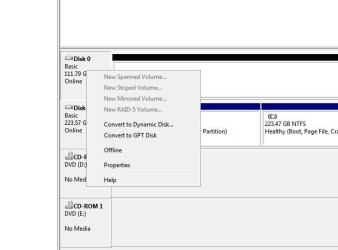
Right clicking Drive 0 didnt show what you advised,see screenshot

- - - Updated - - -

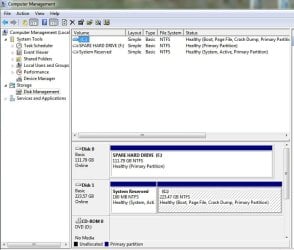
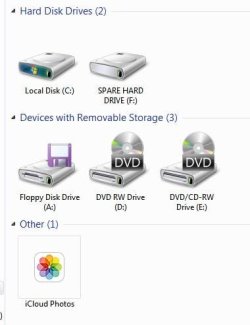
I think ive now done it
 

Attachments

  • EaseUS_2023_08_ 6_16_32_16.jpg
    EaseUS_2023_08_ 6_16_32_16.jpg
    23.2 KB · Views: 4
  • EaseUS_2023_08_ 6_17_50_14.jpg
    EaseUS_2023_08_ 6_17_50_14.jpg
    65.9 KB · Views: 0
  • EaseUS_2023_08_ 6_17_50_22.jpg
    EaseUS_2023_08_ 6_17_50_22.jpg
    17.2 KB · Views: 4

My Computer My Computer

At a glance

Microsoft Windows 7 Professional 64-bit 7601 ...AMD Athlon(tm) II Neo K345 Dual-Core Processor8.00 GBATI Mobility Radeon HD 4200 Series
Computer type
Laptop
Computer Manufacturer/Model Number
Dell Inspiron P07T & Pc Windows 32 / 64 bit
OS
Microsoft Windows 7 Professional 64-bit 7601 Multiprocessor Free Service Pack 1
CPU
AMD Athlon(tm) II Neo K345 Dual-Core Processor
Motherboard
Dell Inc.
Memory
8.00 GB
Graphics Card(s)
ATI Mobility Radeon HD 4200 Series
Sound Card
(1) AMD High Definition Audio Device (2) High Definition A
Monitor(s) Displays
Generic PnP Monitor
Screen Resolution
1366 x 768 x 32 bits (4294967296 colors) @ 59 Hz
Hard Drives
(1) WDC WD3200BEKT-75PVMT0 ATA Device (2) Generic- Multi-Card USB Device
PSU
Dell 65w ac adapter model no LA65NS0-00
Keyboard
Standard Ps2 keyboard
Mouse
Ps2 compatible mouse
Internet Speed
Download 38.9Mbps Upload 18.1Mbps
Antivirus
Avg internet security 19.7.3103 (build 19.7.4674.524)
Browser
Google Chrome Version 76.0.3809.132 (Official Build) (64-bit
Back
Top