
FREE Great Programs for Windows 7

Status
Not open for further replies.
Here's another one done by skwire of donationcoder by request.

I wanted an easy way to total up the track times of albums listed on AllMusic. If there's 6 or more tracks it's a pain to key them in a time calculator.

skwire cooked up this paste pad called TimeStampCalc:

Idea : Time Calculator that accepts a column paste of mm:ss - DonationCoder.com

Just select the track info on AllMusic or another site that uses MM:SS format to show the track times. Paste it in. The program scans the text and adds the times showing the total at the bottom. Very neat.


there is a member looking for this type of app

If you scroll down the thread on donationcoder you'll see the link to the zip file.
I'm the member. It was written for me. I've downloaded and used it on both Vista and Seven. It's there.

edit: I just deleted all my cookies to make sure I would not be logged in, went to that thread, and I can see the link to the .zip. You're not looking far enough down the thread.
 

My Computer

Computer Manufacturer/Model Number
HP Media Center
OS
Windows 7 32 bit
CPU
AMD 5200+ dual core
Memory
2 GB
Graphics Card(s)
NVidia GeForce 6150SE 128 MB
Monitor(s) Displays
CRT
Screen Resolution
1280x1024
Hard Drives
500 GB Sata internal :

SIIG USB 3.0 docking stations w/WD Caviar Black 6 Gb/s drives
Keyboard
PS/2
Mouse
PS/2 Wheel Mouse
Other Info
SIIG USB 3.0 PCIexpress card.
Here's another one done by skwire of donationcoder by request.

I wanted an easy way to total up the track times of albums listed on AllMusic. If there's 6 or more tracks it's a pain to key them in a time calculator.

skwire cooked up this paste pad called TimeStampCalc:

Idea : Time Calculator that accepts a column paste of mm:ss - DonationCoder.com

Just select the track info on AllMusic or another site that uses MM:SS format to show the track times. Paste it in. The program scans the text and adds the times showing the total at the bottom. Very neat.


there is a member looking for this type of app

If you scroll down the thread on donationcoder you'll see the link to the zip file.
I'm the member. It was written for me. I've downloaded and used it on both Vista and Seven. It's there.

edit: I just deleted all my cookies to make sure I would not be logged in, went to that thread, and I can see the link to the .zip. You're not looking far enough down the thread.
:roflmao::doh:
 

My Computer

Computer Manufacturer/Model Number
Gateway/NV7923u & NV79C52u Laptops
OS
windows 7 professional & ultimate 64bit laptops
CPU
2.27 boost to 2.53 & 2.53 boost to 2.80
Motherboard
Mobile Intel® HM55 Express Chipset ???
Memory
4GB
Graphics Card(s)
Intel® Graphics Media Accelerator HD
Sound Card
realtek High-definition audio support
Monitor(s) Displays
17.3 " HD 1600 x 900
Hard Drives
hatachi Travelstar 5400 500GB & west digital 500GB
Internet Speed
35MB fios
Hi. I did not see this on the main page, maybe I missed it.

This works with w7 if needed. You can use it to clone a old dying hdd to a new drive, or if you just want to upgrade to a larger drive and do not need to reformat or the a likes. Or just back up your main C: etc. I would guess it is versions for all brand hdds.

It is free. Was made to help save info during hurricanes or something..

***Acronis True Image WD Edition Software..

WD Support

I just used it. I just built new p55 systems. My wd160 sataII hdd was acting funny from cold boot, when running it was fine. But I was doing a w7 hp upgrade from xp sp3, which was on my 160 gig drive. It lasted until I got w7 installed good and most programs needed and stress tested etc. I cloned my w7 install over to my clean 320 gig data storage drive, made it the boot drive. It is good to go and does work with w7..

Note: when the program is working, it goes to black screen. You might think something is wrong or it is not working. Just wait, near the end it will kick in and let you see it finish up This can take a long time- You think it is not working etc.. It will boot to windows and go black screen again. Just wait.. You can see your hdd power led working if your case has 1 etc.. But then after it boots into windows. It will say, You need to reboot as normal and all will be good to go. I would wait a few minutes let windows calm down and load up all its goodies or security as needed like normal. then reboot..

Good to go. This is a life saver and is very handy. And yes works with w7..

see ya :D
 

My Computer

OS
w7
I would guess it is versions for all brand hdds.

That version is good for WD Drives only.
Seagate has this also. But you have to use the one from Seagate for Seagate Drives.
 

My Computer

Computer Manufacturer/Model Number
Self Built
OS
Win 7 Ultimate 32bit
CPU
C2D E6600 2.4Ghz
Motherboard
Intel D965WH
Memory
4G Kingston KHX5400D2
Graphics Card(s)
EVGA GTX 570 HD SC (012-P3-1573-KR)
Sound Card
On-Board
Monitor(s) Displays
Samsung 226BW
Screen Resolution
1680 x 1050
Hard Drives
2 x 250 Seagate Barracuda
2 x 500 Seagate Barracuda (Raid1)
PSU
Corsair TX750W
Case
In-Win C589
Cooling
Stock Intel Cooling
I found this program quiet useful. It helps 1 to check the processes running in the background.
Security Task Manager shows comprehensible information about programs and processes running on the computer. For each Windows process, it improves on Windows Task Manager, providing:

  • unique security risk rating
    The security risk rating indicates the likelihood of a process being potential spyware, malware or a Trojan. The rating is purely based on behaviour and code analysis, and does not use any signature files.
  • comments from our experts and user community
  • free online scan with all known Antivirus engines
  • full directory path and file name
  • process description
  • CPU usage graph
  • embedded hidden functions (e.g. keyboard monitoring, browser supervision or manipulation)
  • process type (e.g. visible window, systray program, DLL, IE-plugin, startup service)

The Security Task Manager detects unknown malware and rootkits hidden from your antivirus software.

For more details & to download click: Security Task Manager - Windows XP process viewer
 

My Computer

Computer type
Laptop
OS
Windows 7 Ultimate
there is a member looking for this type of app

If you scroll down the thread on donationcoder you'll see the link to the zip file.
I'm the member. It was written for me. I've downloaded and used it on both Vista and Seven. It's there.

edit: I just deleted all my cookies to make sure I would not be logged in, went to that thread, and I can see the link to the .zip. You're not looking far enough down the thread.
:roflmao::doh:

In case someone is looking for it, here's a link to the exact message with the download link:

Idea : Time Calculator that accepts a column paste of mm:ss - DonationCoder.com
 

My Computer

Computer Manufacturer/Model Number
HP Media Center
OS
Windows 7 32 bit
CPU
AMD 5200+ dual core
Memory
2 GB
Graphics Card(s)
NVidia GeForce 6150SE 128 MB
Monitor(s) Displays
CRT
Screen Resolution
1280x1024
Hard Drives
500 GB Sata internal :

SIIG USB 3.0 docking stations w/WD Caviar Black 6 Gb/s drives
Keyboard
PS/2
Mouse
PS/2 Wheel Mouse
Other Info
SIIG USB 3.0 PCIexpress card.

My Computer

Computer Manufacturer/Model Number
Desctop
OS
Windows 7 Enterprise SP1 64-bit.
CPU
Intel Core 2 Duo E8500 3.16GHz 1333MHz 6Mb LGA775
Motherboard
Gigabyte LGA775 GA-EP45-UD3LR P45/ICH10R 4xDDR2-1366 P
Memory
DIMM DDR2 2048MB PC6400 800MHz Kingston -8Gb
Graphics Card(s)
ATI Radeon HD4850 512MB 128bit DDR2
Monitor(s) Displays
Acer LCD 23" H233H
Screen Resolution
1920x1080
Hard Drives
SATA-II 1Tb Hitachi Deskstar 7K1000.C 7200rpm [HDS721010CLA332] Cache 32MB - 2 Tb
From the Google Translator-

With the help of "aero tuner" to adjust the color of the Aero effect individually according to their own desires. To set the slider for the blur effect on the transparency. You'll get down the front and the background color and vary over the control the color intensity and the After Glow Color Balance. Have you made your settings, click on "Save changes Write to registry". "aero tuner" saves your changes and then from the Windows Registry.

~Maxx~
.
Win7_50.png
 

My Computer

Computer Manufacturer/Model Number
HP HPE 270f
OS
Windows 7 x64 Home Premium
CPU
Intel Core i7 930 @ 2.8 Ghz Socket 1366 LGA
Motherboard
Pegatron Truckee v1.04E41
Memory
8 GB 1366 Mhz DDR3 (PC3-10700) RAM
Graphics Card(s)
ATI Radeon 5770 1 GB DDR5 RAM
Sound Card
Realtech High Definition
Monitor(s) Displays
32" Sony Bravia
Screen Resolution
1366 X 768
Hard Drives
Intel 25nm 120 GB Series 320 SSD HD Tune- 265 MBps Read/ 130 MBps Write

LaCie 1TB + 1TB RAID 0 eSATA Drive HD Tune- 160 MBps Read/ 90 MBps Write
Keyboard
Logitech Illuminated
Mouse
Logitech MX Revolution
Internet Speed
36.4 Mbps Maximum on a 37 Mbps Motorola SB501 Modem
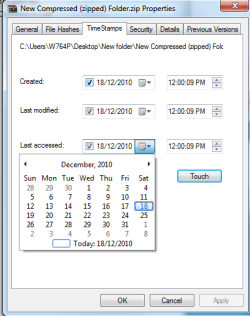
SKTimeStamp

The SKTimeStamp extension adds a page to the file/folder properties dialog. It allows you to change the file/folder dates and times as you like.

From drop-down lists you can change the Timestamps of “Created, Last modified, and Last accessed” attribute of the file. You can also alter the specific time by using the up and down arrows of the ‘time’ section for each attribute.


32 and 64 bit version downloads:


Attachments

  • 2010-12-18_120104.png
    2010-12-18_120104.png
    14.6 KB · Views: 4
Last edited:

My Computer

OS
Windows 7 Professional x64 x86 VISTA XP 98SE 95 3.x
CPU
Intel(R) Core(TM)2 Quad CPU Q9400 @ 2.66GHz
Memory
8 GB
Screen Resolution
1920 x 1200
PSU
OCZ Fatal1ty OCZ550FTY 550W ATX12V v2.2 25A on each rail
Aerobar
Aerobar is a simple and easy to use freeware utility through which you can view title in Explorer’s titles bars when it is Active. It works both in Vista and Windows 7 as well. How to use Aerobar?

  • Download the executable file.
  • If you want only Titles in Explorer – Place the file AeroBar.exe in your StartUp folder and reboot.
  • If you want Titles only without icon’s space – Rename the file AeroBar.exe to AeroBarNoIco.exe and then place it in your StartUp folder and reboot.
  • If you want Titles + Icons – Rename the file AeroBar.exe to AeroBarIco.exe and again follow the same steps.
If in case you don’t like Aerobar and don’t want to use it anymore, you can uninstall the utility by removing it from StartUp folder and restarting your PC.
Download AeroBar: Show Titlebar Text in Windows Vista and 7 Explorer - Tweaking with Vishal
Startup folder is at C:\Users\YOUR USER NAME\AppData\Roaming\Microsoft\Windows\Start Menu\Programs\Startup
Jerry
 

Attachments

  • bb.PNG
    bb.PNG
    4.1 KB · Views: 28

My Computer

Computer type
Laptop
Computer Manufacturer/Model Number
Sager NP9170
OS
Win 7 Pro x64 / Win 10 Pro
CPU
Intel(R) Core(TM) i7-3630QM CPU @ 2.40GHz
Motherboard
CLEVO P170EM
Memory
12 GB
Graphics Card(s)
(1) Intel(R) HD Graphics 4000 (2) NVIDIA GeForce GTX 675M
Sound Card
(1) Realtek High Definition Audio (2) Intel(R) Display Aud
Monitor(s) Displays
17.3
Screen Resolution
1920x1080
Hard Drives
(1) Samsung 860 EVO 500GB(OS) (1) Samsung 860 EVO 500GB(Data)
Keyboard
Backlite
Antivirus
MSE, Malwarebytes Pro
Browser
Firefox
Other Info
DESKTOP: Custom-built.
OS: Win 10 Pro x64.
CASE: Rosewill R5.
CPU: Intel I5 4670K CPU @ 3.40GHz.
CPU COOLER: Cool Master Hyper 212 EVO.
MOTHERBOARD: Asus Z87-A.
MEMORY: Kingston HyperX 2x4 GB.
GPU: Nvidia Geforce 650 TI.
PSU: Corsair TX750.
DRIVES: (1) Samsung 840 120 GB SSD (2) Western Digital blue 500 GB 7200 RPM.

My Computer

Computer type
PC/Desktop
Computer Manufacturer/Model Number
Dell OP7010
OS
Windows 7 Enterprise (x64); Windows Server 2008 R2 (x64)
Memory
16GB
Monitor(s) Displays
4 Dell 24" LCD
Screen Resolution
1280x1024
Keyboard
Dell
Mouse
Dell Optical
Internet Speed
40meg
Hiren's Boot CD 13.0 is available (advertised at least)
I'm surprised it isn't on the main free list.
I have 12.0 on my multiboot USB along with other utility odds & sods including W7 System Repair.

Apart from the utlities, I find Hiren's mini XP quite useful. It enables you to run many standalone windows exes.
The grug4dos booting in Hiren's lets you boot directly into disk partitions. This is useful for a number of purposes including booting into factory recovery partition which aren't marked active. Of course the partitions need to be bootable.
 
Last edited:

My Computer

Computer type
PC/Desktop
Computer Manufacturer/Model Number
Own build
OS
Windows 7x64 Home Premium SP1
CPU
Intel i7 2600k
Motherboard
ASUS P8Z68 Deluxe
Memory
G.Skill Ripjaws (DDR3-1600) 2x4GB
Graphics Card(s)
Nvidia GeForce GTS 450; Intel HD Graphics 3000(GT2+)
Monitor(s) Displays
Dell Ultrasharp IPS panel U2311H, Samsung SyncMaster P2350
Screen Resolution
1920x1080
Hard Drives
Samsung 850 Pro SSD 256GB, Samsung SSD 840 120GB, Seagates 1TB Barracuda ST31000528AS x2
PSU
Seasonic M12II 520W
Case
Lian Li Lancool PC-K60
Cooling
Case: 1x120mm, 3x140mm CPU: Hyper 212+
Keyboard
Logitech MK520 (wireless)
Mouse
Logitech MK520
Internet Speed
6-7 Mbps
Antivirus
Norton Security Premium, Malwarebytes on 2 (MSE on 3rd PC)
Browser
FireFox
Other Info
Audio: Logitech Z523 2.1
Hiren's Boot CD 13.0 is available (advertised at least)
I'm surprised it isn't on the main free list.
I have 12.0 on my multiboot USB along with other utility odds & sods including W7 System Repair.

Apart from the utlities, I find Hiren's mini XP quite useful. It enables you to run many standalone windows exes.
The grug4dos booting in Hiren's lets you boot directly into disk partitions. This is useful for a number of purposes including booting into factory recovery partition which aren't marked active. Of course the partitions need to be bootable.

Here's a download link,

Download Hiren's BootCD 13.0
 

My Computer

Computer type
PC/Desktop
Computer Manufacturer/Model Number
Self Built
OS
Win 10 Pro x64
CPU
Intel I5-2500K @3.3GHz
Motherboard
Asrock P67 Extreme4
Memory
16GB G.Skill Ripjaws X (4x4GB)
Graphics Card(s)
EVGA GeForce 750 Ti SC 2GB
Sound Card
ASUS Xonar DG 5.1 Channels 24-bit 96KHz PCI Interface Sound
Monitor(s) Displays
auria eq2367
Screen Resolution
1920 x 1080
Hard Drives
250GB Samsung 850 EVO SSD
1TB WD Blue
1TB Hitachi
PSU
SeaSonic X 650W 80 Plus Gold
Case
Corsair Obsidian 750D
Cooling
Corsair H60, Three 140mm case fans
Keyboard
Logitech Wireless Keyboard K520
Mouse
Logitech Wireless Mouse M310
Internet Speed
Wave Broadband ~ 100 dn 5 up
Antivirus
Windows Defender, Malwarebytes Premium
Browser
Edge, IE11, Chrome
Other Info
Laptop specs: HP g7-1365dx /
CPU: AMD A6-3420M APU with Radeon(tm) HD Graphics /
RAM: Crucial 8Gb (2x4Gb) /
SSD: Crucial M4-CT128M4SSD2 ATA Device/ FW 000F /
GFX: AMD Radeon HD 6520G /
OS: Windows 10 Pro x64
I know this is an old thread, but I'd add TrulyMail (email client). I've used it extensively on both Win7 x86 and x64 - works great!
 

My Computer

OS
Win7 x64
It's not an old thread, it's an on-going thread, suggestions are welcome that's what it's here for ;)
 

My Computer

Computer type
PC/Desktop
Computer Manufacturer/Model Number
76~2.0
OS
Windows 7 Ult x64 - SP1/ Windows 8 Pro x64
CPU
Intel Core i5-3570K 4.6GHz
Motherboard
Gigabyte GA-Z77X UD3H, f18
Memory
8GB (2X4GB) DDR3 1600 Corsair Vengeance CL8 1.5v
Graphics Card(s)
Sapphire HD 7770 Vapor-X OC 1GB DDR5
Sound Card
Onboard VIA VT2021
Monitor(s) Displays
22" LCD Dell
Screen Resolution
1680x1050
Hard Drives
Samsung 840Pro 128GB SSD,
Seagate Barracuda 500GB SATA2 7200rpm 32MB cache, Seagate Barracuda 1TB SATA2 7200rpm 32MB cache,
PSU
Corsair HX650W
Case
Cooler Master Storm Scout
Cooling
Corsair H80 2x12cm Noctua NF P12 , 2x14cm case fans
Keyboard
Logitech Wave
Mouse
CM Sentinel
Internet Speed
Dismal
Antivirus
Avast
Browser
Opera Next
Other Info
Haswell laptop: HP Envy 17t-j, i7-4700MQ, GeForce 740M 2GB DDR3, 17.3" Full HD 1920x1080, 16GB RAM, Samsung 840 Pro 128GB, 1TB Hitachi 7200 HDD,
Desktop: eSATA ports,
External eSATA Seagate 500GB SATA2 7200rpm,
External WD USB 500GB

My Computer

Computer Manufacturer/Model Number
Gateway/NV7923u & NV79C52u Laptops
OS
windows 7 professional & ultimate 64bit laptops
CPU
2.27 boost to 2.53 & 2.53 boost to 2.80
Motherboard
Mobile Intel® HM55 Express Chipset ???
Memory
4GB
Graphics Card(s)
Intel® Graphics Media Accelerator HD
Sound Card
realtek High-definition audio support
Monitor(s) Displays
17.3 " HD 1600 x 900
Hard Drives
hatachi Travelstar 5400 500GB & west digital 500GB
Internet Speed
35MB fios
Yes, I could not get the Truly mail thing to work either. After I downloaded it. It kept saying truly mail stopped working. Over and over again.
 

My Computer

Computer Manufacturer/Model Number
HP Pavilion p6000 series/Model p6654y
OS
Windows 7 Ultimate x64
CPU
AMD Athlon(tm) II X4 630
Motherboard
Socket AM3 (938)
Memory
DDR3 2048 MB's/ PC3-10600 (1,333 MHz) (2 Cards)
Graphics Card(s)
ATI Radeon HD 4200
Sound Card
Realtek High definition Audio
Monitor(s) Displays
PnP-Monitor (Standard) (I am using my Emerson TV)
Screen Resolution
1024 x 768 pixels at 75 Hz in true colors (32-bit)
Hard Drives
750.05 Gigabytes Usable Hard Drive Capacity
692.61 Gigabytes Hard Drive Free Space

hp DVD-RAM GH60L SATA CdRom Device [Optical drive]
YMAX magicJack USB Device [Optical drive]

Generic- Compact Flash USB Device [Hard drive] -- drive 2
Generic
PSU
250 Watts
Case
HP
Cooling
Fan
Keyboard
Logitech wireless wave combo MK550 (Came with mouse)
Mouse
Logitech wireless wave combo MK550 (Came with keyboard)
Internet Speed
DSL Download speed 15.06-mb/s Upload .49-mb/s ping 45ms
Other Info
HP Wireless 802.11 b/g/n PCIe Card
Convert Video Files Between Multiple Formats And Burn To Disc With Motion Man


Motion Man is an open-source video conversion tool that converts video between multiple file formats such as AVI, MOV, FLV, MPEG, VOB, WMV, RM, MKV, etc. It is a free software released under the GNU GPL License Version 3.
Features:

  • Multiple Video Conversion (Multi-threading)
  • Multiple Video File Formats supported (AVI/MOV/FLV/MPEG/VOB/WMV/RM/MKV/etc)
  • Multiple Audio File Formats Supported (AAC/MP3/WAV/OGG/WMA)
  • 25+ Video Presets for Multiple Devices
  • Burn to Disc (CD/DVD)
  • Video Playback

Review
Convert Video Files Between Multiple Formats And Burn To Disc With Motion Man

Download/Homepage
Motion Man: Open Source Free Video Conversion Tool | Blink Solution

Available in both 32-bit Version | 64-bit Version
 

My Computer

Computer Manufacturer/Model Number
Dell Studio 530S
OS
7 Ultimate 64
CPU
E8200
Motherboard
Who Knows
Memory
4 GB
Graphics Card(s)
Ati Raedon HD 4550 512MB
Sound Card
On Board
Monitor(s) Displays
LG Flatron W2261V
Screen Resolution
1920 1080 HD
Hard Drives
Samsung HD401LJ 400GB
Samsung HD204UI 2TB
PSU
It works
Case
Silver White Dell OEM
Cooling
Yes please
Keyboard
Logitech diNovo Edge
Mouse
Logitech Performance MX
Internet Speed
30MB Fibre
Other Info
Love my PC
Status
Not open for further replies.
Back
Top
