FREE Great Programs for Windows 7

Status
Not open for further replies.
Sorry, I had figured that a person wouldn't endorse a program that they hadn't used themselves.
 

My Computer My Computer

Computer Manufacturer/Model Number
DIY
OS
W7x64 Pro, SuSe 12.1/** W7 x64 Pro, XP MCE
CPU
Phenom II 1090T w/Noctua NH-D14 /**4400+ X2 w/CM Hyper TX 3
Motherboard
ASRock 890FX Deluxe 4/**A8N-SLI
Memory
2 x 2GB Patriot PGS34g1600LLKA/**4x1GB Corsair VS
Graphics Card(s)
EVGA GTX460 SC/**EVGA 8800GTS
Sound Card
Asus Xonar D2X/**Xonar D1
Monitor(s) Displays
Acer X233H, Dell E152FPc /**LG M237-WD
Screen Resolution
1920x1080 & 1024x768/**1980x1080
Hard Drives
WDC 2TB, 1.5TB, 1TB, 500GB,Seagate 500GB , Maxtor 80GB /**500GB Seagate & WDC 1TB Black
PSU
CM RS600 w/ APC BX1000G/**Antec 500 TP w/ APC BX1000
Case
HAF922/**Antec 1040IIB
Cooling
3x200mm, 1x140 and 1x120mm/**5x80mm fans
Keyboard
Logitech Media USB/**Saitek Eclipse
Mouse
Cordless Trackman Wheel/**Ditto
Internet Speed
3.3Mbps
Other Info
SB 560 5.1 w/ Sennheiser RS140/**Creative T20 speakers, Dvico FusionHDTV7 Gold RT, Cisco E3000, HP 5510V AIO, Linksys E3000, Belkin F5U237 hub and **F5D8055 adapter
(** = 2nd rig)
Sorry, I had figured that a person wouldn't endorse a program that they hadn't used themselves.
On the 1st post of this thread, Brink stated he will test all the softwares posted by other members before adding them to the list. So i was just a giving a suggestion. I don't see a problem with that.
 

My Computer My Computer

Computer Manufacturer/Model Number
D3f's Customs
OS
Win 7 Ultimate SP1 x64
CPU
Intel Pentium Dual Core E5300 OC'd @ 3GHz
Motherboard
Asus P5G41-M LE
Memory
Kingston 2x2GB DDR2-800 Dual Channel SDRAM
Graphics Card(s)
Integrated Intel GMA X4500
Sound Card
Realtek 5.1 HD Audio (ALC887)
Monitor(s) Displays
LG Flatron W1943S @ 60Hz
Screen Resolution
1360 x 768
Hard Drives
Internal - WD Caviar Blue 500GB, External - WD My Passport Essential 500GB
PSU
Headway 450w PSU
Case
Pixxo Slim Black mATX Case
Cooling
Stock Cpu Fan, 1 x Top Case Fan
Keyboard
Logitech K120
Mouse
Logitech LS1 Laser Mouse
Internet Speed
17.66Mb/s Down, 0.82Mb/s Up
Other Info
Creative SBS A300 2.1 Speaker System, LG GH22NS50 22x Internal Super-Multi DVD-RW, 2Wire 5012NV Wireless Modem Router
3D drawing toy

Wow, lot of good suggestions here. I almost hate to post another that might make Brink update the master list and take him from more important chores. But of all the demos I have ever given, I cant remember another one that got a standing ovation.

Google's Sketchup -- is to me mostly a toy, as I have little need for a 3D drawing tool. But it is extremely addictive to folks of my generation who struggled with the chores of drafting classes with a pencil and eraser. And now, before I begin to move any furniture, I draw the room, and the furniture, and print a dozen different layouts, and get a notarized, approved, target position. :D
 

My Computer My Computer

Computer Manufacturer/Model Number
Dell XPS17 laptop
OS
Windows 7 Pro 64
CPU
i7 2760QM 2.4GHz
Memory
8GB
Graphics Card(s)
Intel HD/Nvidia GeForce 555M
Sound Card
RealTek
Monitor(s) Displays
Ntrig DuoSense digitzer, touchscreen
Hard Drives
750GB
Mouse
Synaptics touchpad
As mentioned by myself in Formatting NTFS ---> FAT32 the tool can be used to easily format drives up to 2TB if you use the command line. There is also a GUI version which is a bit more user freindly. You can find the software here.
 

My Computer My Computer

OS
Windows 7 Professional x64 Backtrack 4 R2
CPU
Intel Core i5-650
Motherboard
Gigabyte P55-UD3
Memory
4 GB Geil PC3 12800
Graphics Card(s)
HIS HD 4870 X2
Sound Card
Sound Blaster X-Fi Titanium Fatal1ty Champion
Monitor(s) Displays
BenQ 22" G2220HD
Hard Drives
Seagate Barracuda 7200.12 500GB
PSU
Antec High Current Gamer 620W Power Supply
Case
Thermaltake Armor+ MX
Keyboard
Microsoft SideWinder X6
Mouse
Razer Abyssus
System Rescue CD

SystemRescueCd

Seems pretty good, booted and gave me all the options.

Regards....Mike Connor
 

My Computer My Computer

OS
Several, including Windows 7 x64 Ultimate
You can add Synkron as a OpenSource Program. I use it because i am always working at school on my USB, and at home on my PC. It syncs between the two.

Synkron - Folder synchronisation

Synkron is an application for folder synchronisation that allows you to configure your synchronisations in detail. Despite having many features, the user interface of Synkron is very user-friendly and easy to use.

Synkron is able to synchronise multiple folders at once, analyse folders before sync, restore overwritten or deleted files, plan synchronisations and much more.

Synkron is a cross-platform application and runs on Mac OS X, Linux and Windows.

Synkron is distributed under the terms of the GPL v2 licence.
 

My Computer My Computer

Computer type
PC/Desktop
Computer Manufacturer/Model Number
HP
OS
Windows Seven Ultimate x64 SP1
CPU
Intel Core i7 x980 @ 3.33GHz
Memory
12.0 GB
Graphics Card(s)
Nvidia GeForce GTX 260
I'm using Oxelon Media Convertor. This is a quiet easy to use program as couple of options is added to the Context Menu & then all you have to do is right click on the said video & convert it to the desired format....:geek: so easy!!! Don't have to open the program then search for the video & then try to convert it....:confused:

Its a must program for those who loves watching video but struggle with getting it in the riight format....:(

Oxelon Media Converter - Free
 

My Computer My Computer

Computer type
Laptop
OS
Windows 7 Ultimate
PrimoPDF
PDF Converter — #1 Free PDF Creator — PrimoPDF

PDF generator. Installs as a printer on your system. You can choose the PrimoPDF printer from any program and print from the Print menu like any other printer on your system.
Small, fast, free. I've been using it since 2004.
 

My Computer My Computer

Computer type
PC/Desktop
Computer Manufacturer/Model Number
Home Built - Jan 2013
OS
Windows 7 64 Bit Home Premium SP1
CPU
i7-3820
Motherboard
Asus P9X79-PRO - Bios 4608
Memory
GSkill F3-14900CL9Q - 16GB
Graphics Card(s)
EVGA GeForce GTX660 - Driver 352.86
Sound Card
On board Realtek ALC898
Monitor(s) Displays
Acer S271HL
Screen Resolution
1920 x 1080
Hard Drives
#1- Samsung 840 Pro Series
#2- Western Digital WD1002FAEX Sata3 Black
#3- Western Digital WD1002FAEX Sata3 Black
PSU
Corsair CMPSU-850TX-V2 - 850 watt (by Seasonic)
Case
Corsair Obsidian 550D
Cooling
Standard 3 120mm case fans, Cooler Master Hyper 212 EVO
Keyboard
MS KC-0405
Mouse
Intellimouse 5-button
Internet Speed
56 Mbits/Sec (on a good day)
Antivirus
Avast & Malwarebytes
Browser
Firefox
Other Info
Asus DVD - DRW-24B1ST 24X
I used to use Primo too and liked it a lot. But Nitro is also free and it includes the ability to mark up PDF's and save them with the markups included.

Nitro PDF Reader
 

My Computer My Computer

Computer type
PC/Desktop
Computer Manufacturer/Model Number
Custom built
OS
Win7-64
CPU
Intel i7-3770S
Motherboard
ASUS P8Z77-M
Memory
16GB
Graphics Card(s)
nVidia GT630
Sound Card
onboard
Monitor(s) Displays
dual
Screen Resolution
1920x1200 (primary) 1050x1680 (secondary)
Hard Drives
128GB SSD (boot)
64GB SSD (Temp/My Documents)
500GB (photos/videos)
1TB (rendered video, backups)
PSU
650W
Case
Thermaltake A30
Cooling
Thermaltake
Keyboard
Logitech Lighted
Mouse
Kensington Expert Mouse (trackball)
Internet Speed
FIOS 35/35
Antivirus
MS Security Essentials
Browser
Chrome (beta)

My Computer My Computer

Computer type
PC/Desktop
Computer Manufacturer/Model Number
Custom Build
OS
Windows 10 Pro x64
CPU
Intel Core i5 4440 @Stock
Motherboard
Gigabyte Z97 D3H
Memory
4 x 4GB HyperX Fury DDR3
Graphics Card(s)
Gigabyte GTX 1050Ti O4G
Sound Card
Integrated
Monitor(s) Displays
Dell P2417H
Screen Resolution
1920 x 1080
Hard Drives
Samsung EVO 850 120GB / Toshiba DT01ACA050 1TB 7200prm 32MB
PSU
Riotoro Onyx 750W
Case
NZXT H500 Black-Red
Cooling
Stock CPU + NZXT 120mm + 2x120mm red fans
Keyboard
Modecom Volcano Lanparty
Mouse
Asus ROG Gladius / DeepCool E-Pad Plus
Internet Speed
DOCSIS 50/3 Mbit
Browser
Google Chrome
Other Info
Asus K55VJ(i5 3210M, GT635M / 2GB, 8GB DDR3, 500GB HDD)
hi all:)
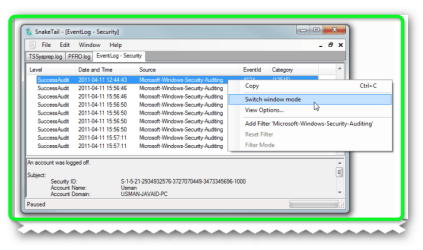
this was in my news letter from addictivetips SnakeTail – Open Large Log Files And Monitor Windows Events In Real Time it seems ok i am testing it out now here is the link >>> SnakeTail - View Large Log Files & Monitor Windows Events In Real Time also the website >>> snaketail-net - Windows Trace Log File Tail utility in .NET - Google Project Hosting

SnakeTail. It’s a small log analyzer and Windows event monitoring utility which lets user open multiple log and events windows in MDI based interface in order to do comparisons and analysis in real time. If you manage a lot of log consoles, it allows saving all the opened log windows sessions in a file, so you can restore them back anytime. The text log and windows events can be filtered by using regular expressions. You can choose to apply different colors on strings to differentiate a specific event from one huge text log file.


SnakeTail is a Windows tail program that can monitor growing log files:

  • Monitor "large" text log files
  • Monitor Windows Event Logs (Without needing administrator rights)
  • Multiple Window Modes supported (MDI, Tabbed, Floating)
  • Save and load entire window session
  • Sentence highlight with colors based on keyword match (Includes regex support)
  • Tails circular logs where the log file is periodically truncated
  • Tails log directory where the latest log file is displayed (Includes regex support)
  • Search in the entire text log file
  • Filtering of Windows Event Logs using regular expressions
  • Display simple process statistics in window title bar (RAM + CPU usage + TRX/Sec)
  • Stop and start services directly
  • Change tail window background color
  • Change tail window text color
  • Change tail window icon
  • Minimize to tray
  • Low memory usage independent of log file size
  • Low cpu usage even when more than 100 lines/sec
  • Works well over remote desktop
  • Supports Windows 2000, XP, 2003, Vista, Win2k8, Win7
  • Requires .NET 2.0
  • GNU GPL License v3
 

Attachments

  • Brys snap ?11 ?April ?2011 18h51m41s 01.png
    Brys snap ?11 ?April ?2011 18h51m41s 01.png
    39.9 KB · Views: 14

My Computer My Computer

Computer Manufacturer/Model Number
packard bell IXTREME M5722
OS
Operating System : Windows 7 Home Premium Edition 6.01.7600 SP1 (x64)
CPU
Processor : Intel Core 2 Quad Q8300 @ 2500 MHz
Motherboard
Mainboard : Packard Bell (Acer EG43M )
Memory
Physical Memory :8GB Corsair4x 2GB 800MHz C5 DDR2
Graphics Card(s)
Video Card : XFX 6700 AMD
Monitor(s) Displays
Maestro 234DL - BenQ V2220 - BenQ VW2420H
Screen Resolution
Current Display :1920x1080p pixels at 60 Hz in HD LED
Hard Drives
Hard Disks : WDC (1000 GB)
Drive C: (Hard Disk) : 428 GB available on 491 GB
Drive D: (Hard Disk) : 426 GB available on 492 GB
SAMSUNG spinpoint HD103SJ 1000.2 GB
(X 2) KINGSTON SSD NOW V 30GB
PSU
XFX ProSeries 550W PSU
Case
PACKARD BELL IXTREME
Cooling
System Blower Current: 150mA Air Flow16CFM ;Akasa 90mm rear
Keyboard
Gigabyte Aivia K8100
Mouse
TRUST-Wireless Laser Mouse - Carbon edition MI-7770C
Internet Speed
TP-LINK > TL-WN951N / AV500 Gigabit Powerline Adapters
Browser
chrome dev
Other Info
EXTRA COOLING>(FAN CONTROLLER) PC Bay Cooler 3 x 40mm fans; Akasa AK-HD-BL Blue hard drive cooler 2 x 40 mm fan 4500 rpm 29.7 dBA
Bios> American Megatrends Inc.
Version : P01-A1
Date : 08/31/2009
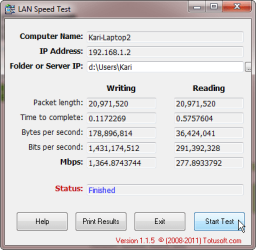
LAN Speed Test:

PC World said:
How fast is your network connection? No, I don't mean how fast you think it is, or how fast your network provider says it is--I mean how fast is it in real-world conditions? LAN Speed Test is an excellent, free way to find out.

Using LAN Speed Test couldn't be simpler. Load the program, click Start Test, and it will ask where you want to store a temporary file it uses to test network speed. Don't worry about clogging your PC; it deletes the file after it performs the test. Once you've done that, click again, and after a few seconds, it shows results for both writing to your disk (essentially the equivalent of download speed), and reading from your disk (essentially the equivalent of upload speed). That's all it takes. Once you've got the results, you can print them.
More information & free download: LAN Speed Test , LAN Utilities Downloads | PCWorld

Kari

LAN_Speed_Test.png
 

My Computer My Computer

Computer type
Laptop
Computer Manufacturer/Model Number
HP ENVY 17-1150eg
OS
Windows 10 Pro x64 EN-GB
CPU
1.6 GHz Intel Core i7-720QM Processor
Memory
6 GB
Graphics Card(s)
ATI Mobility Radeon HD 5850 Graphics
Sound Card
Beats sound system with integrated subwoofer
Monitor(s) Displays
17" laptop display, 22" LED and 32" Full HD TV through HDMI
Screen Resolution
1600*900 (1), 1920*1080 (2&3)
Hard Drives
Internal: 2 x 500 GB SATA Hard Disk Drive 7200 rpm
External: 2TB for backups, 3TB USB3 network drive for media
Cooling
As Envy runs a bit warm, I have it on a Cooler Master pad
Keyboard
Logitech diNovo Media Desktop Laser (bluetooth)
Mouse
Logitech Performance Mouse MX
Internet Speed
50/10 Mbps VDSL
Antivirus
Windows Defender 4.3.9431.0
Browser
Maxthon 3.5.2., IE11
LAN Speed Test:

PC World said:
How fast is your network connection? No, I don't mean how fast you think it is, or how fast your network provider says it is--I mean how fast is it in real-world conditions? LAN Speed Test is an excellent, free way to find out.

Using LAN Speed Test couldn't be simpler. Load the program, click Start Test, and it will ask where you want to store a temporary file it uses to test network speed. Don't worry about clogging your PC; it deletes the file after it performs the test. Once you've done that, click again, and after a few seconds, it shows results for both writing to your disk (essentially the equivalent of download speed), and reading from your disk (essentially the equivalent of upload speed). That's all it takes. Once you've got the results, you can print them.
More information & free download: LAN Speed Test , LAN Utilities Downloads | PCWorld

Kari

View attachment 148545

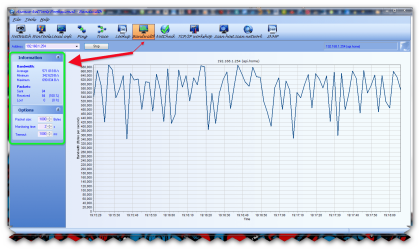
nice Kari. i use Axence NetTools 4.0 Pro very detailed and very good. link>>> Axence Software - Network Monitoring, Network Mapping & Application Monitoring- NetTools Pro
 

Attachments

  • Brys snap ?11 ?April ?2011 19h18m17s 03.png
    Brys snap ?11 ?April ?2011 19h18m17s 03.png
    97.1 KB · Views: 14

My Computer My Computer

Computer Manufacturer/Model Number
packard bell IXTREME M5722
OS
Operating System : Windows 7 Home Premium Edition 6.01.7600 SP1 (x64)
CPU
Processor : Intel Core 2 Quad Q8300 @ 2500 MHz
Motherboard
Mainboard : Packard Bell (Acer EG43M )
Memory
Physical Memory :8GB Corsair4x 2GB 800MHz C5 DDR2
Graphics Card(s)
Video Card : XFX 6700 AMD
Monitor(s) Displays
Maestro 234DL - BenQ V2220 - BenQ VW2420H
Screen Resolution
Current Display :1920x1080p pixels at 60 Hz in HD LED
Hard Drives
Hard Disks : WDC (1000 GB)
Drive C: (Hard Disk) : 428 GB available on 491 GB
Drive D: (Hard Disk) : 426 GB available on 492 GB
SAMSUNG spinpoint HD103SJ 1000.2 GB
(X 2) KINGSTON SSD NOW V 30GB
PSU
XFX ProSeries 550W PSU
Case
PACKARD BELL IXTREME
Cooling
System Blower Current: 150mA Air Flow16CFM ;Akasa 90mm rear
Keyboard
Gigabyte Aivia K8100
Mouse
TRUST-Wireless Laser Mouse - Carbon edition MI-7770C
Internet Speed
TP-LINK > TL-WN951N / AV500 Gigabit Powerline Adapters
Browser
chrome dev
Other Info
EXTRA COOLING>(FAN CONTROLLER) PC Bay Cooler 3 x 40mm fans; Akasa AK-HD-BL Blue hard drive cooler 2 x 40 mm fan 4500 rpm 29.7 dBA
Bios> American Megatrends Inc.
Version : P01-A1
Date : 08/31/2009
LAN Speed Test:

PC World said:
How fast is your network connection? No, I don't mean how fast you think it is, or how fast your network provider says it is--I mean how fast is it in real-world conditions? LAN Speed Test is an excellent, free way to find out.

Using LAN Speed Test couldn't be simpler. Load the program, click Start Test, and it will ask where you want to store a temporary file it uses to test network speed. Don't worry about clogging your PC; it deletes the file after it performs the test. Once you've done that, click again, and after a few seconds, it shows results for both writing to your disk (essentially the equivalent of download speed), and reading from your disk (essentially the equivalent of upload speed). That's all it takes. Once you've got the results, you can print them.
More information & free download: LAN Speed Test , LAN Utilities Downloads | PCWorld

Kari

View attachment 148545

Good post Kari it would be a good test for this thread - What's your Internet Speed , however you may need to convince officer Airbot first.
 

My Computer My Computer

Computer type
PC/Desktop
Computer Manufacturer/Model Number
My own abomination, I call it the Money Pit
OS
Windows 10 Pro x 2/Windows 11 Home
CPU
Intel i7 2600K @ 3.40 GHz
Motherboard
ASUS Sabertooth P67
Memory
Corsair Vengeance 16GB DDR3 1600MHz CL8 Dual Channel Kit
Graphics Card(s)
EVGA GeForce RTX 3080 XC3 ULTRA GAMING 10GB GDDR6X
Sound Card
Onboard Realtek or Nvidia High Definition Audio (HDMI)
Monitor(s) Displays
Samsung JS7000 50" SUHD TV or Samsung 27" FHD 60Hz 8ms GTG V
Screen Resolution
1920 x 1080
Hard Drives
1 x Samsung 870 EVO 250 GB SSD (Windows 10 Pro), 1 x Samsung 850 EVO 250 GB SSD (Windows 10 Pro)
PSU
Corsair AX860 - 860W Modular Power Supply
Case
Phanteks Enthoo Luxe Full Tower Case - Black
Cooling
CORSAIR Hydro Series H150i PRO RGB 360mm Liquid CPU Cooler
Keyboard
Logitech K830 Illuminated Living-Room Keyboard
Mouse
Logitech MX Anywhere 2S Wireless Mouse
Internet Speed
100 Mbps
Antivirus
ESET Internet Security
Browser
Latest Version Of Firefox & Microsoft Edge Chromium Stable
Other Info
LG Super Multi Blue Internal Blu-ray Disk Rewriter - BH10LS30
6x2 HDMI Switcher (6 inputs, 2 outputs) so I can send the output of my Cable Box, Roku, or any my 4 computers to either my TV or Monitor separately or simultaneously.
Yeah. I like LAN Speed Test because it is so simple, doing just one special task. This free version 1.15 is also portable, no installation needed.

More advanced version 2.05 can be downloaded here. It is no longer portable, and it is not free.

Kari
 

My Computer My Computer

Computer type
Laptop
Computer Manufacturer/Model Number
HP ENVY 17-1150eg
OS
Windows 10 Pro x64 EN-GB
CPU
1.6 GHz Intel Core i7-720QM Processor
Memory
6 GB
Graphics Card(s)
ATI Mobility Radeon HD 5850 Graphics
Sound Card
Beats sound system with integrated subwoofer
Monitor(s) Displays
17" laptop display, 22" LED and 32" Full HD TV through HDMI
Screen Resolution
1600*900 (1), 1920*1080 (2&3)
Hard Drives
Internal: 2 x 500 GB SATA Hard Disk Drive 7200 rpm
External: 2TB for backups, 3TB USB3 network drive for media
Cooling
As Envy runs a bit warm, I have it on a Cooler Master pad
Keyboard
Logitech diNovo Media Desktop Laser (bluetooth)
Mouse
Logitech Performance Mouse MX
Internet Speed
50/10 Mbps VDSL
Antivirus
Windows Defender 4.3.9431.0
Browser
Maxthon 3.5.2., IE11
Just a "heads up". The program "Rainbow Folders" in the list, points to the original site, but the download from that site does not work properly.

I got a download that works from here;

Rainbow Folders 2.05 Download - Freeware Files.com - Desktop Category

The rf.zip contains files that do not work properly on this system ( Window 7 x64 Ultimate). And also caused my .net framework to show a lot of errors!

Also, a question; I had an absolutely first class Explorer Context-Menu add-on which added "Search Online" to the context menu. I just rebuilt this system, and can no longer find that add-on. Does anybody know what it is called, or where I might find it?

I have spent hours searching all sorts of combinations with no luck. I remember the site I got it from had a rather weird name, but that's all I can remember! :cry:

Regards....Mike Connor
 

My Computer My Computer

OS
Several, including Windows 7 x64 Ultimate
Status
Not open for further replies.
Back
Top