FREE Great Programs for Windows 7

Status
Not open for further replies.
For some reason I can't find Q-Dir in the list. a lightweight alternative Windows explorer with up to 4 panes.
Ideal for USB sticks since it comes as install and portable versions.
Plus it's actively developed. What I like about it the most: with multiple panes open it let me move my files around in a jiffy :D

Q-Dir - Download

-DG
 

My Computer My Computer

Computer Manufacturer/Model Number
HP m8000n
OS
Windows 7 Ultimate x86
CPU
DualCore AMD Athlon 64 X2, 2600 MHz 5200+
Motherboard
Asus M2N68-LA (Narra)
Memory
Samsung 2GB DDR2
Graphics Card(s)
Onboard NVIDIA GeForce 6150SE nForce 430
Sound Card
Onboard nVIDIA nForce 6100-430 (MCP61P)
Monitor(s) Displays
Westinghouse 19" LED
Screen Resolution
1280x1024
Hard Drives
SATA II Seagate Barracuda 500GB
USB II WD Elements 500GB
USB II WD My Book 1TB
USB II WD My Book 2TB
PSU
Stock (HP)
Case
Stock (HP)
Cooling
Stock
Keyboard
Logitech Classic KB 200
Mouse
Standard HP opticle USB mouse
Thank you DG. Q-Dir added. :)
 

My Computer My Computer

Computer type
PC/Desktop
Computer Manufacturer/Model Number
Self built custom
OS
64-bit Windows 11 Pro for Workstations
CPU
Intel i7-8700K OC'd to 5 GHz
Motherboard
ASUS ROG Maximus XI Formula Z390
Memory
64 GB (4x16GB) G.SKILL TridentZ RGB DDR4 3600 MHz
Graphics Card(s)
ASUS ROG-STRIX-GTX1080TI-O11G-GAMING
Sound Card
Integrated
Monitor(s) Displays
2 x Samsung Odyssey G7 27"
Screen Resolution
2560x1440
Hard Drives
1TB Samsung 990 PRO M.2,
4TB Samsung 990 PRO PRO M.2,
TerraMaster F8 SSD Plus NAS
PSU
Seasonic Prime Titanium 850W
Case
Thermaltake Core P3
Cooling
Corsair Hydro H115i
Keyboard
Logitech wireless K800
Mouse
Logitech MX Master 4
Internet Speed
2 Gb/s Download and 100 Mb/s Upload
Antivirus
Malwarebyte Anti-Malware Premium
Browser
Google Chrome
Other Info
Logitech Z625 speaker system,
Logitech BRIO 4K Pro webcam,
HP Color LaserJet Pro MFP M477fdn,
APC SMART-UPS RT 1000 XL - SURT1000XLI,
Galaxy S23 Plus phone
@Brink

First, This is my first post to this forum and I want to thank you for the great list of Freeware Applications that you have assembled. Many of the apps listed are ones that I use already. I am about to try some others from the list as well.

Second, it is time to update the description of FreeCommander to include x64 bit support.

Thank you JC, and welcome to Seven Forums.

FreeCommander has been updated. :)
 

My Computer My Computer

Computer type
PC/Desktop
Computer Manufacturer/Model Number
Self built custom
OS
64-bit Windows 11 Pro for Workstations
CPU
Intel i7-8700K OC'd to 5 GHz
Motherboard
ASUS ROG Maximus XI Formula Z390
Memory
64 GB (4x16GB) G.SKILL TridentZ RGB DDR4 3600 MHz
Graphics Card(s)
ASUS ROG-STRIX-GTX1080TI-O11G-GAMING
Sound Card
Integrated
Monitor(s) Displays
2 x Samsung Odyssey G7 27"
Screen Resolution
2560x1440
Hard Drives
1TB Samsung 990 PRO M.2,
4TB Samsung 990 PRO PRO M.2,
TerraMaster F8 SSD Plus NAS
PSU
Seasonic Prime Titanium 850W
Case
Thermaltake Core P3
Cooling
Corsair Hydro H115i
Keyboard
Logitech wireless K800
Mouse
Logitech MX Master 4
Internet Speed
2 Gb/s Download and 100 Mb/s Upload
Antivirus
Malwarebyte Anti-Malware Premium
Browser
Google Chrome
Other Info
Logitech Z625 speaker system,
Logitech BRIO 4K Pro webcam,
HP Color LaserJet Pro MFP M477fdn,
APC SMART-UPS RT 1000 XL - SURT1000XLI,
Galaxy S23 Plus phone
I've been using FreeCommander for years. For those who would like to try the beta preview of the "new look" for FreeCommander, here's the link to the XE version:

FreeCommander - freeware file manager for Windows

All the features are not complete. It's basically a preview.
 

My Computer My Computer

Computer Manufacturer/Model Number
HP Media Center
OS
Windows 7 32 bit
CPU
AMD 5200+ dual core
Memory
2 GB
Graphics Card(s)
NVidia GeForce 6150SE 128 MB
Monitor(s) Displays
CRT
Screen Resolution
1280x1024
Hard Drives
500 GB Sata internal :

SIIG USB 3.0 docking stations w/WD Caviar Black 6 Gb/s drives
Keyboard
PS/2
Mouse
PS/2 Wheel Mouse
Other Info
SIIG USB 3.0 PCIexpress card.
two questions...How buggy is it, and is there any problem having both versions installed at the same time?
 

My Computer My Computer

Computer Manufacturer/Model Number
DIY
OS
W7x64 Pro, SuSe 12.1/** W7 x64 Pro, XP MCE
CPU
Phenom II 1090T w/Noctua NH-D14 /**4400+ X2 w/CM Hyper TX 3
Motherboard
ASRock 890FX Deluxe 4/**A8N-SLI
Memory
2 x 2GB Patriot PGS34g1600LLKA/**4x1GB Corsair VS
Graphics Card(s)
EVGA GTX460 SC/**EVGA 8800GTS
Sound Card
Asus Xonar D2X/**Xonar D1
Monitor(s) Displays
Acer X233H, Dell E152FPc /**LG M237-WD
Screen Resolution
1920x1080 & 1024x768/**1980x1080
Hard Drives
WDC 2TB, 1.5TB, 1TB, 500GB,Seagate 500GB , Maxtor 80GB /**500GB Seagate & WDC 1TB Black
PSU
CM RS600 w/ APC BX1000G/**Antec 500 TP w/ APC BX1000
Case
HAF922/**Antec 1040IIB
Cooling
3x200mm, 1x140 and 1x120mm/**5x80mm fans
Keyboard
Logitech Media USB/**Saitek Eclipse
Mouse
Cordless Trackman Wheel/**Ditto
Internet Speed
3.3Mbps
Other Info
SB 560 5.1 w/ Sennheiser RS140/**Creative T20 speakers, Dvico FusionHDTV7 Gold RT, Cisco E3000, HP 5510V AIO, Linksys E3000, Belkin F5U237 hub and **F5D8055 adapter
(** = 2nd rig)
Hi,

Can anybody share with me where to find the newly installed sofiwares folder in a windows 7 system please?..I think in windows 7, it may not be seen and the usual C:\Documents and Settings\[user]\Local Settings\Application Data\software path is not applicable.

Thanks.
 

My Computer My Computer

OS
Windows 7 Home Premium 32bit
Hi,

Can anybody share with me where to find the newly installed sofiwares folder in a windows 7 system please?..I think in windows 7, it may not be seen and the usual C:\Documents and Settings\[user]\Local Settings\Application Data\software path is not applicable.

Thanks.

Programs are installed on your system drive, in this case C: ;


The red folder contains x64 BIT programs, and the blue folder contains x32 BIT programs.

( Your folders will not be coloured, unless you use a program which changes the icons).

Regards....Mike Connor
 

My Computer My Computer

OS
Several, including Windows 7 x64 Ultimate
It would be great if you could add Nemo Documents to the list.

Nemo Documents - The intuitive file manager

Nemo Documents is an intuitive file manager that maps files into a familiar calendar view, complete with Google Docs and calendar integration so that its easier to find things again.

Thanks
 

My Computer My Computer

OS
Windows 7 64 bit
Hi,
Can anybody share with me where to find the newly installed sofiwares folder in a windows 7 system please?..I think in windows 7, it may not be seen and the usual C:\Documents and Settings\[user]\Local Settings\Application Data\software path is not applicable.
Thanks.
To find recently installed software, or software installed on a particular date, do the following:
  1. Click the Start Orb
  2. Click Control Panel
  3. Under the Programs category, click Uninstall a program
  4. Make sure the list is in Details View
  5. When you move the mouse over the right edge of the Installed On column header, a drop down arrow appears. Click it
  6. Select the date and/or date range to filter the list to show only the programs installed on a particular date.
You might also want to checkout the great Tutorials section too.
 

My Computer My Computer

Computer type
PC/Desktop
Computer Manufacturer/Model Number
Virtual Machine
OS
Windows 7 Professional 32-bit SP1
CPU
AMD A4/A6
Motherboard
Intel Corporation 440BX Desktop Reference Platform
Memory
3.00GB EDO
Graphics Card(s)
VMware SVGA 3D
Sound Card
High Definition Audio Device
Monitor(s) Displays
Generic Non-PnP Monitor on VMware SVGA 3D
Screen Resolution
1440x900
Hard Drives
1 x 60GB VMware Virtual SATA Hard Drive ATA Device
Antivirus
Kaspersky Total Security
any good folder protect/password open program?
i was using truecrypt but i was not very happy with it.
 

My Computer My Computer

OS
Windows 7 ultimate 32
HI Mike,

Thanks for taking the trouble to explain and have some images posted here for my clearer understanding.

However, I still can't locate the installation folder looking into program files..

But I managed to find the file by one simple method (and I think this works if there is a shortcut icon on your desktop)..I right clicked on the icon and clicked on "Open file location" to finally get to the installed folder, otherwise, its really hidden in wondows 7.

look at its location athat is not the solution, coz the newly installed file is still invisible

Thanks for your trouble anyway!
Rick

Hi,

Can anybody share with me where to find the newly installed sofiwares folder in a windows 7 system please?..I think in windows 7, it may not be seen and the usual C:\Documents and Settings\[user]\Local Settings\Application Data\software path is not applicable.

Thanks.

Programs are installed on your system drive, in this case C: ;


The red folder contains x64 BIT programs, and the blue folder contains x32 BIT programs.

( Your folders will not be coloured, unless you use a program which changes the icons).

Regards....Mike Connor
 

My Computer My Computer

OS
Windows 7 Home Premium 32bit
Hi Dzomlija,

Thanks for taking the trouble in giving me another way of finding installed files locations on wondows 7.

Rick

;1373320 said:
Hi,
Can anybody share with me where to find the newly installed sofiwares folder in a windows 7 system please?..I think in windows 7, it may not be seen and the usual C:\Documents and Settings\[user]\Local Settings\Application Data\software path is not applicable.
Thanks.
To find recently installed software, or software installed on a particular date, do the following:
  1. Click the Start Orb
  2. Click Control Panel
  3. Under the Programs category, click Uninstall a program
  4. Make sure the list is in Details View
  5. When you move the mouse over the right edge of the Installed On column header, a drop down arrow appears. Click it
  6. Select the date and/or date range to filter the list to show only the programs installed on a particular date.
You might also want to checkout the great Tutorials section too.
 

My Computer My Computer

OS
Windows 7 Home Premium 32bit
Last, for anyone looking for more information on freeware, check out Gizmo's Freeware Site (Gizmos Freeware Reviews). He has reviews of various applications and they are categorized for easy searching.

What Gizmo's does is inveigle people into writing software reviews and then boots them out, and removes the author's signature, leaving the review as if it had been written by "Site Editor". Apart from being a violation of copyright, this is not a very nice thing to do. So anybody tempted to write any reviews for that site, be warned. I wrote a number of reviews for that site, as have others, and that is what occurred.

Regards.....Mike Connor

That is a disgrace if true, I read your post twice to make sure. Sneaky buggers using you as a free company reviewer:mad2:
 

My Computer My Computer

OS
Windows 7 Ultimate x64
CPU
Intel Core2 Duo CPU E8500 @ 3.16GHz
Motherboard
Asus P5KPL-CM
Memory
4096 MB DDR2-SDRAM
Graphics Card(s)
NVIDIA GeForce 9500 GT
Monitor(s) Displays
BenQ BenQ T2200HD and LG Electronics L192WS
Screen Resolution
1920x1080 pixels at 60 Hz in True Colors 32-bit
Hard Drives
WDC (1000 GB)
ST3500320AS (500 GB)
WDC (160 GB)
Case
Generic
Cooling
Fan cooled
Keyboard
Logitech wireless EX100
Mouse
Logitech HID-compliant Cordless Mouse
Internet Speed
8000 x 356
are you downloading some big file (or doing something else time-consuming), want to leave your pc but don't want your computer to go to sleep while you're away?

are you too lazy to visit control panel >> hardware and sound >> power options >> blah blah blah to change your power settings, only to have to change them back again once you're done?

then it looks like you need insomnia - a tiny program which keeps your machine awake!

Insomnia.png


available in .net, 32 or 64 bit flavours - source code too! wake up and smell the coffee!
 

My Computer My Computer

Computer Manufacturer/Model Number
mickey megabyte 1234
OS
ultimate 64 sp1
CPU
i5 2500K [email protected]
Motherboard
MSI P67A-GD53
Memory
8 gigs GSkill Ripjaws 1600
Graphics Card(s)
amd hd6950
Sound Card
creative x-fi gamer
Monitor(s) Displays
samsung 24"
Screen Resolution
1920x1080
Hard Drives
ocz vertex 2e 60 gig, samsung f3 1tb, buffalo 2tb ext
PSU
antec 550
Case
antec three hundred
Cooling
i'm a cooling fan
Keyboard
saitek eclipse ii
Mouse
logitech g3
Internet Speed
about 4 Mbps
Other Info
i love win7
are you downloading some big file (or doing something else time-consuming), want to leave your pc but don't want your computer to go to sleep while you're away?

are you too lazy to visit control panel >> hardware and sound >> power options >> blah blah blah to change your power settings, only to have to change them back again once you're done?

then it looks like you need insomnia - a tiny program which keeps your machine awake!

Insomnia.png


available in .net, 32 or 64 bit flavours - source code too! wake up and smell the coffee!

I could use this when I'm having my shower in the mornings ... thanks mickey :) ... X ... +1
 

My Computer My Computer

Computer Manufacturer/Model Number
Home Built
OS
Windows 7 Professional 64-bit SP1
CPU
Intel E8400
Motherboard
MSI P35 Neo
Memory
4GB Crucial Ballistix
Graphics Card(s)
ATI ASUS Radeon HD 4830
Sound Card
Realtek ALC888 on Board
Monitor(s) Displays
Asus 22-inch VH226H Widescreen
Screen Resolution
1920 x 1080
Hard Drives
Two Western Digital 500GB
PSU
Hiper HPU-4M 530W
Case
Thermaltake Tsunami Dream Black
Cooling
Air/Fans
Keyboard
Saitek Eclipse
Mouse
Razer
Internet Speed
Sky Broadband
Other Info
USB Hub/Card Reader - 2 Pen Drives, 1 Phone Dock
hi all :)
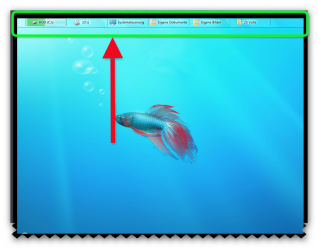
i found this program today Quick access bar it works ok and the aero is cool :)

Quick Access Bar is a Windows Toolbar which can be used to add important shortcuts such as control panel, system drives, external drive, etc to a secondary taskbar on top with auto hide feature. It acts as a secondary panel with an option to add many of the commonly used items which you might not have space to pin to your default taskbar. Hovering your mouse over a system drive displays disk space and the startup Orb allows adding and removing items from the bar. It is a good option for people who might wish to add a secondary taskbar with auto-hide functionality to add shortcuts to Windows resources and custom folders. This way one can avoid cluttering the desktop with unnecessary shortcuts and can instead add them to a secondary panel.

The aim of Quick Access Bar is to improve productivity of an average user by providing quick access to local drives, external drives, control panel, etc.

LINK HERE >>> http://www.quickaccessbar.com/index.php
 

Attachments

  • Brys snap ?03 ?May ?2011 18h22m46s 01.png
    Brys snap ?03 ?May ?2011 18h22m46s 01.png
    126.8 KB · Views: 37
  • Brys snap ?03 ?May ?2011 18h32m27s 02.png
    Brys snap ?03 ?May ?2011 18h32m27s 02.png
    244.6 KB · Views: 23
  • Brys snap ?03 ?May ?2011 18h33m58s 03.png
    Brys snap ?03 ?May ?2011 18h33m58s 03.png
    141.2 KB · Views: 10

My Computer My Computer

Computer Manufacturer/Model Number
packard bell IXTREME M5722
OS
Operating System : Windows 7 Home Premium Edition 6.01.7600 SP1 (x64)
CPU
Processor : Intel Core 2 Quad Q8300 @ 2500 MHz
Motherboard
Mainboard : Packard Bell (Acer EG43M )
Memory
Physical Memory :8GB Corsair4x 2GB 800MHz C5 DDR2
Graphics Card(s)
Video Card : XFX 6700 AMD
Monitor(s) Displays
Maestro 234DL - BenQ V2220 - BenQ VW2420H
Screen Resolution
Current Display :1920x1080p pixels at 60 Hz in HD LED
Hard Drives
Hard Disks : WDC (1000 GB)
Drive C: (Hard Disk) : 428 GB available on 491 GB
Drive D: (Hard Disk) : 426 GB available on 492 GB
SAMSUNG spinpoint HD103SJ 1000.2 GB
(X 2) KINGSTON SSD NOW V 30GB
PSU
XFX ProSeries 550W PSU
Case
PACKARD BELL IXTREME
Cooling
System Blower Current: 150mA Air Flow16CFM ;Akasa 90mm rear
Keyboard
Gigabyte Aivia K8100
Mouse
TRUST-Wireless Laser Mouse - Carbon edition MI-7770C
Internet Speed
TP-LINK > TL-WN951N / AV500 Gigabit Powerline Adapters
Browser
chrome dev
Other Info
EXTRA COOLING>(FAN CONTROLLER) PC Bay Cooler 3 x 40mm fans; Akasa AK-HD-BL Blue hard drive cooler 2 x 40 mm fan 4500 rpm 29.7 dBA
Bios> American Megatrends Inc.
Version : P01-A1
Date : 08/31/2009
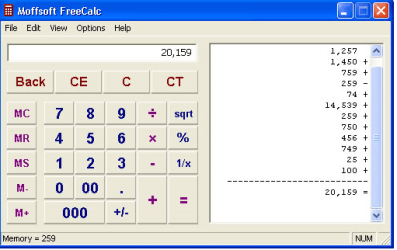
Moffsoft FreeCalc I have used this for 5+ years
Free calculator software - Moffsoft FreeCalc is a great replacement for your Windows calculator.
Region.png
Adjustable calculator size - Make it any size you want and Moffsoft FreeCalc will remember the size and position next time you use it. (see example)
bulletmedium.gif
Tape - Save, print, or clear the simulated paper history tape.
bulletmedium.gif
Color schemes - Select a color combination or use your Windows color settings. (see example)
bulletmedium.gif
New keys - Clear Tape {CT}, double zero {00}, triple zero {000}, and memory subtract {M-} keys have been added.
bulletmedium.gif
Visible memory value - You'll always know what's in memory because it's displayed on the calculator status bar.
bulletmedium.gif
Option settings - Flat buttons, always on top, tray icon, run on startup, and hiding the tape are some of the calculator options. (see example)
bulletmedium.gif
Digit groupings - Number groupings for easy to read numbers.
bulletmedium.gif
International support - Digit grouping and decimal point characters change based on your regional settings. (see example)
bulletmedium.gif
Tray icon - Turn on the tray icon for quick and easy access. (see example)
bulletmedium.gif
System requirements - Windows 95/98/Me/NT/2000/XP/Vista/7
Jerry
 

My Computer My Computer

Computer type
Laptop
Computer Manufacturer/Model Number
Sager NP9170
OS
Win 7 Pro x64 / Win 10 Pro
CPU
Intel(R) Core(TM) i7-3630QM CPU @ 2.40GHz
Motherboard
CLEVO P170EM
Memory
12 GB
Graphics Card(s)
(1) Intel(R) HD Graphics 4000 (2) NVIDIA GeForce GTX 675M
Sound Card
(1) Realtek High Definition Audio (2) Intel(R) Display Aud
Monitor(s) Displays
17.3
Screen Resolution
1920x1080
Hard Drives
(1) Samsung 860 EVO 500GB(OS) (1) Samsung 860 EVO 500GB(Data)
Keyboard
Backlite
Antivirus
MSE, Malwarebytes Pro
Browser
Firefox
Other Info
DESKTOP: Custom-built.
OS: Win 10 Pro x64.
CASE: Rosewill R5.
CPU: Intel I5 4670K CPU @ 3.40GHz.
CPU COOLER: Cool Master Hyper 212 EVO.
MOTHERBOARD: Asus Z87-A.
MEMORY: Kingston HyperX 2x4 GB.
GPU: Nvidia Geforce 650 TI.
PSU: Corsair TX750.
DRIVES: (1) Samsung 840 120 GB SSD (2) Western Digital blue 500 GB 7200 RPM.
hi all :)
i found this program today Quick access bar it works ok and the aero is cool :)

Quick Access Bar is a Windows Toolbar which can be used to add important shortcuts such as control panel, system drives, external drive, etc to a secondary taskbar on top with auto hide feature. It acts as a secondary panel with an option to add many of the commonly used items which you might not have space to pin to your default taskbar. Hovering your mouse over a system drive displays disk space and the startup Orb allows adding and removing items from the bar. It is a good option for people who might wish to add a secondary taskbar with auto-hide functionality to add shortcuts to Windows resources and custom folders. This way one can avoid cluttering the desktop with unnecessary shortcuts and can instead add them to a secondary panel.

The aim of Quick Access Bar is to improve productivity of an average user by providing quick access to local drives, external drives, control panel, etc.
LINK HERE >>> Quick Access Bar for Windows
It looks interesting. It looks like that widgets from Rainmeter... :)
 

My Computer My Computer

Computer type
PC/Desktop
Computer Manufacturer/Model Number
Custom Build
OS
Windows 10 Pro x64
CPU
Intel Core i5 4440 @Stock
Motherboard
Gigabyte Z97 D3H
Memory
4 x 4GB HyperX Fury DDR3
Graphics Card(s)
Gigabyte GTX 1050Ti O4G
Sound Card
Integrated
Monitor(s) Displays
Dell P2417H
Screen Resolution
1920 x 1080
Hard Drives
Samsung EVO 850 120GB / Toshiba DT01ACA050 1TB 7200prm 32MB
PSU
Riotoro Onyx 750W
Case
NZXT H500 Black-Red
Cooling
Stock CPU + NZXT 120mm + 2x120mm red fans
Keyboard
Modecom Volcano Lanparty
Mouse
Asus ROG Gladius / DeepCool E-Pad Plus
Internet Speed
DOCSIS 50/3 Mbit
Browser
Google Chrome
Other Info
Asus K55VJ(i5 3210M, GT635M / 2GB, 8GB DDR3, 500GB HDD)
Status
Not open for further replies.
Back
Top