FREE Great Programs for Windows 7

Status
Not open for further replies.
Process Lasso

Free (with some features disabled, see list at bottom below) for personal use

[ Download for Windows ] [ Download for Windows x64 ]
Process Lasso is a unique new technology that will improve your PC's responsiveness and stability during periods of high CPU load. Windows, by design, allows programs to monopolize your CPU without restraint -- leading to freezes, hangs, and micro-lags. Process Lasso's ProBalance (Process Balance) technology intelligently adjusts the priorities of running programs so that badly behaved processes won't negatively impact the responsiveness of your PC.​
Process Lasso also offers an assortment of ways to take full control of how your CPUs are allocated to running programs. You can choose at what priority processes should run, and which CPUs should be assigned to them. You can also disallow certain programs from running, log all programs run, automatically restart programs, limit the number of instances of a program, and much more. You can even indicate processes that should induce entrance into the High Performance power scheme or prevent the PC from sleeping. A gaming mode also allows for easy process priority optimization for avid gamers.​
Once you install Process Lasso, it will just start working. More advanced users can tweak the configuration, but you needn't touch anything to have it instantly improve your system responsiveness and prevent stalls in high load situations.​
Process Lasso is very useful and effective on even the latest high-end PCs. However, its ProBalance algorithm achieves maximum effect on PCs with relatively little CPU 'power', such as Netbooks, Tablets, and older desktops.​
Process Lasso runs on all editions of Windows 2000, XP, 2003, 2008, Vista, and Windows 7.


  • ProBalance dynamic priority optimization
  • Works great for Desktops, Laptops, Tablets, and Netbooks
  • Persistent (sticky) priorities and CPU affinities
  • Gaming mode
  • Instance count limits
  • Disallowed processes
  • High Performance Power Scheme processes
  • Anti-sleep processes
  • Keep processes running (auto-restart)
  • Unique system responsiveness graph
  • Differentiate between svchost.exe instances
  • Extremely low resource use
  • Stand-alone process management engine (uses as little as 1MB of RAM)
  • Both 32-bit and 64-bit builds for maximum efficiency
  • Event logging
  • MUCH more...

Process Lasso is written in native C++, not .NET. The background core engine that manages processes is completely independent from the graphical user interface, allowing you to keep process rules applied with almost no overhead. With Process Lasso, load time is instant and resource consumption is minimal.

Process Lasso

How free is free?

We don't want there to be ANY surprises with Process Lasso. We offer a free build of Process Lasso, and a paid/registered build called Process Lasso Pro. Home users can use the free build indefinitely, though they will eventually experience some nags and a reduction in available features (see chart below). Process Lasso Pro is well worth the cost and your purchase helps support continued development. Process Lasso was the FIRST utility of its kind, and we'll keep breaking new ground with YOUR support.
Process Lasso PRO (the purchased version) offers extended features and special optimizations. Its up to you whether you want to invest in it or not. We hope you do. Either way, thank you for using our software.
About the Pro build

The Pro build has many benefits over the free build. The table below lists the differences between the two builds.

Feature Process Lasso Free Process Lasso Pro
ProBalance YES YES
Gaming mode YES YES
Persistent priorities YES YES
Persistent CPU affinities YES YES
Instance count limitsTRIAL PERIOD ONLY* YES
Automatic gaming modeTRIAL PERIOD ONLY* YES
CPU throttlingTRIAL PERIOD ONLY* YES
Anti-sleep processesTRIAL PERIOD ONLY* YES
Keep processes runningTRIAL PERIOD ONLY* YES
High performance power scheme processesTRIAL PERIOD ONLY*YES
Core engine as serviceNO YES
TweakScheduler toolNO YES
MM Scheduler toolNO YES

*The trial period may vary, but is typically 7 to 14 days.
**Other unlisted features may also be disabled in the free build.
 

My Computer My Computer

Computer Manufacturer/Model Number
HP DV8t quad
OS
Windows 7 Ultimate x64 (Retail)
CPU
i7-Q 720
Motherboard
Motherboard Chipset Intel Ibex Peak-M PM55, Intel Lynnfield
Memory
6 GB
Graphics Card(s)
nVidia GeForce GT 230M (1GB)
Sound Card
IDT High Definition Audio CODEC
Monitor(s) Displays
18.4 inch HP Infinity FHD (Samsung 184HT03-001)
Screen Resolution
1920 x 1080
Hard Drives
Hitachi 500GB 7200 rpm (x2)
Seagate FreeAgent 1.5 TB External USB (x2)
Thermaltake BlacX eSATA/USB 2.0 3.5/2.5 HD dock
Cooling
Zalman NC-2000 notebook cooling pad
Keyboard
laptop
Mouse
Logitech VX Revolution
Other Info
Backup Unit: Lenovo T61p
A clipboard utility -- ClipX
 

My Computer My Computer

Computer Manufacturer/Model Number
HP
OS
Windows 7 Professional
CPU
i7-980x
Memory
24GB
Graphics Card(s)
ATI 5570
Sound Card
Creative SoundBlaster Titanium
Monitor(s) Displays
Dual LCDs
Hard Drives
2TB RAID 1
Case
uATX
Internet Speed
Verizon FiOS - 15/5
Here's a nice tool that can convert to .mkv or .avi or compress .mkv to a lower bitrate:

Quick AVI Creator Home

It produces good results but it does require horsepower. I recommend editing the xvid.presets file to add an xvid "one pass mode" like so(the stuff after the [One Pass Mode] section should be all on one line)


[One Pass Mode]
xvid_encraw.exe -i "$video_input" -bitrate $video_bitrate -progress 2000 -avi "$video_output"

Let's say for example you have an HD .wmv file you want to convert to .avi. What's nice about this tool is you can convert it to an HD .avi using .xvid codec by accepting the default .avs file produced, or you can add one line to size down to standard 720x480 .avi file for playing on divx stand-alone DVD players that won't play .avi at resolutions higher than 720x576. I find the xvid one pass output very good in both cases provided you give it some bitrate to work with. For HD .avi try at least 3200 kbit for the video bitrate and see how you like it.

edit: btw I've used it on both Windows Seven 32 bit and Vista64. Works out of the box. The only thing a bit quirky is using x264 it wants to know the starting frame for the end credits so that it can encode that end section of the video with crappy quality to use the bits on the rest of the video. To disable just put the number of the last video frame. Or use the preview to get the frame number of the end credits starting frame. It just seems weird the first time you do it. Again I recommend one pass mode unless you can leave your PC churning for a day or 2.
 

My Computer My Computer

Computer Manufacturer/Model Number
HP Media Center
OS
Windows 7 32 bit
CPU
AMD 5200+ dual core
Memory
2 GB
Graphics Card(s)
NVidia GeForce 6150SE 128 MB
Monitor(s) Displays
CRT
Screen Resolution
1280x1024
Hard Drives
500 GB Sata internal :

SIIG USB 3.0 docking stations w/WD Caviar Black 6 Gb/s drives
Keyboard
PS/2
Mouse
PS/2 Wheel Mouse
Other Info
SIIG USB 3.0 PCIexpress card.
Not sure if these are in the list yet...

Windows 7 Start Orb Changer
Fantastic tool to quickly change the Start Orb bitmap (image) in a jiffy. The utility is extremely simple and useful especially for novice Windows users.
Download

StandaloneStack
If you don’t want any dock and simply use your taskbar, you can have stack view too. Just get StandaloneStack 2, create a shortcut and voilà, run it to show the stack.
Download

SMART Utility
SMART is a handy utility designed to help users to tweak the Windows 7 Services. basically you can customize your Windows 7 services settings, to meet your requirements.
Download

7Plus
The 7plus application was developed to be a small tool which tries to make working with Windows much more comfortable by adding features to explorer, window handling, and lots of other small tweaks.
Download

Luxand Blink! (Windows 7 & Vista 32-bit only)
Use your face as a password! With Blink!, you can log into your PC by simply looking into the eye of a webcam. Employing advanced face recognition features resulting from years of research developing biometric technologies, Blink! makes little to no mistakes.
Download

Network Activity Indicator
Network Activity Indicator displays the old 'two monitors' icon in Windows 7 that flashed blue to show network activity on the System Tray.
Download

zum
Your desktop is too scattered? Remove it all! Your new desktop is zum! Add your programs or files to categorized database. And one click to run your item! It's so easy! Give zum a try to see what it's really capable of!
Download
 
Last edited by a moderator:

My Computer My Computer

Computer Manufacturer/Model Number
Dell Inspiron 1545
OS
Windows 7 Professional Build 7601 (x64)
CPU
Intel Mobile Core 2 Duo T6600 @ 2.20GHz 56 °C
Motherboard
Dell Inc. 0G848F (Microprocessor)
Memory
4.0GB Dual-Channel DDR2 @ 399MHz (6-6-6-18)
Graphics Card(s)
Mobile Intel 4 Series Express Chipset Family
Sound Card
Realtek High Definition Audio Device
Screen Resolution
720p HD Resolution @ 1366 x 768
Hard Drives
320GB TOSHIBA TOSHIBA MK3265GSX (IDE)
+1 7plus is a great utility.

There are one or two I haven't come across before , e.g. zum. Will chceck it out.

It's better to link to the sites instead of direct downloads.
 

My Computers My Computers

System One System Two

  • Computer type
    PC/Desktop
    OS
    7 X64
    CPU
    i5 8400
    Motherboard
    gigabyte b365m ds3h
    Memory
    2x8gb 3200mhz
    Hard Drives
    various
    PSU
    pure power 11 400w cm
    Case
    Coolermaster
    Cooling
    cryorig m9i
  • Computer type
    PC/Desktop
    OS
    7x64
    CPU
    g5400
    Motherboard
    ga b365m ds3h
    Memory
    8gb ddr4 2400
    PSU
    xfx pro 450w
Seems like Super Converter is not in the list. It's a good software for encoding Videos and Audio Files. Here is the link. SUPER &copy

- Captain
 

My Computer My Computer

Computer Manufacturer/Model Number
Samsung NP550P5C-S02IN
OS
Windows 7 Ultimate - 64-bit | Windows 8 Pro - 64-bit
CPU
Intel® Core™ i7 Processor 3,610QM (2.30Hz, 6MB L3 Cach
Memory
8 GB
Graphics Card(s)
NVIDIA® GeForce® GT 650M 2GB Graphics, Optimus™ techno
Sound Card
SoundAlive™ JBL 3 Speakers (With sub-Woofer)
Monitor(s) Displays
39.62cm (15.6) SuperBright 300nit HD+ LED Display
Screen Resolution
1,600 x 900, Anti-Reflective
Hard Drives
1TB S-ATA II Hard Drive (5,400RPM)
Is 7Plus really stable? Seems like any of those that add toolbars or buttons to Explorer end up making it act flaky... at least the ones I've tried.

edit: afa categorized programs, I haven't tried zum. But there are several start menu organizer type freewares. The ones I like let you put them on the right hand side of the desktop. One of the things that always frosted me about the start menu, being right handed, is I had to move the mouse way over the other side of the desktop before I even started messing with the cascading or scrolling menu. Easier just to use a categorizer or a bunch of folders in RocketDock and park it on the rhs bottom of the desktop.

The only time I have an icon on my desktop is when I've just installed something and haven't dragged it into the category folder yet.

Just my $.02. Guess I have too much free time. :)
 

My Computer My Computer

Computer Manufacturer/Model Number
HP Media Center
OS
Windows 7 32 bit
CPU
AMD 5200+ dual core
Memory
2 GB
Graphics Card(s)
NVidia GeForce 6150SE 128 MB
Monitor(s) Displays
CRT
Screen Resolution
1280x1024
Hard Drives
500 GB Sata internal :

SIIG USB 3.0 docking stations w/WD Caviar Black 6 Gb/s drives
Keyboard
PS/2
Mouse
PS/2 Wheel Mouse
Other Info
SIIG USB 3.0 PCIexpress card.
Thank you guys. 7plus, Network Activity Indicator, Super, and Quick AVI Creator added. :)
 

My Computer My Computer

Computer type
PC/Desktop
Computer Manufacturer/Model Number
Self built custom
OS
64-bit Windows 11 Pro for Workstations
CPU
Intel i7-8700K OC'd to 5 GHz
Motherboard
ASUS ROG Maximus XI Formula Z390
Memory
64 GB (4x16GB) G.SKILL TridentZ RGB DDR4 3600 MHz
Graphics Card(s)
ASUS ROG-STRIX-GTX1080TI-O11G-GAMING
Sound Card
Integrated
Monitor(s) Displays
2 x Samsung Odyssey G7 27"
Screen Resolution
2560x1440
Hard Drives
1TB Samsung 990 PRO M.2,
4TB Samsung 990 PRO PRO M.2,
TerraMaster F8 SSD Plus NAS
PSU
Seasonic Prime Titanium 850W
Case
Thermaltake Core P3
Cooling
Corsair Hydro H115i
Keyboard
Logitech wireless K800
Mouse
Logitech MX Master 4
Internet Speed
2 Gb/s Download and 100 Mb/s Upload
Antivirus
Malwarebyte Anti-Malware Premium
Browser
Google Chrome
Other Info
Logitech Z625 speaker system,
Logitech BRIO 4K Pro webcam,
HP Color LaserJet Pro MFP M477fdn,
APC SMART-UPS RT 1000 XL - SURT1000XLI,
Galaxy S23 Plus phone
I didn't notice any FTP programs for Windows 7, I'm using Terrapin 3.2 at the moment, works in Vista but not in 7.

if no freebies would appreciate info on paid for 7.
 

My Computer My Computer

Computer Manufacturer/Model Number
Home build.
OS
Vista Ultimate 32 bit, Win 7 Pro 32 bit, Win 7 Pro 64 bit
CPU
Intel i5 CPU 750 @ 2.67 GHZ, OC 3.7 GHZ
Motherboard
Asus P7P55D
Memory
4 Gig
Graphics Card(s)
Nvidia GeForce GTS450
Monitor(s) Displays
Acer 24"
Screen Resolution
1440 x 900
Hard Drives
1000 GIG
1000 GIG
PSU
650
Case
Antec Nine Hundred Two
Internet Speed
14 MB (APPROX)
Most of the well known FTP clients will work with 7. FileZilla does.
 

My Computer My Computer

Computer Manufacturer/Model Number
self built
OS
Windows 7 Professional 64-bit
CPU
Intel E8400 3GHz
Motherboard
Intel DX48BT2
Memory
Kingston PC3-10700H 4Gb
Graphics Card(s)
XFX Radeon HD 5850 BlackEd.
Sound Card
Asus Xonar DG
Monitor(s) Displays
2x Samsung SM-T220HD 22"
Screen Resolution
1680x1050 on two monitors
Hard Drives
OCZ Vertex 2 120gb 3.5" (OS)
Seagate Momentus XT 500gb
Samsung F3 1Tb (games)
2x Samsung F1 1Tb
PSU
Thermaltake ToughPower 850w
Case
Thermaltake Armor
Cooling
Scythe Mugen II
Keyboard
Microsoft Comfort Curve USB
Mouse
Razer Diamondback 3G
Internet Speed
8128/443
Baku is a program I rarely see mentioned, been using it for years. It has a registry cleaner, and I know many warn again them like the plague, but it is just one of many usefull tools, and the registry is automatically backed up before any changes are made should you use it (has never harmed my system).

Baku

Features
Locate duplicate files on your system (while ignoring system files).

Deletes empty folders, 'History' folder contents, 'Recent documents' folder contents, 'Temp' folder contents, temporary internet files, cookies.

Searches Windows log files, shortcuts to missing files and folders and user specified file types.

Registry scan removes unused and obsolete keys, including ActiveX/COM, Application Paths, Fonts, Help files, Icon files, Sound files, Uninstall Programs and Windows Installer.

The registry is automatically backed up before any changes are made.

Implements the standard DOD 5220.22-M, to give you confidence that once deleted, your file data is gone forever (if Eraser is installed it will be used instead).

Clears MRU lists from many applications including Media Player, eMule, Firefox, Opera, Internet Explorer, Microsoft Office, Nero, Adobe Acrobat, WinRAR, WinAce, WinZip, etc.

Compacts the registry hives to the minimum size possible.

Heuristic based scanning of applications MRU lists.

Ability to backup and restore the entire system registry.

Backup and restore system device drivers.


JavaRa

JavaRa is a simple tool that does a simple job: it removes old and redundant versions of the Java Runtime Environment (JRE). Simply select "Check for Updates" or "Remove Older Version" to begin. JavaRa is free under the GNU GPL version two.

About

JavaRa

Download

Download

A Guy
 
Last edited:

My Computer My Computer

Computer type
PC/Desktop
OS
Windows 10 Home x64
CPU
INTEL Core i5-750 Quad-Core 3.37GHz
Motherboard
ASUS P7P55D
Memory
HyperX Fury Black Series 8GB (2 x 4GB) 1866Mhz
Graphics Card(s)
EVGA GeForce GTX 750 Superclocked 1GB 128-Bit GDDR5
Monitor(s) Displays
LG 32MA68HY 32" IPS
Screen Resolution
1920 x 1080
Hard Drives
Samsung 840 Evo 120GB, SEAGATE 500GB Barracuda® 7200.12, SATA 3 Gb/s, 7200 RPM, 16MB cache
PSU
ANTEC TruePower New TP-550, 80 PLUS, 550W
Case
ANTEC Three Hundred Illusion
Cooling
COOLER MASTER Hyper 212 Plus, 4 x 120mm 1 x 140mm Noctua's
Internet Speed
85 + Mbps
Antivirus
Avast
Browser
Vivaldi
Radian
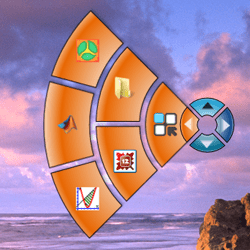
Radian is an application launcher that aims to help you get things done quicker. Now instead of having to dig through folders, or even click on menus, all you need to do is to right click on your screen. No matter where your mouse is on your screen, you've now got access to your Radian menu. Set it up with your most important or most used applications, and see whether your efficiency improves. It's designed in such a way that it shouldn't interfere with your other right-click commands, so you're not really sacrificing functionality that you're familiar with for this new tool.
 

Attachments

  • radian.png
    radian.png
    31.6 KB · Views: 613

My Computer My Computer

OS
Windows 7 Professional x64 x86 VISTA XP 98SE 95 3.x
CPU
Intel(R) Core(TM)2 Quad CPU Q9400 @ 2.66GHz
Memory
8 GB
Screen Resolution
1920 x 1200
PSU
OCZ Fatal1ty OCZ550FTY 550W ATX12V v2.2 25A on each rail
Thank you Patrick. Radian added. :)
 

My Computer My Computer

Computer type
PC/Desktop
Computer Manufacturer/Model Number
Self built custom
OS
64-bit Windows 11 Pro for Workstations
CPU
Intel i7-8700K OC'd to 5 GHz
Motherboard
ASUS ROG Maximus XI Formula Z390
Memory
64 GB (4x16GB) G.SKILL TridentZ RGB DDR4 3600 MHz
Graphics Card(s)
ASUS ROG-STRIX-GTX1080TI-O11G-GAMING
Sound Card
Integrated
Monitor(s) Displays
2 x Samsung Odyssey G7 27"
Screen Resolution
2560x1440
Hard Drives
1TB Samsung 990 PRO M.2,
4TB Samsung 990 PRO PRO M.2,
TerraMaster F8 SSD Plus NAS
PSU
Seasonic Prime Titanium 850W
Case
Thermaltake Core P3
Cooling
Corsair Hydro H115i
Keyboard
Logitech wireless K800
Mouse
Logitech MX Master 4
Internet Speed
2 Gb/s Download and 100 Mb/s Upload
Antivirus
Malwarebyte Anti-Malware Premium
Browser
Google Chrome
Other Info
Logitech Z625 speaker system,
Logitech BRIO 4K Pro webcam,
HP Color LaserJet Pro MFP M477fdn,
APC SMART-UPS RT 1000 XL - SURT1000XLI,
Galaxy S23 Plus phone
Sick of booting the computer every morning? With Boot Snooze you can shut down your computer, performing a full reboot, and then Boot Snooze puts it back into hibernation or standby mode. So you gain the benefits of a reboot and still start quickly out of hibernation.

And, you can add your favourite morning apps to Startup. So when you get down to using the computer, those are already open. See here for a walkthrough.

Start your PC the Productive Way « Tinkering with Tech

Note: You need to have hibernation enabled on your computer. User Account must be set up to logon automatically.
 

Attachments

  • 2010-02-05_095949.jpg
    2010-02-05_095949.jpg
    18 KB · Views: 5

My Computer My Computer

Computer Manufacturer/Model Number
Too many to describe...
OS
Windows 7 x64 pro/ Windows 7 x86 Pro/ XP SP3 x86
Thank you Bill. Added. :)
 

My Computer My Computer

Computer type
PC/Desktop
Computer Manufacturer/Model Number
Self built custom
OS
64-bit Windows 11 Pro for Workstations
CPU
Intel i7-8700K OC'd to 5 GHz
Motherboard
ASUS ROG Maximus XI Formula Z390
Memory
64 GB (4x16GB) G.SKILL TridentZ RGB DDR4 3600 MHz
Graphics Card(s)
ASUS ROG-STRIX-GTX1080TI-O11G-GAMING
Sound Card
Integrated
Monitor(s) Displays
2 x Samsung Odyssey G7 27"
Screen Resolution
2560x1440
Hard Drives
1TB Samsung 990 PRO M.2,
4TB Samsung 990 PRO PRO M.2,
TerraMaster F8 SSD Plus NAS
PSU
Seasonic Prime Titanium 850W
Case
Thermaltake Core P3
Cooling
Corsair Hydro H115i
Keyboard
Logitech wireless K800
Mouse
Logitech MX Master 4
Internet Speed
2 Gb/s Download and 100 Mb/s Upload
Antivirus
Malwarebyte Anti-Malware Premium
Browser
Google Chrome
Other Info
Logitech Z625 speaker system,
Logitech BRIO 4K Pro webcam,
HP Color LaserJet Pro MFP M477fdn,
APC SMART-UPS RT 1000 XL - SURT1000XLI,
Galaxy S23 Plus phone
Sick of booting the computer every morning? With Boot Snooze you can shut down your computer, performing a full reboot, and then Boot Snooze puts it back into hibernation or standby mode. So you gain the benefits of a reboot and still start quickly out of hibernation.

And, you can add your favourite morning apps to Startup. So when you get down to using the computer, those are already open. See here for a walkthrough.

Start your PC the Productive Way « Tinkering with Tech

Note: You need to have hibernation enabled on your computer. User Account must be set up to logon automatically.

Good Find Bill !! Thank You !! :)
 

My Computer My Computer

Computer Manufacturer/Model Number
Samsung NP550P5C-S02IN
OS
Windows 7 Ultimate - 64-bit | Windows 8 Pro - 64-bit
CPU
Intel® Core™ i7 Processor 3,610QM (2.30Hz, 6MB L3 Cach
Memory
8 GB
Graphics Card(s)
NVIDIA® GeForce® GT 650M 2GB Graphics, Optimus™ techno
Sound Card
SoundAlive™ JBL 3 Speakers (With sub-Woofer)
Monitor(s) Displays
39.62cm (15.6) SuperBright 300nit HD+ LED Display
Screen Resolution
1,600 x 900, Anti-Reflective
Hard Drives
1TB S-ATA II Hard Drive (5,400RPM)
I'd like to suggest
- Nitro PDF Reader | Top Features Nitro PDF Reader
- LastPass | https://lastpass.com/

Nitro Reader is still in beta beta, so install it if you are okay with using beta softwares. Though I am sure you'll agree it'll make a good (/better) alternative for Adobe Reader which won't let you edit your docs much.

LastPass is good. It stores passwords in your online account, so I think it's quite handy.
 

My Computer My Computer

Computer Manufacturer/Model Number
TOSHIBA EQUIUM A200 (X86-based PC AT/AT COMPATIBLE)
OS
Windows 7 Ultimate x86
CPU
Intel(R) Pentium(R) Dual CPU T2310 @ 1.46GHz
Motherboard
Intel Corporation SANTA ROSA CRB
Memory
2GB
Graphics Card(s)
Mobile Intel(R) 965 Express Chipset Family
Screen Resolution
1280 * 800 Pixels
Hard Drives
ST9120822AS ATA Device (IDE)
Sick of booting the computer every morning? With Boot Snooze you can shut down your computer, performing a full reboot, and then Boot Snooze puts it back into hibernation or standby mode. So you gain the benefits of a reboot and still start quickly out of hibernation.

And, you can add your favourite morning apps to Startup. So when you get down to using the computer, those are already open. See here for a walkthrough.

Start your PC the Productive Way « Tinkering with Tech

Note: You need to have hibernation enabled on your computer. User Account must be set up to logon automatically.

Love this software.. Good one Bill :thumbsup:
 

My Computer My Computer

OS
window's 7
CPU
core 2 quad
Motherboard
gigabyte
Memory
2gb corsair
Graphics Card(s)
ati hd4850
Monitor(s) Displays
lg
Screen Resolution
1600 X 900
Case
power logic
Other Info
none of the spec above is accurate
Status
Not open for further replies.
Back
Top