FREE Great Programs for Windows 7

Status
Not open for further replies.
Last edited:

My Computer

Computer type
PC/Desktop
Computer Manufacturer/Model Number
My own abomination, I call it the Money Pit
OS
Windows 10 Pro x 2/Windows 11 Home
CPU
Intel i7 2600K @ 3.40 GHz
Motherboard
ASUS Sabertooth P67
Memory
Corsair Vengeance 16GB DDR3 1600MHz CL8 Dual Channel Kit
Graphics Card(s)
EVGA GeForce RTX 3080 XC3 ULTRA GAMING 10GB GDDR6X
Sound Card
Onboard Realtek or Nvidia High Definition Audio (HDMI)
Monitor(s) Displays
Samsung JS7000 50" SUHD TV or Samsung 27" FHD 60Hz 8ms GTG V
Screen Resolution
1920 x 1080
Hard Drives
1 x Samsung 870 EVO 250 GB SSD (Windows 10 Pro), 1 x Samsung 850 EVO 250 GB SSD (Windows 10 Pro)
PSU
Corsair AX860 - 860W Modular Power Supply
Case
Phanteks Enthoo Luxe Full Tower Case - Black
Cooling
CORSAIR Hydro Series H150i PRO RGB 360mm Liquid CPU Cooler
Keyboard
Logitech K830 Illuminated Living-Room Keyboard
Mouse
Logitech MX Anywhere 2S Wireless Mouse
Internet Speed
100 Mbps
Antivirus
ESET Internet Security
Browser
Latest Version Of Firefox & Microsoft Edge Chromium Stable
Other Info
LG Super Multi Blue Internal Blu-ray Disk Rewriter - BH10LS30
6x2 HDMI Switcher (6 inputs, 2 outputs) so I can send the output of my Cable Box, Roku, or any my 4 computers to either my TV or Monitor separately or simultaneously.
Maybe you should check out Sequoia View. Nice program, very usefull.
 

My Computer

Computer Manufacturer/Model Number
Acer Aspire 7535G
OS
Windows 7 Home Premium 32bit
CPU
AMD Athlon x2
Motherboard
Acer 7535G
Memory
3 GB
Graphics Card(s)
ATI Radeon HD 4570/ATI Radeon HD 3200 (Hybrid)
Monitor(s) Displays
17,3" 1600x900
Hard Drives
250 GB
PSU
Laptop Battery

My Computers

System One System Two

  • Computer type
    PC/Desktop
    OS
    7 X64
    CPU
    i5 8400
    Motherboard
    gigabyte b365m ds3h
    Memory
    2x8gb 3200mhz
    Hard Drives
    various
    PSU
    pure power 11 400w cm
    Case
    Coolermaster
    Cooling
    cryorig m9i
  • Computer type
    PC/Desktop
    OS
    7x64
    CPU
    g5400
    Motherboard
    ga b365m ds3h
    Memory
    8gb ddr4 2400
    PSU
    xfx pro 450w
And I had a rave about it (Faststone Capture) here (few pages back) too. Still isn't in the main list!
 

My Computer

Computer Manufacturer/Model Number
AMD Athlon 64 3200+, Lenovo G560 i3
OS
Windows 7 Ultimate, Ubuntu
Motherboard
Gigabyte K8T8000
Memory
DDR 2Gb (!)
Graphics Card(s)
6600GT
Monitor(s) Displays
MultiMonitor (2) LCD
Hard Drives
Old Seagate 75
Big Western Digital
Samsung 500Gb pulled out of an external drive and installed
Ext: Maxtor (Firewire), 1Gb Lacie (Samsung)
Mouse
Logitech MX620 Cordless
Faststone Capture is good, but it's not free since they added screen recorder to it.
 

My Computer

Computer Manufacturer/Model Number
Self Built
OS
Win 7 Ultimate 32bit
CPU
C2D E6600 2.4Ghz
Motherboard
Intel D965WH
Memory
4G Kingston KHX5400D2
Graphics Card(s)
EVGA GTX 570 HD SC (012-P3-1573-KR)
Sound Card
On-Board
Monitor(s) Displays
Samsung 226BW
Screen Resolution
1680 x 1050
Hard Drives
2 x 250 Seagate Barracuda
2 x 500 Seagate Barracuda (Raid1)
PSU
Corsair TX750W
Case
In-Win C589
Cooling
Stock Intel Cooling
Faststone Capture is good, but it's not free since they added screen recorder to it.

Its free - everyone here has carefully linked to 5.3, which was freeware and is available widely.
 

My Computer

Computer Manufacturer/Model Number
AMD Athlon 64 3200+, Lenovo G560 i3
OS
Windows 7 Ultimate, Ubuntu
Motherboard
Gigabyte K8T8000
Memory
DDR 2Gb (!)
Graphics Card(s)
6600GT
Monitor(s) Displays
MultiMonitor (2) LCD
Hard Drives
Old Seagate 75
Big Western Digital
Samsung 500Gb pulled out of an external drive and installed
Ext: Maxtor (Firewire), 1Gb Lacie (Samsung)
Mouse
Logitech MX620 Cordless
Faststone Capture is good, but it's not free since they added screen recorder to it.

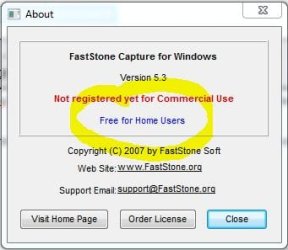
I installed FS Capture 5.3 (last freeware version) many month's ago using the same above link (provided by Barman58) & I just made a screen capture of: About - FS Capture 5.3 below which states that it is free for home users.

PS: Also rechecked link before posting

FS Capture free.JPG
 
Last edited:

My Computer

Computer type
PC/Desktop
Computer Manufacturer/Model Number
My own abomination, I call it the Money Pit
OS
Windows 10 Pro x 2/Windows 11 Home
CPU
Intel i7 2600K @ 3.40 GHz
Motherboard
ASUS Sabertooth P67
Memory
Corsair Vengeance 16GB DDR3 1600MHz CL8 Dual Channel Kit
Graphics Card(s)
EVGA GeForce RTX 3080 XC3 ULTRA GAMING 10GB GDDR6X
Sound Card
Onboard Realtek or Nvidia High Definition Audio (HDMI)
Monitor(s) Displays
Samsung JS7000 50" SUHD TV or Samsung 27" FHD 60Hz 8ms GTG V
Screen Resolution
1920 x 1080
Hard Drives
1 x Samsung 870 EVO 250 GB SSD (Windows 10 Pro), 1 x Samsung 850 EVO 250 GB SSD (Windows 10 Pro)
PSU
Corsair AX860 - 860W Modular Power Supply
Case
Phanteks Enthoo Luxe Full Tower Case - Black
Cooling
CORSAIR Hydro Series H150i PRO RGB 360mm Liquid CPU Cooler
Keyboard
Logitech K830 Illuminated Living-Room Keyboard
Mouse
Logitech MX Anywhere 2S Wireless Mouse
Internet Speed
100 Mbps
Antivirus
ESET Internet Security
Browser
Latest Version Of Firefox & Microsoft Edge Chromium Stable
Other Info
LG Super Multi Blue Internal Blu-ray Disk Rewriter - BH10LS30
6x2 HDMI Switcher (6 inputs, 2 outputs) so I can send the output of my Cable Box, Roku, or any my 4 computers to either my TV or Monitor separately or simultaneously.
Faststone Capture is good, but it's not free since they added screen recorder to it.
5.3 yes is free, which does not contain Screen Recorder.
That is all that I am saying. Newer versions are not free due to the added Screen Recorder.

In response to ,,,
Still isn't in the main list!

Maybe it was a redundant post. Sorry
 

My Computer

Computer Manufacturer/Model Number
Self Built
OS
Win 7 Ultimate 32bit
CPU
C2D E6600 2.4Ghz
Motherboard
Intel D965WH
Memory
4G Kingston KHX5400D2
Graphics Card(s)
EVGA GTX 570 HD SC (012-P3-1573-KR)
Sound Card
On-Board
Monitor(s) Displays
Samsung 226BW
Screen Resolution
1680 x 1050
Hard Drives
2 x 250 Seagate Barracuda
2 x 500 Seagate Barracuda (Raid1)
PSU
Corsair TX750W
Case
In-Win C589
Cooling
Stock Intel Cooling
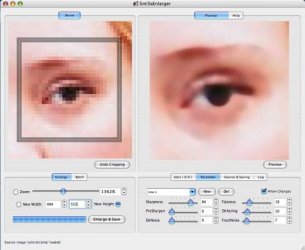
SmillaEnlarger

SmillaEnlarger is an app that helps you make small pictures big. While there are lots of tools you can use to accomplish this task, generally the quality of your images takes such a hit that you'd be better served to just squint and try to do with best you can with the original. This app employs some technical sleight-of-hand to render your enlargements much clearer than you might expect. Portable version

screenshot1.jpg

screenshot.jpg
 
Last edited:

My Computer

OS
Windows 7 Professional x64 x86 VISTA XP 98SE 95 3.x
CPU
Intel(R) Core(TM)2 Quad CPU Q9400 @ 2.66GHz
Memory
8 GB
Screen Resolution
1920 x 1200
PSU
OCZ Fatal1ty OCZ550FTY 550W ATX12V v2.2 25A on each rail
SmillaEnlarger is an app that helps you make small pictures big. While there are lots of tools you can use to accomplish this task, generally the quality of your images takes such a hit that you'd be better served to just squint and try to do with best you can with the original. This app employs some technical sleight-of-hand to render your enlargements much clearer than you might expect.

View attachment 102149

View attachment 102152

Thank you Patrick. Added. :)
 

My Computer

Computer type
PC/Desktop
Computer Manufacturer/Model Number
Self built custom
OS
64-bit Windows 11 Pro for Workstations
CPU
Intel i7-8700K OC'd to 5 GHz
Motherboard
ASUS ROG Maximus XI Formula Z390
Memory
64 GB (4x16GB) G.SKILL TridentZ RGB DDR4 3600 MHz
Graphics Card(s)
ASUS ROG-STRIX-GTX1080TI-O11G-GAMING
Sound Card
Integrated
Monitor(s) Displays
2 x Samsung Odyssey G7 27"
Screen Resolution
2560x1440
Hard Drives
1TB Samsung 990 PRO M.2,
4TB Samsung 990 PRO PRO M.2,
TerraMaster F8 SSD Plus NAS
PSU
Seasonic Prime Titanium 850W
Case
Thermaltake Core P3
Cooling
Corsair Hydro H115i
Keyboard
Logitech wireless K800
Mouse
Logitech MX Master 4
Internet Speed
2 Gb/s Download and 100 Mb/s Upload
Antivirus
Malwarebyte Anti-Malware Premium
Browser
Google Chrome
Other Info
Logitech Z625 speaker system,
Logitech BRIO 4K Pro webcam,
HP Color LaserJet Pro MFP M477fdn,
APC SMART-UPS RT 1000 XL - SURT1000XLI,
Galaxy S23 Plus phone
What Is Reality Factory?

Anyone ever want to try and make games just to say...Hey I did that. Well with a few tools that are free you can do that on your own pc, and you don't need to know c/c++ and you won't need any coders to do any work for you.
I'm experimenting with these 2 programs right now to see what type of games I can come up with. I'm sure it will not be any award winning game, but like I said, I made it.
We already have Blender on the list of freebies, so here is my submission for the do it yourself game maker.
What Is Reality Factory?
Use this in conjunction with Blender and create whatever your mind desires. Use Blender to make your models and so forth, and use RF to put it all together. ENJOY!
Maybe we should start a thread and see what everyone can create.:geek:
 

My Computer

OS
win7 ultimate x64
CPU
Intel Core2 Duo E8400 @ 3.0
Motherboard
NVIDIA nForce 680i SLI
Memory
4gb corsair 6400 ddr2
Graphics Card(s)
Palit GTX260 Sonic 216 SP
Sound Card
sb audigy 24bit
Monitor(s) Displays
i-inc 19" lcd
Screen Resolution
1440x900
Hard Drives
seagate barracuda 7200 250 gb
PSU
ULTRA LSP Pro 750
Case
ultra midtower
Cooling
air
I'm surprised this hasn't been added yet:
Open Office
Open Office is a great, free office program that anyone is allowed to edit (open-source). The cool thing about that is that there are new add-ons made by the users always being added to the site and available to download for free. Without having to install anything other than the program itself (which surprisingly won't take that long to download or install, luckily), it can be used for word processing, spreadsheets, presentations, graphics, databases and more. It is available in many languages and works on all common computers (It works on my Windows 7 64 Bit OS). To learn more about this great program, click here!
 

My Computer

Computer Manufacturer/Model Number
Dell Inspiron i560-4905NBK
OS
Windows 7 Home Premium 64-bit (6.1, Build 7600)
CPU
Pentium(R) Dual-Core CPU E5400 @ 2.70GHz
Motherboard
Dell 0K83V0 A00
Memory
6.00 GB
Graphics Card(s)
Intel(R) G45/G43 Express Chipset
Sound Card
Intel(R) High Definition Audio HDMI
Monitor(s) Displays
Dell 23" Widescreen Flat Panel Monitor S2309W(Analog)
Screen Resolution
1920x1080
PSU
300 Watts
Keyboard
Microsoft Comfort Curve Keyboard 2000
Mouse
Logitech LX 8 Cordless Laser Mouse
Internet Speed
Download: 192 KB Upload: 35 KB
Other Info
I know my internet speed is terrible, but it's the best we can get where I live. :\
Also, I plan on getting a better power supply and graphics card soon.
I'm surprised this hasn't been added yet:
Open Office
Open Office is a great, free office program that anyone is allowed to edit (open-source). The cool thing about that is that there are new add-ons made by the users always being added to the site and available to download for free. Without having to install anything other than the program itself (which surprisingly won't take that long to download or install, luckily), it can be used for word processing, spreadsheets, presentations, graphics, databases and more. It is available in many languages and works on all common computers (It works on my Windows 7 64 Bit OS). To learn more about this great program, click here!

It has been added ;) on the first page ....

http://www.sevenforums.com/software/92-free-great-programs-windows-7-a.html#post264
 

My Computers

System One System Two

  • Computer type
    PC/Desktop
    Computer Manufacturer/Model Number
    ChillBlast - Custom to my design
    OS
    Windows 11 Pro x64 [Latest Release and Release Preview]
    CPU
    Ryzen 9 5950X, 3.8 - 5.2 MHz
    Motherboard
    Asus Prime X570-Pro
    Memory
    64GB [2 x 32GB] DDR4 3200MHz
    Graphics Card(s)
    4GB NVIDIA GEFORCE GTX 1650 Ti
    Sound Card
    On-board SPDIF to 5.1 System + HDMI [5.1 system]
    Monitor(s) Displays
    32" UHD 32 Bit HDR Monitor + 43" UHD 4K 32Bit HDR TV
    Screen Resolution
    2 x 3840 x 2160 @60Hz
    Hard Drives
    1TB M2 SSD OS, 500GB Fast Access SSD, 2 x 8TB Data + Various Externals from 1TB to 4TB, 10TB NAS
    PSU
    NZXT C750 80 PLUS Gold 750W Modular PSU
    Case
    Workstation Case [Matt Black]
    Cooling
    NZXT Kraken X63 280mm CPU Cooler +2x Quiet Case fans
    Keyboard
    Logitech Wireless MX Keys & K400 + others
    Mouse
    Logitech Wireless MX Master 3S
    Internet Speed
    920 MB Down 50 MB Up
    Antivirus
    BitDefender Total Security Pro
    Browser
    Chrome (always run latest Non-Beta)
    Other Info
    Also run ...
    Laptop - Quad 8GB - Windows 10 Pro x64
    Nexus 7 Android tablet x2
    Samsung 10.2" tablet
    Blackview TAB 8 4G Android Tablet c/w Keyboard
    Wacom Intuos Pro Medium Pen Pad
    Wacom Intuos Pro Small Pen Pad
    Wacom Expresskeys Remote
    Loopdeck+ Graphics Controller
    Shuttle Pro v2 Control
  • Computer type
    Laptop
    System Manufacturer/Model Number
    Dell XPS 17 10750H
    OS
    Windows 11 Pro x64 Latest RP
    CPU
    Intel I7 10750H 5.0GHz
    Motherboard
    Dell XPS
    Memory
    32GB [2x16GB] DDR4 2933 MHz
    Graphics Card(s)
    nVidia GTX1650Ti 4 GB GDDR6
    Sound Card
    Stock [Realtek] 4 Speaker
    Monitor(s) Displays
    17" IPS UHD+ Infinity Edge Touchscreen
    Screen Resolution
    3840 x 2400
    Hard Drives
    2TB M2 NVMe, 4TB External + various 500GB & 1TB External NVMe (also have access to spinner HDD from
    PSU
    Stock
    Case
    Stock XPS Aluminium & Carbon Fibre
    Cooling
    Stock - Active Fan Control
    Keyboard
    Backlit + Various Logitech
    Mouse
    Stock Track Pad + Logitech MX Trackball
    Internet Speed
    72 MB Down 18MB Up
    Browser
    Chrome
    Other Info
    Also run ...
    Laptop - Quad 8GB - Windows 10 Pro x64
    Nexus 7 Android tablet x2
    10.2" tablet
    Sony Z3 Android Smartphone
    Wacom Intuos Pro Medium Pen Pad
    Wacom Intuos Pro Small Pen Pad
    Wacom Expresskeys Remote
    Loopdeck+ Graphics Controller
    Shuttle Pro v2 Control Pad
    10TB NAS
Oh...whoops. I typed in "Open" in the search menu after pressing control+f, and it brought up a few different things, so I put a space instead of "O"...I guess I should be more careful next time, sorry.
 

My Computer

Computer Manufacturer/Model Number
Dell Inspiron i560-4905NBK
OS
Windows 7 Home Premium 64-bit (6.1, Build 7600)
CPU
Pentium(R) Dual-Core CPU E5400 @ 2.70GHz
Motherboard
Dell 0K83V0 A00
Memory
6.00 GB
Graphics Card(s)
Intel(R) G45/G43 Express Chipset
Sound Card
Intel(R) High Definition Audio HDMI
Monitor(s) Displays
Dell 23" Widescreen Flat Panel Monitor S2309W(Analog)
Screen Resolution
1920x1080
PSU
300 Watts
Keyboard
Microsoft Comfort Curve Keyboard 2000
Mouse
Logitech LX 8 Cordless Laser Mouse
Internet Speed
Download: 192 KB Upload: 35 KB
Other Info
I know my internet speed is terrible, but it's the best we can get where I live. :\
Also, I plan on getting a better power supply and graphics card soon.
No need to apologise - The list here is probably the most comprehensive on the net, it's easy to miss something :D

I've set up quite a few systems for people where the only software cost is the operating system, (and that often comes Free with the OEM system), and this list is an essential resource :cool:
 

My Computers

System One System Two

  • Computer type
    PC/Desktop
    Computer Manufacturer/Model Number
    ChillBlast - Custom to my design
    OS
    Windows 11 Pro x64 [Latest Release and Release Preview]
    CPU
    Ryzen 9 5950X, 3.8 - 5.2 MHz
    Motherboard
    Asus Prime X570-Pro
    Memory
    64GB [2 x 32GB] DDR4 3200MHz
    Graphics Card(s)
    4GB NVIDIA GEFORCE GTX 1650 Ti
    Sound Card
    On-board SPDIF to 5.1 System + HDMI [5.1 system]
    Monitor(s) Displays
    32" UHD 32 Bit HDR Monitor + 43" UHD 4K 32Bit HDR TV
    Screen Resolution
    2 x 3840 x 2160 @60Hz
    Hard Drives
    1TB M2 SSD OS, 500GB Fast Access SSD, 2 x 8TB Data + Various Externals from 1TB to 4TB, 10TB NAS
    PSU
    NZXT C750 80 PLUS Gold 750W Modular PSU
    Case
    Workstation Case [Matt Black]
    Cooling
    NZXT Kraken X63 280mm CPU Cooler +2x Quiet Case fans
    Keyboard
    Logitech Wireless MX Keys & K400 + others
    Mouse
    Logitech Wireless MX Master 3S
    Internet Speed
    920 MB Down 50 MB Up
    Antivirus
    BitDefender Total Security Pro
    Browser
    Chrome (always run latest Non-Beta)
    Other Info
    Also run ...
    Laptop - Quad 8GB - Windows 10 Pro x64
    Nexus 7 Android tablet x2
    Samsung 10.2" tablet
    Blackview TAB 8 4G Android Tablet c/w Keyboard
    Wacom Intuos Pro Medium Pen Pad
    Wacom Intuos Pro Small Pen Pad
    Wacom Expresskeys Remote
    Loopdeck+ Graphics Controller
    Shuttle Pro v2 Control
  • Computer type
    Laptop
    System Manufacturer/Model Number
    Dell XPS 17 10750H
    OS
    Windows 11 Pro x64 Latest RP
    CPU
    Intel I7 10750H 5.0GHz
    Motherboard
    Dell XPS
    Memory
    32GB [2x16GB] DDR4 2933 MHz
    Graphics Card(s)
    nVidia GTX1650Ti 4 GB GDDR6
    Sound Card
    Stock [Realtek] 4 Speaker
    Monitor(s) Displays
    17" IPS UHD+ Infinity Edge Touchscreen
    Screen Resolution
    3840 x 2400
    Hard Drives
    2TB M2 NVMe, 4TB External + various 500GB & 1TB External NVMe (also have access to spinner HDD from
    PSU
    Stock
    Case
    Stock XPS Aluminium & Carbon Fibre
    Cooling
    Stock - Active Fan Control
    Keyboard
    Backlit + Various Logitech
    Mouse
    Stock Track Pad + Logitech MX Trackball
    Internet Speed
    72 MB Down 18MB Up
    Browser
    Chrome
    Other Info
    Also run ...
    Laptop - Quad 8GB - Windows 10 Pro x64
    Nexus 7 Android tablet x2
    10.2" tablet
    Sony Z3 Android Smartphone
    Wacom Intuos Pro Medium Pen Pad
    Wacom Intuos Pro Small Pen Pad
    Wacom Expresskeys Remote
    Loopdeck+ Graphics Controller
    Shuttle Pro v2 Control Pad
    10TB NAS
People,
Shouldn't it be more clear which of the programs that are portable and which are not?
Currently for some of them it is listed, but not for all. And some programs come in both a portable and a version that must be installed (some "portable" apps even need to be installed but that I do not consider portable).

As an example, the Revo Uninstaller is available in a portable version, but this is not mentioned. A simple note that Portable version exists would suffice.

I (try to) only use portable programs, so this info is crucial to me.
 

My Computer

OS
Win 7
People,
Shouldn't it be more clear which of the programs that are portable and which are not?
Currently for some of them it is listed, but not for all. And some programs come in both a portable and a version that must be installed (some "portable" apps even need to be installed but that I do not consider portable).

As an example, the Revo Uninstaller is available in a portable version, but this is not mentioned. A simple note that Portable version exists would suffice.

I (try to) only use portable programs, so this info is crucial to me.


try www.portableapps.com & Download PORTABLE SOFTWARE - Softpedia
 

My Computer

Computer Manufacturer/Model Number
Gateway/NV7923u & NV79C52u Laptops
OS
windows 7 professional & ultimate 64bit laptops
CPU
2.27 boost to 2.53 & 2.53 boost to 2.80
Motherboard
Mobile Intel® HM55 Express Chipset ???
Memory
4GB
Graphics Card(s)
Intel® Graphics Media Accelerator HD
Sound Card
realtek High-definition audio support
Monitor(s) Displays
17.3 " HD 1600 x 900
Hard Drives
hatachi Travelstar 5400 500GB & west digital 500GB
Internet Speed
35MB fios
Don't know if you're interested in 3D too:

Wings3D: a 3D modeling application, works fine under 32bit and 64bit -> Wings 3d

DAZ Studio: a 3D rendering application (not for modeling but for using external ready-for-use content, many plugins and add-ons available) - works fine under 32bit and 64bit -> DAZ 3D - Free 3D Software and 3D Model Providers

Edit: Both need to be installed, they aren't portable.
 

My Computer

OS
Win 7 Professional 64bit
CPU
Intel i7-3930K @ 3.2GHz
Memory
16 GB
Graphics Card(s)
NVIDIA GeForce GTX 650
Monitor(s) Displays
1 CRT, 1 LCD
Hard Drives
3 hard drives
Status
Not open for further replies.
Back
Top