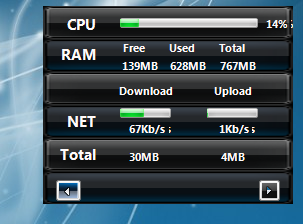
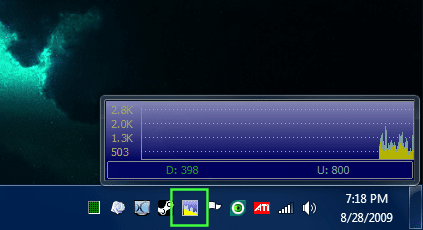
Networx is a very light-weight and powerful network monitor tool for Windows 7 x86/x64. Much like DUMeter, it has many logging functions or can simply be used to quickly determine network activity. I've used it since v5.0 and have found it to be very stable and reliable. It also fully Aero compatible (I included snapshots of the meter on my desktop). It can be run as a fully viewable meter or simply as a tray meter, very handy!
A few highlights...
- Free
- Windows 7 x86/x64 friendly
- Powerful and easy to use
- Able to monitor all network traffic via any connection
- Clear graphic and/or numeric display
- Usage reports with export functions
- Network information & testing tools
More info and free download here.
EDIT:
V5.03 released September 1, 2009
A few highlights...
- Free
- Windows 7 x86/x64 friendly
- Powerful and easy to use
- Able to monitor all network traffic via any connection
- Clear graphic and/or numeric display
- Usage reports with export functions
- Network information & testing tools
softperfect.com said:NetWorx is a simple and free, yet powerful tool that helps you objectively evaluate your bandwidth situation. You can use it to collect bandwidth usage data and measure the speed of your Internet or any other network connection. NetWorx can help you identify possible sources of network problems, ensure that you do not exceed the bandwidth limits specified by your ISP, or track down suspicious network activity characteristic of Trojan horses and hacker attacks.
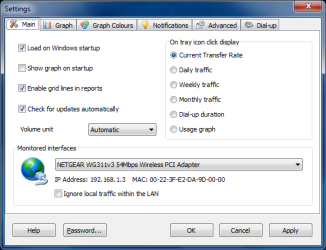
The program allows you to monitor all your network connections or a specific network connection (such as Ethernet or PPP) only. The software also features a system of highly customizable visual and sound alerts. You can set it up to alert you when the network connection is down or when some suspicious activity, such as unusually heavy data flow, occurs. It can also automatically disconnect all dialup connections and shut down the system.
The incoming and outgoing traffic is represented on a line chart and logged to a file, so that you can always view statistics about your daily, weekly and monthly bandwidth usage and dialup duration. The reports can be exported to a variety of formats, such as HTML, MS Word and Excel, for further analysis.
More info and free download here.
EDIT:
V5.03 released September 1, 2009
- Added drop-down month list in custom reports to quickly access monthly usage.
- Added import of DU Meter Backup files (*.sqbackup) and NetMeter files (*.csv) under the Restore button in the usage report.
- Added IP address manager to exclude custom networks as local traffic.
- Short-term notifications now can apply in a wider range. Now 'more' conditions trigger even if they occur before time elapses
- Playing a windows sound when quota overused message shown.
- Some fixes related to sleep and hibernation issues when the Ignore LAN option was turned on.
- Volume unit multiplier made customisable (1000 or 1024 bytes per KB).
- On/off-peak hours menu item in the usage report now causes the tray tooltip to display on/off-peak usage info accordingly.
Attachments
Last edited:
My Computer
- Computer type
- PC/Desktop
- Computer Manufacturer/Model Number
- Custom Build/Mod
- OS
- Windows 7 Home Premium x64
- CPU
- Intel QX9650 Extreme 4.0 GHz
- Motherboard
- ASUS Rampage Extreme Rev2
- Memory
- 8GB (4x2) Corsair Dominator DDR3
- Graphics Card(s)
- 2x Radeon R390X [8GB]
- Sound Card
- SupremeFX X-Fi
- Monitor(s) Displays
- Dell 2408WFP 26" Panel
- Screen Resolution
- 1920x1200
- Hard Drives
- 4x WD 2TB (8TB+ Total)
2x Crucial SSD 128GB (RAID-0)
1x LG Blu-ray read/write
1x Phillips LightScribe DVD read/write
- PSU
- Corsair HX1000
- Case
- CoolerMaster - Cosmos S
- Cooling
- Custom Liquid - 320mm rad w/ 3x 80mm fans, CPU/NB/SB Blocks
- Keyboard
- Logitech Illuminater Pro
- Mouse
- Logitech
- Internet Speed
- Fractional T1 - 125Mbps
- Antivirus
- ESET Security Suite / Microsoft Security Essentials
- Browser
- Cyberfox Intel x64
- Other Info
- OC'd to 5.0GHz @ 44c under full load


 ... its not that much but its usable ;p