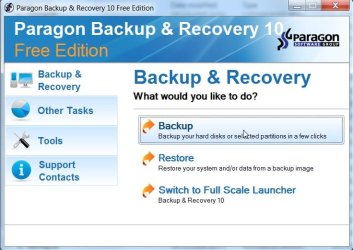
Free Paragon Back Up Software

richc46

Moderator
VIP
SF Team
Local time
8:17 PM
Messages
17,783
Location
CT

My Computer

Computer type
PC/Desktop
Computer Manufacturer/Model Number
Dell XPS 420
OS
Windows 10, Home Clean Install
CPU
Intel Core2 processsor Q8200(2.33Ghz 1333FSB) Quad Core Tech
Motherboard
Dell
Memory
6 gb
Graphics Card(s)
ATI Radeon 256MB HD3650
Sound Card
Intergrated 7.1 Channel Audio
Monitor(s) Displays
Dell SP2009W 20"
Hard Drives
640 GB Serial ATA Hard drive
Cooling
Fan
Keyboard
Dell USB Keyboard
Mouse
Dell Premium Optical USB
Internet Speed
DSL 2.85
Hi Rich,

Yes, it is good - I started a whole thread about it quite a while back. It is also on the great free programs list on this forum.

Good that you mention it again - lots of people may have missed those posts.

One thing I suggest you check on the boot cd is that the Linux mode (Normal Mode ) loads for you. If not, the DOS (Safe Mode) should. There are a small number of machines it doesn't play well with - they are using the new Linux Kernel with support for ICH9.

It is a terrific app. - the only free one that does Differential backup - and includes some partitioning functions.

I made an Express launcher for it, looks like this, and takes you straight to the functions you want:

B&R10-FREE-EXPLAUNCH-2009-12-23_185820.jpg

Extract the 2 files from the .zip - copy them into the "Paragon Software\Backup and Recovery 10 Free Edition\program" folder.

Create a shortcut to the explauncher.exe, or change the target in the exisiting desktop shortcut from ...launcher.exe to explauncher.exe.

Have Fun

 

Attachments

Last edited:

My Computers

System One System Two

  • Computer type
    PC/Desktop
    OS
    7 X64
    CPU
    i5 8400
    Motherboard
    gigabyte b365m ds3h
    Memory
    2x8gb 3200mhz
    Hard Drives
    various
    PSU
    pure power 11 400w cm
    Case
    Coolermaster
    Cooling
    cryorig m9i
  • Computer type
    PC/Desktop
    OS
    7x64
    CPU
    g5400
    Motherboard
    ga b365m ds3h
    Memory
    8gb ddr4 2400
    PSU
    xfx pro 450w
Hi Rich,

Yes, it is good - I started a whole thread about it quite a while back. It is also on the great free programs list on this forum.

Good that you mention it again - lots of people never see the older threads.

One thing I suggest you check on the boot cd is that the Linux mode (Normal Mode ) loads for you. If not, the DOS (Safe Mode) should. There are a small number of machines it doesn't play well with - they are using the new Linux Kernel with support for ICH9.

It is a terrific app. - the only free one that does Differential backup - and includes some partitioning functions.

I made an Express launcher for it, looks like this, and takes you straight to the functions you want:

View attachment 43308

Extract the 2 files from the .zip - copy them into the program folder.

Create a shortcut to the explauncher.exe, or change the target in the exisiting desktop shortcut from ...launcher.exe to explauncher.exe.

Have Fun

Thanks for the thought. I wanted to see if it is better than Win 7, system image.
 

My Computer

Computer type
PC/Desktop
Computer Manufacturer/Model Number
Dell XPS 420
OS
Windows 10, Home Clean Install
CPU
Intel Core2 processsor Q8200(2.33Ghz 1333FSB) Quad Core Tech
Motherboard
Dell
Memory
6 gb
Graphics Card(s)
ATI Radeon 256MB HD3650
Sound Card
Intergrated 7.1 Channel Audio
Monitor(s) Displays
Dell SP2009W 20"
Hard Drives
640 GB Serial ATA Hard drive
Cooling
Fan
Keyboard
Dell USB Keyboard
Mouse
Dell Premium Optical USB
Internet Speed
DSL 2.85
Paragon is a bit quicker than Windows Sys Image, and the image it creates is smaller.

You can create additional Differential ( not incremental) images . That takes longer ( doesn't matter - unless you want to watch it - Paragon resource use is low so you can work over the top ).

The advantage of Differential , apart from using less space, is that you only need the base image and one differential to restore - with incremental , you need them all.

The biggest advantage with Paragon - you can Browse and select what to image , and where to restore it.

You don't get that option with Windows Sys Image.
 

My Computers

System One System Two

  • Computer type
    PC/Desktop
    OS
    7 X64
    CPU
    i5 8400
    Motherboard
    gigabyte b365m ds3h
    Memory
    2x8gb 3200mhz
    Hard Drives
    various
    PSU
    pure power 11 400w cm
    Case
    Coolermaster
    Cooling
    cryorig m9i
  • Computer type
    PC/Desktop
    OS
    7x64
    CPU
    g5400
    Motherboard
    ga b365m ds3h
    Memory
    8gb ddr4 2400
    PSU
    xfx pro 450w
Thanks for that zip file SIW2

FyrmnJ in Philly
 

My Computer

Computer Manufacturer/Model Number
White Box
OS
Dual Booting Windows Vista32 bit And Windows 7 Home premium (x64) (build 7600)
CPU
ntel(R) Core(TM)2 Quad CPU Q6700 @ 2.66GHz (4 CPUs),
Motherboard
Board: ASUSTeK Computer INC. P5B-Premium Rev 1.xx Bus Clock:
Memory
3072MB RAM Available OS Memory: 2816MB RAM
Graphics Card(s)
MSI RX1600Pro (MS-V040);VisionTek RADEON X1300 PCI SFF
Sound Card
SoundMAX Integrated Digital HD Audio
Monitor(s) Displays
Envision SP2107W [Monitor] (22.0"vis, s/n B7976JA007061, Jun
Screen Resolution
1680x1050
Hard Drives
PLEXTOR DVDR PX-712A ATA Device [CD-ROM drive]
3.5" format removeable media [Floppy drive]

INTEL SSDSA2MH080G1GC [Hard drive] (80.03 GB) -- drive 2, s/n CVEM926000FK080DGN, rev 045C8820, SMART Status: Healthy
IOMEGA ZIP 100 SCSI Disk Device -- d
PSU
Have 2 PSU's Installed
Case
Coolmaster
Keyboard
Microsoft Internet Keyboard Pro Hot Keys
Mouse
Logitec MX500
Internet Speed
DSL
Other Info
Rollback Rx system repair software by Horizon Data Systems
Texas Instruments 1394 OHCI Compliant Host Controller
Acronis True Image Backup Archive Explorer
HID-compliant device
Microsoft PS/2 Mouse
General Purpose USB Hub
Microsoft Internet Keyboard Pro Composite Device
USB Mass Storage Device
USB Root Hub (7x)
B:\
You're welcome.

Linux boot disc working OK for you?
 

My Computers

System One System Two

  • Computer type
    PC/Desktop
    OS
    7 X64
    CPU
    i5 8400
    Motherboard
    gigabyte b365m ds3h
    Memory
    2x8gb 3200mhz
    Hard Drives
    various
    PSU
    pure power 11 400w cm
    Case
    Coolermaster
    Cooling
    cryorig m9i
  • Computer type
    PC/Desktop
    OS
    7x64
    CPU
    g5400
    Motherboard
    ga b365m ds3h
    Memory
    8gb ddr4 2400
    PSU
    xfx pro 450w
Gang this is a one day offer. It seems that if you use any other link other than the one I provided, the offer is no longer available. Hurry Christmas will not last forever.
I just downloade mine, looks like I will like it.
 

My Computer

Computer type
PC/Desktop
Computer Manufacturer/Model Number
Dell XPS 420
OS
Windows 10, Home Clean Install
CPU
Intel Core2 processsor Q8200(2.33Ghz 1333FSB) Quad Core Tech
Motherboard
Dell
Memory
6 gb
Graphics Card(s)
ATI Radeon 256MB HD3650
Sound Card
Intergrated 7.1 Channel Audio
Monitor(s) Displays
Dell SP2009W 20"
Hard Drives
640 GB Serial ATA Hard drive
Cooling
Fan
Keyboard
Dell USB Keyboard
Mouse
Dell Premium Optical USB
Internet Speed
DSL 2.85
Back
Top