
Free Software Firewalls for Windows 7

tw33k

New member
Guru
VIP
Local time
6:02 AM
Messages
3,028
Free Firewalls for Windows 7

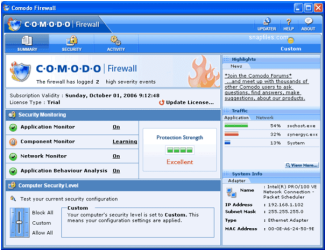
Comodo Firewall Pro 3 v4.0 (32 and 64 Bit)
Features:

Host Intrusion Prevention System to protect system files
Blocks viruses and malware
Friendly GUI
Highly granular configuration options
Understandable and informative alerts
Wizard-based detection of trusted zones
Great level of protection
Easy of options for beginners
comodo.png

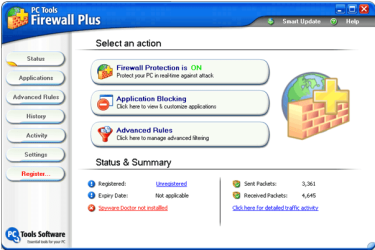
PC Tools Firewall Plus v6.0 (32 Bit)
Features:

Application monitoring
Detects Trojans, backdoors, keyloggers and other malware
Powerful default settings
Advanced packet filtering rules, including IPv6 support
Easy installation and immediate and automatic ongoing protection
pctools.png

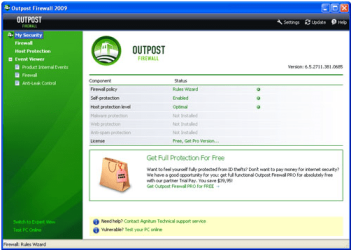
[FONT=&quot]Outpost Firewall v2009 [/FONT](32 bit)
Features:
Standard packet and application filtering
Advanced protection against illegal program activity
outpost.png

[FONT=&quot]Zone Alarm Firewall v9.1 [/FONT](32 bit)
Features:
Basic network and program firewall
Simple interface and very easy to learn
Gaming mode

za.png

Private Firewall v7.0.20.37 (32 and 64 bit)
Features:
Advanced packet filtering
Process Detection
System Anomaly Detection
Intelligent Tray Alerts
Stealth Mode
Port Tracking and Reporting
Email Anomaly Detection

private_firewall.png

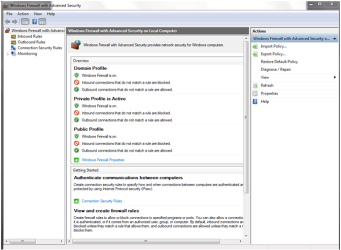
Windows Firewall (32 and 64 bit)
Windows Firewall helps you protect your computer against many types of malicious software.
Properly configured, it can stop many kinds of malware before they can infect your computer or other computers on your network. Windows Firewall, which comes with Windows Vista, is turned on by default and begins protecting your computer as soon as Windows starts. The Windows Firewall Control Panel is designed to be easy to use, with several configuration options and a simple interface.
Windows Firewall helps protect you by restricting other operating system resources if they behave in unexpected ways-a common indicator of the presence of malware. For example, if a component of Windows that is designed to send network messages over a given port on your PC tries to send messages by way of a different port due to an attack, Windows Firewall can prevent that message from leaving your computer, thereby preventing the malware from spreading to other users.

ms.png

This is for information only not for having debates about which is best.
It is not an exhaustive list. If the program you are looking for is not listed, click here for information.
Thank you
 
Last edited:

My Computer

Computer Manufacturer/Model Number
tw33k
OS
Windows 7 Ultimate (x64) SP1
CPU
Intel 3770k 4.6GHz
Motherboard
ASUS Maximus V Formula
Memory
8GB (2x 4GB) Crucial Ballistix
Graphics Card(s)
Sapphire 7950 (1060/1600)
Sound Card
On Board Realtek HD Audio
Monitor(s) Displays
27" Acer B273HU (via HDMI)
Screen Resolution
2048 x 1152
Hard Drives
Crucial M4 128GB
2TB WD Black
1TB Samsung F3 SATA
1TB WD Elite External
2TB WD USB 3.0
PSU
Corsair AX750 Gold
Case
Corsair Obsidian 800DW
Cooling
Corsair H100 (2x AP-121/2x UK-3000 push/pull)
Keyboard
Microsoft Wireless 5000
Mouse
Microsoft Wireless 5000
Internet Speed
5mb/s
Other Info
Logitech z-2300 2.1 speakers
Lamptron FC-5 v2
Please keep this thread as a resource for other members & guests.

This is not directed at any member but a general statement

If you are having issues with a particular product please either start another thread or ask your question in one of the many threads on this subject that are already open.

   Warning
Unsuitable posts in this thread will be removed
 

My Computers

System One System Two

  • Computer type
    PC/Desktop
    Computer Manufacturer/Model Number
    ChillBlast - Custom to my design
    OS
    Windows 11 Pro x64 [Latest Release and Release Preview]
    CPU
    Ryzen 9 5950X, 3.8 - 5.2 MHz
    Motherboard
    Asus Prime X570-Pro
    Memory
    64GB [2 x 32GB] DDR4 3200MHz
    Graphics Card(s)
    4GB NVIDIA GEFORCE GTX 1650 Ti
    Sound Card
    On-board SPDIF to 5.1 System + HDMI [5.1 system]
    Monitor(s) Displays
    32" UHD 32 Bit HDR Monitor + 43" UHD 4K 32Bit HDR TV
    Screen Resolution
    2 x 3840 x 2160 @60Hz
    Hard Drives
    1TB M2 SSD OS, 500GB Fast Access SSD, 2 x 8TB Data + Various Externals from 1TB to 4TB, 10TB NAS
    PSU
    NZXT C750 80 PLUS Gold 750W Modular PSU
    Case
    Workstation Case [Matt Black]
    Cooling
    NZXT Kraken X63 280mm CPU Cooler +2x Quiet Case fans
    Keyboard
    Logitech Wireless MX Keys & K400 + others
    Mouse
    Logitech Wireless MX Master 3S
    Internet Speed
    920 MB Down 50 MB Up
    Antivirus
    BitDefender Total Security Pro
    Browser
    Chrome (always run latest Non-Beta)
    Other Info
    Also run ...
    Laptop - Quad 8GB - Windows 10 Pro x64
    Nexus 7 Android tablet x2
    Samsung 10.2" tablet
    Blackview TAB 8 4G Android Tablet c/w Keyboard
    Wacom Intuos Pro Medium Pen Pad
    Wacom Intuos Pro Small Pen Pad
    Wacom Expresskeys Remote
    Loopdeck+ Graphics Controller
    Shuttle Pro v2 Control
  • Computer type
    Laptop
    System Manufacturer/Model Number
    Dell XPS 17 10750H
    OS
    Windows 11 Pro x64 Latest RP
    CPU
    Intel I7 10750H 5.0GHz
    Motherboard
    Dell XPS
    Memory
    32GB [2x16GB] DDR4 2933 MHz
    Graphics Card(s)
    nVidia GTX1650Ti 4 GB GDDR6
    Sound Card
    Stock [Realtek] 4 Speaker
    Monitor(s) Displays
    17" IPS UHD+ Infinity Edge Touchscreen
    Screen Resolution
    3840 x 2400
    Hard Drives
    2TB M2 NVMe, 4TB External + various 500GB & 1TB External NVMe (also have access to spinner HDD from
    PSU
    Stock
    Case
    Stock XPS Aluminium & Carbon Fibre
    Cooling
    Stock - Active Fan Control
    Keyboard
    Backlit + Various Logitech
    Mouse
    Stock Track Pad + Logitech MX Trackball
    Internet Speed
    72 MB Down 18MB Up
    Browser
    Chrome
    Other Info
    Also run ...
    Laptop - Quad 8GB - Windows 10 Pro x64
    Nexus 7 Android tablet x2
    10.2" tablet
    Sony Z3 Android Smartphone
    Wacom Intuos Pro Medium Pen Pad
    Wacom Intuos Pro Small Pen Pad
    Wacom Expresskeys Remote
    Loopdeck+ Graphics Controller
    Shuttle Pro v2 Control Pad
    10TB NAS
Just a note: Please do NOT rely on Matousec test when you search for the firewall. The reason is simple Matousec tests all suites and firewalls which have HIPS implemented module.
The most of his tests - testing security software against leaks, and HIPS abilities.

This is why in his previous tests Look 'n' Stop - very powerful and strong PURE firewall (without HIPS module) took almost the latest position (~2% if my memory serves me well).
Pure firewall do what every firewall should do - filters packets, that's all.

So, if you are looking for Firewall, pure Firewall without addons like HIPS, anti-, etc - do NOT rely on Matousec tests.
 

My Computer

Computer type
PC/Desktop
Computer Manufacturer/Model Number
Self Built
OS
Windows 7 Home Premium x32 SP1
CPU
x2 2.6 GHz
Motherboard
Asus
Memory
A-Data 2GB DDR2-800
Graphics Card(s)
ATI X1250
Sound Card
SB 5.1 Live!
Hard Drives
WD and Seagate FAP
PSU
Tagan TG-480-U01
Keyboard
BTC 6300
Mouse
Logitech VX Nano
Antivirus
None
Be aware that even some security products have taken to including pre-checked toolbars and other add-ons. For example:

-- Zone Alarm includes a pre-checked option to install ZoneAlarm Spy Blocker, which is a renamed version of the Ask Toolbar.

-- PC Tools Firewall Plus includes the Google Toolbar and Threatfire

-- Comodo includes the HopSurf Toolbar (another IAC product which replaced the Ask Toolbar)

(See Calendar of Updates, Installers Hall of Shame (Unwanted Add-on)).
 

My Computer

OS
Windows 7 & Windows Vista Ultimate
Good point Corrine. Many free programs are doing this now so yes, users need to ensure they pay attention to what they are agreeing to when clicking "Accept"
 

My Computer

Computer Manufacturer/Model Number
tw33k
OS
Windows 7 Ultimate (x64) SP1
CPU
Intel 3770k 4.6GHz
Motherboard
ASUS Maximus V Formula
Memory
8GB (2x 4GB) Crucial Ballistix
Graphics Card(s)
Sapphire 7950 (1060/1600)
Sound Card
On Board Realtek HD Audio
Monitor(s) Displays
27" Acer B273HU (via HDMI)
Screen Resolution
2048 x 1152
Hard Drives
Crucial M4 128GB
2TB WD Black
1TB Samsung F3 SATA
1TB WD Elite External
2TB WD USB 3.0
PSU
Corsair AX750 Gold
Case
Corsair Obsidian 800DW
Cooling
Corsair H100 (2x AP-121/2x UK-3000 push/pull)
Keyboard
Microsoft Wireless 5000
Mouse
Microsoft Wireless 5000
Internet Speed
5mb/s
Other Info
Logitech z-2300 2.1 speakers
Lamptron FC-5 v2
Be aware that even some security products have taken to including pre-checked toolbars and other add-ons. For example:

-- Zone Alarm includes a pre-checked option to install ZoneAlarm Spy Blocker, which is a renamed version of the Ask Toolbar.

-- PC Tools Firewall Plus includes the Google Toolbar and Threatfire

-- Comodo includes the HopSurf Toolbar (another IAC product which replaced the Ask Toolbar)

(See Calendar of Updates, Installers Hall of Shame (Unwanted Add-on)).
Thanks as always Corrine. What I find really worrying is the annotation used during the install procedure. Spy Blocker: I would quite easily mistake that as part and parcel of ZoneAlarm's firewall setup, inherent to the working of the program :eek:
 

My Computer

OS
Windows XP - Now Windows 7 Home Premium (64-bit).

My Computer

Computer Manufacturer/Model Number
Toshiba L505
OS
Windows 7 64x
CPU
AMD Turion II Dual-Core Mobile M520 2.30 GHz
Memory
4GB
Graphics Card(s)
ATI Radeon HD 4200
Personally, I have found that the Windows 7 Firewall works great "out of the box" with the default settings. The only program it questioned permission to access the Internet was Trillian.
 

My Computer

OS
Windows 7 & Windows Vista Ultimate
Be aware that even some security products have taken to including pre-checked toolbars and other add-ons. For example:

-- Zone Alarm includes a pre-checked option to install ZoneAlarm Spy Blocker, which is a renamed version of the Ask Toolbar.

-- PC Tools Firewall Plus includes the Google Toolbar and Threatfire

-- Comodo includes the HopSurf Toolbar (another IAC product which replaced the Ask Toolbar)

(See Calendar of Updates, Installers Hall of Shame (Unwanted Add-on)).

You are right on target. I always use a custom install and read very carefully before I check or uncheck anything.
 

My Computer

Computer Manufacturer/Model Number
Home built
OS
Windows 7 Ultimate 32 bit
CPU
Intel(R) Pentium(R) 4 CPU 3.00GHz
Motherboard
ASUS P4P800-VM Motherboard Chipset: Intel 865G + ICH5
Memory
2.50 GB RAM
Graphics Card(s)
NVIDIA GeForce 7600 GS
Sound Card
SoundMax Integrated Digital Audio (Chip)
Monitor(s) Displays
ViewSonic VX 1962 wm
Screen Resolution
1680 X 1050
Hard Drives
Seagate Barracuda 7200.10 80 GB
ST380215A ATA Device 18.6 GB
Western Digital "My Book" external hard drive 750 GB
Cooling
Fan based
Keyboard
Microsoft Comfort Curve Keyboard 2000 v10 USB
Mouse
Logitec optic USB
Internet Speed
3.01 Mb/s download 0.64 Mb/s upload

My Computer

Computer Manufacturer/Model Number
D3f's Customs
OS
Win 7 Ultimate SP1 x64
CPU
Intel Pentium Dual Core E5300 OC'd @ 3GHz
Motherboard
Asus P5G41-M LE
Memory
Kingston 2x2GB DDR2-800 Dual Channel SDRAM
Graphics Card(s)
Integrated Intel GMA X4500
Sound Card
Realtek 5.1 HD Audio (ALC887)
Monitor(s) Displays
LG Flatron W1943S @ 60Hz
Screen Resolution
1360 x 768
Hard Drives
Internal - WD Caviar Blue 500GB, External - WD My Passport Essential 500GB
PSU
Headway 450w PSU
Case
Pixxo Slim Black mATX Case
Cooling
Stock Cpu Fan, 1 x Top Case Fan
Keyboard
Logitech K120
Mouse
Logitech LS1 Laser Mouse
Internet Speed
17.66Mb/s Down, 0.82Mb/s Up
Other Info
Creative SBS A300 2.1 Speaker System, LG GH22NS50 22x Internal Super-Multi DVD-RW, 2Wire 5012NV Wireless Modem Router
If you want to be spammed endlessly then use "Free" ashampoo anything. I have used "Full Version" ashampoo software from discs published with magazines like PC Authority/User etc and found I get emails from ashampoo every second day asking me to buy this buy that.
So much so I have uninstalled the program and was promptly hit with a why did you uninstall the program etc from them.
Your choice.
Cheers
 

My Computer

Computer Manufacturer/Model Number
home built
OS
Windows 7 Professional 64 bit
CPU
930 i7 quad O/C 4ghz
Motherboard
Asus P6X58D premium
Memory
G Skill 3x2gb O/C to 1603mhz 1T timing
Graphics Card(s)
EVGA 570
Sound Card
creative titanium
Monitor(s) Displays
samsung s23a950d..120hz 3D
Screen Resolution
1920x1080
Hard Drives
Western Digital 3X150 Velocoraptors in Raid 5
PSU
Antec Quattro 1000 watt
Case
Xigmatek Elysium
Cooling
Custom Loop..Kryos block.360rad..BP comp fittings etc
Keyboard
Razor arcosa
Mouse
Razer Diamondback
Internet Speed
Wireless so w/e I get at the time
Windows 7 Firewall Control has worked very well for me. It just adds functionality to the built-in firewall.

Windows 7 Firewall Control : Sphinx Software

I too discovered W7FC and here are my comments:
a) the free version is very easy to use but it really is not adequate because it only allows "accept all" or "refuse all" options or allow in or out. No zones and no logging.

b) I (very briefly) tried the W7FC plus version and found it a little too confusing (even though I had used Zone Alarm for years in XP). Maybe I did not give it an adequate try because it was so brief a try.

c) in doing this I discovered that you must totally uninstall the plus version before re-installing the free version. Otherwise you get problems with blocking of ivP6, etc. I had wrongly assumed that because they were the same program one did not need to do so. Wrong!

I'm no expert in this but wonder
1) With Microsoft being such a target for attack, is it a problem that W7FC uses the same underlying engine as Windows 7's own firewall? Would be better to go with something like Comodo (ZA is getting a little long in the tooth) that is totally independent - always using a custom install and unselecting unwanted toolbars.

2) How important is the presence or absence of a HIPS module?

3) Other than avoiding the unwanted toolbars, is there any problem with Comodo free in W 7 ?

My 2 cents.
 

My Computer

OS
Windows 7
Windows 7 Firewall Control has worked very well for me. It just adds functionality to the built-in firewall.

Windows 7 Firewall Control : Sphinx Software

I too discovered W7FC and here are my comments:
a) the free version is very easy to use but it really is not adequate because it only allows "accept all" or "refuse all" options or allow in or out. No zones and no logging.

b) I (very briefly) tried the W7FC plus version and found it a little too confusing (even though I had used Zone Alarm for years in XP). Maybe I did not give it an adequate try because it was so brief a try.

c) in doing this I discovered that you must totally uninstall the plus version before re-installing the free version. Otherwise you get problems with blocking of ivP6, etc. I had wrongly assumed that because they were the same program one did not need to do so. Wrong!

I'm no expert in this but wonder
1) With Microsoft being such a target for attack, is it a problem that W7FC uses the same underlying engine as Windows 7's own firewall? Would be better to go with something like Comodo (ZA is getting a little long in the tooth) that is totally independent - always using a custom install and unselecting unwanted toolbars.

2) How important is the presence or absence of a HIPS module?

3) Other than avoiding the unwanted toolbars, is there any problem with Comodo free in W 7 ?

My 2 cents.

1. There is nothing wrong with the engine in Windows firewall. You do not need to be afraid of that. ZA does not yet play nice with Windows 7; I am sure that will be fixed down the road.

2. The firewall expert will have to answer this one.

3. Some have reported problems with Comodo and PCTools running with Win 7. I have run both and had no problems with either one on my system. And I avoided the toolbars. I am currently running Comodo. Like yourself, I simply want it for outbound protection.
 

My Computer

Computer Manufacturer/Model Number
Home built
OS
Windows 7 Ultimate 32 bit
CPU
Intel(R) Pentium(R) 4 CPU 3.00GHz
Motherboard
ASUS P4P800-VM Motherboard Chipset: Intel 865G + ICH5
Memory
2.50 GB RAM
Graphics Card(s)
NVIDIA GeForce 7600 GS
Sound Card
SoundMax Integrated Digital Audio (Chip)
Monitor(s) Displays
ViewSonic VX 1962 wm
Screen Resolution
1680 X 1050
Hard Drives
Seagate Barracuda 7200.10 80 GB
ST380215A ATA Device 18.6 GB
Western Digital "My Book" external hard drive 750 GB
Cooling
Fan based
Keyboard
Microsoft Comfort Curve Keyboard 2000 v10 USB
Mouse
Logitec optic USB
Internet Speed
3.01 Mb/s download 0.64 Mb/s upload
I normally operate behind a hardware NAT firewall so need not really run any software firewall but I run Comodo firewall because on my home network other users have access and therefore I like to have the additional protection that this can bring.

Also with Netbooks and laptops that are used on "Other Peoples" networks such as Hotspots you never can be sure that the firewall is running and set correctly.

Comodo did have some issues with win7 during the early Beta stages but I have had no issues since this time.

To use Comodo, or any other professional standard firewall, you have to spend some time to learn it's operation and fine tune the options for the best compromise between protection and system usability.

For the majority of users behind a Hardware NAT firewall Windows Firewall is adequate, (windows firewall control is a good addition for better control).
 

My Computers

System One System Two

  • Computer type
    PC/Desktop
    Computer Manufacturer/Model Number
    ChillBlast - Custom to my design
    OS
    Windows 11 Pro x64 [Latest Release and Release Preview]
    CPU
    Ryzen 9 5950X, 3.8 - 5.2 MHz
    Motherboard
    Asus Prime X570-Pro
    Memory
    64GB [2 x 32GB] DDR4 3200MHz
    Graphics Card(s)
    4GB NVIDIA GEFORCE GTX 1650 Ti
    Sound Card
    On-board SPDIF to 5.1 System + HDMI [5.1 system]
    Monitor(s) Displays
    32" UHD 32 Bit HDR Monitor + 43" UHD 4K 32Bit HDR TV
    Screen Resolution
    2 x 3840 x 2160 @60Hz
    Hard Drives
    1TB M2 SSD OS, 500GB Fast Access SSD, 2 x 8TB Data + Various Externals from 1TB to 4TB, 10TB NAS
    PSU
    NZXT C750 80 PLUS Gold 750W Modular PSU
    Case
    Workstation Case [Matt Black]
    Cooling
    NZXT Kraken X63 280mm CPU Cooler +2x Quiet Case fans
    Keyboard
    Logitech Wireless MX Keys & K400 + others
    Mouse
    Logitech Wireless MX Master 3S
    Internet Speed
    920 MB Down 50 MB Up
    Antivirus
    BitDefender Total Security Pro
    Browser
    Chrome (always run latest Non-Beta)
    Other Info
    Also run ...
    Laptop - Quad 8GB - Windows 10 Pro x64
    Nexus 7 Android tablet x2
    Samsung 10.2" tablet
    Blackview TAB 8 4G Android Tablet c/w Keyboard
    Wacom Intuos Pro Medium Pen Pad
    Wacom Intuos Pro Small Pen Pad
    Wacom Expresskeys Remote
    Loopdeck+ Graphics Controller
    Shuttle Pro v2 Control
  • Computer type
    Laptop
    System Manufacturer/Model Number
    Dell XPS 17 10750H
    OS
    Windows 11 Pro x64 Latest RP
    CPU
    Intel I7 10750H 5.0GHz
    Motherboard
    Dell XPS
    Memory
    32GB [2x16GB] DDR4 2933 MHz
    Graphics Card(s)
    nVidia GTX1650Ti 4 GB GDDR6
    Sound Card
    Stock [Realtek] 4 Speaker
    Monitor(s) Displays
    17" IPS UHD+ Infinity Edge Touchscreen
    Screen Resolution
    3840 x 2400
    Hard Drives
    2TB M2 NVMe, 4TB External + various 500GB & 1TB External NVMe (also have access to spinner HDD from
    PSU
    Stock
    Case
    Stock XPS Aluminium & Carbon Fibre
    Cooling
    Stock - Active Fan Control
    Keyboard
    Backlit + Various Logitech
    Mouse
    Stock Track Pad + Logitech MX Trackball
    Internet Speed
    72 MB Down 18MB Up
    Browser
    Chrome
    Other Info
    Also run ...
    Laptop - Quad 8GB - Windows 10 Pro x64
    Nexus 7 Android tablet x2
    10.2" tablet
    Sony Z3 Android Smartphone
    Wacom Intuos Pro Medium Pen Pad
    Wacom Intuos Pro Small Pen Pad
    Wacom Expresskeys Remote
    Loopdeck+ Graphics Controller
    Shuttle Pro v2 Control Pad
    10TB NAS
ZA free now plays nice with Win7 x64. Just make sure to do the custom install and read everything before the install. It wants to install a zone alarm toolbar which you can opt out of in the custom setup, it also wants to change your search engine to Google...so as always....be sure to read the fine print.
 

My Computer

Computer Manufacturer/Model Number
Systemax N2000 Gaming PC
OS
Windows 7 Ultimate x64
CPU
Q6600 @2.4ghz (G0 stepping)
Motherboard
XFX nforce 680i LT
Memory
8 gb OCZ vista essential sli PC-6400
Graphics Card(s)
Dual 9800gt in SLI mode
Sound Card
Integrated 8.1 High Definition Audio
Monitor(s) Displays
Dual Sceptre x246w 24 inch monitors
Screen Resolution
1920 x 1200 each monitor
Hard Drives
500 GB SATA II / 7500 rpm
PSU
Cooler Master Real Power Pro 1250W
Case
N2000 server tower
Cooling
Thermaltake Bigwater 760 is
Keyboard
MS Intelitype 6000 v2.0
Mouse
MS Intelipoint 6000
Internet Speed
Wi-power 1.5GB up / 512k down
Other Info
Windows 7 Ultimate x64, Windows 7 Pro x64, Windows Home Premium X86, Windows XP pro, Windows Home Server x86, Ubuntu 10.4 x86 and x64, Ubuntu server 10.4, SQL Server 2005, MySQL 5.0
for personal use,windows firewall does it job so far for me but to be more secure,i add comodo too. with normal setting
 

My Computer

OS
window's 7
CPU
core 2 quad
Motherboard
gigabyte
Memory
2gb corsair
Graphics Card(s)
ati hd4850
Monitor(s) Displays
lg
Screen Resolution
1600 X 900
Case
power logic
Other Info
none of the spec above is accurate
I normally operate behind a hardware NAT firewall so need not really run any software firewall but I run Comodo firewall because on my home network other users have access and therefore I like to have the additional protection that this can bring.

Also with Netbooks and laptops that are used on "Other Peoples" networks such as Hotspots you never can be sure that the firewall is running and set correctly.

Comodo did have some issues with win7 during the early Beta stages but I have had no issues since this time.

To use Comodo, or any other professional standard firewall, you have to spend some time to learn it's operation and fine tune the options for the best compromise between protection and system usability.

For the majority of users behind a Hardware NAT firewall Windows Firewall is adequate, (windows firewall control is a good addition for better control).

Well stated, Nigel. I, too, use Comodo. My main reason for using it is the ease of blocking/controlling outgoing internet connections. I have had no problems with Comodo and Win 7. I, too, use Mae Lyne's notebook at WiFi hotspots and I like to know that computer is protected.

ZA free now plays nice with Win7 x64. Just make sure to do the custom install and read everything before the install. It wants to install a zone alarm toolbar which you can opt out of in the custom setup, it also wants to change your search engine to Google...so as always....be sure to read the fine print.
I am glad to hear this. I like ZA's interface and ease of use.
 

My Computer

Computer Manufacturer/Model Number
Home built
OS
Windows 7 Ultimate 32 bit
CPU
Intel(R) Pentium(R) 4 CPU 3.00GHz
Motherboard
ASUS P4P800-VM Motherboard Chipset: Intel 865G + ICH5
Memory
2.50 GB RAM
Graphics Card(s)
NVIDIA GeForce 7600 GS
Sound Card
SoundMax Integrated Digital Audio (Chip)
Monitor(s) Displays
ViewSonic VX 1962 wm
Screen Resolution
1680 X 1050
Hard Drives
Seagate Barracuda 7200.10 80 GB
ST380215A ATA Device 18.6 GB
Western Digital "My Book" external hard drive 750 GB
Cooling
Fan based
Keyboard
Microsoft Comfort Curve Keyboard 2000 v10 USB
Mouse
Logitec optic USB
Internet Speed
3.01 Mb/s download 0.64 Mb/s upload
for personal use,windows firewall does it job so far for me but to be more secure,i add comodo too. with normal setting
Is Windows Firewall enabled?

It is not recommended to use two software firewalls.
 

My Computer

OS
Arch Linux 64-bit
for personal use,windows firewall does it job so far for me but to be more secure,i add comodo too. with normal setting
Is Windows Firewall enabled?

It is not recommended to use two software firewalls.

comodo enabled when the situation demand me too. probably when my friend use my pc fo surf the internet:)
 

My Computer

OS
window's 7
CPU
core 2 quad
Motherboard
gigabyte
Memory
2gb corsair
Graphics Card(s)
ati hd4850
Monitor(s) Displays
lg
Screen Resolution
1600 X 900
Case
power logic
Other Info
none of the spec above is accurate
Back
Top