Solved freeze, audio loop while gaming, 0x00000124, requires hard restart

HazardousMoose

New member
Member
Local time
11:46 PM
Messages
7
So first of all: thanks in advance for any help. I'm at the end of my knowledge trying to solve this.

So now to the meat of it: Whenever I play a rather demanding game, e.g. BF4, GTA V, my screen will seemingly at random freeze and the last bit of audio will loop. I can wait and nothing will happen. I have to force a restart by holding the power button for 5 sec. The crash does not show a bsod but creates a dump. It sometimes happens after 5 hours, sometimes after 30 minutes. Subjectively speaking it seems to take longer if I alt-tab and do less demanding stuff or a while and then play again, compared to continues sessions. But I haven't yet written down times to confirm it.

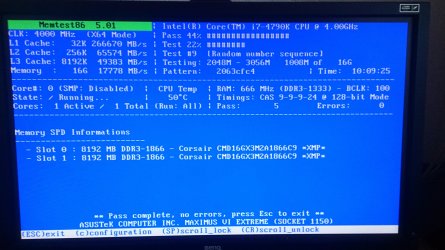
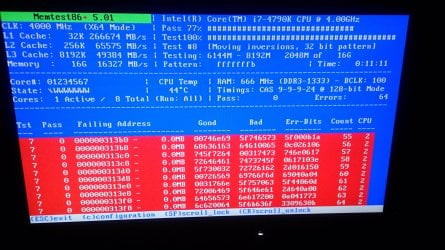
What I've done so far: I ran memtest86 for multiple hours. I got 57 errors, but all during test13 (hammertest), all others passed. By what I've read so far this shouldn't cause issues during normal use. Switched it with another stick from my second pc, didn't help though. Picutes of the result attached.

I ran prime95, had no issues, even though cpu temps seem to get rather high(up to 96 on core 2, measured with core temp). But I haven't yet ran it long time. Max 1 hour long.

I ran IntelBurnTest. Standart seems to run fine. But I'm getting the freeze on high/very high, normally on the second run. This happend with any combination of my 2 dominator ram sticks, as well as a ram stick from my second pc, trying any combination of slots on the mobo.

I ran driver verifier and had it freeze within a minute of startup, but I haven't had the time to find the culprit driver. I'll try to get to this when I find time. But then again I did a clean install of windows since and haven't tested after that.

I turned of SLI and played with both cards one at a time, yet crashed with either one.

Since my CPU is water cooled with two quite powerful 140mm noctua fans, I think the 90+ temps with burntest at 4.4 ghz boost are way too high, yet not out of spec so I shouldn't cause a crash... But I'll probably still renew the thermal paste.

I previously had issues with my ax1200i, it crashed the system with a red light on the psu, not letting me restart, until I disconnected power for about 10 minutes. I sent the PSU into RMA and the system runs on my corsair ax760(5 months old), which should be plenty, especially with sli disabled. After 6 weeks I'm still waiting to get my psu back.

The system it self is about 1 1/2 years old, It ran stable for about the first 8 months, then I had the psu problems, increasingly often. I'm not sure if I had the freeze before the PSU switch, or if all crashes where because of the AX1200i, but by my memory I had freezes before the PSU switch, which now dates 7 weeks back.

I'm currently not home during workdays so I can only work on this on weekends, which is why I haven't had much time to do more elaborate tests and data collection. At this point I guess it's my mobo or a software issue.

EDIT: I added zip-folders with pictures of the memtest86 results, and a picture of a BSOD. Note here: I normally don't get a BSOD but just the freeze, so maybe those are to separate problems, but I'm guessing at this point.

As stated I'd appreciate any help. This is my first post, so I'm sry for any newbie mistakes.

greetings

Jon

System specs:
Asus rog maximus VI extreme
Intel i7-4790k @ stock
Corsair H110
2x Asus STRIX Geforce GTX 970(SLI)
2x8 GB of corsair Dominator
Asus Xonar Essence STX
2x Samsung 840 Evo 500 gb
Seagate Barracuda 1TB
WD Black 4tb
corsair ax760
 

Attachments

Last edited:

My Computer My Computer

At a glance

Windows 7 Home Premium 64bitintel i7-4790kCorsair dominator platium 2x8gb2x Asus strix gtx 970
Computer type
PC/Desktop
Computer Manufacturer/Model Number
custom build
OS
Windows 7 Home Premium 64bit
CPU
intel i7-4790k
Motherboard
asus maximus VI extreme
Memory
Corsair dominator platium 2x8gb
Graphics Card(s)
2x Asus strix gtx 970
Hard Drives
2x Samsung 840 evo basic 500gb
1x Seagate barracuda 7200 rpm 1tb
1x WD black 4 tb
Antivirus
avast
Browser
chrome
I've had this issue before and this sounds identical to mine, albeit a few years earlier, have you overclocked the RAM at all? my RAM is capable of going to 1066Mhz but my motherboard only supported overclocking while using 4 sticks in dual channel mode, try going back to stock speeds and see if that helps.

If not then have a look at your CPU temps, anything over 60c at idle is generally not good, might need some new thermal paste/cleaning.
 

My Computer My Computer

At a glance

Windows 7 Ultimate x64 SP1Intel Q6600 @ 2.6Ghz4Gb DDR2 Corsair Dominator @ 800Mhz 5-5-5-15EVGA 560 GTX SC FTW 1GB
Computer type
PC/Desktop
Computer Manufacturer/Model Number
Custom Build
OS
Windows 7 Ultimate x64 SP1
CPU
Intel Q6600 @ 2.6Ghz
Motherboard
Evga NF78-CK-132-A 3-Way SLI
Memory
4Gb DDR2 Corsair Dominator @ 800Mhz 5-5-5-15
Graphics Card(s)
EVGA 560 GTX SC FTW 1GB
Sound Card
Realtek HD 7.1 Audio, Plantronics GameCom780 7.1 Headset
Monitor(s) Displays
Dell S2409W
Screen Resolution
1920 x 1080
Hard Drives
SanDisk SDSSDHII-120G-G25 120GB SSD
Samsung 7200RPM 750Gb SATA
Samsung 850 EVO 120GB SSD
Western Digital Green 1TB 7200RPM
PSU
Xigmatek 750W Quad sli quad core 80% eff
Case
Antec 900 Gaming Case
Cooling
Zalman CNPS9700-NT NVIDIA Tritium
Keyboard
Logitech generic keyboard, MS wireless keyboard
Mouse
Razor Lachesis Banshee V2 Blue, 4000DPI, MS wireless mouse
Internet Speed
152Mb Virgin Media Fibre Optic
Antivirus
Microsoft Security Essentials
Browser
Google Chrome
Other Info
Wireless Gaming Receiver for Windows, Wireless Xbox 360 Pad
I'm running Idle below 40°C, and under normal heavy load around 70-80°C. Only if I run a stress test like IntelBurnTest, that stresses all cores 100%, will I run into temps above 90°C.

RAM runs below stock...
 

My Computer My Computer

At a glance

Windows 7 Home Premium 64bitintel i7-4790kCorsair dominator platium 2x8gb2x Asus strix gtx 970
Computer type
PC/Desktop
Computer Manufacturer/Model Number
custom build
OS
Windows 7 Home Premium 64bit
CPU
intel i7-4790k
Motherboard
asus maximus VI extreme
Memory
Corsair dominator platium 2x8gb
Graphics Card(s)
2x Asus strix gtx 970
Hard Drives
2x Samsung 840 evo basic 500gb
1x Seagate barracuda 7200 rpm 1tb
1x WD black 4 tb
Antivirus
avast
Browser
chrome

My Computer My Computer

At a glance

Windows 7 Ultimate x64 SP1AMD Phenom 2 1090T2x8GB Kingston HyperX Fury Black 1600Mhz Unga...MSI GTX 970 Gaming 4G
Computer type
PC/Desktop
Computer Manufacturer/Model Number
Custom Build
OS
Windows 7 Ultimate x64 SP1
CPU
AMD Phenom 2 1090T
Motherboard
Gigabyte GA-890FXA-UD5
Memory
2x8GB Kingston HyperX Fury Black 1600Mhz Unganged
Graphics Card(s)
MSI GTX 970 Gaming 4G
Sound Card
Realtek On-Board HD 7.1 Audio / Logitech G35
Monitor(s) Displays
3xAcer GD245HQ
Screen Resolution
1920x1080
Hard Drives
Samsung 850 Pro 512GB SSD - OS /
WD Caviar Black SATA 3 - 1 TBx2 - Dynamic RAID 0 /
WD Caviar Green SATA 2 - 640GBx2 - Dynamic RAID 0 /
WD Caviar Green SATA 2 - 640GB - Internal Backup /
Seagate Barracude SATA 3 - 3TB - External Backup/ Sync
PSU
HighPower 1000W
Case
Cooler Master HAF 932
Cooling
Noctua NH-D14
Keyboard
Logitech G19
Mouse
Logitech G500
Internet Speed
100/4 Mbit Cable (100GB quota)
Antivirus
ZoneAlarm Extreme Security / MBAM Pro / MBAE Free / SAS Free
Browser
IE 11 - Firefox - Chrome
Other Info
Logitech F710/ G27/ G940/ Z5500 // TrackIR 5 // Nvidia 3D Surround Vision
Your dump files are all, as you say, 0x124s. These are generic STOP codes that indicate a piece of hardware is failing but, as is the case here, they very rarely give any indication as to what the problem actually is.
Code:
WHEA_UNCORRECTABLE_ERROR (124)
A fatal hardware error has occurred. Parameter 1 identifies the type of error
source that reported the error. Parameter 2 holds the address of the
WHEA_ERROR_RECORD structure that describes the error conditon.
Arguments:
Arg1: 0000000000000000, Machine Check Exception
Arg2: [COLOR=RoyalBlue]fffffa800a423028[/COLOR], Address of the WHEA_ERROR_RECORD structure.
Arg3: 00000000be000000, High order 32-bits of the MCi_STATUS value.
Arg4: 000000000100110a, Low order 32-bits of the MCi_STATUS value.

Debugging Details:
------------------


BUGCHECK_STR:  0x124_GenuineIntel

CUSTOMER_CRASH_COUNT:  1

DEFAULT_BUCKET_ID:  WIN7_DRIVER_FAULT

PROCESS_NAME:  linpack64.exe

CURRENT_IRQL:  f

ANALYSIS_VERSION: 6.3.9600.17336 (debuggers(dbg).150226-1500) amd64fre

5: kd> !errrec [COLOR=RoyalBlue]fffffa800a423028[/COLOR]
===============================================================================
Common Platform Error Record @ fffffa800a423028
-------------------------------------------------------------------------------
Record Id     : 01d09fc01c1d4d66
Severity      : Fatal (1)
Length        : 928
Creator       : Microsoft
Notify Type   : Machine Check Exception
Timestamp     : 6/5/2015 18:51:20 (UTC)
Flags         : 0x00000000

===============================================================================
Section 0     : Processor Generic
-------------------------------------------------------------------------------
Descriptor    @ fffffa800a4230a8
Section       @ fffffa800a423180
Offset        : 344
Length        : 192
Flags         : 0x00000001 Primary
Severity      : Fatal

Proc. Type    : x86/x64
Instr. Set    : x64
Error Type    : Cache error
Operation     : Generic
Flags         : 0x00
Level         : 2
CPU Version   : 0x00000000000306c3
Processor ID  : 0x0000000000000005

===============================================================================
Section 1     : x86/x64 Processor Specific
-------------------------------------------------------------------------------
Descriptor    @ fffffa800a4230f0
Section       @ fffffa800a423240
Offset        : 536
Length        : 128
Flags         : 0x00000000
Severity      : Fatal

Local APIC Id : 0x0000000000000005
CPU Id        : c3 06 03 00 00 08 10 05 - bf fb fa 7f ff fb eb bf
                00 00 00 00 00 00 00 00 - 00 00 00 00 00 00 00 00
                00 00 00 00 00 00 00 00 - 00 00 00 00 00 00 00 00

Proc. Info 0  @ fffffa800a423240

===============================================================================
Section 2     : x86/x64 MCA
-------------------------------------------------------------------------------
Descriptor    @ fffffa800a423138
Section       @ fffffa800a4232c0
Offset        : 664
Length        : 264
Flags         : 0x00000000
Severity      : Fatal

Error         : GCACHEL2_ERR_ERR (Proc 5 Bank 6)
  Status      : 0xbe0000000100110a
  Address     : 0x00000000a841e840
  Misc.       : 0x000001d080000086
I'm going to list a series of diagnostic and stress tests below, if you could run through them we might be able to start pinpointing the actual problem.
You may have performed some of these already but I'd like you to perform them again please and post the results after each test. Note that MemTest86+ listed below is different to MemTest86 which you ran previously (and is far more reliable, MemTest86 is a pile of turd in my eyes) so read the instructions carefully before proceeding.

If you have any questions feel free to ask.


STOP 0x124 Troubleshooting

Read carefully before proceeding.


   Warning
:warn: If you're overclocking your system, revert back to stock clocks now. :warn:

   Note
Test the system once the overclock is removed before continuing with the steps outlined below.


Part One: CPU Stress Test
Part Two: MemTest86+ RAM Diagnostic
Part Three: Hard Drive Diagnostics
Part Four:GPU Stress Test


ONE

 CPU TEST


:ar: Run Prime95 to stress test your CPU. http://www.sevenforums.com/tutorials/100352-hardware-stress-test-prime95.html

   Warning
Your CPU temperatures will rise quickly while under this stress test. Keep a keen eye on them and abort the test if overheating occurs.


TWO

 RAM TEST


:ar: Run MemTest86+ to analyse your RAM. http://www.sevenforums.com/tutorials/105647-ram-test-memtest86.html

   Note
picture.php


MemTest86+ needs to be run for at least 8 passes for conclusive results. Set it running before you go to bed and leave it overnight. We're looking for zero errors here. Even a single error will indicate RAM failure.


THREE

 HDD TEST


:ar: Run SeaTools to check the integrity of your HDD. http://www.sevenforums.com/tutorials/313457-seatools-dos-windows-how-use.html

   Note
Do not run SeaTools on an SSD as the results will be invalid.


:ar: Run chkdsk http://www.sevenforums.com/tutorials/433-disk-check.html


FOUR

 GPU TEST


:ar: Run Furmark to stress test your GPU. http://www.sevenforums.com/tutorials/100356-video-card-stress-test-furmark.html

   Note
Run Furmark for around 30 minutes.
   Warning
Your GPU temperatures will rise quickly while Furmark is running. Keep a keen eye on them and abort the test if overheating occurs.
 

My Computer My Computer

At a glance

W7 Pro x64 SP1 | W10 Pro IP x64 | W8.1 Pro x6...i7-4790k @ 4GHz (4.4GHz Boost)16GB DDR3 Kingston HyperX Fury @ 1600MHz CL 9...EVGA GTX 980 Classified
Computer type
PC/Desktop
Computer Manufacturer/Model Number
Custom Build
OS
W7 Pro x64 SP1 | W10 Pro IP x64 | W8.1 Pro x64 VM | Linux Mint VM
CPU
i7-4790k @ 4GHz (4.4GHz Boost)
Motherboard
ASUS Sabertooth Z87 (BIOS Rev 2004)
Memory
16GB DDR3 Kingston HyperX Fury @ 1600MHz CL 9-9-9-27
Graphics Card(s)
EVGA GTX 980 Classified
Sound Card
Realtek Onboard
Monitor(s) Displays
Samsung S27D390
Screen Resolution
1920 x 1080
Hard Drives
240GB Intel 520 Series SSD |
Samsung 850 EVO 120GB SSD |
2TB WD Caviar Black |
2TB WD Caviar Green
PSU
Corsair HX850-80 Gold Modular
Case
Cooler Master Silencio 650
Cooling
Corsair H80i w/2 x Corsair SP120 | 2 x 120mm Noctua NF-S12B
Keyboard
Microsoft Sidewinder X4
Mouse
Gigabyte M6900 optical
Internet Speed
152mb
Antivirus
F-Secure
Browser
Firefox 38.0
Other Info
Backup Rig: Win 7 Pro 64-bit | AMD A10-5800k | ASUS F2A85-V Pro | 8GB Samsung DDR3 @1600MHz | 120GB Toshiba SDD | 2TB Seagate HDD | Cooler Master Silencio 550
okay, I used the night to run prime95 and I just finished furMark and chkdisk. I'll run memtest86+ this night. As you can tell prime ran without errors for 13 hours, furmark barely got above 70°C and didn't show any issues and chkdisk all came back without errors including the c: drive...
 

Attachments

My Computer My Computer

At a glance

Windows 7 Home Premium 64bitintel i7-4790kCorsair dominator platium 2x8gb2x Asus strix gtx 970
Computer type
PC/Desktop
Computer Manufacturer/Model Number
custom build
OS
Windows 7 Home Premium 64bit
CPU
intel i7-4790k
Motherboard
asus maximus VI extreme
Memory
Corsair dominator platium 2x8gb
Graphics Card(s)
2x Asus strix gtx 970
Hard Drives
2x Samsung 840 evo basic 500gb
1x Seagate barracuda 7200 rpm 1tb
1x WD black 4 tb
Antivirus
avast
Browser
chrome
I ran memtest86+ twice, different results as you can see in the attachements. And I don't know if it has to do with hot ambient temperatures, but I'm at the point where my pc crashes after about 10 mins of bf4 and I normally can't even finish one game...
I might run it again when I have more than 10 hours time but atm that's the longest I can go since I still wanna use this machine. And because of the quite significant amount of crashes lately I decided to upload a more recent collection of the dump files.
 

Attachments

My Computer My Computer

At a glance

Windows 7 Home Premium 64bitintel i7-4790kCorsair dominator platium 2x8gb2x Asus strix gtx 970
Computer type
PC/Desktop
Computer Manufacturer/Model Number
custom build
OS
Windows 7 Home Premium 64bit
CPU
intel i7-4790k
Motherboard
asus maximus VI extreme
Memory
Corsair dominator platium 2x8gb
Graphics Card(s)
2x Asus strix gtx 970
Hard Drives
2x Samsung 840 evo basic 500gb
1x Seagate barracuda 7200 rpm 1tb
1x WD black 4 tb
Antivirus
avast
Browser
chrome
If MemTest86+ has shown errors then there's a problem with either your RAM or the DIMM slot/s. Now it would be best to test each stick in each slot to see what fails.

If the output is like this then you have bad RAM so the stick(s) need replacing.

Test|Slot 1|Slot 2
RAM 1| Error | Error
RAM 2|Good|Good

If the output is like this then you should replace the motherboard, however you can leave that DIMM slot empty although it's not advised to use a system with a faulty motherboard.

Test|Slot 1|Slot 2
RAM 1| Error |Good
RAM 2| Error |Good
 

My Computer My Computer

At a glance

W7 Pro x64 SP1 | W10 Pro IP x64 | W8.1 Pro x6...i7-4790k @ 4GHz (4.4GHz Boost)16GB DDR3 Kingston HyperX Fury @ 1600MHz CL 9...EVGA GTX 980 Classified
Computer type
PC/Desktop
Computer Manufacturer/Model Number
Custom Build
OS
W7 Pro x64 SP1 | W10 Pro IP x64 | W8.1 Pro x64 VM | Linux Mint VM
CPU
i7-4790k @ 4GHz (4.4GHz Boost)
Motherboard
ASUS Sabertooth Z87 (BIOS Rev 2004)
Memory
16GB DDR3 Kingston HyperX Fury @ 1600MHz CL 9-9-9-27
Graphics Card(s)
EVGA GTX 980 Classified
Sound Card
Realtek Onboard
Monitor(s) Displays
Samsung S27D390
Screen Resolution
1920 x 1080
Hard Drives
240GB Intel 520 Series SSD |
Samsung 850 EVO 120GB SSD |
2TB WD Caviar Black |
2TB WD Caviar Green
PSU
Corsair HX850-80 Gold Modular
Case
Cooler Master Silencio 650
Cooling
Corsair H80i w/2 x Corsair SP120 | 2 x 120mm Noctua NF-S12B
Keyboard
Microsoft Sidewinder X4
Mouse
Gigabyte M6900 optical
Internet Speed
152mb
Antivirus
F-Secure
Browser
Firefox 38.0
Other Info
Backup Rig: Win 7 Pro 64-bit | AMD A10-5800k | ASUS F2A85-V Pro | 8GB Samsung DDR3 @1600MHz | 120GB Toshiba SDD | 2TB Seagate HDD | Cooler Master Silencio 550
So quick update: For the memory test: I tested all slots with my two sticks, plus a third 8 gb stick of my second PC, a while ago but not testing it with memtest86 but just running intel burn test to see if it would freeze up, and no matter the combination it did.

But it seems as things have taken a turn for the better:
After over 3 months I FINALLY got my PSU, a Corsair AX1200i, back from RMA. I swapped it out for my AX760 which I ran to replace it and look at that: Crashes be (almost) gone. During the whole weekend with more than 15 hours of play time I only had one crash. Comparing that to the week before where I had over 15, near 20. I hope this isn't just a coincidence, but it seems too extreme a change to be one. But it makes me wonder if the 760 was insufficient under heavy load or if it's faulty...
Because in order to find the root of the issue I also tried running the system with only one GPU and no overclock on the CPU. With that setup I still had crashes but a 760 Watt PSU should by far be sufficient for 1 970 and an i7-4790k both running stock...

So I'll leave this thread open till next weekend, if I still have next to no crashes I'll mark it solved and blame my PSU even though that seriously surprises me...
 
Last edited:

My Computer My Computer

At a glance

Windows 7 Home Premium 64bitintel i7-4790kCorsair dominator platium 2x8gb2x Asus strix gtx 970
Computer type
PC/Desktop
Computer Manufacturer/Model Number
custom build
OS
Windows 7 Home Premium 64bit
CPU
intel i7-4790k
Motherboard
asus maximus VI extreme
Memory
Corsair dominator platium 2x8gb
Graphics Card(s)
2x Asus strix gtx 970
Hard Drives
2x Samsung 840 evo basic 500gb
1x Seagate barracuda 7200 rpm 1tb
1x WD black 4 tb
Antivirus
avast
Browser
chrome
Good news but can be better: You should have no crashes whatsoever :) Some extremely rare crash happens everywhere I believe.

When you switch out hardware, try loading defaults in BIOS. The old configuration may be interfering somehow.

Did you memtest with the new setup yet?
 

My Computer My Computer

At a glance

Windows 7 Ultimate x64 SP1AMD Phenom 2 1090T2x8GB Kingston HyperX Fury Black 1600Mhz Unga...MSI GTX 970 Gaming 4G
Computer type
PC/Desktop
Computer Manufacturer/Model Number
Custom Build
OS
Windows 7 Ultimate x64 SP1
CPU
AMD Phenom 2 1090T
Motherboard
Gigabyte GA-890FXA-UD5
Memory
2x8GB Kingston HyperX Fury Black 1600Mhz Unganged
Graphics Card(s)
MSI GTX 970 Gaming 4G
Sound Card
Realtek On-Board HD 7.1 Audio / Logitech G35
Monitor(s) Displays
3xAcer GD245HQ
Screen Resolution
1920x1080
Hard Drives
Samsung 850 Pro 512GB SSD - OS /
WD Caviar Black SATA 3 - 1 TBx2 - Dynamic RAID 0 /
WD Caviar Green SATA 2 - 640GBx2 - Dynamic RAID 0 /
WD Caviar Green SATA 2 - 640GB - Internal Backup /
Seagate Barracude SATA 3 - 3TB - External Backup/ Sync
PSU
HighPower 1000W
Case
Cooler Master HAF 932
Cooling
Noctua NH-D14
Keyboard
Logitech G19
Mouse
Logitech G500
Internet Speed
100/4 Mbit Cable (100GB quota)
Antivirus
ZoneAlarm Extreme Security / MBAM Pro / MBAE Free / SAS Free
Browser
IE 11 - Firefox - Chrome
Other Info
Logitech F710/ G27/ G940/ Z5500 // TrackIR 5 // Nvidia 3D Surround Vision
As stated in the original post: For the entire last year I was only home on weekends. But that will finally take an end by the end of this month. Then I'll have time testing the system. But just until now I didn't have time to run memtest86+ again. But I suppose I might have had multiple issues and that for now I was able to get rid of the most common. But I can't really see how my PSU would cause memtest errors so I will definitely get back to that...


edit: I loaded bios defaults more than once during the past 3 months. I even reinstalled windows twice trying to get rid of this problem.
 
Last edited:

My Computer My Computer

At a glance

Windows 7 Home Premium 64bitintel i7-4790kCorsair dominator platium 2x8gb2x Asus strix gtx 970
Computer type
PC/Desktop
Computer Manufacturer/Model Number
custom build
OS
Windows 7 Home Premium 64bit
CPU
intel i7-4790k
Motherboard
asus maximus VI extreme
Memory
Corsair dominator platium 2x8gb
Graphics Card(s)
2x Asus strix gtx 970
Hard Drives
2x Samsung 840 evo basic 500gb
1x Seagate barracuda 7200 rpm 1tb
1x WD black 4 tb
Antivirus
avast
Browser
chrome
So: As previously stated: after I changed my PSU back to my original that came back from RMA I didn't encounter any issues for the entire weekend, and that was amazing. But The crashes came back. But that post about loading default BIOS settings got me thinking, so I decided to check for a BIOS update. I did that when I first bought the mobo and got the newest one. But that was october 2013. So I headed over to ASUS and look at that: new Bios version from 2014, described as "Improves system stability". Yeah well it did. Ran Memtest 4 times, not a single error with 20 passes, ran prime np, furmark np, and played over 100 hours since. had a few games crash but never the entire PC like before. So yeah, learned something: Keep your BIOS up to date...

So thanks for the help, I'm just glad that all is working now and hopefully I don't need to edit this thread ever again:D
 

My Computer My Computer

At a glance

Windows 7 Home Premium 64bitintel i7-4790kCorsair dominator platium 2x8gb2x Asus strix gtx 970
Computer type
PC/Desktop
Computer Manufacturer/Model Number
custom build
OS
Windows 7 Home Premium 64bit
CPU
intel i7-4790k
Motherboard
asus maximus VI extreme
Memory
Corsair dominator platium 2x8gb
Graphics Card(s)
2x Asus strix gtx 970
Hard Drives
2x Samsung 840 evo basic 500gb
1x Seagate barracuda 7200 rpm 1tb
1x WD black 4 tb
Antivirus
avast
Browser
chrome
Back
Top