Freeze/Crash on system on sleep/resume/restart/shutdown win7

dmaco

New member
Local time
3:04 PM
Messages
24
Hi,

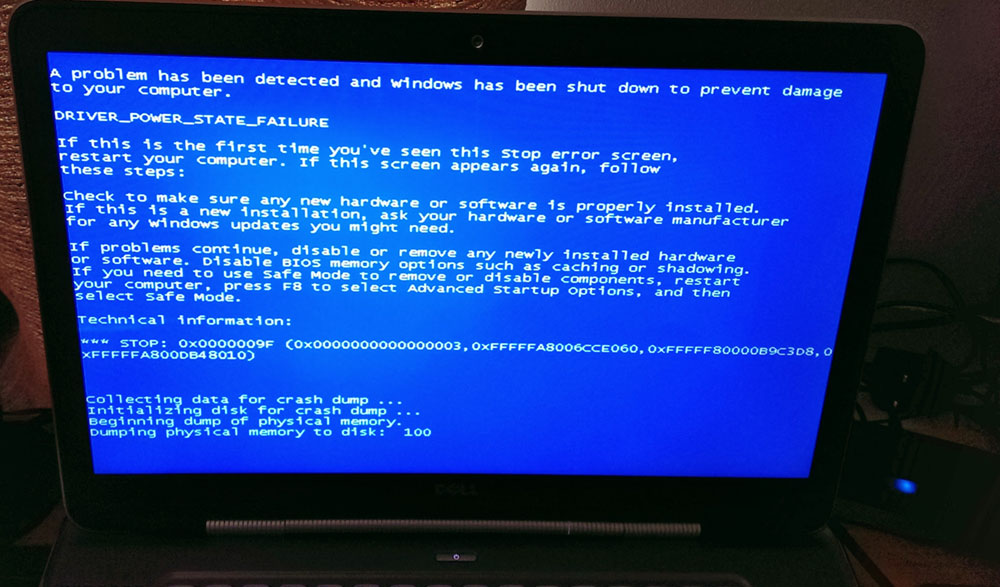
When I my computer goes to sleep, shuts down, restart and when I turn it on again, it says that a severe error occurred.

My System specs are the following:
http://speccy.piriform.com/results/QJv1LCWRzb2rKaIPoJoIITK

Dump file attached. I'm new on here. Appreciate any help on this, trying for a while to resolve it.
Please let me know.
Thanks,
Darren.
 
Last edited:

My Computer My Computer

At a glance

Windows 7Intel Core i7 @ 2.80GHz: Sandy Bridge 32nm Te...Total memory slots: 2 Used memory slots: 2 Fr...NVIDIA GeForce GT 525M, Intel(R) HD Graphics ...
Computer type
PC/Desktop
Computer Manufacturer/Model Number
Dell XPS 15z
OS
Windows 7
CPU
Intel Core i7 @ 2.80GHz: Sandy Bridge 32nm Technology
Motherboard
Dell Inc. 00WW5M
Memory
Total memory slots: 2 Used memory slots: 2 Free. 8Gb Total
Graphics Card(s)
NVIDIA GeForce GT 525M, Intel(R) HD Graphics 3000
Sound Card
Realtek High Definition Audio, NVIDIA Virtual Audio Device
Monitor(s) Displays
Generic PnP Monitor, 22EA53
Screen Resolution
(1920x1080@60Hz), (1920x1080@60Hz)
Hard Drives
733GB Western Digital WDC WD7500BPKT-75PK4 SCSI Disk Device (SATA)
Case
Dell
Keyboard
Dell
Mouse
Generic BT wireless mouse
Internet Speed
40Gb Fiber
Antivirus
ESET Nod 32
Browser
Chrome
To follow up guys, i've used WhoCrashed, and its output is:

Code:
On Thu 23/01/2014 20:21:33 GMT your computer crashed
crash dump file: C:\Windows\Minidump\012314-24304-01.dmp
This was probably caused by the following module: ntoskrnl.exe (nt+0x78A8A) 
Bugcheck code: 0x1000009F (0x4, 0x258, 0xFFFFFA8006D5B040, 0xFFFFF80000B9C3D0)
Error: CUSTOM_ERROR
file path: C:\Windows\system32\ntoskrnl.exe
product: Microsoft® Windows® Operating System
company: Microsoft Corporation
description: NT Kernel & System
The crash took place in the Windows kernel. Possibly this problem is caused by another driver that cannot be identified at this time.

Thanks,
Darren.
 

My Computer My Computer

At a glance

Windows 7Intel Core i7 @ 2.80GHz: Sandy Bridge 32nm Te...Total memory slots: 2 Used memory slots: 2 Fr...NVIDIA GeForce GT 525M, Intel(R) HD Graphics ...
Computer type
PC/Desktop
Computer Manufacturer/Model Number
Dell XPS 15z
OS
Windows 7
CPU
Intel Core i7 @ 2.80GHz: Sandy Bridge 32nm Technology
Motherboard
Dell Inc. 00WW5M
Memory
Total memory slots: 2 Used memory slots: 2 Free. 8Gb Total
Graphics Card(s)
NVIDIA GeForce GT 525M, Intel(R) HD Graphics 3000
Sound Card
Realtek High Definition Audio, NVIDIA Virtual Audio Device
Monitor(s) Displays
Generic PnP Monitor, 22EA53
Screen Resolution
(1920x1080@60Hz), (1920x1080@60Hz)
Hard Drives
733GB Western Digital WDC WD7500BPKT-75PK4 SCSI Disk Device (SATA)
Case
Dell
Keyboard
Dell
Mouse
Generic BT wireless mouse
Internet Speed
40Gb Fiber
Antivirus
ESET Nod 32
Browser
Chrome
Can anyone help me please. Thank you.
 

My Computer My Computer

At a glance

Windows 7Intel Core i7 @ 2.80GHz: Sandy Bridge 32nm Te...Total memory slots: 2 Used memory slots: 2 Fr...NVIDIA GeForce GT 525M, Intel(R) HD Graphics ...
Computer type
PC/Desktop
Computer Manufacturer/Model Number
Dell XPS 15z
OS
Windows 7
CPU
Intel Core i7 @ 2.80GHz: Sandy Bridge 32nm Technology
Motherboard
Dell Inc. 00WW5M
Memory
Total memory slots: 2 Used memory slots: 2 Free. 8Gb Total
Graphics Card(s)
NVIDIA GeForce GT 525M, Intel(R) HD Graphics 3000
Sound Card
Realtek High Definition Audio, NVIDIA Virtual Audio Device
Monitor(s) Displays
Generic PnP Monitor, 22EA53
Screen Resolution
(1920x1080@60Hz), (1920x1080@60Hz)
Hard Drives
733GB Western Digital WDC WD7500BPKT-75PK4 SCSI Disk Device (SATA)
Case
Dell
Keyboard
Dell
Mouse
Generic BT wireless mouse
Internet Speed
40Gb Fiber
Antivirus
ESET Nod 32
Browser
Chrome
Hello and welcome to SF dmaco :), I'm sorry about the delay.

A single dump is not much to go on, please stop using Ccleaner for the duration of the troubleshooting
procedure as it deletes the dump files which we need in order to get a sense as to what is going on.

The bugcheck code you're experiencing is a tricky one as we don't have access to Microsoft
private symbols (:mad:), but it is in line with your description, 0x9F 1st parameter = 4.

The call stack paints a picture with regards to the graphics layer.
Please update the intel iGPU and roll back the nVidia driver to a known good release.

:ar: Please follow this detailed quote and roll-back the driver to a known stable release.

Install the 314.22 WHQL only.

  • Uninstall All nvidia items in Control Panel > Programs and features
    • 3D Vision Control Driver
    • 3D Vision Driver
    • Graphics Driver
    • HD Audio Driver
    • PhysX
    • nvidia Update
    (Are you using nvidia chipset drivers? If so, dont uninstall anything other than those are listed).
  • Now follow Drivers - Clean Left over Files after Uninstalling
  • Boot normally now. Download 314.22 WHQL. While installing, Select Custom (Advanced) install. In the next page, follow this settings:


:ar: Intel Update Utility;
   Note
It is possible that using this utility may cause a BSOD with cpudrv.sys, this is a known
bug and nothing to be worried about. But it is always wise to have a restore point ready -
http://www.sevenforums.com/tutorials/697-system-restore-point-create.html.


Test it again and post back with the results.
 

My Computer My Computer

At a glance

Windows 10Intel Core i5 3570K16GB 1600Mhz G.SkillGigabyte GTX 970 G1-Gaming
Computer type
PC/Desktop
OS
Windows 10
CPU
Intel Core i5 3570K
Motherboard
Asus P8Z77V-PRO
Memory
16GB 1600Mhz G.Skill
Graphics Card(s)
Gigabyte GTX 970 G1-Gaming
PSU
Seasonic 1000W Platinum
Case
Fractal Design Define R4
Cooling
Noctua NH-D14
Thanks for your details reply.
I do everything as you said:

3D Vision Control Driver - not listed
3D Vision Driver - removed
Graphics Driver - removed
HD Audio Driver - removed
PhysX - removed
nvidia Update - not listed

Cleaned the driver in safe-mode via DDU.

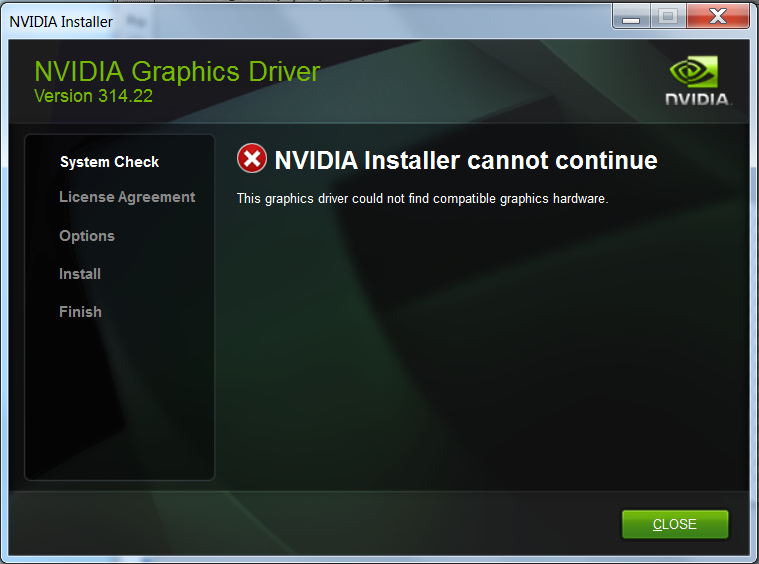
But while installing: 314.22 WHQL. I get the following screen:
nvidia.png


I will see if removing the nvidia drivers will make any difference to my BSOD, and report back.
Thank you,
Darren.
 

My Computer My Computer

At a glance

Windows 7Intel Core i7 @ 2.80GHz: Sandy Bridge 32nm Te...Total memory slots: 2 Used memory slots: 2 Fr...NVIDIA GeForce GT 525M, Intel(R) HD Graphics ...
Computer type
PC/Desktop
Computer Manufacturer/Model Number
Dell XPS 15z
OS
Windows 7
CPU
Intel Core i7 @ 2.80GHz: Sandy Bridge 32nm Technology
Motherboard
Dell Inc. 00WW5M
Memory
Total memory slots: 2 Used memory slots: 2 Free. 8Gb Total
Graphics Card(s)
NVIDIA GeForce GT 525M, Intel(R) HD Graphics 3000
Sound Card
Realtek High Definition Audio, NVIDIA Virtual Audio Device
Monitor(s) Displays
Generic PnP Monitor, 22EA53
Screen Resolution
(1920x1080@60Hz), (1920x1080@60Hz)
Hard Drives
733GB Western Digital WDC WD7500BPKT-75PK4 SCSI Disk Device (SATA)
Case
Dell
Keyboard
Dell
Mouse
Generic BT wireless mouse
Internet Speed
40Gb Fiber
Antivirus
ESET Nod 32
Browser
Chrome
I've no idea what to do now, i'm without my second monitor now as can't install the driver.
Any ideas?
 

My Computer My Computer

At a glance

Windows 7Intel Core i7 @ 2.80GHz: Sandy Bridge 32nm Te...Total memory slots: 2 Used memory slots: 2 Fr...NVIDIA GeForce GT 525M, Intel(R) HD Graphics ...
Computer type
PC/Desktop
Computer Manufacturer/Model Number
Dell XPS 15z
OS
Windows 7
CPU
Intel Core i7 @ 2.80GHz: Sandy Bridge 32nm Technology
Motherboard
Dell Inc. 00WW5M
Memory
Total memory slots: 2 Used memory slots: 2 Free. 8Gb Total
Graphics Card(s)
NVIDIA GeForce GT 525M, Intel(R) HD Graphics 3000
Sound Card
Realtek High Definition Audio, NVIDIA Virtual Audio Device
Monitor(s) Displays
Generic PnP Monitor, 22EA53
Screen Resolution
(1920x1080@60Hz), (1920x1080@60Hz)
Hard Drives
733GB Western Digital WDC WD7500BPKT-75PK4 SCSI Disk Device (SATA)
Case
Dell
Keyboard
Dell
Mouse
Generic BT wireless mouse
Internet Speed
40Gb Fiber
Antivirus
ESET Nod 32
Browser
Chrome
nvidia.png


I will see if removing the nvidia drivers will make any difference to my BSOD, and report back.
Thank you,
Darren.

Hello Darren :).

Did you download the driver for the link I provided (implanted inside the quote)?
The nVidia install will fail to recognize the hardware if Windows can't recognize its driver is missing,
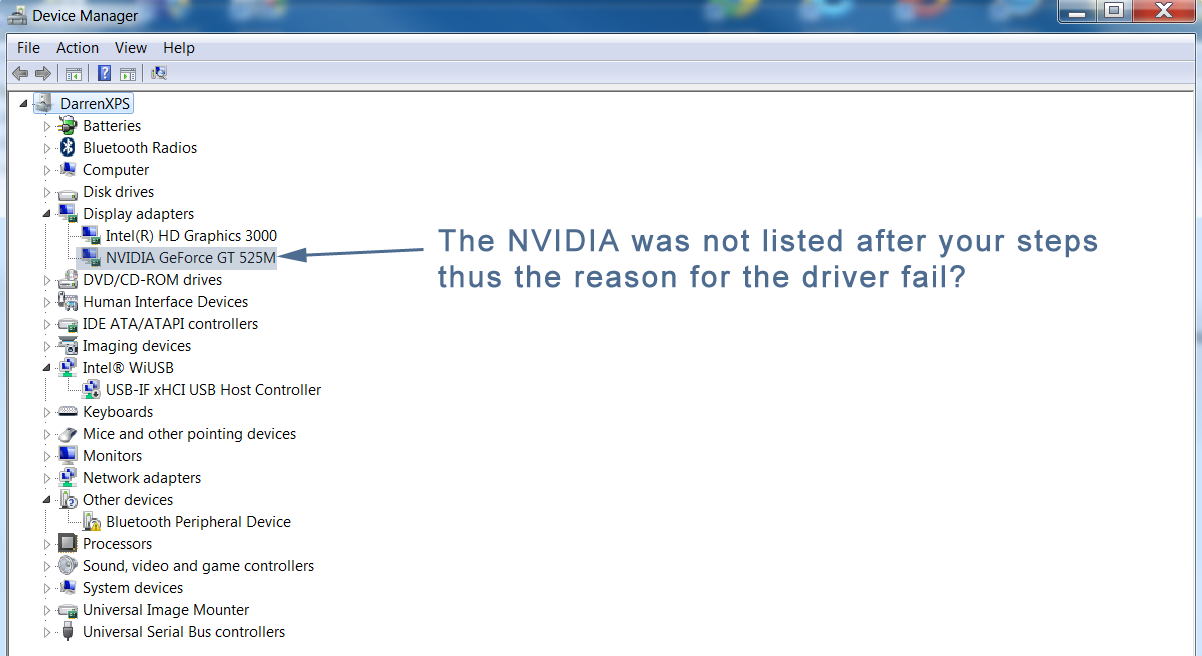
please post a picture of the Device Manager and a new instance of the MSINFO32 file.

Please upload the MSINFO32 file:

:orb:Start → Run → type MSINFO32 then hit Enter.
In MSINFO32 go to, File → Save → name it your user-name.
Once the file is saved right click it and choose Send toCompressed (zipped) folder.


Attach the files in your next post.
 

My Computer My Computer

At a glance

Windows 10Intel Core i5 3570K16GB 1600Mhz G.SkillGigabyte GTX 970 G1-Gaming
Computer type
PC/Desktop
OS
Windows 10
CPU
Intel Core i5 3570K
Motherboard
Asus P8Z77V-PRO
Memory
16GB 1600Mhz G.Skill
Graphics Card(s)
Gigabyte GTX 970 G1-Gaming
PSU
Seasonic 1000W Platinum
Case
Fractal Design Define R4
Cooling
Noctua NH-D14
Hi, thanks for the reply. I did instal the driver you implanted inside the quote, thus the screenshot i posted, was from THAT driver.
Since that didn't work, and i couldn't install it, i had no other choice but to install the Dell Gforce driver from dell website: Driver Details | Dell US
(nVIDIA GeForce GT 525M/GT540M Graphics Driver)

... as i needed to get the second monitor working with my work, i can't operate without a second monitor, and the delay in your reply (i'm not complaining!) forced me to install the Dell Driver to get my machine to recognise my GForce Card so i could continue work. If i repeat it all again, i will be without my second monitor again, which i can't do at work.

When i done your previous steps, and tried to install the 314.22 WHQL driver, i got that failed message (screenshot) installing. When i looked at the Device Manager at that time, under displays, it only had the Intel HD Graphics 3000, ONLY, and NOT the Nvidia. See screen shot below.
Attached the and device-manager MSINFO32. Appreciate the help.

device-manager-dmaco.png
 

My Computer My Computer

At a glance

Windows 7Intel Core i7 @ 2.80GHz: Sandy Bridge 32nm Te...Total memory slots: 2 Used memory slots: 2 Fr...NVIDIA GeForce GT 525M, Intel(R) HD Graphics ...
Computer type
PC/Desktop
Computer Manufacturer/Model Number
Dell XPS 15z
OS
Windows 7
CPU
Intel Core i7 @ 2.80GHz: Sandy Bridge 32nm Technology
Motherboard
Dell Inc. 00WW5M
Memory
Total memory slots: 2 Used memory slots: 2 Free. 8Gb Total
Graphics Card(s)
NVIDIA GeForce GT 525M, Intel(R) HD Graphics 3000
Sound Card
Realtek High Definition Audio, NVIDIA Virtual Audio Device
Monitor(s) Displays
Generic PnP Monitor, 22EA53
Screen Resolution
(1920x1080@60Hz), (1920x1080@60Hz)
Hard Drives
733GB Western Digital WDC WD7500BPKT-75PK4 SCSI Disk Device (SATA)
Case
Dell
Keyboard
Dell
Mouse
Generic BT wireless mouse
Internet Speed
40Gb Fiber
Antivirus
ESET Nod 32
Browser
Chrome

My Computer My Computer

At a glance

Windows 10Intel Core i5 3570K16GB 1600Mhz G.SkillGigabyte GTX 970 G1-Gaming
Computer type
PC/Desktop
OS
Windows 10
CPU
Intel Core i5 3570K
Motherboard
Asus P8Z77V-PRO
Memory
16GB 1600Mhz G.Skill
Graphics Card(s)
Gigabyte GTX 970 G1-Gaming
PSU
Seasonic 1000W Platinum
Case
Fractal Design Define R4
Cooling
Noctua NH-D14
Hi thanks for reply.
314.22 WHQL. is now installed.
BSOD logs attached like before. I do not get a BSOD any more, but on startup or resume from sleep or hibernate, just gives me a blank (black) screen and seem to hang. Doesn't boot then. I have to force shutdown to get the system booting again. I think the 314 version of the driver is actually worse than what i had.
Logs attached as before.
Thanks.
 

My Computer My Computer

At a glance

Windows 7Intel Core i7 @ 2.80GHz: Sandy Bridge 32nm Te...Total memory slots: 2 Used memory slots: 2 Fr...NVIDIA GeForce GT 525M, Intel(R) HD Graphics ...
Computer type
PC/Desktop
Computer Manufacturer/Model Number
Dell XPS 15z
OS
Windows 7
CPU
Intel Core i7 @ 2.80GHz: Sandy Bridge 32nm Technology
Motherboard
Dell Inc. 00WW5M
Memory
Total memory slots: 2 Used memory slots: 2 Free. 8Gb Total
Graphics Card(s)
NVIDIA GeForce GT 525M, Intel(R) HD Graphics 3000
Sound Card
Realtek High Definition Audio, NVIDIA Virtual Audio Device
Monitor(s) Displays
Generic PnP Monitor, 22EA53
Screen Resolution
(1920x1080@60Hz), (1920x1080@60Hz)
Hard Drives
733GB Western Digital WDC WD7500BPKT-75PK4 SCSI Disk Device (SATA)
Case
Dell
Keyboard
Dell
Mouse
Generic BT wireless mouse
Internet Speed
40Gb Fiber
Antivirus
ESET Nod 32
Browser
Chrome
Hi thanks for reply.
314.22 WHQL. is now installed.
BSOD logs attached like before. I do not get a BSOD any more, but on startup or resume from sleep or hibernate, just gives me a blank (black) screen and seem to hang. Doesn't boot then. I have to force shutdown to get the system booting again. I think the 314 version of the driver is actually worse than what i had.
Logs attached as before.
Thanks.
That is progress :).
Does the system behave in that manner every time you try to wake it from sleep?
Please do it a couple more times and then upload the system event log.

Please export and upload your system event log.

  1. :orb: Start → type eventvwr → hit Enter.
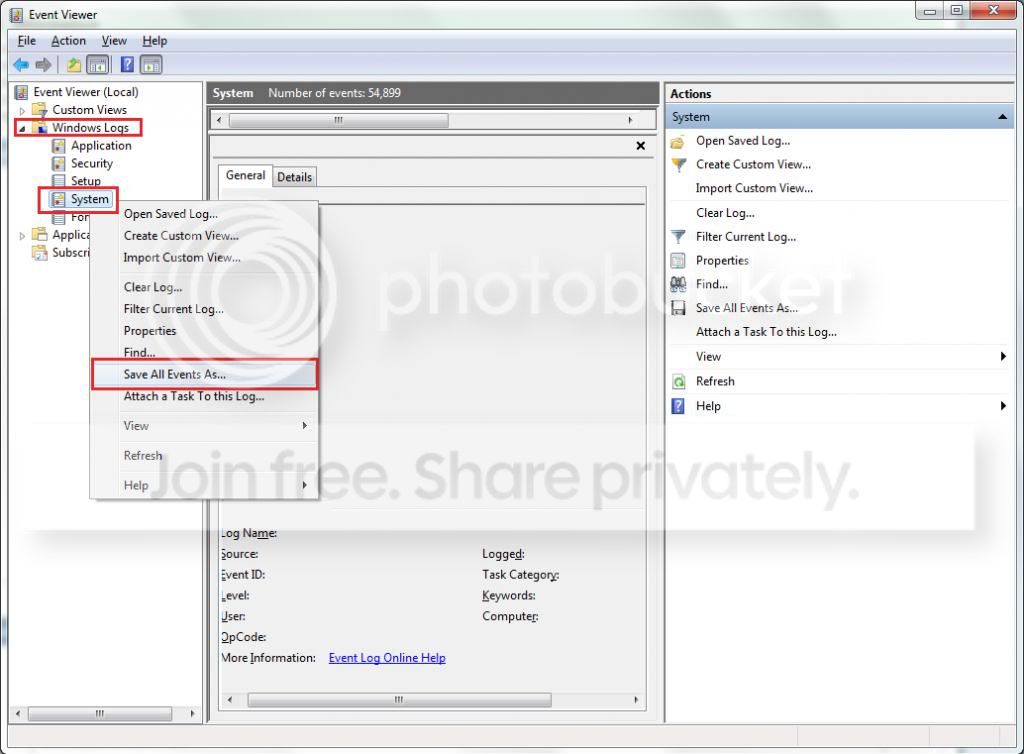
  2. Toggle open the triangle to the left of Windows Logs, right-click on System and choose Save All Events As...
  3. syseventvwrlog1_zps5b0a5395.jpg
  4. A dialogue box will pop up asking you to name the file and select the save directory, name the file the same as your Seven Forums user-name and save it to the desktop.
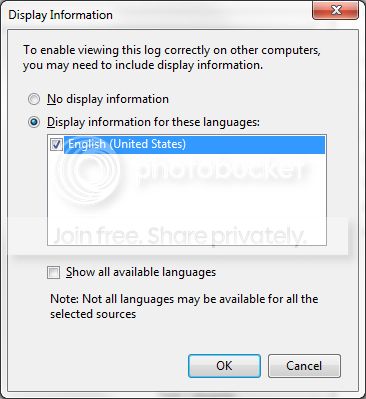
  5. A second dialogue box will appear asking you to select the Display Information, select Display information for these languages and check the box next to English (if you don't have English automatically offered check the box at the bottom to display additional languages - Show all available languages and check English).
  6. syseventvwrlog2_zpsdafa4dba.jpg
  7. Wait a few moments until the cursor returns to normal. The file will now be on your desktop (given it's the directory it was saved to) UserName.evtx, next to it there will be a folder called LocaleMetaData select both the .evtx file as well as the folder and compress them using Winrar / 7zip and attach it in your next post.
 

My Computer My Computer

At a glance

Windows 10Intel Core i5 3570K16GB 1600Mhz G.SkillGigabyte GTX 970 G1-Gaming
Computer type
PC/Desktop
OS
Windows 10
CPU
Intel Core i5 3570K
Motherboard
Asus P8Z77V-PRO
Memory
16GB 1600Mhz G.Skill
Graphics Card(s)
Gigabyte GTX 970 G1-Gaming
PSU
Seasonic 1000W Platinum
Case
Fractal Design Define R4
Cooling
Noctua NH-D14
Hi , thanks for the prompt reply.
Yes this happens every time it awakes from sleep mode. I have done this 3 times there, and its happened 3 times in a row.
Windows Logs attached.
Thank you.
 

My Computer My Computer

At a glance

Windows 7Intel Core i7 @ 2.80GHz: Sandy Bridge 32nm Te...Total memory slots: 2 Used memory slots: 2 Fr...NVIDIA GeForce GT 525M, Intel(R) HD Graphics ...
Computer type
PC/Desktop
Computer Manufacturer/Model Number
Dell XPS 15z
OS
Windows 7
CPU
Intel Core i7 @ 2.80GHz: Sandy Bridge 32nm Technology
Motherboard
Dell Inc. 00WW5M
Memory
Total memory slots: 2 Used memory slots: 2 Free. 8Gb Total
Graphics Card(s)
NVIDIA GeForce GT 525M, Intel(R) HD Graphics 3000
Sound Card
Realtek High Definition Audio, NVIDIA Virtual Audio Device
Monitor(s) Displays
Generic PnP Monitor, 22EA53
Screen Resolution
(1920x1080@60Hz), (1920x1080@60Hz)
Hard Drives
733GB Western Digital WDC WD7500BPKT-75PK4 SCSI Disk Device (SATA)
Case
Dell
Keyboard
Dell
Mouse
Generic BT wireless mouse
Internet Speed
40Gb Fiber
Antivirus
ESET Nod 32
Browser
Chrome
Hi Darren thanks for the file :).

I see a couple of issues and a new bugcheck, so please attach to your next post
a new instance of the SFDT.
Code:
Error    01/02/2014 22:55:41    BugCheck    1001    None

The computer has rebooted from a bugcheck.  The bugcheck was: 0x0000009f (0x0000000000000003, 0xfffffa8006cd4a10, 0xfffff80000b9c3d8, 0xfffffa8006ecf010). A dump was saved in: C:\Windows\MEMORY.DMP. Report Id: 020114-22417-01.
:ar: Please clear up your startup by following this tutorial -


   Note
I suggest removing the following listed software, but don't if you have specific need for them
post back explaining which you did and didn't.


:ar:Remove Tuneup Utilities.
Code:
A timeout (30000 milliseconds) was reached while waiting for a  transaction response from the TuneUp.UtilitiesSvc service.
:ar:Remove LogMeIn.
Code:
The LogMeIn Kernel Information Provider service failed to start due to the following error: 
The system cannot find the path specified.
:ar:Remove TeamViewer.
Code:
The TeamViewer 9 service failed to start due to the following error: 
The service did not respond to the start or control request in a timely fashion.

A timeout was reached (30000 milliseconds) while waiting for the TeamViewer 9 service to connect.
:ar:Remove Garmin. - (Some sort of map software?)
Code:
The Garmin Core Update Service service failed to start due to the following error: 
The service did not respond to the start or control request in a timely fashion.
 

My Computer My Computer

At a glance

Windows 10Intel Core i5 3570K16GB 1600Mhz G.SkillGigabyte GTX 970 G1-Gaming
Computer type
PC/Desktop
OS
Windows 10
CPU
Intel Core i5 3570K
Motherboard
Asus P8Z77V-PRO
Memory
16GB 1600Mhz G.Skill
Graphics Card(s)
Gigabyte GTX 970 G1-Gaming
PSU
Seasonic 1000W Platinum
Case
Fractal Design Define R4
Cooling
Noctua NH-D14
Thanks for that.
I have uninstalled what you recommend and other applications that were not essential.
I have went into msconfig and disabled everything except the MS services on boot.
I restarted the machine, and put it into sleep mode, woke from sleep mode, and same blank (black) screen.
This happened a few times. Logs attached again. I think i may have to install the latest GForce driver?
Thanks,
Darren.
 

My Computer My Computer

At a glance

Windows 7Intel Core i7 @ 2.80GHz: Sandy Bridge 32nm Te...Total memory slots: 2 Used memory slots: 2 Fr...NVIDIA GeForce GT 525M, Intel(R) HD Graphics ...
Computer type
PC/Desktop
Computer Manufacturer/Model Number
Dell XPS 15z
OS
Windows 7
CPU
Intel Core i7 @ 2.80GHz: Sandy Bridge 32nm Technology
Motherboard
Dell Inc. 00WW5M
Memory
Total memory slots: 2 Used memory slots: 2 Free. 8Gb Total
Graphics Card(s)
NVIDIA GeForce GT 525M, Intel(R) HD Graphics 3000
Sound Card
Realtek High Definition Audio, NVIDIA Virtual Audio Device
Monitor(s) Displays
Generic PnP Monitor, 22EA53
Screen Resolution
(1920x1080@60Hz), (1920x1080@60Hz)
Hard Drives
733GB Western Digital WDC WD7500BPKT-75PK4 SCSI Disk Device (SATA)
Case
Dell
Keyboard
Dell
Mouse
Generic BT wireless mouse
Internet Speed
40Gb Fiber
Antivirus
ESET Nod 32
Browser
Chrome
Last edited:

My Computer My Computer

At a glance

Windows 7Intel Core i7 @ 2.80GHz: Sandy Bridge 32nm Te...Total memory slots: 2 Used memory slots: 2 Fr...NVIDIA GeForce GT 525M, Intel(R) HD Graphics ...
Computer type
PC/Desktop
Computer Manufacturer/Model Number
Dell XPS 15z
OS
Windows 7
CPU
Intel Core i7 @ 2.80GHz: Sandy Bridge 32nm Technology
Motherboard
Dell Inc. 00WW5M
Memory
Total memory slots: 2 Used memory slots: 2 Free. 8Gb Total
Graphics Card(s)
NVIDIA GeForce GT 525M, Intel(R) HD Graphics 3000
Sound Card
Realtek High Definition Audio, NVIDIA Virtual Audio Device
Monitor(s) Displays
Generic PnP Monitor, 22EA53
Screen Resolution
(1920x1080@60Hz), (1920x1080@60Hz)
Hard Drives
733GB Western Digital WDC WD7500BPKT-75PK4 SCSI Disk Device (SATA)
Case
Dell
Keyboard
Dell
Mouse
Generic BT wireless mouse
Internet Speed
40Gb Fiber
Antivirus
ESET Nod 32
Browser
Chrome
Hi again Darren :).

The blocked irp appears to be due to MEI, Intel Management Engine Interface.
Code:
BugCheck 9F, {3, fffffa8006cce060, fffff80000b9c3d8, [COLOR=Blue][U]fffffa800db48010[/U][/COLOR]}

FAILURE_BUCKET_ID:  X64_0x9F_3_POWER_DOWN_[COLOR=Red][B]TeeDriverx64[/B][/COLOR]_IMAGE_pci.sys

!irp [COLOR=Blue][U]fffffa800db48010[/U][/COLOR]
Irp is active with 3 stacks 2 is current (= 0xfffffa800db48128)
 No Mdl: No System Buffer: Thread 00000000:  Irp stack trace.  
     cmd  flg cl Device   File     Completion-Context
 [ 16, 0]   0  0 fffffa8006cce060 00000000 00000000-00000000    
           \Driver\pci
            Args: 00000000 00000000 00000000 00000002
[COLOR=Red]>[ 16, 2][/COLOR]   0 e1 fffffa800ac09a30 00000000 00000000-00000000    [COLOR=Red]pending
          Unable to load image \SystemRoot\system32\DRIVERS\TeeDriverx64.sys, Win32 error 0n2
*** WARNING: Unable to verify timestamp for TeeDriverx64.sys
*** ERROR: Module load completed but symbols could not be loaded for TeeDriverx64.sys[/COLOR]
 \Driver\MEIx64
Code:
meix64    Intel(R) Management Engine Interface    c:\windows\system32\drivers\teedriverx64.sys
Please remove the software.


---------


Other constantly active drivers may or may not be a problem, time will tell.


Code:
Unable to load image \SystemRoot\system32\DRIVERS\cyhid.sys, Win32 error 0n2
*** WARNING: Unable to verify timestamp for cyhid.sys
*** ERROR: Module load completed but symbols could not be loaded for [COLOR=Red][U]cyhid.sys[/U][/COLOR]
Unable to load image \SystemRoot\system32\DRIVERS\Netwsw00.sys, Win32 error 0n2
*** WARNING: Unable to verify timestamp for Netwsw00.sys
*** ERROR: Module load completed but symbols could not be loaded for [COLOR=Red][U]Netwsw00.sys[/U][/COLOR]
Unable to load image \SystemRoot\system32\DRIVERS\eamonm.sys, Win32 error 0n2
*** WARNING: Unable to verify timestamp for eamonm.sys
*** ERROR: Module load completed but symbols could not be loaded for [COLOR=Red][U]eamonm.sys[/U][/COLOR]


Let us now the results :).
 

My Computer My Computer

At a glance

Windows 10Intel Core i5 3570K16GB 1600Mhz G.SkillGigabyte GTX 970 G1-Gaming
Computer type
PC/Desktop
OS
Windows 10
CPU
Intel Core i5 3570K
Motherboard
Asus P8Z77V-PRO
Memory
16GB 1600Mhz G.Skill
Graphics Card(s)
Gigabyte GTX 970 G1-Gaming
PSU
Seasonic 1000W Platinum
Case
Fractal Design Define R4
Cooling
Noctua NH-D14
Hi, thanks for the update.
Intel Management Engine Components uninstalled.
Intel(R) Management Engine Interface was not listed.
c:\windows\system32\drivers\teedriverx64.sys << still exists after restart, and after uninstalling the above. do i just delete the file?
Blank, black screen still on awaking from sleep-mode. Force shutdown to use the laptop.
Logs attached. Thanks
 

My Computer My Computer

At a glance

Windows 7Intel Core i7 @ 2.80GHz: Sandy Bridge 32nm Te...Total memory slots: 2 Used memory slots: 2 Fr...NVIDIA GeForce GT 525M, Intel(R) HD Graphics ...
Computer type
PC/Desktop
Computer Manufacturer/Model Number
Dell XPS 15z
OS
Windows 7
CPU
Intel Core i7 @ 2.80GHz: Sandy Bridge 32nm Technology
Motherboard
Dell Inc. 00WW5M
Memory
Total memory slots: 2 Used memory slots: 2 Free. 8Gb Total
Graphics Card(s)
NVIDIA GeForce GT 525M, Intel(R) HD Graphics 3000
Sound Card
Realtek High Definition Audio, NVIDIA Virtual Audio Device
Monitor(s) Displays
Generic PnP Monitor, 22EA53
Screen Resolution
(1920x1080@60Hz), (1920x1080@60Hz)
Hard Drives
733GB Western Digital WDC WD7500BPKT-75PK4 SCSI Disk Device (SATA)
Case
Dell
Keyboard
Dell
Mouse
Generic BT wireless mouse
Internet Speed
40Gb Fiber
Antivirus
ESET Nod 32
Browser
Chrome
Hi, thanks for the update.
Intel Management Engine Components uninstalled.
Intel(R) Management Engine Interface was not listed.
c:\windows\system32\drivers\teedriverx64.sys << still exists after restart, and after uninstalling the above. do i just delete the file?
Blank, black screen still on awaking from sleep-mode. Force shutdown to use the laptop.
Logs attached. Thanks
No new dumps are present in the new archive file uploaded.

Don't delete it as we don't yet know what system component might be looking for it.
Try this instead;


  1. Logon into SAFE-MODE.
  2. Navigate to the Drivers folder located at C:\Windows\System32\drivers.
  3. Locate the driver in question, in our case it is TeeDriverx64.sys.
  4. Rename it from TeeDriverx64.sys to TeeDriverx64.bak.
  5. Restart the PC normally and try Sleep again.
Let us know :).
 

My Computer My Computer

At a glance

Windows 10Intel Core i5 3570K16GB 1600Mhz G.SkillGigabyte GTX 970 G1-Gaming
Computer type
PC/Desktop
OS
Windows 10
CPU
Intel Core i5 3570K
Motherboard
Asus P8Z77V-PRO
Memory
16GB 1600Mhz G.Skill
Graphics Card(s)
Gigabyte GTX 970 G1-Gaming
PSU
Seasonic 1000W Platinum
Case
Fractal Design Define R4
Cooling
Noctua NH-D14

My Computer My Computer

At a glance

Windows 7Intel Core i7 @ 2.80GHz: Sandy Bridge 32nm Te...Total memory slots: 2 Used memory slots: 2 Fr...NVIDIA GeForce GT 525M, Intel(R) HD Graphics ...
Computer type
PC/Desktop
Computer Manufacturer/Model Number
Dell XPS 15z
OS
Windows 7
CPU
Intel Core i7 @ 2.80GHz: Sandy Bridge 32nm Technology
Motherboard
Dell Inc. 00WW5M
Memory
Total memory slots: 2 Used memory slots: 2 Free. 8Gb Total
Graphics Card(s)
NVIDIA GeForce GT 525M, Intel(R) HD Graphics 3000
Sound Card
Realtek High Definition Audio, NVIDIA Virtual Audio Device
Monitor(s) Displays
Generic PnP Monitor, 22EA53
Screen Resolution
(1920x1080@60Hz), (1920x1080@60Hz)
Hard Drives
733GB Western Digital WDC WD7500BPKT-75PK4 SCSI Disk Device (SATA)
Case
Dell
Keyboard
Dell
Mouse
Generic BT wireless mouse
Internet Speed
40Gb Fiber
Antivirus
ESET Nod 32
Browser
Chrome
Please try and be more specific :), what issues are you encountering?
is it the same black screen after sleep-mode?

Yes you can go ahead and try that now.
Correct me if I'm wrong but no BSOD's have happened since post #17?

Also I would like to have an updated look.
Please export and upload your system event log.

  1. :orb: Start → type eventvwr → hit Enter.
  2. Toggle open the triangle to the left of Windows Logs, right-click on System and choose Save All Events As...
  3. syseventvwrlog1_zps5b0a5395.jpg
  4. A dialogue box will pop up asking you to name the file and select the save directory, name the file the same as your Seven Forums user-name and save it to the desktop.
  5. A second dialogue box will appear asking you to select the Display Information, select Display information for these languages and check the box next to English (if you don't have English automatically offered check the box at the bottom to display additional languages - Show all available languages and check English).
  6. syseventvwrlog2_zpsdafa4dba.jpg
  7. Wait a few moments until the cursor returns to normal. The file will now be on your desktop (given it's the directory it was saved to) UserName.evtx, next to it there will be a folder called LocaleMetaData select both the .evtx file as well as the folder and compress them using Winrar / 7zip and attach it in your next post.
 

My Computer My Computer

At a glance

Windows 10Intel Core i5 3570K16GB 1600Mhz G.SkillGigabyte GTX 970 G1-Gaming
Computer type
PC/Desktop
OS
Windows 10
CPU
Intel Core i5 3570K
Motherboard
Asus P8Z77V-PRO
Memory
16GB 1600Mhz G.Skill
Graphics Card(s)
Gigabyte GTX 970 G1-Gaming
PSU
Seasonic 1000W Platinum
Case
Fractal Design Define R4
Cooling
Noctua NH-D14
Back
Top