Freezes during boot phase

MattMJB0188

New member
Local time
5:11 PM
Messages
75
Location
Santa Clarita, CA
HI installed Windows 7 RC in May and ever since then sometimes when I load Windows 7 it will freeze during the part when the Windows logo is moving and just hang there. So I restart by pushing the power button. Then I am prompted with Windows Recovery, I use it and it doesn't find any errors or says cannot be repaired if you have attached any new hardware to the computer please remove it or something like that. Just wanna know how to resolve this. Perhaps, it's only my computer. To clarify, it always does this during the windows logo boot. It doesn't happen all the time but enough to bother me and for there to be something wrong.

Dual booting Windows Vista Ultimate and Windows 7 RC both 32bit.

HP M9000t Desktop
Intel Core 2 Duo @ 2.33 Ghz
3 GB of Ram
Nvidia 8400 GS
1TB HD
 

My Computer

Computer Manufacturer/Model Number
Apple Macbook Pro 15" 2010
OS
Mac OS X / Windows 7 Home Premium 64-bit
CPU
Intel Core i5 @ 2.4 GHz
Memory
8GB DDR3
Graphics Card(s)
NVidia GeForce GT330 M
Screen Resolution
1680x1050
Hard Drives
Intel X25 Mainstream G2 160 GB
Anyone have any advice because since I have reinstalled Windows 7 RC 64bit and its still doing it, wasn't doing it at first but now its happening every time I load Windows 7?
 

My Computer

Computer Manufacturer/Model Number
Apple Macbook Pro 15" 2010
OS
Mac OS X / Windows 7 Home Premium 64-bit
CPU
Intel Core i5 @ 2.4 GHz
Memory
8GB DDR3
Graphics Card(s)
NVidia GeForce GT330 M
Screen Resolution
1680x1050
Hard Drives
Intel X25 Mainstream G2 160 GB
Is your machine Overclocked? I know this happens with unstable overclocks.
 

My Computer

Computer type
PC/Desktop
Computer Manufacturer/Model Number
DELL VOSTRO 3650
OS
Windows 8.1 PRO
CPU
3rd Generation Intel Core i7‐3612QM CPU @ 2.10GHZ
Memory
8GB DDR3
Graphics Card(s)
NVIDIA GeForce GT 525M (128 bit), 1GB Grpahics
Screen Resolution
1920X1080
Hard Drives
750GB 5400RPM
Anyone have any advice because since I have reinstalled Windows 7 RC 64bit and its still doing it, wasn't doing it at first but now its happening every time I load Windows 7?

have you tried to repair the install? boot up with your 7 disc and keep an eye out for the "repair" option. Let it do it's thing and see what happens
 

My Computer

Computer Manufacturer/Model Number
tw33k
OS
Windows 7 Ultimate (x64) SP1
CPU
Intel 3770k 4.6GHz
Motherboard
ASUS Maximus V Formula
Memory
8GB (2x 4GB) Crucial Ballistix
Graphics Card(s)
Sapphire 7950 (1060/1600)
Sound Card
On Board Realtek HD Audio
Monitor(s) Displays
27" Acer B273HU (via HDMI)
Screen Resolution
2048 x 1152
Hard Drives
Crucial M4 128GB
2TB WD Black
1TB Samsung F3 SATA
1TB WD Elite External
2TB WD USB 3.0
PSU
Corsair AX750 Gold
Case
Corsair Obsidian 800DW
Cooling
Corsair H100 (2x AP-121/2x UK-3000 push/pull)
Keyboard
Microsoft Wireless 5000
Mouse
Microsoft Wireless 5000
Internet Speed
5mb/s
Other Info
Logitech z-2300 2.1 speakers
Lamptron FC-5 v2
See if it boots ok in safe mode ... if it does, try doing a system restore using the oldest (first) restore point...
 

My Computer

Computer type
PC/Desktop
Computer Manufacturer/Model Number
LENOVO K450 @3.0GHZ
OS
64-bit Windows 8.1 Pro
CPU
Core(TM) i5 CPU 4330 Haswell @ 3.20GHz
Motherboard
LENOVO
Memory
12.00 GB
Graphics Card(s)
Intel(R) HD Graphics
Sound Card
Intel HD integtrated
Monitor(s) Displays
HP 25' ISP Monitor
Screen Resolution
1900/1020
Hard Drives
(1) ST1000DM003-1CH162 (2) Generic STORAGE DEVICE USB Device (3) Generic STORAGE DEVICE USB Device
Internet Speed
100mb down/10mb up
Anyone have any advice because since I have reinstalled Windows 7 RC 64bit and its still doing it, wasn't doing it at first but now its happening every time I load Windows 7?

Hi Matt,

That appears to be a driver issue, Something like daemon tools or an old device driver can cause that problem, try scaling back any applications you have installed and removing the majority of your hardware and see if the problem still occurs. Can you also check your bios for any option called HPET and try disabling it?

Steven
 
See if it boots ok in safe mode ...

Thank you for jizzing my memory. If it does boot in safe mode, it could mean that you're lacking power..
 

My Computer

Computer type
PC/Desktop
Computer Manufacturer/Model Number
DELL VOSTRO 3650
OS
Windows 8.1 PRO
CPU
3rd Generation Intel Core i7‐3612QM CPU @ 2.10GHZ
Memory
8GB DDR3
Graphics Card(s)
NVIDIA GeForce GT 525M (128 bit), 1GB Grpahics
Screen Resolution
1920X1080
Hard Drives
750GB 5400RPM
NO my system is not overclocked and once it freezes I have no other option but to hold the power button down. Then I turn it on again and choose Windows 7 to boot into and get the startup recovery thing. I always do as it recommends like it will do a system restore and repair the startup. Yet even though it says the startup has been repaired I still get it. First time I had 32-bit 7RC installed now 64-bit and I'm getting this. It has to be my computer because 7RC worked fine on my laptop. ???
 

My Computer

Computer Manufacturer/Model Number
Apple Macbook Pro 15" 2010
OS
Mac OS X / Windows 7 Home Premium 64-bit
CPU
Intel Core i5 @ 2.4 GHz
Memory
8GB DDR3
Graphics Card(s)
NVidia GeForce GT330 M
Screen Resolution
1680x1050
Hard Drives
Intel X25 Mainstream G2 160 GB
Oh and I forgot to mention I think the drivers with my NVIDIA card are f**Ked because if I use the real drivers the pc wont shut down.

In May my NVidia 8400 card got messed up so I took it to be repaired and they gave me a lower graphic card called the Azuse 8400 I think? Since that I have not really had any luck with drivers and on vista I use generic drivers or my PC wont shutdown and I guess on 7 its affected another way. Good this be the problem?
 
Last edited:

My Computer

Computer Manufacturer/Model Number
Apple Macbook Pro 15" 2010
OS
Mac OS X / Windows 7 Home Premium 64-bit
CPU
Intel Core i5 @ 2.4 GHz
Memory
8GB DDR3
Graphics Card(s)
NVidia GeForce GT330 M
Screen Resolution
1680x1050
Hard Drives
Intel X25 Mainstream G2 160 GB
could this be related to my graphics card?
 

My Computer

Computer Manufacturer/Model Number
Apple Macbook Pro 15" 2010
OS
Mac OS X / Windows 7 Home Premium 64-bit
CPU
Intel Core i5 @ 2.4 GHz
Memory
8GB DDR3
Graphics Card(s)
NVidia GeForce GT330 M
Screen Resolution
1680x1050
Hard Drives
Intel X25 Mainstream G2 160 GB
HI installed Windows 7 RC in May and ever since then sometimes when I load Windows 7 it will freeze during the part when the Windows logo is moving and just hang there. So I restart by pushing the power button. Then I am prompted with Windows Recovery, I use it and it doesn't find any errors or says cannot be repaired if you have attached any new hardware to the computer please remove it or something like that. Just wanna know how to resolve this. Perhaps, it's only my computer. To clarify, it always does this during the windows logo boot. It doesn't happen all the time but enough to bother me and for there to be something wrong.

Dual booting Windows Vista Ultimate and Windows 7 RC both 32bit.

HP M9000t Desktop
Intel Core 2 Duo @ 2.33 Ghz
3 GB of Ram
Nvidia 8400 GS
1TB HD


Hi and welcome

there are a bunch of things that could cause this. Have you tried safe booting? if successful it could be your vid card. It could also be a power setting, a bios setting, etc.

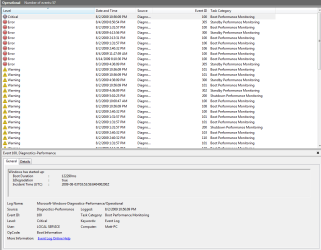
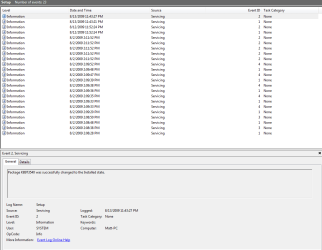
Let try this first. If you can bootinto windows go into device manager (type deice manager in search) and see if there are any "unknown devices. Second you can go into event viewer (type event viewer in search) and see if there are any errors relating to the problems.

If there are either use the snipping tool (snipping tool in search) to take a snapshot of it and upload it to us.

At least you can start to diagnose the problem

Hope this helps

Ken
 

My Computer

Computer Manufacturer/Model Number
HP Pavillion dv-7 1005 Tx
OS
Win 8 Release candidate 8400
CPU
[email protected]
Memory
4 gigs
Graphics Card(s)
Nvidia 9600M
Sound Card
HD built-in
Monitor(s) Displays
17" Wxga
Screen Resolution
1440x900
Cooling
none
Internet Speed
45Mb down 5Mb up
See now I normally was able to boot perfectly fine, its like only certain times it freezes. Went into device manager and everything looked fine, went into event viewer but maybe you could direct me where to go in there so I could provide a screen shot?
 

My Computer

Computer Manufacturer/Model Number
Apple Macbook Pro 15" 2010
OS
Mac OS X / Windows 7 Home Premium 64-bit
CPU
Intel Core i5 @ 2.4 GHz
Memory
8GB DDR3
Graphics Card(s)
NVidia GeForce GT330 M
Screen Resolution
1680x1050
Hard Drives
Intel X25 Mainstream G2 160 GB
See now I normally was able to boot perfectly fine, its like only certain times it freezes. Went into device manager and everything looked fine, went into event viewer but maybe you could direct me where to go in there so I could provide a screen shot?

Matt

there are two tabs of importance. first apps, then setup/system. see pics. if you have any errors that relate to anything you think might be the problem uplpad the most relevant

Ken
 
Last edited:

My Computer

Computer Manufacturer/Model Number
HP Pavillion dv-7 1005 Tx
OS
Win 8 Release candidate 8400
CPU
[email protected]
Memory
4 gigs
Graphics Card(s)
Nvidia 9600M
Sound Card
HD built-in
Monitor(s) Displays
17" Wxga
Screen Resolution
1440x900
Cooling
none
Internet Speed
45Mb down 5Mb up
Ok I just need to know how to upload pictures on here.
 

My Computer

Computer Manufacturer/Model Number
Apple Macbook Pro 15" 2010
OS
Mac OS X / Windows 7 Home Premium 64-bit
CPU
Intel Core i5 @ 2.4 GHz
Memory
8GB DDR3
Graphics Card(s)
NVidia GeForce GT330 M
Screen Resolution
1680x1050
Hard Drives
Intel X25 Mainstream G2 160 GB
How's this
 

Attachments

  • Apps W7.PNG
    Apps W7.PNG
    24.3 KB · Views: 82
  • Setup W7.PNG
    Setup W7.PNG
    15.7 KB · Views: 96

My Computer

Computer Manufacturer/Model Number
Apple Macbook Pro 15" 2010
OS
Mac OS X / Windows 7 Home Premium 64-bit
CPU
Intel Core i5 @ 2.4 GHz
Memory
8GB DDR3
Graphics Card(s)
NVidia GeForce GT330 M
Screen Resolution
1680x1050
Hard Drives
Intel X25 Mainstream G2 160 GB
I did, and there is no HPET option, but what I did is reinstall the original driver for my video card which was on a cd. So far so good, but I don't think this problem is resolved.
 

My Computer

Computer Manufacturer/Model Number
Apple Macbook Pro 15" 2010
OS
Mac OS X / Windows 7 Home Premium 64-bit
CPU
Intel Core i5 @ 2.4 GHz
Memory
8GB DDR3
Graphics Card(s)
NVidia GeForce GT330 M
Screen Resolution
1680x1050
Hard Drives
Intel X25 Mainstream G2 160 GB
same problem

i 'm having the same problem right now d$#@ u Microsoft:mad:

i don't think is the video card

i have a 8400m gs Notebook

and worked just fine a few weeks an now suddenly hangs at Starting Windows
 

My Computer

OS
windows 7
Hi fast4life,

Are you able to get into windows at all - or is it just slow/intermittent?
 

My Computers

System One System Two

  • Computer type
    PC/Desktop
    OS
    7 X64
    CPU
    i5 8400
    Motherboard
    gigabyte b365m ds3h
    Memory
    2x8gb 3200mhz
    Hard Drives
    various
    PSU
    pure power 11 400w cm
    Case
    Coolermaster
    Cooling
    cryorig m9i
  • Computer type
    PC/Desktop
    OS
    7x64
    CPU
    g5400
    Motherboard
    ga b365m ds3h
    Memory
    8gb ddr4 2400
    PSU
    xfx pro 450w
Back
Top