Solved Frequent BSOD at any time, errors vary

Canite

New member
Local time
2:55 AM
Messages
7
Frequent BSOD at any time, errors vary, jcgriff2 attached

I built my own computer for the first time about a month ago and everything has been fine, but a few days ago I got my first BSOD and it has been excessive since then. I can't seem to pinpoint what I'm doing when it happens, because it can happen while doing anything from playing a game, surfing on chrome, or just sitting there. I tried to have a go at analyzing the event logs and I redownloaded and reinstalled my graphics driver but it did not help. I then found there was a newer BIOS version for my motherboard, so I updated that and there were no BSOD's for the entire day and I thought I fixed the problem. But then I got a new mouse, tried to install the drivers and now the crashes have started again. I get a BSOD on startup when I try to run driver verifier and it always get BSOD before I can finish a full scan with my anti-virus (microsoft security essentials). I also ran check disk and it reported no problems or bad sectors. I'll attach the minidump files here and I'm going to run a memtest, any help is appreciated. Let me know if you need any more info.
Computer Specs:
Windows 7 Home Premium 64bit
ASUS M5A97 motherboard
Radeon HD6670 graphics card
AMD Phenom II X4 965 Processor
1x 4gb ram

edit: I apologize for not doing so in the first place, but I've run the jcgriff program and uploaded that zipped file now, instead of just the minidump. I'm unable to to the health report right now because it can't be done in safe mode and I get a BSOD before it can be done.
 
Last edited:

My Computer My Computer

OS
Windows 7 Home Premium 64bit
I just got another BSOD while in safe mode (with networking) while I was trying to run a scan on malwarebytes. I've never gotten a BSOD while in safe mode before, so hopefully this means something.. Attaching the .dmp
 

My Computer My Computer

OS
Windows 7 Home Premium 64bit
Some of your crashes point to USB. What USB devices do you use? Please list any you use whether they are plugged in all the time or not.


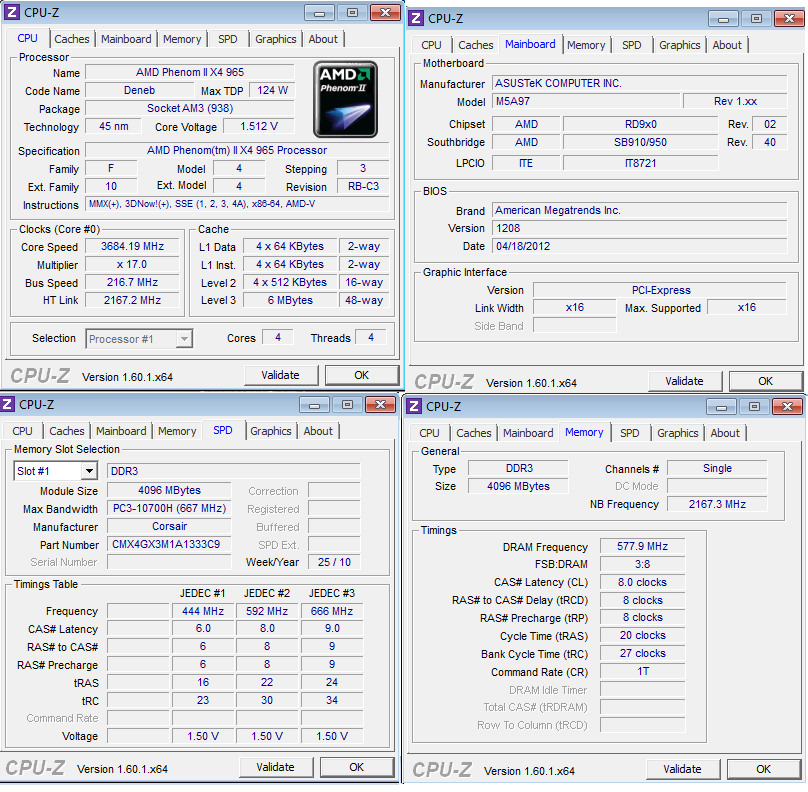
Other crashes indicate memory conflicts. Download and install CPU-Z and Upload screenshots of the CPU, Mainboard, Memory, and SPD tabs. In the SPD tab, upload an image of each slot.
 

My Computer My Computer

Computer Manufacturer/Model Number
HP Pavilion e9110t
OS
Windows 7 Home Premium 64 Bit
CPU
Intel(R) Core(TM)2 Quad CPU Q9550 @ 2.83GHz
Motherboard
Pegatron IPIEL-LA3
Memory
6.00 GB Hundai HMT125U6BFR8C-H9
Graphics Card(s)
ATI Radeon HD 4850
Sound Card
Realtek High Definition Audio/ATI High Definition Audio
Monitor(s) Displays
Acer AL2216W
Screen Resolution
1680x1050
Hard Drives
Hitachi HDP725050GLA360 ATA Device 500 GB
PSU
Unknown/installed by HP
Case
HP generic case
Cooling
Intel Stock Cooling
Keyboard
HP Keyboard
Mouse
HP Mouse
Internet Speed
Download: 19.15 Mbps Upload: 1.67 Mbps
Other Info
Network Adapter Realtek RTL8168D/8111D Family PCI-E Gigabit Ethernet NIC (NDIS 6.20)
Network Adapter 802.11n Wireless PCI Express Card LAN Adapter
I ran the memtest86+ and it got errors within 10 seconds or so.. I only have 1 ram module so I followed the step on moving the memory and put it in a different slot and ran the memtest and got the same results. The module was in the recommened slot to begin with. So does this mean my ram is corrupt? Or is it just incompatible with my motherboard? It's corsair but ill also try to run the CPU-Z, hopefully it doesn't crash before it finishes.

The USB devices I use are my keyboard, my mouse, and an HP webcam.
Thanks for the help! It's greatly appreciated :)

As for the USB related crash, I do specifically remember one crash happening right when I plugged in my mouse the mouse is a deathadder 3.5g of that helps, but with the amount of errors that came up from the memtest I assume the USB isn't the root cause.

Edit once more..
While looking through some documents on the memtest86+, I found this:
There are some systems that cause Memtest86 to be confused about the size of memory and it will try to test non-existent memory. This will cause a large number of consecutive addresses to be reported as bad and generally there will be many bits in error. If you have a relatively small number of failing addresses and only one or two bits in error you can be certain that the errors are valid.
When I ran the memtest, it was pretty much instant errors across the board, reaching the thousands within minutes. I don't know if this is relevant.. just trying to give as much information as possible.

Here's the CPU-Z results:
thSbE.png


I only showed the first slot of RAM because the other 3 slots are empty.
 
Last edited:

My Computer My Computer

OS
Windows 7 Home Premium 64bit
According to Corsair, that RAM is compatible with all Intel and AMD platforms, so it should not be causing problems. I am fairly certain that module will work with your board if it is not damaged or faulty. However, it is XMP RAM, and XMP RAM is known to work better with newer AMD processors than the older AMD processor you own. You should contact Corsair and make sure the RAM is compatible with your processor and board, and if they say it will work, then ask for an RMA because your module is probably faulty.
 

My Computer My Computer

Computer Manufacturer/Model Number
HP Pavilion e9110t
OS
Windows 7 Home Premium 64 Bit
CPU
Intel(R) Core(TM)2 Quad CPU Q9550 @ 2.83GHz
Motherboard
Pegatron IPIEL-LA3
Memory
6.00 GB Hundai HMT125U6BFR8C-H9
Graphics Card(s)
ATI Radeon HD 4850
Sound Card
Realtek High Definition Audio/ATI High Definition Audio
Monitor(s) Displays
Acer AL2216W
Screen Resolution
1680x1050
Hard Drives
Hitachi HDP725050GLA360 ATA Device 500 GB
PSU
Unknown/installed by HP
Case
HP generic case
Cooling
Intel Stock Cooling
Keyboard
HP Keyboard
Mouse
HP Mouse
Internet Speed
Download: 19.15 Mbps Upload: 1.67 Mbps
Other Info
Network Adapter Realtek RTL8168D/8111D Family PCI-E Gigabit Ethernet NIC (NDIS 6.20)
Network Adapter 802.11n Wireless PCI Express Card LAN Adapter
Ok, update here:
I checked the manual for my motherboard, and apparently it does not support this module unless it is dual channel (8gb total with 2x4gb) But in the manual the product code for the dual channel version is slightly different (has an 8 and a 2 instead of a 4 and 1 somewhere in it).. would it be safe to simply buy a second module of the same product code? And do these crashes mean that the one I have is bad now?
Also, if this is the reason for the crashes, why did it take a month for them to happen? Wouldn't the computer crash on the first startup because of the incompatible ram?

Also, to be safe that its not a malware problem, I'm reformatting my hard drive and reinstalling windows, but when I tried to boot the computer from the windows 7 install DVD I got a BSOD right after the "starting windows" logo. I tried it one more time and same thing. Error codes were 0x000000c5 and 0x00000050, however I went into the BIOS and noticed that the memory frequency was set to 1115 Mhz.. Which I thought was odd since its supposed to be a 1333 Mhz module, so I went in changed the memory frequency to "Auto" and tried starting the windows installer again and it worked this time. I'm currently wiping my hard drive using DiskPart.

Thanks a lot for your help writhziden :)

Edit: Well the diskpart finished cleaning the drive and I continued with the install but when I tried to partition my harddrive I got a BSOD! Error was 0x00000050 again, so I'm pretty sure my memory is to blame here. But this makes my first question even more relevant.. why did this not happen a month ago?
 
Last edited:

My Computer My Computer

OS
Windows 7 Home Premium 64bit
It may just be that the RAM suffered static damage when it was installed and is just now starting to show signs. This is a known problem with electronics that are sensitive to static damage. The damage can occur without the user feeling the static discharge, so it often results in users wondering why electronics suddenly stop working right. It actually isn't a sudden occurrence at all, but something that happened over time until failure started to show symptoms.

Further reading: Avoid Static Damage to Your PC | PCWorld
 

My Computer My Computer

Computer Manufacturer/Model Number
HP Pavilion e9110t
OS
Windows 7 Home Premium 64 Bit
CPU
Intel(R) Core(TM)2 Quad CPU Q9550 @ 2.83GHz
Motherboard
Pegatron IPIEL-LA3
Memory
6.00 GB Hundai HMT125U6BFR8C-H9
Graphics Card(s)
ATI Radeon HD 4850
Sound Card
Realtek High Definition Audio/ATI High Definition Audio
Monitor(s) Displays
Acer AL2216W
Screen Resolution
1680x1050
Hard Drives
Hitachi HDP725050GLA360 ATA Device 500 GB
PSU
Unknown/installed by HP
Case
HP generic case
Cooling
Intel Stock Cooling
Keyboard
HP Keyboard
Mouse
HP Mouse
Internet Speed
Download: 19.15 Mbps Upload: 1.67 Mbps
Other Info
Network Adapter Realtek RTL8168D/8111D Family PCI-E Gigabit Ethernet NIC (NDIS 6.20)
Network Adapter 802.11n Wireless PCI Express Card LAN Adapter
Ah, I see.. Very unfortunate :/ I'm planning on buying some new ram, making sure they are on the compatible list in my motherboard manual and I'm also buying an anti-static wristband.
But, is there any way to tell and make sure that it is just the RAM that's damaged and not my whole motherboard?
 

My Computer My Computer

OS
Windows 7 Home Premium 64bit
If you can find some RAM to borrow from a friend, that would be the best way. You could also take it to an electronics or PC store and see if they can test it for you, but they will probably charge you. :(

Hardware debugging over the internet is rather difficult. I wish we had a crystal ball with all the answers, but alas, we have to work with the only tools available. Our best troubleshooting over the internet involves narrowing things down and a fair bit of luck to find the true culprit.
 

My Computer My Computer

Computer Manufacturer/Model Number
HP Pavilion e9110t
OS
Windows 7 Home Premium 64 Bit
CPU
Intel(R) Core(TM)2 Quad CPU Q9550 @ 2.83GHz
Motherboard
Pegatron IPIEL-LA3
Memory
6.00 GB Hundai HMT125U6BFR8C-H9
Graphics Card(s)
ATI Radeon HD 4850
Sound Card
Realtek High Definition Audio/ATI High Definition Audio
Monitor(s) Displays
Acer AL2216W
Screen Resolution
1680x1050
Hard Drives
Hitachi HDP725050GLA360 ATA Device 500 GB
PSU
Unknown/installed by HP
Case
HP generic case
Cooling
Intel Stock Cooling
Keyboard
HP Keyboard
Mouse
HP Mouse
Internet Speed
Download: 19.15 Mbps Upload: 1.67 Mbps
Other Info
Network Adapter Realtek RTL8168D/8111D Family PCI-E Gigabit Ethernet NIC (NDIS 6.20)
Network Adapter 802.11n Wireless PCI Express Card LAN Adapter
Yeah that's true, well I'm going to go ahead and buy the ram and get it in there (hopefully with no static this time..) and I'll report back with the results. Thanks for all the help :)
 

My Computer My Computer

OS
Windows 7 Home Premium 64bit
You're welcome. Post back when you get the new RAM and let us know whether the problem is resolved. Best wishes that solves the problem for you! :)
 

My Computer My Computer

Computer Manufacturer/Model Number
HP Pavilion e9110t
OS
Windows 7 Home Premium 64 Bit
CPU
Intel(R) Core(TM)2 Quad CPU Q9550 @ 2.83GHz
Motherboard
Pegatron IPIEL-LA3
Memory
6.00 GB Hundai HMT125U6BFR8C-H9
Graphics Card(s)
ATI Radeon HD 4850
Sound Card
Realtek High Definition Audio/ATI High Definition Audio
Monitor(s) Displays
Acer AL2216W
Screen Resolution
1680x1050
Hard Drives
Hitachi HDP725050GLA360 ATA Device 500 GB
PSU
Unknown/installed by HP
Case
HP generic case
Cooling
Intel Stock Cooling
Keyboard
HP Keyboard
Mouse
HP Mouse
Internet Speed
Download: 19.15 Mbps Upload: 1.67 Mbps
Other Info
Network Adapter Realtek RTL8168D/8111D Family PCI-E Gigabit Ethernet NIC (NDIS 6.20)
Network Adapter 802.11n Wireless PCI Express Card LAN Adapter
I got my new ram, reinstalled windows and everything is working! :) I used an antistatic wristband when installing the new ram so it shouldnt be damaged but I will have to wait a while to see.. however multiple runs on memtest reported no errors! So I'm going to put this as solved :) thank you very much for the help writhziden!

edit: Also, without making a new thread I wanted to ask something. I always switch off my power supply after my computer has shut down completely. Is this something I should not be doing or can it damage anything?
 

My Computer My Computer

OS
Windows 7 Home Premium 64bit
You're welcome. I am very glad the problem is now solved. :D :party:
 

My Computer My Computer

Computer Manufacturer/Model Number
HP Pavilion e9110t
OS
Windows 7 Home Premium 64 Bit
CPU
Intel(R) Core(TM)2 Quad CPU Q9550 @ 2.83GHz
Motherboard
Pegatron IPIEL-LA3
Memory
6.00 GB Hundai HMT125U6BFR8C-H9
Graphics Card(s)
ATI Radeon HD 4850
Sound Card
Realtek High Definition Audio/ATI High Definition Audio
Monitor(s) Displays
Acer AL2216W
Screen Resolution
1680x1050
Hard Drives
Hitachi HDP725050GLA360 ATA Device 500 GB
PSU
Unknown/installed by HP
Case
HP generic case
Cooling
Intel Stock Cooling
Keyboard
HP Keyboard
Mouse
HP Mouse
Internet Speed
Download: 19.15 Mbps Upload: 1.67 Mbps
Other Info
Network Adapter Realtek RTL8168D/8111D Family PCI-E Gigabit Ethernet NIC (NDIS 6.20)
Network Adapter 802.11n Wireless PCI Express Card LAN Adapter
Back
Top