Frequent connection drops

Andeby

New member
Local time
11:28 PM
Messages
12
Hey there,
I have been having trouble with my connection dropping out and then instantly reconnecting, it lasts just long enough to disconnect me from everything I have running that requires a connection to the net and stop all downloads and streams.

I had this problem on my built-in Realtek Gigabit adapter (Which is currently disabled), and I ended up buying a new Linksys NIC (EG1032) in hope of a fix, but the exact same thing happens on this one as well.

Sometimes I won't see it for weeks, even months, then suddenly I am getting DC's every few minutes.

I can't see any pattern in when it happens. It has happened after clean Windows installs, reboots with nearly nothing running, under load ... any time really.

Doing a tracert at the moment I see a loss, gave me this:
Tracing route to placebo-eu.com [69.163.238.113]
over a maximum of 30 hops:

1 <1 ms <1 ms <1 ms 192.168.1.1
2 * * * Request timed out.
3 * * * Request timed out.
4 * * * Request timed out.
5 * * * Request timed out.
6 * * * Request timed out.
7 * * * Request timed out.
8 * * * Request timed out.
9 * * * Request timed out.
10 * * * Request timed out.
11 * * * Request timed out.
12 188 ms 191 ms * apache2-zoo.skopje.dreamhost.com [69.163.238.113]
13 197 ms 198 ms 200 ms apache2-zoo.skopje.dreamhost.com [69.163.238.113]

Trace complete.

I have tried several different fixes in threads about connection losses (Disabling power saving settings, IPv6 etc...), nothing has worked so far.

I am running on Windows 7 Ultimate x64, using a quad core CPU (i7 920), have not tried any other OS, can't remember seeing this before Windows 7.

If I forgot anything, or you need more info, please let me know. :)

Thanks,
Andeby
 
Last edited:

My Computer

OS
Windows 7 RC 1 build 7100
Is your Internet connection secured?
 

My Computer

Computer Manufacturer/Model Number
HP DV6 1330sa
OS
Windows 7 Professional 64 Bit SP1
CPU
INTEL DUAL CORE 2.1Ghz
Motherboard
N/A
Memory
4GB DDR3
Graphics Card(s)
INTEL
Sound Card
LAPTOP
Monitor(s) Displays
2
Screen Resolution
3200x1080
Hard Drives
250GB
PSU
LAPTOP
Case
LAPTOP
Cooling
LAPTOP
Keyboard
SOLID YEAR 260U
Mouse
USB
Internet Speed
20 MB/S
Is your Internet connection secured?

How do you mean secured? I am honestly not too experienced with internet connection and such. :<
Secure = Password protected~

You said:

Sometimes I won't see it for weeks, even months, then suddenly I am getting DC's every few minutes.

My first thought on that was someone is using your connection to download stuff and therein consuming all your connections bandwidth.
 

My Computer

Computer Manufacturer/Model Number
HP DV6 1330sa
OS
Windows 7 Professional 64 Bit SP1
CPU
INTEL DUAL CORE 2.1Ghz
Motherboard
N/A
Memory
4GB DDR3
Graphics Card(s)
INTEL
Sound Card
LAPTOP
Monitor(s) Displays
2
Screen Resolution
3200x1080
Hard Drives
250GB
PSU
LAPTOP
Case
LAPTOP
Cooling
LAPTOP
Keyboard
SOLID YEAR 260U
Mouse
USB
Internet Speed
20 MB/S
Yes, wireless is password protected.

Also, I am not on wireless myself. Even tried several different network cables.
 

My Computer

OS
Windows 7 RC 1 build 7100
I do doubt that is the issue. I forgot to add that I am the only one in my home that has had this issue, only on this PC. Don't remember if I've seen it connected elsewhere with this PC, but I don't think I have.
 

My Computer

OS
Windows 7 RC 1 build 7100
Are you using wired or wireless, I'm still a little confused on that part.
 

My Computer

Computer type
PC/Desktop
Computer Manufacturer/Model Number
Home built
OS
Windows 7 Ult, Windows 8.1 Pro,
CPU
Q9650-4.275GHz, E8600 4.5GHz, E6750-3.8GHz
Motherboard
Evga 780i FTW
Memory
G.Skill PC2 9600 1200Mhz 5 5 5 15 2T
Graphics Card(s)
GTX480
Sound Card
Asus Xonar D2
Monitor(s) Displays
HannsG
Screen Resolution
1680X1050
Hard Drives
GSkill Phoenix Pro 120GB SSD
PSU
ThermalTake Toughpower 1000Watt modular
Case
ThermalTake XaserV
Cooling
Xigmatek S1283
Keyboard
Logitech G15
Mouse
Logitech G9
Internet Speed
T1
Are there other Win7 machines in your network?

What brand make model version of router are you using for this connection?

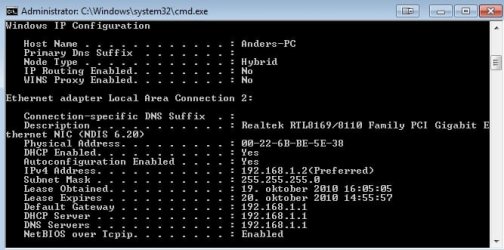
Can you post an ipconfig /all screen shot of your machine when the connection is up?

What type of A/V software do you have installed on this machine?
 

My Computer

Computer type
PC/Desktop
Computer Manufacturer/Model Number
Home built
OS
Windows 7 Ult, Windows 8.1 Pro,
CPU
Q9650-4.275GHz, E8600 4.5GHz, E6750-3.8GHz
Motherboard
Evga 780i FTW
Memory
G.Skill PC2 9600 1200Mhz 5 5 5 15 2T
Graphics Card(s)
GTX480
Sound Card
Asus Xonar D2
Monitor(s) Displays
HannsG
Screen Resolution
1680X1050
Hard Drives
GSkill Phoenix Pro 120GB SSD
PSU
ThermalTake Toughpower 1000Watt modular
Case
ThermalTake XaserV
Cooling
Xigmatek S1283
Keyboard
Logitech G15
Mouse
Logitech G9
Internet Speed
T1
Yes, other Ultimate x64 systems with same CPU as mine.

Not sure, I will check.

Edit: I used NOD32 until I read someone with a similar problem had uninstalled NOD32 and their problem was gone, but it did not solve anything for me. Currently no AV.

Windows firewall enabled, I can try disabling it.

More edit: I could also mention that a friend tried using TeamViewer to look at some stuff, and we discovered that while I got disconnected from MSN, he did not loose connection to me on TeamViewer.
 

Attachments

  • ipconfig.jpg
    ipconfig.jpg
    35 KB · Views: 17

My Computer

OS
Windows 7 RC 1 build 7100
It might be interesting to see an ipconfig /all when this mystery disconnection occurs. It's very stange that you would still be able to use teamviewer but not be able to browse. Nod32 can cause problems like this but you say it's uninstalled. The ipconfig looks perfectly normal.
 

My Computer

Computer type
PC/Desktop
Computer Manufacturer/Model Number
Home built
OS
Windows 7 Ult, Windows 8.1 Pro,
CPU
Q9650-4.275GHz, E8600 4.5GHz, E6750-3.8GHz
Motherboard
Evga 780i FTW
Memory
G.Skill PC2 9600 1200Mhz 5 5 5 15 2T
Graphics Card(s)
GTX480
Sound Card
Asus Xonar D2
Monitor(s) Displays
HannsG
Screen Resolution
1680X1050
Hard Drives
GSkill Phoenix Pro 120GB SSD
PSU
ThermalTake Toughpower 1000Watt modular
Case
ThermalTake XaserV
Cooling
Xigmatek S1283
Keyboard
Logitech G15
Mouse
Logitech G9
Internet Speed
T1
I will try to get an ipconfig /all when it happens, but it seems better again now. Also, I have to notice that I am DCed from something to even know it happens.

Also, it never stops me from browsing websites, I just get disconnected from chat clients, online games, etc etc, along with all streaming/downloading stopping (Streaming stops completely and downloading stops for a few seconds).

Edit: It seems I am no longer getting DC's from MSN, but streaming and other apps etc still show the same issue. Did an ipconfig /all as soon as I got a DC and there were no changes.
 

My Computer

OS
Windows 7 RC 1 build 7100
Oh ok that is a different problem then. It sounds like your connection is getting overloaded but not disconnected by what you are saying here.

You might try adjusting the settings of your driver. Using the jumbo frames or jumbo packet settings can make a difference with this sort of problem. You can get there by going into device manager then Network adaptor properties, advanced tab. Try adjusting the packet size up to the largest one.
 

My Computer

Computer type
PC/Desktop
Computer Manufacturer/Model Number
Home built
OS
Windows 7 Ult, Windows 8.1 Pro,
CPU
Q9650-4.275GHz, E8600 4.5GHz, E6750-3.8GHz
Motherboard
Evga 780i FTW
Memory
G.Skill PC2 9600 1200Mhz 5 5 5 15 2T
Graphics Card(s)
GTX480
Sound Card
Asus Xonar D2
Monitor(s) Displays
HannsG
Screen Resolution
1680X1050
Hard Drives
GSkill Phoenix Pro 120GB SSD
PSU
ThermalTake Toughpower 1000Watt modular
Case
ThermalTake XaserV
Cooling
Xigmatek S1283
Keyboard
Logitech G15
Mouse
Logitech G9
Internet Speed
T1
Looking for those settings, I only found Jumbo Frame, which gave me a set of options named '2KB MTU' ranging to '7KB MTU'. Setting from disabled to different values appeared to make no change.
 

My Computer

OS
Windows 7 RC 1 build 7100
Looking for those settings, I only found Jumbo Frame, which gave me a set of options named '2KB MTU' ranging to '7KB MTU'. Setting from disabled to different values appeared to make no change.

Set to it's highest value. Try loading up your usual programs that cause the crash then see if those programs are still disconnecting.

There are bandwidth limits that can't be avoided, when you are streaming it tends to hog all the bandwidth so there are limits on what you can do with a connection.
 

My Computer

Computer type
PC/Desktop
Computer Manufacturer/Model Number
Home built
OS
Windows 7 Ult, Windows 8.1 Pro,
CPU
Q9650-4.275GHz, E8600 4.5GHz, E6750-3.8GHz
Motherboard
Evga 780i FTW
Memory
G.Skill PC2 9600 1200Mhz 5 5 5 15 2T
Graphics Card(s)
GTX480
Sound Card
Asus Xonar D2
Monitor(s) Displays
HannsG
Screen Resolution
1680X1050
Hard Drives
GSkill Phoenix Pro 120GB SSD
PSU
ThermalTake Toughpower 1000Watt modular
Case
ThermalTake XaserV
Cooling
Xigmatek S1283
Keyboard
Logitech G15
Mouse
Logitech G9
Internet Speed
T1
That's what I did, disconnects were still present.
 

My Computer

OS
Windows 7 RC 1 build 7100
In that case I'd say you are at the bandwidth limits of your connection. Trying a different or updated driver might help with that.
 

My Computer

Computer type
PC/Desktop
Computer Manufacturer/Model Number
Home built
OS
Windows 7 Ult, Windows 8.1 Pro,
CPU
Q9650-4.275GHz, E8600 4.5GHz, E6750-3.8GHz
Motherboard
Evga 780i FTW
Memory
G.Skill PC2 9600 1200Mhz 5 5 5 15 2T
Graphics Card(s)
GTX480
Sound Card
Asus Xonar D2
Monitor(s) Displays
HannsG
Screen Resolution
1680X1050
Hard Drives
GSkill Phoenix Pro 120GB SSD
PSU
ThermalTake Toughpower 1000Watt modular
Case
ThermalTake XaserV
Cooling
Xigmatek S1283
Keyboard
Logitech G15
Mouse
Logitech G9
Internet Speed
T1
In that case I'd say you are at the bandwidth limits of your connection. Trying a different or updated driver might help with that.

I'll get the newest drivers from Realtek, gotta hate their site though. Tried earlier and none of the download links actually did anything. <.<

Edit: Sigh, updated driver and there's no improvement.
 

My Computer

OS
Windows 7 RC 1 build 7100
Bumping this, still no solution and it's gotten worse again.

Appreciate the help so far! :)
 

My Computer

OS
Windows 7 RC 1 build 7100
Hello again, I am back with some new info.

After a good day of only having one session of dropouts, it's just as bad again today.

Now, I also got my laptop running, where I noticed that even if never having had a problem before, it has also started getting the dropouts today, and now I got my father to check his PC's (one with Windows XP and one with Linux, forgot what distro) where both also had the same issue, yet my brother has not ever seen a trace of this issue (And it gets very annyoing after a while, not noticing it would be hard).

I have ran a virus scan on my PC but found nothing interesting, also running one on my dad's Windows PC to see if it could have been carrying something and spreading it around the network, but that seems unlikely. I will try to plug my laptop directly into the router with an unused network cable and see if it still occurs.

I guess this might leave for a lot more options as to what could be going on, really appreciate any help!
 

My Computer

OS
Windows 7 RC 1 build 7100
Back
Top