
Fresh install advice

craney5

New member
Power User
Local time
7:26 AM
Messages
212
Hi all,

I am thinking of doing a fresh install of 7, jsut wanted some advice on a few things.

I understand that windows will make a 100mb partition for the MBR etc, the thing is i really want to have 4 partitions, windows, applications, games, music & pics. I was wondering how i would go about setting up a logical drive and when i actually do it? do i save the unallocated space during the setup and create it in disk manager once i have installed windows?

Was thinking of creating maybe 1 more logical drive and just saving a fresh image of my install for easy access incase things were to go wrong in the future

hope you can help
 

My Computer

OS
Windows 7 64bit
CPU
Phenom IIx4 955 Black Edition
Memory
4GB Kingston 1066mhz DDR2
Graphics Card(s)
Gigabyte 260GTX
Monitor(s) Displays
Samsung syncmaster 2033
Hard Drives
500GB Samsung ATA
500GB Segate ATA
PSU
Antec True blue 750W Modular
Case
Antec 1200
Cooling
Prolimatech Megahalems Performance CPU Cooler/2x Apache Fan

My Computer

Computer type
PC/Desktop
Computer Manufacturer/Model Number
Self Built
OS
Windows 7 Ultimate 64bit
CPU
AMD Phenom Quad core 9950 black edition
Motherboard
Gigabyte
Memory
16Gb
Graphics Card(s)
2x XFX Radeon 5850
Sound Card
PCI Express X-Fi Titanium / Logitech G35
Monitor(s) Displays
2x HP 2410i
Screen Resolution
1920x1080
Hard Drives
2x 500Gb Seagate
1x 300Gb Seagate
1x 1Tb Seagate
2x 1Tb Hitatchi
PSU
Jean Tech Storm 700W
Case
Cooler Master COSMOS S
Cooling
Akasa Evo Blue Pro
Keyboard
Logitech G15
Mouse
Mad Catz M.M.O. 7
Internet Speed
12mb
Hi,

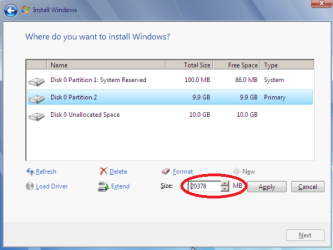
When choosing the partition to install onto Windows allows you to

  1. Delete the partition and create a new 1 giving you the option to set the size of the partition.
  2. Set the size of the new partition. You'll notice the new 'Disk' and an unallocated space
  3. Delete the 'Unallocated space' and follow step 2 again
partition_14.png
Once happy you can then install Windows 7 on the partition of your choice.
   Note
Deleting all partitions will create 1 large Unallocates Space


OS
 

My Computer

Computer Manufacturer/Model Number
Compaq Desktop
OS
Windows 7 Ultimate x64
CPU
AMD Sempron Dual Core
Memory
3GB
Graphics Card(s)
NVIDIA GeForce 6150SE nForce 430
Screen Resolution
1024x768
Hard Drives
150GB Sata
I have wiped my HD using diskpart in the command prompt, now i am trying to create partitions using diskpart before i actually install windows, i type the command "create partition primary size=1024" for example and this then says primary partition created, can i do this again for another 3 partitions or will diskpart only let me create 1 primary? I am testing on a usb flash drive at the mo just to be safe, i created 1 partiton at 1024mb and when i try creating another at 500mb its says insufficiant space, its a 2gb flash drive.

hope you can help
 

My Computer

OS
Windows 7 64bit
CPU
Phenom IIx4 955 Black Edition
Memory
4GB Kingston 1066mhz DDR2
Graphics Card(s)
Gigabyte 260GTX
Monitor(s) Displays
Samsung syncmaster 2033
Hard Drives
500GB Samsung ATA
500GB Segate ATA
PSU
Antec True blue 750W Modular
Case
Antec 1200
Cooling
Prolimatech Megahalems Performance CPU Cooler/2x Apache Fan

My Computer

Computer Manufacturer/Model Number
* BFK Customs *
OS
W 7 64-bit Ultimate
CPU
Intel Q9550 Yorkfield
Motherboard
ASUS P5Q Pro
Memory
8GB Dominator 8500C5D
Graphics Card(s)
ATI : XFX 5870
Sound Card
Realtek HD Audio 7-1
Monitor(s) Displays
1x 47" LCD HDMI & 3x 26" LCD HDMI
Screen Resolution
1920x1080P & 1920x1200
Hard Drives
1x 80GB Intel X25-M G2 SSD : 1x 500GB & 1x 640GB WD Caviar Black(s)
PSU
Corsair 620HX
Case
Cooler Master RC-690
Cooling
Tuniq Tower 120, 2x 140mm and 3x 120mm case fans
Keyboard
Microsoft 500
Mouse
Razer Diamondback 3G
Internet Speed
14 Mb/s
Other Info
1x Koutech 3Gb/s SATA HDD Hot Swap Rack
Thanks for that matey im going blind lol i was following that guide but missed step 3 :) oops

EDIT

Still getting the same issue on my flash drive where once i have created a primary partiton of 1024mb, i try creating another 400mb partition and it tells me i dont have enough space. There is 800mb of unallocated space on the drive.

Is the reason this wont work because its a flash drive?
 

My Computer

OS
Windows 7 64bit
CPU
Phenom IIx4 955 Black Edition
Memory
4GB Kingston 1066mhz DDR2
Graphics Card(s)
Gigabyte 260GTX
Monitor(s) Displays
Samsung syncmaster 2033
Hard Drives
500GB Samsung ATA
500GB Segate ATA
PSU
Antec True blue 750W Modular
Case
Antec 1200
Cooling
Prolimatech Megahalems Performance CPU Cooler/2x Apache Fan
I would go the simple route.

1, Use this program's bootable CD (on the left side of the webpage) and clear the whole disk
2. Then define a partition large enough for the Windows7 installation. The size will depend on your requirements but for normal use (no games), 50GBs should suffice.
3. Then set this partition to primary, active (using the same CD program - in Partition tab > Modify)
4. Leave the rest of the disk free. It is easy to define your other partitions in that freespace with Disk Management once you have Win7 up and running. http://www.sevenforums.com/tutorials/72427-data-partition.html
5. Install Win7 in that one partition you defined. This way you will get your MBR in the same partition and avoid the seperate 100MB boot partition.

PS: if you have other disks on the system (possibly with other operating systems) you should physically disconnect them during this operation.
 

My Computer

Computer Manufacturer/Model Number
HP, Dell, Gateway, Toshiba - 4 laptops and 2 desktops
OS
Vista, Windows7, Mint Mate, Zorin, Windows 8
CPU
from 1.6GHz Duo to i7
Monitor(s) Displays
2x HP w2207
Hard Drives
5x HDD, 7x SSD, 12x Externals
Keyboard
with trackball - no mices
Mouse
Trackball mice
Internet Speed
DSL 6000
Wolfgang's suggestion to use our favorite tool here, free Partition Wizard, is a good one to have a picture of what you're doing while you partition your drive. The installer can do this as well.

What I'd like to suggest is that you NOT install programs (if that's what you mean by applications) on a separate partition from Win7. Programs write themselves into registry keys so that they integrate with the OS and should be on the same partition.

Here's a tutorial on how to put your User folders on another data partition: http://www.sevenforums.com/tutorials/18629-user-folders-change-default-location.html

This keeps your Win7 and programs partition backup image lean so if Win7 becomes irreparable, you can easily reimage it's partition in 20 minutes and your data is current and waiting in its own partition "vault" which should be backed up separately to another HD.
 
Thanks fot that mate, i see what your saying with regards to having all the applications installed on the same partition as windows makes sense. Whenever i re-imaged my machine i always restored the windows partition of course but i made sure i also restored the applications partition as well to go with it so i was kinda wasting my time really wern't i putting them seperate lol

As for the tut are moving the users folders, the only folders i move to a different drive is the My Music, My Pictures & My Videos as i always have them on my media partition and the way i do it is just right click the folder and change the location to D:\My Music for example.

I have just finished my fresh install (very quick now) i created the primary active partiton using diskpart before i installed windows and i made it 80GB in size would you say that a good size for 7 and all my applications? Just need to go into disk management now and create my other 3 partitons i would like
 

My Computer

OS
Windows 7 64bit
CPU
Phenom IIx4 955 Black Edition
Memory
4GB Kingston 1066mhz DDR2
Graphics Card(s)
Gigabyte 260GTX
Monitor(s) Displays
Samsung syncmaster 2033
Hard Drives
500GB Samsung ATA
500GB Segate ATA
PSU
Antec True blue 750W Modular
Case
Antec 1200
Cooling
Prolimatech Megahalems Performance CPU Cooler/2x Apache Fan
Cheers mate, i will download the partition application you suggested but i should be able to create another 2 partitions using disk management shouldn't i? i'm always a little wary when using 3rd party tools thats all :)
 

My Computer

OS
Windows 7 64bit
CPU
Phenom IIx4 955 Black Edition
Memory
4GB Kingston 1066mhz DDR2
Graphics Card(s)
Gigabyte 260GTX
Monitor(s) Displays
Samsung syncmaster 2033
Hard Drives
500GB Samsung ATA
500GB Segate ATA
PSU
Antec True blue 750W Modular
Case
Antec 1200
Cooling
Prolimatech Megahalems Performance CPU Cooler/2x Apache Fan
Yes, there is good reason to use Disk Management for all operations possible.

But if you run into any it cannot do, then I'd go with PW CD as it has never failed in hundreds of complicated partitioning operations we have helped with here.
 
wicked thanks a million mate really appreciate all your help
 

My Computer

OS
Windows 7 64bit
CPU
Phenom IIx4 955 Black Edition
Memory
4GB Kingston 1066mhz DDR2
Graphics Card(s)
Gigabyte 260GTX
Monitor(s) Displays
Samsung syncmaster 2033
Hard Drives
500GB Samsung ATA
500GB Segate ATA
PSU
Antec True blue 750W Modular
Case
Antec 1200
Cooling
Prolimatech Megahalems Performance CPU Cooler/2x Apache Fan
Back
Top