The horror… The horror…
Take pity… Please help… Save me from more of this… The same “CD/DVD drivers missing” msg as so many others.
Desperately attempting to fresh install Win7, 64bit (Genuine OEM disk)
(This is what I get by trying to "Move on up" from XP)
If I set the BIOS to default values, Win7 installs fine.
If I change BIOS values to RAID1…
1) Scrolling white bar “Windows is loading files”
2) “Language” , Enter
3) “Install now”, Enter
4) “Setup is Starting”
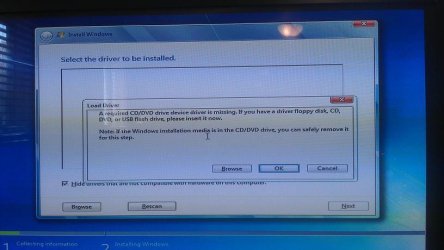
5) About 3seconds later I get “Select the driver to be installed” with a sub-window on top of that; Fig 1.
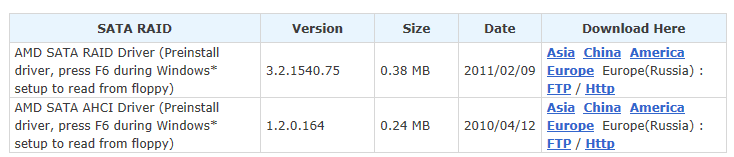
6) Gigabyte explains similar (but not exact), Fig 2.

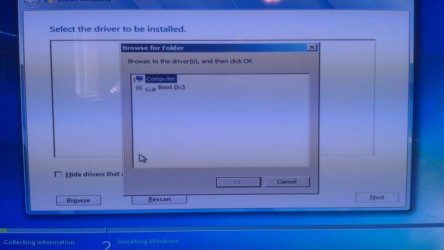
7) I remove OS disk, insert mobo disk…. Nothing…. Machine only sees OS boot disk. Fig 3.
At your mercy,
Stoph
Take pity… Please help… Save me from more of this… The same “CD/DVD drivers missing” msg as so many others.
Desperately attempting to fresh install Win7, 64bit (Genuine OEM disk)
(This is what I get by trying to "Move on up" from XP)
If I set the BIOS to default values, Win7 installs fine.
If I change BIOS values to RAID1…
1) Scrolling white bar “Windows is loading files”
2) “Language” , Enter
3) “Install now”, Enter
4) “Setup is Starting”
5) About 3seconds later I get “Select the driver to be installed” with a sub-window on top of that; Fig 1.
6) Gigabyte explains similar (but not exact), Fig 2.
7) I remove OS disk, insert mobo disk…. Nothing…. Machine only sees OS boot disk. Fig 3.
At your mercy,
Stoph
My Computer
- Computer Manufacturer/Model Number
- Blood, Sweat & Tears
- OS
- Win7 Home Premium, 64bit
- CPU
- AMD Phenom II 955 Black
- Motherboard
- Gigabyte 990XA-UD3
- Memory
- 4 x 4GB Corsair Vengeance, DDR3 1600
- Graphics Card(s)
- HIS IceQ Radeon 6790
- Hard Drives
- 2 - Seagate, 2TB, SATA, ST2000DL003
- PSU
- Cougar 760W
- Case
- Rosewill Blackbone
- Other Info
- 2 - LiteOn DVD Burners - iHAS124-04