Fresh install on new SSD with Windows 7 still on previous HDD

mmurray1988

New member
Member
Local time
8:23 PM
Messages
98
Location
San Diego
Hello

I am going to be installing Windows onto a new SSD. The HDD I am using now is running Windows along with being my main storage device.

My question is: can I remove just Windows 7 from my HDD and keep the files on it? Or do I have to take off all my files and start over?

Side note: I don't know if it matters, but my SSD is an 850 EVO.
 

My Computer My Computer

At a glance

Windows 7 ProfessionalGenuineIntel Intel(R) Core(TM) i7-3770K CPU @...16.0 GBNVIDIA GeForce GTX 1070
Computer type
PC/Desktop
Computer Manufacturer/Model Number
Custom Build
OS
Windows 7 Professional
CPU
GenuineIntel Intel(R) Core(TM) i7-3770K CPU @ 3.50GHz
Motherboard
ASRock, Z77 Extreme4
Memory
16.0 GB
Graphics Card(s)
NVIDIA GeForce GTX 1070
Monitor(s) Displays
Viewsonic VX2450WM-LED 24-Inch
Screen Resolution
1080
Hard Drives
1TB WD Black
250 GB 850 EVO
PSU
HX 650
Antivirus
MSE
Browser
Brave
When you install Windows on the new SSD disconnect ALL storage devices except the SSD you are installing Windows to and the device you are installing Windows from.
Having other storage devices connected during the install can cause problems.

After you have Windows clean installed on the new SSD, you can reconnect your HDD with Windows and data.
You might need to change the first boot device in BIOS to use the new SSD.
Then you can use the HDD as a data only device with your current data, and remove Windows from the HDD.

See this tutorial for how to clean install Windows:
http://www.sevenforums.com/tutorials/219487-clean-reinstall-factory-oem-windows-7-a.html
Take your time, read through it to understand it.

If you clean install you will have to re-install all of your installed programs.
If you would prefer to transfer your current Windows OS and programs to the new SSD, that can be done, but there are different tutorials/instructions for that.

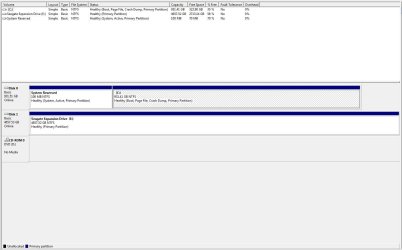
Post a screen print of your current Disk Management before making changes.
That will help anyone trying to help you.
http://www.sevenforums.com/tutorials/274797-disk-management-post-screen-capture-image.html

Make sure you have everything backed up before making changes so you can restore/recover if anything goes wrong.
 

My Computer My Computer

At a glance

Multi-Boot W7_Pro_x64 W8.1_Pro_x64 W10_Pro_x6...AMD Athlon II x4 6206GB GSkill DDR2 800AMD 4670 GPU + AMD 4200 IGP
Computer type
PC/Desktop
Computer Manufacturer/Model Number
home built
OS
Multi-Boot W7_Pro_x64 W8.1_Pro_x64 W10_Pro_x64 +Linux_VMs +Chromium_VM
CPU
AMD Athlon II x4 620
Motherboard
Gigabyte GA-MA785G-UD3H
Memory
6GB GSkill DDR2 800
Graphics Card(s)
AMD 4670 GPU + AMD 4200 IGP
Sound Card
on board Realtek ALC889A
Monitor(s) Displays
RCA 40" LCD TV, Insignia 32" LCD TV, HP 15" LCD monitor
Screen Resolution
1680 x 1050
Hard Drives
OCZ Vertex 3 120GB,
Samsung F3 1TB (3),
Several others - WD, Seagate, Hitachi, ...
PSU
Corsair 500 W
Case
Rosewill mid tower
Cooling
CM 90mm rifle
Keyboard
Gyration wireless, Logitech wireless, Dell USB wired
Mouse
Gyration wireless, Logitech wireless, V7 USB wired
Internet Speed
Spectrum - 100Mbps D / 10Mbps U
Antivirus
Avast, MBAM3, EMET, WinPatrol
Browser
Pale Moon, Firefox, IE
Other Info
2 multi-boot PC's
Mainly HTPC/Office/Gen purpose (no gaming).
Trendnet USB KVM.
LG DVD burner/Blue Ray Player.
Tray system for removable SATA backup drives.

Not currently OCd, under-volted.
I use Hybrid sleep, rarely re-boot or shutdown.

Hauppauge HD-PVR, Avermedia PCIe TV Tuner, Hauppauge PCI TV Tuner.
Thank you for the response.

I have successful experience with both a fresh and reinstall of Windows.

After I install Windows onto the SSD, how do I remove Windows from the HDD when reconnected?
 

Attachments

  • Capture.JPG
    Capture.JPG
    87.6 KB · Views: 5

My Computer My Computer

At a glance

Windows 7 ProfessionalGenuineIntel Intel(R) Core(TM) i7-3770K CPU @...16.0 GBNVIDIA GeForce GTX 1070
Computer type
PC/Desktop
Computer Manufacturer/Model Number
Custom Build
OS
Windows 7 Professional
CPU
GenuineIntel Intel(R) Core(TM) i7-3770K CPU @ 3.50GHz
Motherboard
ASRock, Z77 Extreme4
Memory
16.0 GB
Graphics Card(s)
NVIDIA GeForce GTX 1070
Monitor(s) Displays
Viewsonic VX2450WM-LED 24-Inch
Screen Resolution
1080
Hard Drives
1TB WD Black
250 GB 850 EVO
PSU
HX 650
Antivirus
MSE
Browser
Brave
You are storing User data on your drive, not a different partition right ? See step 8 in [URL]http://www.sevenforums.com/tutorials/219487-clean-reinstall-factory-oem-windows-7-a.html#step8[/URL] If your new SSD is smaller than your current HD you can't "restore" all your user data to the new SSD if there is not enough space on the SSD for OS+Programs+User Data. You will need to start using the SSD for the OS+Programs only, and use the HD for User Data only. Create a Backup Image of your [C] drive on your [E] drive. You have enough free space on [E] for this, and that will be your backup to restore user data from, after you clean install Windows on the new SSD. Do you have a big enough SSD (1+ GB) to store everything on it ? Do you want to continue storing User Data in the Windows [C] partition, or move it to a different drive/partition so you don't have an issue if you ever need to restore/reinstall Windows going forward, and keep using your User data without all the hassles ? I store all User data on a separate device/partition than my [C] OS+programs partition. I can restore/reinstall the OS, and my User data is untouched, available as it was before the OS restore/reinstall.
 

My Computer My Computer

At a glance

Multi-Boot W7_Pro_x64 W8.1_Pro_x64 W10_Pro_x6...AMD Athlon II x4 6206GB GSkill DDR2 800AMD 4670 GPU + AMD 4200 IGP
Computer type
PC/Desktop
Computer Manufacturer/Model Number
home built
OS
Multi-Boot W7_Pro_x64 W8.1_Pro_x64 W10_Pro_x64 +Linux_VMs +Chromium_VM
CPU
AMD Athlon II x4 620
Motherboard
Gigabyte GA-MA785G-UD3H
Memory
6GB GSkill DDR2 800
Graphics Card(s)
AMD 4670 GPU + AMD 4200 IGP
Sound Card
on board Realtek ALC889A
Monitor(s) Displays
RCA 40" LCD TV, Insignia 32" LCD TV, HP 15" LCD monitor
Screen Resolution
1680 x 1050
Hard Drives
OCZ Vertex 3 120GB,
Samsung F3 1TB (3),
Several others - WD, Seagate, Hitachi, ...
PSU
Corsair 500 W
Case
Rosewill mid tower
Cooling
CM 90mm rifle
Keyboard
Gyration wireless, Logitech wireless, Dell USB wired
Mouse
Gyration wireless, Logitech wireless, V7 USB wired
Internet Speed
Spectrum - 100Mbps D / 10Mbps U
Antivirus
Avast, MBAM3, EMET, WinPatrol
Browser
Pale Moon, Firefox, IE
Other Info
2 multi-boot PC's
Mainly HTPC/Office/Gen purpose (no gaming).
Trendnet USB KVM.
LG DVD burner/Blue Ray Player.
Tray system for removable SATA backup drives.

Not currently OCd, under-volted.
I use Hybrid sleep, rarely re-boot or shutdown.

Hauppauge HD-PVR, Avermedia PCIe TV Tuner, Hauppauge PCI TV Tuner.
The SSD has not been installed yet, which is why it's not showing up. The [E] is my external, which is used just to back up files, and extra storage.

I will be using the HDD as my primary storage for my user data. The SSD (which is 250gb) will be used as an OS+games. But I do want to remove Windows from the [E] after installation of Windows onto the SSD. How do I go about doing that? I will create an Image of my [C] and put it into my [E] drive.
 

My Computer My Computer

At a glance

Windows 7 ProfessionalGenuineIntel Intel(R) Core(TM) i7-3770K CPU @...16.0 GBNVIDIA GeForce GTX 1070
Computer type
PC/Desktop
Computer Manufacturer/Model Number
Custom Build
OS
Windows 7 Professional
CPU
GenuineIntel Intel(R) Core(TM) i7-3770K CPU @ 3.50GHz
Motherboard
ASRock, Z77 Extreme4
Memory
16.0 GB
Graphics Card(s)
NVIDIA GeForce GTX 1070
Monitor(s) Displays
Viewsonic VX2450WM-LED 24-Inch
Screen Resolution
1080
Hard Drives
1TB WD Black
250 GB 850 EVO
PSU
HX 650
Antivirus
MSE
Browser
Brave
The problem is right now you have everything stored on the drive. When you install Windows+Programs on the SSD you then need to store/access your User Data from the HD, a different partition / drive letter. That means all shortcuts, program configurations, etc. that expect User Data to be stored on the [C] drive will not work. You will need to fix all that, so everything looks for data on the [E] drive, and not the [C] drive. Or, you could MOVE your User folder to [E]. See this tutorial: [URL]http://www.sevenforums.com/tutorials/18629-user-folders-change-default-location.html[/URL] I use Libraries, haven't changed the default location for User data, so i can't help if you MOVE user data.
 

My Computer My Computer

At a glance

Multi-Boot W7_Pro_x64 W8.1_Pro_x64 W10_Pro_x6...AMD Athlon II x4 6206GB GSkill DDR2 800AMD 4670 GPU + AMD 4200 IGP
Computer type
PC/Desktop
Computer Manufacturer/Model Number
home built
OS
Multi-Boot W7_Pro_x64 W8.1_Pro_x64 W10_Pro_x64 +Linux_VMs +Chromium_VM
CPU
AMD Athlon II x4 620
Motherboard
Gigabyte GA-MA785G-UD3H
Memory
6GB GSkill DDR2 800
Graphics Card(s)
AMD 4670 GPU + AMD 4200 IGP
Sound Card
on board Realtek ALC889A
Monitor(s) Displays
RCA 40" LCD TV, Insignia 32" LCD TV, HP 15" LCD monitor
Screen Resolution
1680 x 1050
Hard Drives
OCZ Vertex 3 120GB,
Samsung F3 1TB (3),
Several others - WD, Seagate, Hitachi, ...
PSU
Corsair 500 W
Case
Rosewill mid tower
Cooling
CM 90mm rifle
Keyboard
Gyration wireless, Logitech wireless, Dell USB wired
Mouse
Gyration wireless, Logitech wireless, V7 USB wired
Internet Speed
Spectrum - 100Mbps D / 10Mbps U
Antivirus
Avast, MBAM3, EMET, WinPatrol
Browser
Pale Moon, Firefox, IE
Other Info
2 multi-boot PC's
Mainly HTPC/Office/Gen purpose (no gaming).
Trendnet USB KVM.
LG DVD burner/Blue Ray Player.
Tray system for removable SATA backup drives.

Not currently OCd, under-volted.
I use Hybrid sleep, rarely re-boot or shutdown.

Hauppauge HD-PVR, Avermedia PCIe TV Tuner, Hauppauge PCI TV Tuner.
Sorry, I think I'm misunderstanding. Internet's famous lost in translation.

Are you saying that even though all my User data (pictures/documents/music) will still be on after installing Windows on the SSD, I wouldn't be able to access it? I want to keep my [E] as strictly an external. I haven't moved anything. I've just created an image/backed up my data on the [E]. All the original information is still on [C].
 

My Computer My Computer

At a glance

Windows 7 ProfessionalGenuineIntel Intel(R) Core(TM) i7-3770K CPU @...16.0 GBNVIDIA GeForce GTX 1070
Computer type
PC/Desktop
Computer Manufacturer/Model Number
Custom Build
OS
Windows 7 Professional
CPU
GenuineIntel Intel(R) Core(TM) i7-3770K CPU @ 3.50GHz
Motherboard
ASRock, Z77 Extreme4
Memory
16.0 GB
Graphics Card(s)
NVIDIA GeForce GTX 1070
Monitor(s) Displays
Viewsonic VX2450WM-LED 24-Inch
Screen Resolution
1080
Hard Drives
1TB WD Black
250 GB 850 EVO
PSU
HX 650
Antivirus
MSE
Browser
Brave
I'm saying your current drive uses over [B]500 GB[/B] of space, looking at the DM screen print in post #3. All that won't fit in a [B]250 GB[/B] SSD.
 

My Computer My Computer

At a glance

Multi-Boot W7_Pro_x64 W8.1_Pro_x64 W10_Pro_x6...AMD Athlon II x4 6206GB GSkill DDR2 800AMD 4670 GPU + AMD 4200 IGP
Computer type
PC/Desktop
Computer Manufacturer/Model Number
home built
OS
Multi-Boot W7_Pro_x64 W8.1_Pro_x64 W10_Pro_x64 +Linux_VMs +Chromium_VM
CPU
AMD Athlon II x4 620
Motherboard
Gigabyte GA-MA785G-UD3H
Memory
6GB GSkill DDR2 800
Graphics Card(s)
AMD 4670 GPU + AMD 4200 IGP
Sound Card
on board Realtek ALC889A
Monitor(s) Displays
RCA 40" LCD TV, Insignia 32" LCD TV, HP 15" LCD monitor
Screen Resolution
1680 x 1050
Hard Drives
OCZ Vertex 3 120GB,
Samsung F3 1TB (3),
Several others - WD, Seagate, Hitachi, ...
PSU
Corsair 500 W
Case
Rosewill mid tower
Cooling
CM 90mm rifle
Keyboard
Gyration wireless, Logitech wireless, Dell USB wired
Mouse
Gyration wireless, Logitech wireless, V7 USB wired
Internet Speed
Spectrum - 100Mbps D / 10Mbps U
Antivirus
Avast, MBAM3, EMET, WinPatrol
Browser
Pale Moon, Firefox, IE
Other Info
2 multi-boot PC's
Mainly HTPC/Office/Gen purpose (no gaming).
Trendnet USB KVM.
LG DVD burner/Blue Ray Player.
Tray system for removable SATA backup drives.

Not currently OCd, under-volted.
I use Hybrid sleep, rarely re-boot or shutdown.

Hauppauge HD-PVR, Avermedia PCIe TV Tuner, Hauppauge PCI TV Tuner.
I understand that. I don't want to put all of my data from the onto the SSD. What I want to do is put only Windows and games onto the SSD. Everything else I want to use my current [C] drive for. Which is why I asked if it was possible to delete just Windows from the [C] drive and bring Windows over to the SSD. The rest of my User data would be kept on my [C] to be used as extra storage. I just want the SSD as a boot drive and HDD as a data drive
 

My Computer My Computer

At a glance

Windows 7 ProfessionalGenuineIntel Intel(R) Core(TM) i7-3770K CPU @...16.0 GBNVIDIA GeForce GTX 1070
Computer type
PC/Desktop
Computer Manufacturer/Model Number
Custom Build
OS
Windows 7 Professional
CPU
GenuineIntel Intel(R) Core(TM) i7-3770K CPU @ 3.50GHz
Motherboard
ASRock, Z77 Extreme4
Memory
16.0 GB
Graphics Card(s)
NVIDIA GeForce GTX 1070
Monitor(s) Displays
Viewsonic VX2450WM-LED 24-Inch
Screen Resolution
1080
Hard Drives
1TB WD Black
250 GB 850 EVO
PSU
HX 650
Antivirus
MSE
Browser
Brave
I don't know how to automatically delete the Windows OS and programs only, and keep only all User data on the HDD.

I would create a Macrium Backup Image of your current HDD.
After you clean install Windows + Programs on the new SSD, reconnect the HDD.
Delete everything on the HDD, create a new single logical partition for "Data".
Then mount the Macrium Backup image and copy User data from the backup image to the HDD.

Hopefully most of your User data is stored in your User folder.
If you later find you are missing something important you can mount the Macrium backup Image again, and copy more data from it.

There may be better/easier ways to do this, i don't know.
 

My Computer My Computer

At a glance

Multi-Boot W7_Pro_x64 W8.1_Pro_x64 W10_Pro_x6...AMD Athlon II x4 6206GB GSkill DDR2 800AMD 4670 GPU + AMD 4200 IGP
Computer type
PC/Desktop
Computer Manufacturer/Model Number
home built
OS
Multi-Boot W7_Pro_x64 W8.1_Pro_x64 W10_Pro_x64 +Linux_VMs +Chromium_VM
CPU
AMD Athlon II x4 620
Motherboard
Gigabyte GA-MA785G-UD3H
Memory
6GB GSkill DDR2 800
Graphics Card(s)
AMD 4670 GPU + AMD 4200 IGP
Sound Card
on board Realtek ALC889A
Monitor(s) Displays
RCA 40" LCD TV, Insignia 32" LCD TV, HP 15" LCD monitor
Screen Resolution
1680 x 1050
Hard Drives
OCZ Vertex 3 120GB,
Samsung F3 1TB (3),
Several others - WD, Seagate, Hitachi, ...
PSU
Corsair 500 W
Case
Rosewill mid tower
Cooling
CM 90mm rifle
Keyboard
Gyration wireless, Logitech wireless, Dell USB wired
Mouse
Gyration wireless, Logitech wireless, V7 USB wired
Internet Speed
Spectrum - 100Mbps D / 10Mbps U
Antivirus
Avast, MBAM3, EMET, WinPatrol
Browser
Pale Moon, Firefox, IE
Other Info
2 multi-boot PC's
Mainly HTPC/Office/Gen purpose (no gaming).
Trendnet USB KVM.
LG DVD burner/Blue Ray Player.
Tray system for removable SATA backup drives.

Not currently OCd, under-volted.
I use Hybrid sleep, rarely re-boot or shutdown.

Hauppauge HD-PVR, Avermedia PCIe TV Tuner, Hauppauge PCI TV Tuner.
No problem, I figured it was a long shot anyways.

I will just fresh install Windows on the SSD and format the HDD. Just use the SSD as a boot drive and HDD as a data drive.

Thanks for your help.
 

My Computer My Computer

At a glance

Windows 7 ProfessionalGenuineIntel Intel(R) Core(TM) i7-3770K CPU @...16.0 GBNVIDIA GeForce GTX 1070
Computer type
PC/Desktop
Computer Manufacturer/Model Number
Custom Build
OS
Windows 7 Professional
CPU
GenuineIntel Intel(R) Core(TM) i7-3770K CPU @ 3.50GHz
Motherboard
ASRock, Z77 Extreme4
Memory
16.0 GB
Graphics Card(s)
NVIDIA GeForce GTX 1070
Monitor(s) Displays
Viewsonic VX2450WM-LED 24-Inch
Screen Resolution
1080
Hard Drives
1TB WD Black
250 GB 850 EVO
PSU
HX 650
Antivirus
MSE
Browser
Brave
That`s exactly what DavidE was saying to do, just backup your data on Disk 0 to Disk 1 first :)

After that, unplug Disk 0 and Disk 1 and start your install on the new SSD.

Don`t forget to setup the SSD before you install windows.

http://www.sevenforums.com/tutorials/113967-ssd-alignment.html

Personally, I use a Partition Wizard Boot CD to setup my drive for a Windows install.

Bootable Partition Manger | MiniTool Partition Wizard Bootable Edition

When you are done, go back and put the SSD on sata port 1 on the motherboard and put your 1 TB drive on sata port 2, then format the 1 TB drive, then start storing your data on it.

If windows does not let you format the 1 TB drive, (most likely it won`t) then use Partition Wizard or Diskpart.
 

My Computer My Computer

At a glance

Windows 10 Pro x64Intel Core i7 6700KGSkill TridentZ RGB 16GB 3600 16-16-16-36EVGA GTX 980 Ti SC x2
Computer type
PC/Desktop
Computer Manufacturer/Model Number
Skylake Special #666
OS
Windows 10 Pro x64
CPU
Intel Core i7 6700K
Motherboard
Asus Sabertooth Z170 Mark 1
Memory
GSkill TridentZ RGB 16GB 3600 16-16-16-36
Graphics Card(s)
EVGA GTX 980 Ti SC x2
Sound Card
Realtek High Definition
Monitor(s) Displays
AOC G2460PG
Screen Resolution
1920 x 1080 144Hz
Hard Drives
Samsung 860 Pro 256GB, Seagate Barracuda 4TB x2
PSU
EVGA 1000 P2, EVGA White Custom Braided Cables
Case
Corsair Vengeance C70 Gunmetal Black
Cooling
Corsair H100i v2, Corsair ML120 x2, Thermal Grizzly Kryonaut
Keyboard
Logitech G910 Orion Spectrum
Mouse
Logitech G700s
Internet Speed
Verizon Fios Quantum Gateway 75/75
Antivirus
Windows Defender, Malwarebytes Free 3.8.3
Browser
Chrome
Other Info
Corsair SP120 x4, LG Blu-ray Drive, Durabrand HT-395 100 Watt Dolby Digital Amp, Corsair H2100 Wireless 7.1 Headset
Back
Top