Fresh Installation "Checking for updates" frozen.

Jemjem787

New member
Member
VIP
Local time
6:29 AM
Messages
277
Just reinstalled Windows 7 Home Premium (64 bit) and i am having troubles doing the first windows update. I have googled around and it seems like other people are having this problem as well, here is a list of fixes i have tried.

I have tried installing both of the updates listed below, but they are stuck at the screen below when left loading for a few hours. When i try to cancel, nothing happens, and i have to end the process manually.
KB3102810
KB3172605
e724cb74c8cc49c744fcdc612ee3d614.png


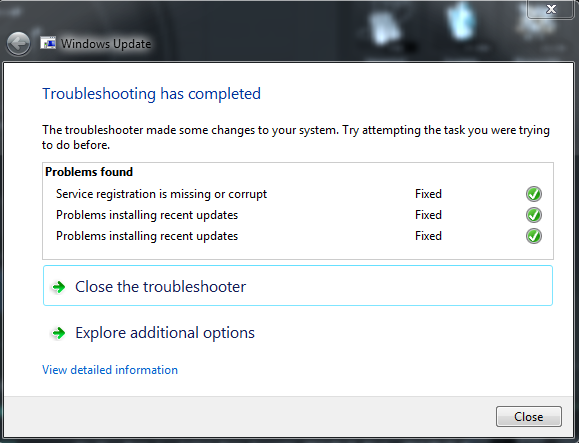
I have also tried the link listed below, and here is what it gives me.
https://support.microsoft.com/en-us/kb/971058
ced3d25b5f43acf7d103d4949944924f.png


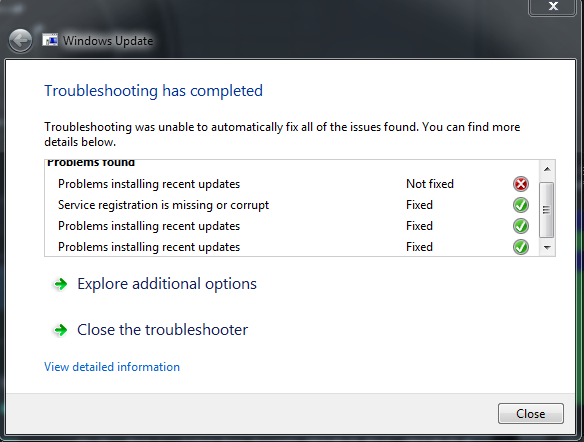
When i ran it again, i got this.
2cb2c1dbf6df024169d8a81286ee2595.png


and when i ran it a 3rd time, i got exactly the same result as the screenshot directly above,

So i tried to run windows update again, i got the error code 80244019, so i went to the URL Microsoft Community , but the "Turn on DEP for all Programs and Services except those I select:" was already set to the correct one according to the webpage.
 

My Computer

Computer type
PC/Desktop
Computer Manufacturer/Model Number
Custom Build
OS
MS Windows 7 Home Premium 64-bit SP1
CPU
Intel Core i7 3770K @ 3.50GHz
Motherboard
ASUSTeK COMPUTER INC. P8Z77-V LX (LGA1155)
Memory
8.00 GB Dual-Channel DDR3 @ 679MHz
Graphics Card(s)
EVGA GeForce GTX 760 Graphic Card - 1085MHz Core - 4GB GDDR5
Sound Card
Realtek High Definition Audio
Monitor(s) Displays
2 Acer and 1 Asus
Screen Resolution
1920x1080 and 1280x1024 ans 1280x800
Hard Drives
120GB Kingston HyperX SSD
1.8TB Western Digital
932GB Western Digital
PSU
750W Coolermaster
Case
Coolermaster 912
Cooling
3 Fans, an Extreme CoolerMaster CPU Heatsink
Keyboard
G110 Logitect Black USB Backlighting Keyboard
Mouse
Synaptics PS/2 Port TouchPad
Internet Speed
60MB p/s
Antivirus
Microsoft Security Essentials
Browser
Chrome

My Computer

Computer type
PC/Desktop
Computer Manufacturer/Model Number
Custom Built
OS
Windows 10 Pro x64, Windows 8.1 Pro x64, Windows 7 Ultimate x64 SP1,
CPU
INTEL i9-7920X LGA 2066
Motherboard
Gigabyte X299-WU8 F3
Memory
64 GB (4 X 16 GB) G-Skill V Series DDR4 3200 Quad Channel
Graphics Card(s)
EVGA GTX 1060 SC 3 GB
Sound Card
Realtek Onboard ALC1220
Monitor(s) Displays
2 x Samsung S27E310
Screen Resolution
1920x1080
Hard Drives
Samsung 2 x 970 EVO Plus 500 GB NVMe
1 x 6TB WD 6003FZBX SATA
1 x 6TB WD 60EFRX SATA
12 x 3TB WD 30EFRX SATA
PSU
Seasonic X-1050
Case
Thermaltake Armor+
Cooling
Corsair H80i V2 Liquid AOI Cooler
Keyboard
Logitech G510s
Mouse
Logitech MX Master 2S
Internet Speed
200 Mb/s
Antivirus
ESET NOD32 13.1
Browser
EDGE (Dev, Canary, Beta), Chrome
Other Info
ASUS RT-AC68U router
Malwarebytes 4.0.4
And if you still have issues, which you shouldn`t after installing the above updates, contact Thrashzone, he has helped many people with windows update.

But you should be good after you install those 2 updates, but it still may take awhile to get fully updated.

Then, do not forget to make some disk images with both Windows imaging and Macrium Reflect after you`re all updated and have your programs installed.

Macrium Reflect Free

http://www.sevenforums.com/tutorials/663-backup-complete-computer-create-image-backup.html
 

My Computer

Computer type
PC/Desktop
Computer Manufacturer/Model Number
Skylake Special #666
OS
Windows 10 Pro x64
CPU
Intel Core i7 6700K
Motherboard
Asus Sabertooth Z170 Mark 1
Memory
GSkill TridentZ RGB 16GB 3600 16-16-16-36
Graphics Card(s)
EVGA GTX 980 Ti SC x2
Sound Card
Realtek High Definition
Monitor(s) Displays
AOC G2460PG
Screen Resolution
1920 x 1080 144Hz
Hard Drives
Samsung 860 Pro 256GB, Seagate Barracuda 4TB x2
PSU
EVGA 1000 P2, EVGA White Custom Braided Cables
Case
Corsair Vengeance C70 Gunmetal Black
Cooling
Corsair H100i v2, Corsair ML120 x2, Thermal Grizzly Kryonaut
Keyboard
Logitech G910 Orion Spectrum
Mouse
Logitech G700s
Internet Speed
Verizon Fios Quantum Gateway 75/75
Antivirus
Windows Defender, Malwarebytes Free 3.8.3
Browser
Chrome
Other Info
Corsair SP120 x4, LG Blu-ray Drive, Durabrand HT-395 100 Watt Dolby Digital Amp, Corsair H2100 Wireless 7.1 Headset
Follow these instructions exactly.
First, set Windows Updates to never check for Updates.
Next reboot your computer, then install KB3020369, if not installed.
Then install KB3172605.

Windows updates should return to normal. You can then reset your updates to automatically check for updates if desired

https://support.microsoft.com/en-us/kb/3020369

https://support.microsoft.com/en-us/kb/3172605

Completed the steps above and it is currently downloading and installing the updates. Thanks!
 

My Computer

Computer type
PC/Desktop
Computer Manufacturer/Model Number
Custom Build
OS
MS Windows 7 Home Premium 64-bit SP1
CPU
Intel Core i7 3770K @ 3.50GHz
Motherboard
ASUSTeK COMPUTER INC. P8Z77-V LX (LGA1155)
Memory
8.00 GB Dual-Channel DDR3 @ 679MHz
Graphics Card(s)
EVGA GeForce GTX 760 Graphic Card - 1085MHz Core - 4GB GDDR5
Sound Card
Realtek High Definition Audio
Monitor(s) Displays
2 Acer and 1 Asus
Screen Resolution
1920x1080 and 1280x1024 ans 1280x800
Hard Drives
120GB Kingston HyperX SSD
1.8TB Western Digital
932GB Western Digital
PSU
750W Coolermaster
Case
Coolermaster 912
Cooling
3 Fans, an Extreme CoolerMaster CPU Heatsink
Keyboard
G110 Logitect Black USB Backlighting Keyboard
Mouse
Synaptics PS/2 Port TouchPad
Internet Speed
60MB p/s
Antivirus
Microsoft Security Essentials
Browser
Chrome
So I ****ed up. When I rebooted my computer and logged in, the login window disappeared but the wallpaper remained, and it was frozen like that and I decided to restart the computer after 20 minutes. When I restarted it couldn't find any boot device, and when I used my original installation cd to use the startup repair tool, it found no errors.
 

My Computer

Computer type
PC/Desktop
Computer Manufacturer/Model Number
Custom Build
OS
MS Windows 7 Home Premium 64-bit SP1
CPU
Intel Core i7 3770K @ 3.50GHz
Motherboard
ASUSTeK COMPUTER INC. P8Z77-V LX (LGA1155)
Memory
8.00 GB Dual-Channel DDR3 @ 679MHz
Graphics Card(s)
EVGA GeForce GTX 760 Graphic Card - 1085MHz Core - 4GB GDDR5
Sound Card
Realtek High Definition Audio
Monitor(s) Displays
2 Acer and 1 Asus
Screen Resolution
1920x1080 and 1280x1024 ans 1280x800
Hard Drives
120GB Kingston HyperX SSD
1.8TB Western Digital
932GB Western Digital
PSU
750W Coolermaster
Case
Coolermaster 912
Cooling
3 Fans, an Extreme CoolerMaster CPU Heatsink
Keyboard
G110 Logitect Black USB Backlighting Keyboard
Mouse
Synaptics PS/2 Port TouchPad
Internet Speed
60MB p/s
Antivirus
Microsoft Security Essentials
Browser
Chrome

My Computer

Computer type
PC/Desktop
Computer Manufacturer/Model Number
Custom assembled by me :}
OS
Win-7-Pro64bit 7-H-Prem-64bit
CPU
i7-5930K 2nd i9-9940x both water blocked VRM's too
Motherboard
ASUS SABERTOOTH X99 2nd ASUS x299 Apex
Memory
Trident-z 3200C14 2nd Trident-z 3600C16
Graphics Card(s)
EVGA 1080ti ftw3 2nd Titan Xp both water blocked
Sound Card
Built-in Realtek
Monitor(s) Displays
1-AOC G2460PG 24"G-Sync 144Hz/ 2nd 1-ASUS VG248QE 24" 144Hz
Screen Resolution
1920 x 1080 144Hz
Hard Drives
2-Samsung M.2 Evo & Evo Plus
2-Samsung 850 EVO 500GB SSD's/ 3-2.5 W.D. Black 1tb-&3-1tb/3-3.5 WD Black 1tb hdd's
PSU
EVGA SuperNOVA 1000-P2 2nd 1200-P2
Case
2-Corsair Obsidian Series 450D Black ATX Mid Tower
Cooling
Custom water loops
Keyboard
Logitech G710+/ 2nd Logitech G910
Mouse
2-RedDragon M901 Perdition 16400 dpi Gaming mouse = wired
Internet Speed
Comcast Ping 19ms 89.31mbps download speed 6.12mbps upload
Antivirus
Malwarebytes Pro/ Superantispyware Pro
Browser
FireFox & Pale moon
Other Info
2nd ASUS X299 Apex/Intel i9-9940x with Custom water loop/7H-Prem-x64/Corsair 450D case/Ram Trident-z 3600C16 4x8gb / Samsung970Evo plus 500gb SSD/Dual ssd EZ swap evo/PSU EVGA SuperNova 1200w-P2 80+Platinum/GPU Titan Xp /8-ML-140 on push-pull on 2-280GTX rads

I did what the article suggested and still can't find any boot device. Please note, i was able to boot one time after installing the two updates (And the entire windows update), and i never received any sort of secure boot violation error message.
 

My Computer

Computer type
PC/Desktop
Computer Manufacturer/Model Number
Custom Build
OS
MS Windows 7 Home Premium 64-bit SP1
CPU
Intel Core i7 3770K @ 3.50GHz
Motherboard
ASUSTeK COMPUTER INC. P8Z77-V LX (LGA1155)
Memory
8.00 GB Dual-Channel DDR3 @ 679MHz
Graphics Card(s)
EVGA GeForce GTX 760 Graphic Card - 1085MHz Core - 4GB GDDR5
Sound Card
Realtek High Definition Audio
Monitor(s) Displays
2 Acer and 1 Asus
Screen Resolution
1920x1080 and 1280x1024 ans 1280x800
Hard Drives
120GB Kingston HyperX SSD
1.8TB Western Digital
932GB Western Digital
PSU
750W Coolermaster
Case
Coolermaster 912
Cooling
3 Fans, an Extreme CoolerMaster CPU Heatsink
Keyboard
G110 Logitect Black USB Backlighting Keyboard
Mouse
Synaptics PS/2 Port TouchPad
Internet Speed
60MB p/s
Antivirus
Microsoft Security Essentials
Browser
Chrome
Hi,
Depending on how win-7 was installed boot error may differ
So it was set at windows uefi mode ?
Try disabling fast start too.

Boot back to your installation disk and use startup repair again.
How many hard drives are installed ?
 

My Computer

Computer type
PC/Desktop
Computer Manufacturer/Model Number
Custom assembled by me :}
OS
Win-7-Pro64bit 7-H-Prem-64bit
CPU
i7-5930K 2nd i9-9940x both water blocked VRM's too
Motherboard
ASUS SABERTOOTH X99 2nd ASUS x299 Apex
Memory
Trident-z 3200C14 2nd Trident-z 3600C16
Graphics Card(s)
EVGA 1080ti ftw3 2nd Titan Xp both water blocked
Sound Card
Built-in Realtek
Monitor(s) Displays
1-AOC G2460PG 24"G-Sync 144Hz/ 2nd 1-ASUS VG248QE 24" 144Hz
Screen Resolution
1920 x 1080 144Hz
Hard Drives
2-Samsung M.2 Evo & Evo Plus
2-Samsung 850 EVO 500GB SSD's/ 3-2.5 W.D. Black 1tb-&3-1tb/3-3.5 WD Black 1tb hdd's
PSU
EVGA SuperNOVA 1000-P2 2nd 1200-P2
Case
2-Corsair Obsidian Series 450D Black ATX Mid Tower
Cooling
Custom water loops
Keyboard
Logitech G710+/ 2nd Logitech G910
Mouse
2-RedDragon M901 Perdition 16400 dpi Gaming mouse = wired
Internet Speed
Comcast Ping 19ms 89.31mbps download speed 6.12mbps upload
Antivirus
Malwarebytes Pro/ Superantispyware Pro
Browser
FireFox & Pale moon
Other Info
2nd ASUS X299 Apex/Intel i9-9940x with Custom water loop/7H-Prem-x64/Corsair 450D case/Ram Trident-z 3600C16 4x8gb / Samsung970Evo plus 500gb SSD/Dual ssd EZ swap evo/PSU EVGA SuperNova 1200w-P2 80+Platinum/GPU Titan Xp /8-ML-140 on push-pull on 2-280GTX rads
Hi,
Depending on how win-7 was installed boot error may differ
So it was set at windows uefi mode ?
Try disabling fast start too.

Boot back to your installation disk and use startup repair again.
How many hard drives are installed ?

Yes, it was set to UEFI mode with the platform key already unloaded. Fast boot is already disabled. Only hard drive that is currently plugged in is the SSD. Just tried the startup repair and it did not find something, however,

I was looking around in the bios manual boot settings, when i tried to boot directly to the hard drive, i still couldn't find a boot device, but i found a entry for a "Windows boot manager", i booted into it and it loaded up my OS and everything worked correctly. I restarted the PC again after that, and it seemed to fix itself and boot normally. Any idea what could of caused this?
 

My Computer

Computer type
PC/Desktop
Computer Manufacturer/Model Number
Custom Build
OS
MS Windows 7 Home Premium 64-bit SP1
CPU
Intel Core i7 3770K @ 3.50GHz
Motherboard
ASUSTeK COMPUTER INC. P8Z77-V LX (LGA1155)
Memory
8.00 GB Dual-Channel DDR3 @ 679MHz
Graphics Card(s)
EVGA GeForce GTX 760 Graphic Card - 1085MHz Core - 4GB GDDR5
Sound Card
Realtek High Definition Audio
Monitor(s) Displays
2 Acer and 1 Asus
Screen Resolution
1920x1080 and 1280x1024 ans 1280x800
Hard Drives
120GB Kingston HyperX SSD
1.8TB Western Digital
932GB Western Digital
PSU
750W Coolermaster
Case
Coolermaster 912
Cooling
3 Fans, an Extreme CoolerMaster CPU Heatsink
Keyboard
G110 Logitect Black USB Backlighting Keyboard
Mouse
Synaptics PS/2 Port TouchPad
Internet Speed
60MB p/s
Antivirus
Microsoft Security Essentials
Browser
Chrome

My Computer

Computer type
PC/Desktop
Computer Manufacturer/Model Number
Custom assembled by me :}
OS
Win-7-Pro64bit 7-H-Prem-64bit
CPU
i7-5930K 2nd i9-9940x both water blocked VRM's too
Motherboard
ASUS SABERTOOTH X99 2nd ASUS x299 Apex
Memory
Trident-z 3200C14 2nd Trident-z 3600C16
Graphics Card(s)
EVGA 1080ti ftw3 2nd Titan Xp both water blocked
Sound Card
Built-in Realtek
Monitor(s) Displays
1-AOC G2460PG 24"G-Sync 144Hz/ 2nd 1-ASUS VG248QE 24" 144Hz
Screen Resolution
1920 x 1080 144Hz
Hard Drives
2-Samsung M.2 Evo & Evo Plus
2-Samsung 850 EVO 500GB SSD's/ 3-2.5 W.D. Black 1tb-&3-1tb/3-3.5 WD Black 1tb hdd's
PSU
EVGA SuperNOVA 1000-P2 2nd 1200-P2
Case
2-Corsair Obsidian Series 450D Black ATX Mid Tower
Cooling
Custom water loops
Keyboard
Logitech G710+/ 2nd Logitech G910
Mouse
2-RedDragon M901 Perdition 16400 dpi Gaming mouse = wired
Internet Speed
Comcast Ping 19ms 89.31mbps download speed 6.12mbps upload
Antivirus
Malwarebytes Pro/ Superantispyware Pro
Browser
FireFox & Pale moon
Other Info
2nd ASUS X299 Apex/Intel i9-9940x with Custom water loop/7H-Prem-x64/Corsair 450D case/Ram Trident-z 3600C16 4x8gb / Samsung970Evo plus 500gb SSD/Dual ssd EZ swap evo/PSU EVGA SuperNova 1200w-P2 80+Platinum/GPU Titan Xp /8-ML-140 on push-pull on 2-280GTX rads
Back
Top