Fresh Installation of Windows 7 using ISO and OEM Key on Toshiba L450

What is the installed Display device and driver in Device Manager? Are there any other drivers missing?

Did you import the PC's chipset? Compare it to the drivers for various chipset devices in Device Manager like SM Bus Controller and SATA controller.

I don't have access to the computer again for a couple of days, but did not know about importing the PC's chipset - is this important. I will check for missing drivers and what Display device and driver is installed - might this affect the performance. Any information on this very welcome.

(PS I have another laptop, a HP running Windows 8.1 - can I use the same method here using WinPE to reboot then selecting a Macriam image to put onto the new SSD? Is there any advantage in using Samsung's Magician software - it seems to require a SATA lead which I don't have)
 

My Computer My Computer

At a glance

Windows 7 64 bitCeleron4gb
Computer type
Laptop
Computer Manufacturer/Model Number
Toshiba
OS
Windows 7 64 bit
CPU
Celeron
Memory
4gb
Hard Drives
160gb
Antivirus
Avanti, Malware Bytes
Browser
chrome
I now have access to the computer again for 24 hours. Performance is good and everything looks alright. Will format old HDD and reattach as external, relocate cloud services there. Someone suggested having two partitions on SSD - one for OS, one for apps? A good idea? Can this be done on Disk Management or Partition Wizard? I guess the apps would need to be separated from C individually and moved over.

I have used the SSD tweaks tutorial for a few things, got a few left to do. Any tips very welcome. Will try to check the installed Display device and driver, missing drivers, and PC's chipset -- but how does one do the latter? What is the significance of these last checks and should i prioritise them - how can I do them?

There is an app called SSD tweaker that you can download - do you recommend it. SSD Tweaker 3.4.1 | Software Downloads | Techworld

Browser is the one app not sped up obviously. Any tips on maximising internet browsing speed v welcome.

Will bring this thread to a close and post thanks and mark as solved having done a few last things. Many thanks again for the excellent advice.


What is the installed Display device and driver in Device Manager? Are there any other drivers missing?

Did you import the PC's chipset? Compare it to the drivers for various chipset devices in Device Manager like SM Bus Controller and SATA controller.

I don't have access to the computer again for a couple of days, but did not know about importing the PC's chipset - is this important. I will check for missing drivers and what Display device and driver is installed - might this affect the performance. Any information on this very welcome.

(PS I have another laptop, a HP running Windows 8.1 - can I use the same method here using WinPE to reboot then selecting a Macriam image to put onto the new SSD? Is there any advantage in using Samsung's Magician software - it seems to require a SATA lead which I don't have)
 

My Computer My Computer

At a glance

Windows 7 64 bitCeleron4gb
Computer type
Laptop
Computer Manufacturer/Model Number
Toshiba
OS
Windows 7 64 bit
CPU
Celeron
Memory
4gb
Hard Drives
160gb
Antivirus
Avanti, Malware Bytes
Browser
chrome
I'd generally stay away from SSD tweaking tools. Just make sure defrag is turned off for that drive. Download and use the SSD manufacturer's tool. It should give you a way to view SMART details and provide necessary maintenance on the drive, including firmware updates.

I wouldn't make separate partitions for Windows and apps. I'm not aware of any performance advantages. Partitioning can easily lead to running out of space on a partition because it's difficult to anticipate the rate of growth of the occupied space.

You can download a program such as Speccy from Piriform.com which will tell you a lot of details about your hardware---serial numbers, chipset, temperatures, voltages, etc.
 

My Computer My Computer

At a glance

Windows 7 Home Premium SP1, 64-bitIntel Skylake i5-6600K, not overclocked8 GB HyperX DDR4-2666 (2 x 4 GB)none; graphics are integrated on CPU
Computer type
PC/Desktop
Computer Manufacturer/Model Number
Ignatz Special; 4 speed manual gearbox; factory air conditioning; one of one
OS
Windows 7 Home Premium SP1, 64-bit
CPU
Intel Skylake i5-6600K, not overclocked
Motherboard
AsRock Z170M Extreme 4, micro ATX
Memory
8 GB HyperX DDR4-2666 (2 x 4 GB)
Graphics Card(s)
none; graphics are integrated on CPU
Sound Card
onboard: Realtek ALC1150; external: USB Behringer UF0-202
Monitor(s) Displays
Dell S2340M 23 inch IPS
Screen Resolution
1600 x 900
Hard Drives
System: Crucial MX100 series SSD, 128 GB;
Data: Samsung Spinpoint 103SJ, 1 TB;
Backup: WD Caviar Green WD30EZRX-00D8PB0, 3 TB
PSU
Rosewill SilentNight 500 watt fanless, semi-modular
Case
Antec Solo II
Cooling
Noctua NH-U12S; Noctua F12 intake, Noctua S12A exhaust
Keyboard
Microsoft 200 6JH-00001 USB
Mouse
Dell or Microsoft optical wired; USB
Antivirus
Microsoft Security Essentials and Malwarebytes Premium
Browser
Pale Moon
Other Info
All fans PWM; speeds at idle: CPU circa 500 rpm; intake circa 600 rpm; exhaust circa 600 rpm; CPU temps 27 idle and 47 C load in a warm room (27 C/81 F) when running Intel Extreme Tuning Utility stress test.
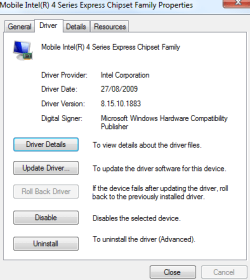
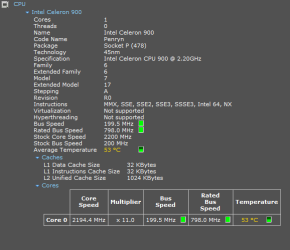
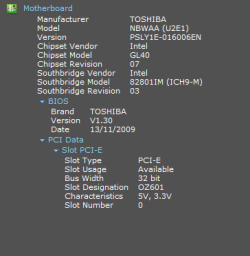
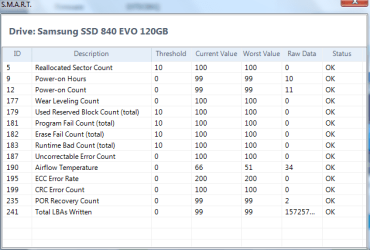
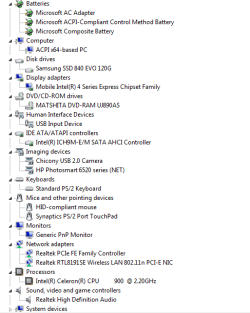
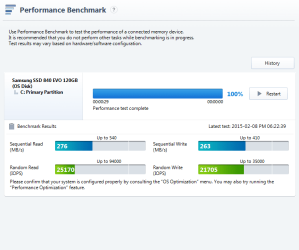
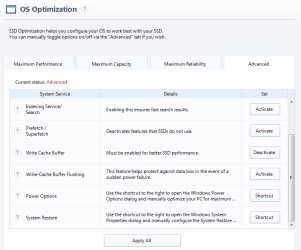
Just looking at Samsung Magician and its recommendations are below, which I have applied -- plus the details of the motherboard and the Celeron settings- overkill with the information but nevermind - i realise the SSD is not as effective as it might be cos its SATA II rather SATA III but nevermind that either. Interesting to experiment, and thanks for bearing with me.
 

Attachments

  • chipset family.PNG
    chipset family.PNG
    11.3 KB · Views: 7
  • Celeron Skippy.PNG
    Celeron Skippy.PNG
    9.2 KB · Views: 7
  • motherboard.PNG
    motherboard.PNG
    5.7 KB · Views: 7
  • SMART details.PNG
    SMART details.PNG
    13 KB · Views: 7
  • postSSD device manager.PNG
    postSSD device manager.PNG
    14.8 KB · Views: 7
  • performance benchmark.PNG
    performance benchmark.PNG
    19.1 KB · Views: 0
  • Magician recommendations.PNG
    Magician recommendations.PNG
    18.4 KB · Views: 0

My Computer My Computer

At a glance

Windows 7 64 bitCeleron4gb
Computer type
Laptop
Computer Manufacturer/Model Number
Toshiba
OS
Windows 7 64 bit
CPU
Celeron
Memory
4gb
Hard Drives
160gb
Antivirus
Avanti, Malware Bytes
Browser
chrome
If performance is fine then you don't need to worry about the chipset. I'd want the latest one from the PC model's Support download webpage.

You only need to check SSD alignment here: SSD Alignment - Windows 7 Forums

No one here would advise you to have separate OS and programs partitions.
 
Thanks that's great, yes I managed to 'verify' SSD on Disk Part, it is offset 1024kb, so that sounds like its fine.
Interesting little hitch with reconnecting the old HDD - Disk Management said the now external HDD was 'off-line' because of an identity clash with the SSD - I used Partition Wizard to wipe the old drive and problem is solved.
Will try to connect google drive, onedrive and dropbox to the old HDD now, but will be happier once it is more stably connected -present external HDD caddy is not reliable and keeps disconnecting - will try caddy in optical drive slot next. Guess best way to put cloud data accounts on HDD is to copy Users there or fiddle with account settings to have them sync with the HDD rather than SDD but I know you have put a tutorial on that elsewhere so will consult.
Excuse the obsession with detail, nearly done and out of your hair! Thanks again,
 

My Computer My Computer

At a glance

Windows 7 64 bitCeleron4gb
Computer type
Laptop
Computer Manufacturer/Model Number
Toshiba
OS
Windows 7 64 bit
CPU
Celeron
Memory
4gb
Hard Drives
160gb
Antivirus
Avanti, Malware Bytes
Browser
chrome
Back
Top