Fresh Win 7 Installed OK but Not Working "Properly"

Rincewindwiz

New member
Member
VIP
Local time
10:42 AM
Messages
192
OK I know its a bad title but . . . . well apologies.
I'm resurrecting an old Toshiba Laptop (T9000 32 bit, 1GM Ram Pentium III mobile CPU 1Ghz)
The Win7 install went fine. I thought I'd leave windows updates (likely a day or so) until at least I was sure it was working.

Install left some devices without drivers (Base System [NtPNP_PIC0013], unknown device [ACPI\SMCF010] and a LAN card). I tried Avasts driver updated but it didn't find anything (scanned the drivers but I suspect it never "phoned home" to see if they were OK)

The laptop has IE8 (Ugh) so I tried to install Firefox, chrome but they kept crashing. In desperation I downloaded an offline installer for Edge. That got as far as the 'Are you OK to let this program make changes' question and when I clicked yes it shut down half way though ' Please wait while configures etc etc

sfc /scannow reports no integrity violations

dism /Online /Cleanup-Image /RestoreHealth reportss error 87 restpre health not recognised in this context

dism /Online /Cleanup-Image error 87 enure that comman line arguments are valid!!

As an aside - I was going to do a virus scan with windows defender but it reported a need for up to date definitions and when I clicked "check for updates now" I received "the program cant check for definition updates error 0x80072f8f"
But this error is related to date/time settings and they are correct.

(I also get web site issues with security certificates which are also probably date and time related)

So there is something badly wrong mostly I suspect with Web access but exactly what and how to fix it . . .

Sensible suggestions gratefully received
 

My Computer My Computer

At a glance

64 bit Win 7 Ultimate12GBNVIDIA 630M
Computer type
Laptop
Computer Manufacturer/Model Number
HP ENVY DV6
OS
64 bit Win 7 Ultimate
Memory
12GB
Graphics Card(s)
NVIDIA 630M
Hard Drives
750GB
You have quite a challenge with a computer that has such an old CPU. Only 1GB RAM also limits your computer.

I have an old desktop with a AMD Athlon XP 2800+ (2.25GHz) CPU. It came out about a few months after the mobile Intel Pentium III-M
933 MHz CPU. What they both lack is the CPU SSE2 instruction which limits the software and Windows versions that will run on them. For example, I found out that Windows updates after about 2018 will cause your computer to crash. You have to do a system restore to recover. Right now I have Windows 7 installed again on that computer but will be careful what updates I install. Some software also requires SSE2 so you will have to install old versions that work without SSE2. I have Firefox 45.9.0 on my old computer. I selected that version based on:

Q: My xp computer will not let me download Fire Fox that will work. It says I need SSE2 to allow it? Where and how can I accomplish this?
A: Since your CPU does not support SSE2, this means for Windows Firefox 48.0.2 Release and the much more current 45.9.0 ESR were the last as 49.0 and later on Windows required CPU's that supported SSE2.

Directory Listing: /pub/firefox/releases/45.9.0esr/win32/ and pick your locale.

What version of Fire Fox for XP and site to download from?
What version of Fire Fox for XP and site to download from? | Firefox Support Forum | Mozilla Support

BTW, I have Toshiba Tecra M7-S7331 laptop. It has an Intel Core Duo T2400 1.83GHz. It was purchased in 2006. It came with 1GB RAM but now has 4GB. Since the CPU is much newer than yours it does support SSE2. It came with Windows XP Tablet Edition but now has Windows 7 Pro. Note Windows 10 does work on it but is really slow with it.
 

My Computers My Computers

  • At a glance

    Windows 7 Home Premium 64-bitsAMD FX-8350GSKILL Ripjaw-X PC3 12800 8GB (2x4GB)ASUS ROG STRIX GTX 1060 6GB
    Computer type
    PC/Desktop
    Computer Manufacturer/Model Number
    Custom build
    OS
    Windows 7 Home Premium 64-bits
    CPU
    AMD FX-8350
    Motherboard
    Gigabyte GA-990FXA-UD3 (AM3+)
    Memory
    GSKILL Ripjaw-X PC3 12800 8GB (2x4GB)
    Graphics Card(s)
    ASUS ROG STRIX GTX 1060 6GB
    Sound Card
    Integrated
    Monitor(s) Displays
    Asus VE228H (21.5-in)
    Screen Resolution
    1920x1080 60Hz
    Hard Drives
    SAMSUNG 870 EVO 2.5 Inch SATA SSD (1TB)
    SAMSUNG 870 EVO 2.5 Inch SATA SSD (1TB)
    SAMSUNG 870 EVO 2.5 Inch SATA SSD (1TB)
    PSU
    Corsair RM750x (750 watts)
    Case
    Corsair Carbide Series 200R
    Cooling
    Corsair Hydro Series H60 (CWCH60)
    Keyboard
    Logitech Elite
    Mouse
    Logitech M510 Wireless Mouse
    Internet Speed
    Comcast Gigabit Extra (1200Mbps down / 35Mbps up)
    Antivirus
    Malwarebytes
    Browser
    Firefox, Edge, Chrome
    Other Info
    ASUS DRW-24B1ST DVD-RW (24X) optical drive
    Seagate Expansion Desk (5TB) external SATA/USB HDD
    Comcast XB8 Internet Gateway
  • At a glance

    Windows 7 Pro (64-bit)AMD Phenom II 960T X4Corsair XMS2 DDR2-800 8GB (4x2GB)ASUS ENGTX560 DCII OC/2DI/1GD5 1GB
    Computer type
    PC/Desktop
    System Manufacturer/Model Number
    Custom
    OS
    Windows 7 Pro (64-bit)
    CPU
    AMD Phenom II 960T X4
    Motherboard
    ASUS M4N82 Deluxe
    Memory
    Corsair XMS2 DDR2-800 8GB (4x2GB)
    Graphics Card(s)
    ASUS ENGTX560 DCII OC/2DI/1GD5 1GB
    Monitor(s) Displays
    Samsung 930B 19-inch LCD
    Screen Resolution
    1280x1024
    Hard Drives
    Samsung SSD 870 EVO 1000 GB (Windows 10)
    Seagate ST1000DM003 1000 GB (Windows 7)
    PSU
    Antec TruePower (new) TP-650
    Case
    Antec Three Hundred
    Cooling
    AMD stock cooler from FX8350
    Mouse
    Logitech M100
    Internet Speed
    Xfinity Gigabit Extra 1200/35 Mbps
Assuming you have internet connection:

You can either manually install a couple of updates so windows update will work and there is sha 2 support ( sha 2 support needed for lots of things including mse definitions)
windows6.1-kb3138612-x64.msu
https://www.microsoft.com/en-us/download/details.aspx?id=51212
windows6.1-kb4474419-v3-x64.msu
https://catalog.s.download.windowsu..._b5614c6cea5cb4e198717789633dca16308ef79c.msu

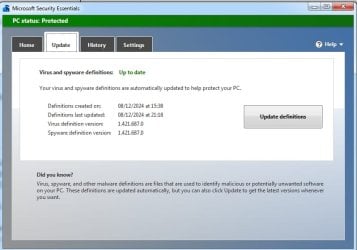
mse-8-12-24.jpg

or you can use dism++

:ar: https://github.com/Chuyu-Team/Dism-.../download/v10.1.1002.2/Dism++10.1.1002.1B.zip

HERE

that shows how to mount and update the install.wim

To update installation media see first post on that thread
Update your Win 7 installation media


If using dism++ on your currently running system it will already be selected ( highlighted in blue in top pane )

click Updates in the left pane then click Scan
 
Last edited:

My Computers My Computers

  • At a glance

    7 X64i5 84002x8gb 3200mhz
    Computer type
    PC/Desktop
    OS
    7 X64
    CPU
    i5 8400
    Motherboard
    gigabyte b365m ds3h
    Memory
    2x8gb 3200mhz
    Hard Drives
    various
    PSU
    pure power 11 400w cm
    Case
    Coolermaster
    Cooling
    cryorig m9i
  • At a glance

    7x64g54008gb ddr4 2400
    Computer type
    PC/Desktop
    OS
    7x64
    CPU
    g5400
    Motherboard
    ga b365m ds3h
    Memory
    8gb ddr4 2400
    PSU
    xfx pro 450w
Assuming you have internet connection:
You can either manually install a couple of updates so windows update will work and there is sha 2 support ( sha 2 support needed for lots of things including mse definitions) windows6.1-kb3138612-x64.msu https://www.microsoft.com/en-us/download/details.aspx?id=51212 windows6.1-kb4474419-v3-x64.msu https://catalog.s.download.windowsu..._b5614c6cea5cb4e198717789633dca16308ef79c.msu

Thanks.
It seem strange that Win7 SP1 does nto proviude this as standard?
This is a 32 bit machine. Where can I find 32 bit equivalents

- - - Updated - - -

You have quite a challenge with a computer that has such an old CPU. Only 1GB RAM also limits your computer.
What version of Fire Fox for XP and site to download from?
What version of Fire Fox for XP and site to download from? | Firefox Support Forum | Mozilla Support

.

Thanks

Challenge - I know :-). But it original XP OS was screwed up. I tried a fresh reinstall of XP but that din't work so I thought I'd try Win7 as I had an old version lying around

I was using firefox 52.9 because I read somewhere that it should work I'll try the earlier version you mentioned

- - - Updated - - -

You have quite a challenge with a computer that has such an old CPU. Only 1GB RAM also limits your computer.
What version of Fire Fox for XP and site to download from?
What version of Fire Fox for XP and site to download from? | Firefox Support Forum | Mozilla Support

.

Thanks

Challenge - I know :-). But it original XP OS was screwed up. I tried a fresh reinstall of XP but that din't work so I thought I'd try Win7 as I had an old version lying around
I was using firefox 52.9 because I read somewhere that it should work I'll try the earlier version you mentioned
 

My Computer My Computer

At a glance

64 bit Win 7 Ultimate12GBNVIDIA 630M
Computer type
Laptop
Computer Manufacturer/Model Number
HP ENVY DV6
OS
64 bit Win 7 Ultimate
Memory
12GB
Graphics Card(s)
NVIDIA 630M
Hard Drives
750GB
Dism wasn't setup for W7 hence the error 87.... please run KB947821... SURT System Update Readiness Tool
 

My Computer My Computer

At a glance

W7 home premium 32bit/W7HP 64bit/w10 tp insid...E5300 dual core3gbNvidia Geforce 7100 Nforce 630i
Computer type
PC/Desktop
Computer Manufacturer/Model Number
medionl/Aspire 6930G/acer x55a
OS
W7 home premium 32bit/W7HP 64bit/w10 tp insider ring
CPU
E5300 dual core
Motherboard
medion MS7366
Memory
3gb
Graphics Card(s)
Nvidia Geforce 7100 Nforce 630i
Monitor(s) Displays
avixc
Internet Speed
n (isp resticted to 72)
Antivirus
mse/pands
Browser
palemoon
Other Info
Belkin Fd7050 n USB using Railink RT2870 drivers, more upto date
An update. I've tried installing various KBs that WWW articles seemed to think important
4496028 installed OK
4474419 reported not applicable to this computer
3138612 reported not applicable to this computer
3020369 reported not applicable to this computer
The 'Not applicable KBs generally searched for updates first so looks like one or more required KBs are missing

Windows update fails with error 80072EFE (which is some issue that prevents the software from contacting the Microsoft servers)
However, the internet works fine - at least firefox (Thanks MisterEd) now works fine.

SURT reported no errors in its log file
SFC /Scannow reports no errors
So what now?
 

My Computer My Computer

At a glance

64 bit Win 7 Ultimate12GBNVIDIA 630M
Computer type
Laptop
Computer Manufacturer/Model Number
HP ENVY DV6
OS
64 bit Win 7 Ultimate
Memory
12GB
Graphics Card(s)
NVIDIA 630M
Hard Drives
750GB
Windows update fails with error 80072EFE

I already explained that an update is required for win7 windows update to work nowadays.

You can install it manually by downloading it from microsoft.

The 64 bit version is windows6.1-kb3138612-x64.msu

The 32 bit version is windows6.1-kb3138612-x86.msu
https://www.microsoft.com/en-us/download/details.aspx?id=51208

I also explained the importance of the sha 2 update

The 64 bit version is windows6.1-kb4474419-v3-x64.msu

The 32 bit version is windows6.1-kb4474419-v3-x86.msu
https://catalog.s.download.windowsu..._0f687d50402790f340087c576886501b3223bec6.msu

I also suggested you try dism++ and provided the download link.
 
Last edited:

My Computers My Computers

  • At a glance

    7 X64i5 84002x8gb 3200mhz
    Computer type
    PC/Desktop
    OS
    7 X64
    CPU
    i5 8400
    Motherboard
    gigabyte b365m ds3h
    Memory
    2x8gb 3200mhz
    Hard Drives
    various
    PSU
    pure power 11 400w cm
    Case
    Coolermaster
    Cooling
    cryorig m9i
  • At a glance

    7x64g54008gb ddr4 2400
    Computer type
    PC/Desktop
    OS
    7x64
    CPU
    g5400
    Motherboard
    ga b365m ds3h
    Memory
    8gb ddr4 2400
    PSU
    xfx pro 450w
I was going to do a virus scan with windows defender but it reported a need for up to date definitions and when I clicked "check for updates now" I received "the program cant check for definition updates error 0x80072f8f"

Enable the TLS 1.2 protocol.

0x80072F8F
 

My Computer My Computer

At a glance

Windows 7 Home Premium
Computer type
PC/Desktop
OS
Windows 7 Home Premium
as previously noted:
kb3138612 (for X86) reported not applicable to this computer
kb4474419 (for x86) reported not applicable to this computer
3140245 (enable TLs1.2) reported not applicable on this computer
so how do I get TLS1.2 installed?

SFC /scannow now reports "windows resource protection could nto start the repair service"
SURT reported no errors

I am afraid operating DSIM is beyond my modest capabilities. I did start it up on the problem machine; it did display the OS on the big blue box top left but selecting Windows Update (top) Updates (left) and scan simply produces the message "the system cannot find the file specified" - which file should be specified and how

What can I try next?
 

My Computer My Computer

At a glance

64 bit Win 7 Ultimate12GBNVIDIA 630M
Computer type
Laptop
Computer Manufacturer/Model Number
HP ENVY DV6
OS
64 bit Win 7 Ultimate
Memory
12GB
Graphics Card(s)
NVIDIA 630M
Hard Drives
750GB
kb3138612 (for X86) reported not applicable to this computer
kb4474419 (for x86) reported not applicable to this computer

What installation media did you use?

Ideally start with the sp1 media refresh .iso file

en_windows_7_ultimate_with_sp1_x86_dvd_u_677460.iso
also known as
X17-59463.iso

SHA1: 65FCE0F445D9BF7E78E43F17E441E08C63722657
 

My Computers My Computers

  • At a glance

    7 X64i5 84002x8gb 3200mhz
    Computer type
    PC/Desktop
    OS
    7 X64
    CPU
    i5 8400
    Motherboard
    gigabyte b365m ds3h
    Memory
    2x8gb 3200mhz
    Hard Drives
    various
    PSU
    pure power 11 400w cm
    Case
    Coolermaster
    Cooling
    cryorig m9i
  • At a glance

    7x64g54008gb ddr4 2400
    Computer type
    PC/Desktop
    OS
    7x64
    CPU
    g5400
    Motherboard
    ga b365m ds3h
    Memory
    8gb ddr4 2400
    PSU
    xfx pro 450w
I just installed 7 SP-1 on my "old asrock z97 extreme4 " with 4790K processor and everything went great. Installed Chrome, Edge and Firefox, and they all work great. Not sure I even need any updates, I don't do anything on this install but surf the internet.
 

My Computers My Computers

  • At a glance

    Windows 7 Pro x64
    OS
    Windows 7 Pro x64
  • Computer type
    PC/Desktop
I already explained that an update is required for win7 windows update to work nowadays.
You can install it manually by downloading it from microsoft.
The 64 bit version is windows6.1-kb3138612-x64.msu
Shockingly the 32 bit version is windows6.1-kb3138612-x86.msu
https://www.microsoft.com/en-us/download/details.aspx?id=51208
I also explained the importance of the sha 2 update
The 64 bit version is windows6.1-kb4474419-v3-x64.msu
Surprisingly, the 32 bit version is windows6.1-kb4474419-v3-x86.msu
https://catalog.s.download.windowsu..._0f687d50402790f340087c576886501b3223bec6.msu
kb4490629 x86installed
kb3138612 X86 reported not applicable to your computer
kb4474419-v3-X86 reported not applicaable
sfc now reports "Windows resource protection could not start the repair service"
SURT installs KB947821 and reports no errors (344 secs)

I think I'll start over with the recommended distro. But I need to do some other stuff. Thanks for the help so far

- - - Updated - - -

I just installed 7 SP-1 on my "old asrock z97 extreme4 " with 4790K processor and everything went great. Installed Chrome, Edge and Firefox, and they all work great. Not sure I even need any updates, I don't do anything on this install but surf the internet.

Lucky you :-) I am surprised at my problems as I had no problem with a Win 7 install on an antique laptop a few years back.

- - - Updated - - -

OK progress but . . . :-(
So I installed from the recommended ISO
then Installed:
1. kb3138612 (x86) - No problem. restarted
2. kb4474419-v3 (x86) - No problem installing. BUT the computer wont restart Wont even go into safe mode.

so I tried again installing
kb3138612 (x86) as before and restarted
kb4490628 (x86) because I read somewhere it is apparently needed
kb4474419-v3 (x86) - Now the install process says "not applicable to this machine"
Any suggestions?
 

My Computer My Computer

At a glance

64 bit Win 7 Ultimate12GBNVIDIA 630M
Computer type
Laptop
Computer Manufacturer/Model Number
HP ENVY DV6
OS
64 bit Win 7 Ultimate
Memory
12GB
Graphics Card(s)
NVIDIA 630M
Hard Drives
750GB

My Computers My Computers

  • At a glance

    7 X64i5 84002x8gb 3200mhz
    Computer type
    PC/Desktop
    OS
    7 X64
    CPU
    i5 8400
    Motherboard
    gigabyte b365m ds3h
    Memory
    2x8gb 3200mhz
    Hard Drives
    various
    PSU
    pure power 11 400w cm
    Case
    Coolermaster
    Cooling
    cryorig m9i
  • At a glance

    7x64g54008gb ddr4 2400
    Computer type
    PC/Desktop
    OS
    7x64
    CPU
    g5400
    Motherboard
    ga b365m ds3h
    Memory
    8gb ddr4 2400
    PSU
    xfx pro 450w
Indeed. But all this says (in the summary at the end) is
The following required updates must be installed and then the device restarted before installing any update released August 13, 2019 or later. The required updates can be installed in any order and do not need to be reinstalled, unless there is a new version of the required update.

  • Servicing stack update (SSU) (KB4490628). If you use Windows Update, the required SSU will be offered to you automatically
  • SHA-2 update (KB4474419) released September 10, 2019. If you use Windows Update, the required SHA-2 update will be offered to you automatically.
and restart


It does not tell you what to do if, aas reported above, the computer wont restart (without kb3138612) or says the KB is 'not applicable'. (with kb3138612)

- - - Updated - - -

For anyone else unwise enough to attempt this, the solution (to not booting) is - microsoftily obscure!.
It seems that 447419 updates winload.exe - presumably to do with UEFI - and MS forgot to test it with legacy boot machines
So 'all' you have to do is
1. save a copy of winload.exe (497kb) somewhere
2. install 447419
3. replace the new copy of winload (c. 535kb) with the version you saved and the machine will (well did in my case) boot up properly
(Taking ownership of the files away from trustedinstaller allows you to manipulate them)
Another 2 days of my life stolen by MS!

But sadly the problem is not over
Now windows update reports error 80080005.
SFC says Windows Resource Protetion cant start the repair serviceBut strangely? SURT reports no problems.

I think maybe I should just trash the computer
 

My Computer My Computer

At a glance

64 bit Win 7 Ultimate12GBNVIDIA 630M
Computer type
Laptop
Computer Manufacturer/Model Number
HP ENVY DV6
OS
64 bit Win 7 Ultimate
Memory
12GB
Graphics Card(s)
NVIDIA 630M
Hard Drives
750GB
Hadn't heard of that before.
 

My Computers My Computers

  • At a glance

    7 X64i5 84002x8gb 3200mhz
    Computer type
    PC/Desktop
    OS
    7 X64
    CPU
    i5 8400
    Motherboard
    gigabyte b365m ds3h
    Memory
    2x8gb 3200mhz
    Hard Drives
    various
    PSU
    pure power 11 400w cm
    Case
    Coolermaster
    Cooling
    cryorig m9i
  • At a glance

    7x64g54008gb ddr4 2400
    Computer type
    PC/Desktop
    OS
    7x64
    CPU
    g5400
    Motherboard
    ga b365m ds3h
    Memory
    8gb ddr4 2400
    PSU
    xfx pro 450w
Like I said in a previous post the Pentium III does not support SSE2. Most if not all Windows 7 updates starting in March 2018 require SSE2. The problem is the updates do not check for this and will simply cause Windows to crash. You have to do a system restore to recover from this.
 

My Computers My Computers

  • At a glance

    Windows 7 Home Premium 64-bitsAMD FX-8350GSKILL Ripjaw-X PC3 12800 8GB (2x4GB)ASUS ROG STRIX GTX 1060 6GB
    Computer type
    PC/Desktop
    Computer Manufacturer/Model Number
    Custom build
    OS
    Windows 7 Home Premium 64-bits
    CPU
    AMD FX-8350
    Motherboard
    Gigabyte GA-990FXA-UD3 (AM3+)
    Memory
    GSKILL Ripjaw-X PC3 12800 8GB (2x4GB)
    Graphics Card(s)
    ASUS ROG STRIX GTX 1060 6GB
    Sound Card
    Integrated
    Monitor(s) Displays
    Asus VE228H (21.5-in)
    Screen Resolution
    1920x1080 60Hz
    Hard Drives
    SAMSUNG 870 EVO 2.5 Inch SATA SSD (1TB)
    SAMSUNG 870 EVO 2.5 Inch SATA SSD (1TB)
    SAMSUNG 870 EVO 2.5 Inch SATA SSD (1TB)
    PSU
    Corsair RM750x (750 watts)
    Case
    Corsair Carbide Series 200R
    Cooling
    Corsair Hydro Series H60 (CWCH60)
    Keyboard
    Logitech Elite
    Mouse
    Logitech M510 Wireless Mouse
    Internet Speed
    Comcast Gigabit Extra (1200Mbps down / 35Mbps up)
    Antivirus
    Malwarebytes
    Browser
    Firefox, Edge, Chrome
    Other Info
    ASUS DRW-24B1ST DVD-RW (24X) optical drive
    Seagate Expansion Desk (5TB) external SATA/USB HDD
    Comcast XB8 Internet Gateway
  • At a glance

    Windows 7 Pro (64-bit)AMD Phenom II 960T X4Corsair XMS2 DDR2-800 8GB (4x2GB)ASUS ENGTX560 DCII OC/2DI/1GD5 1GB
    Computer type
    PC/Desktop
    System Manufacturer/Model Number
    Custom
    OS
    Windows 7 Pro (64-bit)
    CPU
    AMD Phenom II 960T X4
    Motherboard
    ASUS M4N82 Deluxe
    Memory
    Corsair XMS2 DDR2-800 8GB (4x2GB)
    Graphics Card(s)
    ASUS ENGTX560 DCII OC/2DI/1GD5 1GB
    Monitor(s) Displays
    Samsung 930B 19-inch LCD
    Screen Resolution
    1280x1024
    Hard Drives
    Samsung SSD 870 EVO 1000 GB (Windows 10)
    Seagate ST1000DM003 1000 GB (Windows 7)
    PSU
    Antec TruePower (new) TP-650
    Case
    Antec Three Hundred
    Cooling
    AMD stock cooler from FX8350
    Mouse
    Logitech M100
    Internet Speed
    Xfinity Gigabit Extra 1200/35 Mbps
No need to trash the computer if you can't solve it. Put something else on it. Linux. Or make a Hackintosh. There's even Chrome Flex, if you don't mind Google spying on you.
 

My Computer My Computer

At a glance

Windows 7 x64 SP1AMD Athlon 64 X2 6000+ / 3.0 GHz6 GB
Computer type
PC/Desktop
Computer Manufacturer/Model Number
Gateway GT5656
OS
Windows 7 x64 SP1
CPU
AMD Athlon 64 X2 6000+ / 3.0 GHz
Motherboard
NVIDIA GeForce 6150 SE
Memory
6 GB
Monitor(s) Displays
Lenovo LED
Screen Resolution
1920 X 1080
Hard Drives
Windows on 500 GB spinner; Ubuntu 16 on Sandisk 250GB SSD; Bodhi5 on Samsung 250GB SSD; another old spinner for fooling around.
PSU
Original that came with computer
Keyboard
Logitech wireless
Mouse
Logitech wireless
Antivirus
Microsoft Sec Essentials
Browser
Vivaldi
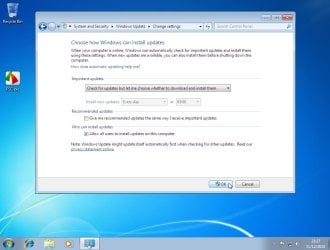
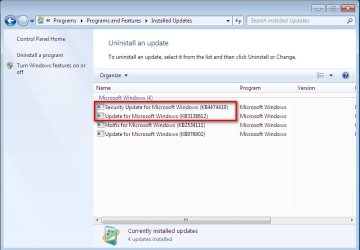
I have just tested

official iso file x86 mbr partition style mechanical disk bios boot

only the two updates and realtek net driver added.

It works perfectly.

2024-12-11_232547.jpg

2024-12-11_232729.jpg

2024-12-11_233215.jpg

it scanned for updates pretty quickly, only took 4 minutes or so.

I am not using Pentium III which might be the cause of the OP's problem
 
Last edited:

My Computers My Computers

  • At a glance

    7 X64i5 84002x8gb 3200mhz
    Computer type
    PC/Desktop
    OS
    7 X64
    CPU
    i5 8400
    Motherboard
    gigabyte b365m ds3h
    Memory
    2x8gb 3200mhz
    Hard Drives
    various
    PSU
    pure power 11 400w cm
    Case
    Coolermaster
    Cooling
    cryorig m9i
  • At a glance

    7x64g54008gb ddr4 2400
    Computer type
    PC/Desktop
    OS
    7x64
    CPU
    g5400
    Motherboard
    ga b365m ds3h
    Memory
    8gb ddr4 2400
    PSU
    xfx pro 450w

My Computer My Computer

At a glance

64 bit Win 7 Ultimate12GBNVIDIA 630M
Computer type
Laptop
Computer Manufacturer/Model Number
HP ENVY DV6
OS
64 bit Win 7 Ultimate
Memory
12GB
Graphics Card(s)
NVIDIA 630M
Hard Drives
750GB
My August install on a MBR (legacy set-up) has all 3 of those updates
(via Simplex)

allthough it does have SSE2 support .... Intel core2 Duo T5800


Re TLS

Control Panel > Internet Options > ADVANCED... check tick box
 

My Computer My Computer

At a glance

W7 home premium 32bit/W7HP 64bit/w10 tp insid...E5300 dual core3gbNvidia Geforce 7100 Nforce 630i
Computer type
PC/Desktop
Computer Manufacturer/Model Number
medionl/Aspire 6930G/acer x55a
OS
W7 home premium 32bit/W7HP 64bit/w10 tp insider ring
CPU
E5300 dual core
Motherboard
medion MS7366
Memory
3gb
Graphics Card(s)
Nvidia Geforce 7100 Nforce 630i
Monitor(s) Displays
avixc
Internet Speed
n (isp resticted to 72)
Antivirus
mse/pands
Browser
palemoon
Other Info
Belkin Fd7050 n USB using Railink RT2870 drivers, more upto date
Back
Top