- Local time
- 10:43 AM
- Messages
- 94
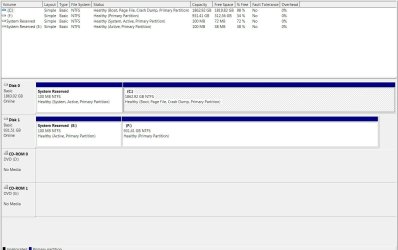
I updated the BIOS settings to change the Sata controller to AHCI, then booted to Windows and the registry edit loaded up the appropriate windows drivers. Still no sign of the missing 2 tb drive. See attached snip, and notice it's assigning a drive letter E: to my old C: drive's system reserved partition. Oh yeah, I hooked that drive back up to get some files off and actually do a little work. Is there a way to not give that drive letter E: to the reserved partition, and maybe it will then have room in the alphabet for the missing drive? I will be trying to boot again with old C: drive disconnected, to see if AHCI and only 2 HDDs connected will do the trick. Either way I'd like to get rid of the E: assignment to the reserved partition. How would I do that?
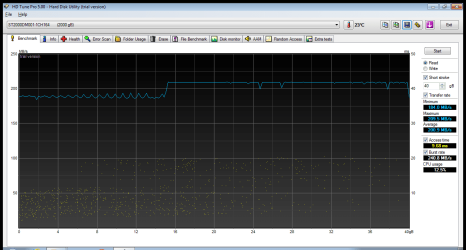
Regarding drivers, I reverted back to plan A, which is to gather drivers from Asus and other specific manufactures site. Prior to that I gave Windows permission to take over drivers and installation, restarted and let it think about it for a while. It didn't seem interested in going beyond the lame generic drivers it already had installed, and there was one USB controller that it said it couldn't install at all. I had no sound at all from either output (HDMI from AMD Radeon and analog speakers from onboard audio VIA chipset). After laying down AMD chipset from their site, AMD full Catalyst install, JMicron storage controller from their site, things are working smooth and all functionality is back. I'm definitely getting the sata 6 speeds out of the new C: drive now too.
So two questions:
1) How to remove letter E system reserved partition from old C: drive in Disk Management
2) Is there a good reference for the ASUS BIOS menus, which helps describe what some of the options do? Anything would be better than the Asus manual which basically tells me what the menu says with no explanation.
Thanks a lot
Regarding drivers, I reverted back to plan A, which is to gather drivers from Asus and other specific manufactures site. Prior to that I gave Windows permission to take over drivers and installation, restarted and let it think about it for a while. It didn't seem interested in going beyond the lame generic drivers it already had installed, and there was one USB controller that it said it couldn't install at all. I had no sound at all from either output (HDMI from AMD Radeon and analog speakers from onboard audio VIA chipset). After laying down AMD chipset from their site, AMD full Catalyst install, JMicron storage controller from their site, things are working smooth and all functionality is back. I'm definitely getting the sata 6 speeds out of the new C: drive now too.
So two questions:
1) How to remove letter E system reserved partition from old C: drive in Disk Management
2) Is there a good reference for the ASUS BIOS menus, which helps describe what some of the options do? Anything would be better than the Asus manual which basically tells me what the menu says with no explanation.
Thanks a lot
Attachments
My Computer
At a glance
Windows 7 Professional 64 bitAMD Phenom II X6 1055T 2.8 GHz (3.51 over clo...Corsair 8 GB CMX4GX3M2A1600C9R (1333 mHz)Saphire Radeon 5830HD + Hauppauge WinTV-HVR-2...
- Computer type
- PC/Desktop
- Computer Manufacturer/Model Number
- Custom build
- OS
- Windows 7 Professional 64 bit
- CPU
- AMD Phenom II X6 1055T 2.8 GHz (3.51 over clocked)
- Motherboard
- Asus M4A87TD-EVO
- Memory
- Corsair 8 GB CMX4GX3M2A1600C9R (1333 mHz)
- Graphics Card(s)
- Saphire Radeon 5830HD + Hauppauge WinTV-HVR-2250 Dual Tuner
- Sound Card
- VIA VT1818 High Definition Audio 8-Channel, AMD Radeon HDMI
- Monitor(s) Displays
- 23" Samsung SyncMaster PX2370 + 47" LG 47LH90 LED HDTV
- Screen Resolution
- 1920x1080p
- Hard Drives
- Western Digital --> WD10EARS-00Y5B1 1 TB 5200 rpm (Backup)
Seagate --> ST2000DM001-1CH164 2 TB 7200 rpm (Media) Mirrored to
Seagate --> ST2000DM001-1CH164 2 TB 7200 rpm
BUSlink --> "USB2.0 Disk-On-The-Go/Lite" 18 GB mini HDD (Bootable Win 7 Insta
- PSU
- 850 WATT OCZ --> OCZ850GXSSLI RTL
- Case
- Cool Master Scout --> SGC-2000-KKN1-GP RT
- Cooling
- CM 140mm front & top, 120mm rear & 2x side, stock CPU fan
- Keyboard
- Razer Lycosa Mirror, Logitech MX3200 wireless
- Mouse
- Logitech G9x, Logitech MX3200 wireless
- Internet Speed
- 10 Mbps
- Antivirus
- Microsoft Security Essentials
- Browser
- Chrome & Internet Explorer 11
- Other Info
- Custom rig self build.
Recently upgraded for part time Media Center DVR duties.


 .
.