
You are using an out of date browser. It may not display this or other websites correctly.
You should upgrade or use an alternative browser.
You should upgrade or use an alternative browser.
Fried legs on host, for breakfast
- Thread starter ggrrttdd
- Start date

what speed is your fan spinning at?
My Computer
At a glance
Windows 8 Pro (32-bit)1.83GHz Intel Core Duo2GB 667MHz DDR2 SDRAM (PC2-5300) (upgrade)ATI Radeon X1600 with 128MB GDDR3 memory
- Computer type
- PC/Desktop
- Computer Manufacturer/Model Number
- Apple 17" iMac MA199LL (Early 2006)
- OS
- Windows 8 Pro (32-bit)
- CPU
- 1.83GHz Intel Core Duo
- Memory
- 2GB 667MHz DDR2 SDRAM (PC2-5300) (upgrade)
- Graphics Card(s)
- ATI Radeon X1600 with 128MB GDDR3 memory
- Monitor(s) Displays
- 17-inch TFT active-matrix LCD, millions of colors
- Screen Resolution
- 1440 x 900
- Hard Drives
- Hitachi 320GB HDT721032SLA360 7200RPM SATA II (upgrade)
- Keyboard
- Microsoft Wired Keyboard 600
- Mouse
- Microsoft Basic Optical Mouse v2.0
- Internet Speed
- 4 Mbps
- Antivirus
- Microsoft Security Essentials
- Browser
- Google Chrome
- Other Info
- WEI:
Base Score: 3.9 Processor: 4.4 Memory 4.7
Graphics: 3.9 Gaming Graphics: 4.1 Primary HD: 5.9

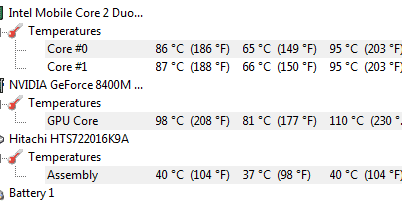
that is hot.... :devil:
your laptop needs a clean.....
your laptop needs a clean.....
failing that, you could grab one of these.
there's not much else you can do with a laptop.
are you running the power-saving features on your chip..??, Speedstep, C1E / EIST..??
usually laptop chips down-clock while idle to save power & keep the machine cooler..??

there's not much else you can do with a laptop.
are you running the power-saving features on your chip..??, Speedstep, C1E / EIST..??
usually laptop chips down-clock while idle to save power & keep the machine cooler..??
My Computer
At a glance
SEVEN x64Q9450 @ 3.6GHZ 1.34v8GB 1066 buffalo firestix @ 1152mhz CL5Sapphire HD 5970 + GTX260 (physX)
- Computer Manufacturer/Model Number
- myself
- OS
- SEVEN x64
- CPU
- Q9450 @ 3.6GHZ 1.34v
- Motherboard
- ASUS P5K PREMIUM P35
- Memory
- 8GB 1066 buffalo firestix @ 1152mhz CL5
- Graphics Card(s)
- Sapphire HD 5970 + GTX260 (physX)
- Sound Card
- Creative X-FI Xtreme Gamer
- Monitor(s) Displays
- SAMSUNG 20'' & SAMSUNG 23'' (dual screens)
- Screen Resolution
- 2048x1152 & 1680x1050
- Hard Drives
- 1x seagate 160gb IDE & 1x seagate 160gb SATA
- PSU
- XCILIO 850w (78A)
- Case
- CM590 1x 120x38mm & 2x92x38mm / 4x 120x25mm
- Cooling
- AC7 PRO @ 92x38mm blower, Lamptron military bus bay controll
- Keyboard
- LOGITECH E110
- Mouse
- logitech NX5
- Internet Speed
- 2MB
- Other Info
- its a continual ''work in progress''....

Damn, I don't feel too bad about my "duo" getting to 75C-80C now, thanks!
My Computer
At a glance
Windows 7 Professional x64Intel Core i7 8604GB DDR3 Mushkin 1600Mhz @ 7-8-7-20MSI GTS250 1GB DDR3 Twin Frozr
- Computer Manufacturer/Model Number
- Keeps changing - (Custom)
- OS
- Windows 7 Professional x64
- CPU
- Intel Core i7 860
- Motherboard
- Gigabyte GA-P55-UD4P
- Memory
- 4GB DDR3 Mushkin 1600Mhz @ 7-8-7-20
- Graphics Card(s)
- MSI GTS250 1GB DDR3 Twin Frozr
- Sound Card
- Onboard realtek
- Monitor(s) Displays
- Samsung SyncMaster 24" P2450 + Samsung 20" 2033
- Screen Resolution
- 1920 X 1080 and 1600 X 900 (#2 system 1440 X 900)
- Hard Drives
- Patriot Inferno 120GB SSD + 3 WD Blue 640GB drives
- PSU
- Corsair 750 HX Modular
- Case
- Lancool PC-K62
- Cooling
- Cooler Master TX3 CPU cooler and 4-140mm and 1-120mm case
- Keyboard
- Gigabyte USB keyboard
- Mouse
- Microsoft wireless laser mouse 5000
- Internet Speed
- 7 Mb down 1.5 up
- Other Info
- System #2: AMD Phenom II X6 1055T (Freezer 7 Pro cooler) - Gigabyte 880GMA-UD2H - WD 500GB Black - 9500GT (1GB) 500W OCZ modular PSU - Antec 200 case. System #3 (LapTop) Core 2 Duo T6670 - 320GB 7200RPM HD - 4GB DDR3 RAM.
I cleaned it out a few times before, I will get around to doing it again at some point.
I got a good warranty (3 years) after I heard about overheating problems with the 8400m gs.
It has the latest bios updates etc.
The fan is running flat out and the laptop is sitting on a table top, the graphics will still crash when playing games with minimal graphics demands.
I got a good warranty (3 years) after I heard about overheating problems with the 8400m gs.
It has the latest bios updates etc.
The fan is running flat out and the laptop is sitting on a table top, the graphics will still crash when playing games with minimal graphics demands.
My Computer
At a glance
7 Pro x86
- OS
- 7 Pro x86
has it been overclocked, or are the vents obstructed?
My Computer
At a glance
Windows 8 Pro (32-bit)1.83GHz Intel Core Duo2GB 667MHz DDR2 SDRAM (PC2-5300) (upgrade)ATI Radeon X1600 with 128MB GDDR3 memory
- Computer type
- PC/Desktop
- Computer Manufacturer/Model Number
- Apple 17" iMac MA199LL (Early 2006)
- OS
- Windows 8 Pro (32-bit)
- CPU
- 1.83GHz Intel Core Duo
- Memory
- 2GB 667MHz DDR2 SDRAM (PC2-5300) (upgrade)
- Graphics Card(s)
- ATI Radeon X1600 with 128MB GDDR3 memory
- Monitor(s) Displays
- 17-inch TFT active-matrix LCD, millions of colors
- Screen Resolution
- 1440 x 900
- Hard Drives
- Hitachi 320GB HDT721032SLA360 7200RPM SATA II (upgrade)
- Keyboard
- Microsoft Wired Keyboard 600
- Mouse
- Microsoft Basic Optical Mouse v2.0
- Internet Speed
- 4 Mbps
- Antivirus
- Microsoft Security Essentials
- Browser
- Google Chrome
- Other Info
- WEI:
Base Score: 3.9 Processor: 4.4 Memory 4.7
Graphics: 3.9 Gaming Graphics: 4.1 Primary HD: 5.9
powersaving features...??
My Computer
At a glance
SEVEN x64Q9450 @ 3.6GHZ 1.34v8GB 1066 buffalo firestix @ 1152mhz CL5Sapphire HD 5970 + GTX260 (physX)
- Computer Manufacturer/Model Number
- myself
- OS
- SEVEN x64
- CPU
- Q9450 @ 3.6GHZ 1.34v
- Motherboard
- ASUS P5K PREMIUM P35
- Memory
- 8GB 1066 buffalo firestix @ 1152mhz CL5
- Graphics Card(s)
- Sapphire HD 5970 + GTX260 (physX)
- Sound Card
- Creative X-FI Xtreme Gamer
- Monitor(s) Displays
- SAMSUNG 20'' & SAMSUNG 23'' (dual screens)
- Screen Resolution
- 2048x1152 & 1680x1050
- Hard Drives
- 1x seagate 160gb IDE & 1x seagate 160gb SATA
- PSU
- XCILIO 850w (78A)
- Case
- CM590 1x 120x38mm & 2x92x38mm / 4x 120x25mm
- Cooling
- AC7 PRO @ 92x38mm blower, Lamptron military bus bay controll
- Keyboard
- LOGITECH E110
- Mouse
- logitech NX5
- Internet Speed
- 2MB
- Other Info
- its a continual ''work in progress''....
you say that the graphics card crashes on simple games?
put it in an airtight bag (garbage bag and tie it tight, doublebag)
stick it in the freezer for a few hours.
when you take it out, run tests to see if the hardware is still unusually slow.
put it in an airtight bag (garbage bag and tie it tight, doublebag)
stick it in the freezer for a few hours.
when you take it out, run tests to see if the hardware is still unusually slow.
My Computer
At a glance
Windows 8 Pro (32-bit)1.83GHz Intel Core Duo2GB 667MHz DDR2 SDRAM (PC2-5300) (upgrade)ATI Radeon X1600 with 128MB GDDR3 memory
- Computer type
- PC/Desktop
- Computer Manufacturer/Model Number
- Apple 17" iMac MA199LL (Early 2006)
- OS
- Windows 8 Pro (32-bit)
- CPU
- 1.83GHz Intel Core Duo
- Memory
- 2GB 667MHz DDR2 SDRAM (PC2-5300) (upgrade)
- Graphics Card(s)
- ATI Radeon X1600 with 128MB GDDR3 memory
- Monitor(s) Displays
- 17-inch TFT active-matrix LCD, millions of colors
- Screen Resolution
- 1440 x 900
- Hard Drives
- Hitachi 320GB HDT721032SLA360 7200RPM SATA II (upgrade)
- Keyboard
- Microsoft Wired Keyboard 600
- Mouse
- Microsoft Basic Optical Mouse v2.0
- Internet Speed
- 4 Mbps
- Antivirus
- Microsoft Security Essentials
- Browser
- Google Chrome
- Other Info
- WEI:
Base Score: 3.9 Processor: 4.4 Memory 4.7
Graphics: 3.9 Gaming Graphics: 4.1 Primary HD: 5.9


you say that the graphics card crashes on simple games?
put it in an airtight bag (garbage bag and tie it tight, doublebag)
stick it in the freezer for a few hours.
when you take it out, run tests to see if the hardware is still unusually slow.
:huh: ... or... since you're not complaining about the card slowing down, just crashing... take a less radical approach and let it cool on it's own.
Sounds like you need a cooling pad.
My Computer
At a glance
7 Ultimate x64i5-2500k8GB G.Skill Ripjaws X F3-12800CL7D-8GBXH 1866...EVGA GTX 570 SC
- OS
- 7 Ultimate x64
- CPU
- i5-2500k
- Motherboard
- Asus P8P67 Pro
- Memory
- 8GB G.Skill Ripjaws X F3-12800CL7D-8GBXH 1866MHz 8-9-8-24
- Graphics Card(s)
- EVGA GTX 570 SC
- Sound Card
- X-Fi Titanium Fatality
- Monitor(s) Displays
- Samsung S27A550H 27" LED
- Screen Resolution
- 1920x1080
- Hard Drives
- OCZ Vertex 3 120GB.
1TB Samsung F3.
2TB Samsung F4.
- PSU
- PC Power & Cooling Silencer 760
- Case
- Lian Li Lancool K62
- Cooling
- Thermalright Venomous X Black/Scythe S-Flex/Shin-Etsu X23
- Keyboard
- MS Natural Elite 4000 Ergonomic
- Mouse
- Logitech G500
- Internet Speed
- 6MB/768
- Other Info
- Logitech Z-5500 505 watts.
D-Link DGL-4500.
Tripp-Lite Smart Pro 1500.
Yeah, it's occasionally used to play games which are freely available on the internet so its not a big problem for me.
It just makes me laugh that it gets so hot, if it burns up I get a replacement so not to worry.
I think it deserves a clean today.
It just makes me laugh that it gets so hot, if it burns up I get a replacement so not to worry.
I think it deserves a clean today.
My Computer
At a glance
7 Pro x86
- OS
- 7 Pro x86
Similar threads
- Replies
- 7
- Views
- 7K

- Replies
- 1
- Views
- 3K

- Replies
- 1
- Views
- 6K

- Replies
- 5
- Views
- 4K


