Front Audio Doesn't work - Windows 7

Bekar

New member
Local time
6:56 AM
Messages
2
Hello,
I just upgraded from windows XP to Windoes 7 & installed all the latest available motherboard drivers from intel.
Everything is working fine but there is no audio via my front audio jack. Even Realteck Audio Manager is even not recognizing any pluggen in jack in the front audio panel.

Have installed the latest drivers & checked the Realteck Sound Manager settings. There everything is OK but don't know whats wrong.

Will be thankful if any of you genius people give the solution.

Configuration: - Intel P4 C2D Processor
Intel DG33FB Motherboard

Regards,
Bekar
 

My Computer

OS
WIndows 7
Use the Windows Update drivers. Don't use the ones from your CD
 

My Computer

OS
windows 7
Are you certain the front panel header is properly connected on the motherboard? It is very easy to pull a connector while working inside the case. Even geniuses can make this mistake.
 
Yes, the front panel header is properly connected.
I take a try with driver update.

Thanks.
 
Last edited:

My Computer

OS
WIndows 7
Open up Device Manager, and just check to see if anything flagged as either no driver of faulty driver. Is unusual, but it may be a case that your hardware config means separate driver for front speaker.
 

My Computer

Computer Manufacturer/Model Number
ASUS G2S
OS
Win7 x64 & Vista Ultimate x86
CPU
Intel Core Duo T7500 2.20 GHz
Memory
2GB (meaning to upgrade to 4GB)
Graphics Card(s)
GeForce 8600M GT
Sound Card
Realtek High Definition Audio (exact model unknown)
Monitor(s) Displays
in-build notebook (second BENQ 19" in storage)
Screen Resolution
1440x900
Hard Drives
300GB internal, dual partitioned
500GB external WD
Keyboard
diNovo Media Desktop Laser (BlueTooth - love it)
Mouse
as above
Internet Speed
1.5Mb
Other Info
Speakers - Altec Lansing FX6021... blows away most 5.1 speakers on the market
Try the latest realtek drivers:
Realtek
 

My Computer

Computer Manufacturer/Model Number
Built Myself
OS
Windows 7 7600.16384 x64
CPU
Intel Core i7 OC'd to 3.20 GHz
Motherboard
Gigabyte
Memory
6GB GSkillz Triple Channel DDR3 OC'd to 1600 MHz
Graphics Card(s)
Nvidia GTX 280
Sound Card
X-Fi Platinum
Monitor(s) Displays
Dual 2001FWP
Screen Resolution
1680x1050 x 2
Hard Drives
System - Dual 150GB Raptors Raid0
Doc Storage - 1TB SATA 32MB cache Samsung
TV Recordings - 1TB SATA 32MB cache Samsung
PSU
Gigawatt Antec
Case
Antec 900
Keyboard
Saitek
Mouse
logitech MX 10000
Internet Speed
30 mb/s
audio

Hello,
I just upgraded from windows XP to Windoes 7 & installed all the latest available motherboard drivers from intel.
Everything is working fine but there is no audio via my front audio jack. Even Realteck Audio Manager is even not recognizing any pluggen in jack in the front audio panel.

Have installed the latest drivers & checked the Realteck Sound Manager settings. There everything is OK but don't know whats wrong.

Will be thankful if any of you genius people give the solution.

Configuration: - Intel P4 C2D Processor
Intel DG33FB Motherboard

Regards,
Bekar


Ok could we get a couple of snips from the device manager of the driver setup? type device manager in search, type snipping in search. then upload them.


Thanks

Ken
 

My Computer

Computer Manufacturer/Model Number
HP Pavillion dv-7 1005 Tx
OS
Win 8 Release candidate 8400
CPU
[email protected]
Memory
4 gigs
Graphics Card(s)
Nvidia 9600M
Sound Card
HD built-in
Monitor(s) Displays
17" Wxga
Screen Resolution
1440x900
Cooling
none
Internet Speed
45Mb down 5Mb up
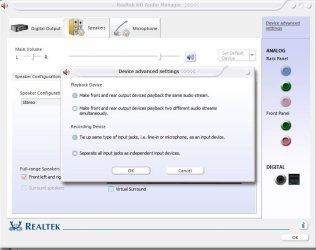
did you set this correctly:
 

Attachments

  • realtek.JPG
    realtek.JPG
    53.8 KB · Views: 1,432

My Computer

Computer Manufacturer/Model Number
me and myself
OS
vista x64/ win 7 x64
CPU
phenom 9950 BE
Motherboard
ASUS M2A-VM HDMI
Memory
8 gb
Graphics Card(s)
nvidia gts 250
Sound Card
realtek HD onboard
Monitor(s) Displays
dual hd 19" tft
Screen Resolution
1440x900
Hard Drives
2 x 500 gb WDC
1 x 500 gb Seagate
1 x 1000 gb Seagate
1 80 gb raptor
1 usb 160 gb
Cooling
standard issue
Keyboard
logitech g11
Mouse
usb wireless MS laser 6000
Internet Speed
18 mb (according to my provider :)
Back
Top