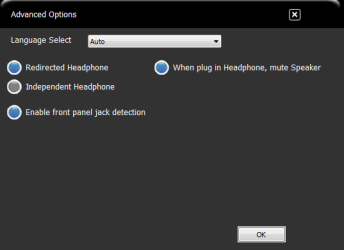
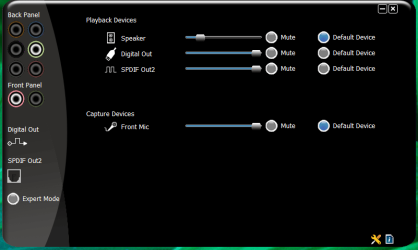
When connecting the front panel (mic, headset) of a case to the mobo, is it possible to plug it in backwards and still have it work. I ask only because in my VIA HD screen it lists the back panel and front panel. In it the green jack is highlighted where my speakers are connected to. In the front panel I have my head phones w/mic plug in and in the VIA HD panel it's not showing up. So when I use my headphones it does not mute my speakers.....sound comes from both speakers and headset. If I plug headset in to jack on speakers it mutes speakers and sound comes only through headset but I can't use my mic. So I have to use front panel w/headset and turn off speakers....is there a way to work around this or a fix.
My Computer
Computer Manufacturer/Model Number
Custom built
OS
Windows 7 Ultimate 64 bit
CPU
AMD Phenom II X4 965 Black Edition
Motherboard
Gigabyte GA-MA790X-DS4
Memory
GSkill 4 X 2 GB PC 8500
Graphics Card(s)
XFX Radeon HD 6790 D
Sound Card
On board RealTek HD
Monitor(s) Displays
Dual monitors:Samsung SyncMaster S20B300
Screen Resolution
1600 X 900
Hard Drives
Seagate Barracuda 1TB (primary)
Seagate Barracuda 2 X 320 GB
PSU
Ultra X4 750 watt fully modular
Case
Thermaltake Overseer RX 1 full tower
Cooling
Core-Contact 92 mm CPU Cooler
Keyboard
Logitech G510
Mouse
Razor DeathAdder
Internet Speed
50/5 Mbps UL/DL
Other Info
Optical: Super Muliti DVD burner w/lightscribe, Hauppauge WinTV HVR-1800
Probably not, but seeing as the case is from Ultra who knows. Anyway check you bios settings under "Onboard Devices Configuration" and make sure the "Front panel Select" setting is set to AC'97. Reason being is that your case doesn't have/support HD Audio through the front panel, only an AC'97 connection. Couldn't find anything on Ultra's site support/manual-wise (they are willing to sell it to you though, at nearly twice the price as from Tiger Direct; go figure, one owns the other), but I did find this review on it,
Thanks for the input stromy13. This is what I did.....unplugged everything and pulled computer out to work station. Opened up case and checked front panel connections to mobo. To my unbelieving eyes, I had the front panel header plug (AC'97 plugged in) and had HD set in bios as you said. I also had a HD plug, so I switched. Now in my HD VIA panel the mic port shows up when I plug in my mic. The only problems are that the panel doesn't show the headset as being plug in but does work just fine and when headset/mic is plug in and in use it still does not mute speakers. I'm one step closer....so next step is to do it all over again this time using AC'97 plug and change it in bios and see what happens. Will keep you posted as to my progress.
My Computer
Computer Manufacturer/Model Number
Custom built
OS
Windows 7 Ultimate 64 bit
CPU
AMD Phenom II X4 965 Black Edition
Motherboard
Gigabyte GA-MA790X-DS4
Memory
GSkill 4 X 2 GB PC 8500
Graphics Card(s)
XFX Radeon HD 6790 D
Sound Card
On board RealTek HD
Monitor(s) Displays
Dual monitors:Samsung SyncMaster S20B300
Screen Resolution
1600 X 900
Hard Drives
Seagate Barracuda 1TB (primary)
Seagate Barracuda 2 X 320 GB
PSU
Ultra X4 750 watt fully modular
Case
Thermaltake Overseer RX 1 full tower
Cooling
Core-Contact 92 mm CPU Cooler
Keyboard
Logitech G510
Mouse
Razor DeathAdder
Internet Speed
50/5 Mbps UL/DL
Other Info
Optical: Super Muliti DVD burner w/lightscribe, Hauppauge WinTV HVR-1800