Solved Front USB ports not working, driver problem

bob12345

New member
Member
Local time
9:44 PM
Messages
32
I noticed these past few days that my front USB 3.0 ports are not working. Whenever I plug a USB 2.0 flash drive into the front ports, the activity light on the flash drive itself does not turn on.

I did clean all old Windows updates using disk cleanup which may have caused the problem.

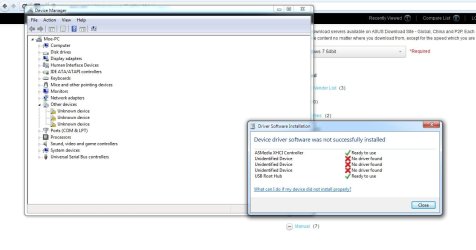
So far, I uninstalled the USB driver and tried to reinstall the software with no success.
I have attached a picture of a screenshot after the driver installation failed.
Thank you
 

Attachments
  • usb.jpg
    usb.jpg
    69.3 KB · Views: 8
Last edited:

My Computer

Computer type
PC/Desktop
Computer Manufacturer/Model Number
Custom build
OS
Windows 7 Home Premium 64-bit SP1
CPU
AMD A8 5600K
Motherboard
Asus F2-A85 M-Pro
Memory
4.00 GB DDR3
Hard Drives
500 GB HDD Western Digital Black
PSU
XFX Pro 550W
Case
Fractal Design Arc Midi R2
Cooling
Stock
Internet Speed
Fast enough
Just a couple of questions, how did you reinstall the drivers? Through Device Manager or running from the motherboard disc utility? And did you have any USB devices plugged in when installed it?
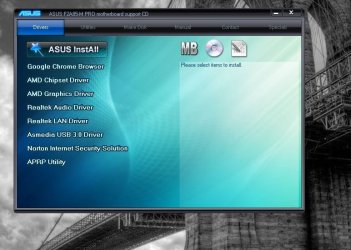
Usually if you run the software from the motherboard disc and choose drivers you'll get a list of drivers with check boxes next to them, and any that aren't installed will be unchecked. Those would be the ones you need. The ASMedia XHCI controller is the driver for your mid board header which controls the front USB 3.0 ports and that look as if it's installed fine, so I'd run that motherboard utility and see what it shows up.
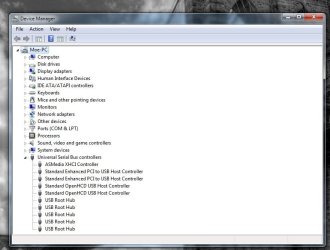
Also could you post a screenshot of Device Manager with the USB controllers section expanded.

For what it's worth I have a very similar set up in my back up rig (A10-5800k on an ASUS F2A85-V Pro) and have never got the front USB 3.0 ports working on the BitFenix front panel I added. Not saying we won't get yours working, just that you're certainly not alone with this issue.
 

My Computer

Computer type
PC/Desktop
Computer Manufacturer/Model Number
Custom Build
OS
W7 Pro x64 SP1 | W10 Pro IP x64 | W8.1 Pro x64 VM | Linux Mint VM
CPU
i7-4790k @ 4GHz (4.4GHz Boost)
Motherboard
ASUS Sabertooth Z87 (BIOS Rev 2004)
Memory
16GB DDR3 Kingston HyperX Fury @ 1600MHz CL 9-9-9-27
Graphics Card(s)
EVGA GTX 980 Classified
Sound Card
Realtek Onboard
Monitor(s) Displays
Samsung S27D390
Screen Resolution
1920 x 1080
Hard Drives
240GB Intel 520 Series SSD |
Samsung 850 EVO 120GB SSD |
2TB WD Caviar Black |
2TB WD Caviar Green
PSU
Corsair HX850-80 Gold Modular
Case
Cooler Master Silencio 650
Cooling
Corsair H80i w/2 x Corsair SP120 | 2 x 120mm Noctua NF-S12B
Keyboard
Microsoft Sidewinder X4
Mouse
Gigabyte M6900 optical
Internet Speed
152mb
Antivirus
F-Secure
Browser
Firefox 38.0
Other Info
Backup Rig: Win 7 Pro 64-bit | AMD A10-5800k | ASUS F2A85-V Pro | 8GB Samsung DDR3 @1600MHz | 120GB Toshiba SDD | 2TB Seagate HDD | Cooler Master Silencio 550
I downloaded the USB driver from Asus site. Using the provided software, the driver was removed then reinstalled using the downloaded files.
During initial setup of this computer back in May, I downloaded and installed all drivers without a CD-Rom with success.
I believe the USB flash drive was not plugged in at the time.

My front USB ports were working good for months, but just recently this problem arose.
 

Attachments

  • usb2.jpg
    usb2.jpg
    51 KB · Views: 1

My Computer

Computer type
PC/Desktop
Computer Manufacturer/Model Number
Custom build
OS
Windows 7 Home Premium 64-bit SP1
CPU
AMD A8 5600K
Motherboard
Asus F2-A85 M-Pro
Memory
4.00 GB DDR3
Hard Drives
500 GB HDD Western Digital Black
PSU
XFX Pro 550W
Case
Fractal Design Arc Midi R2
Cooling
Stock
Internet Speed
Fast enough
I'm pretty sure this is a replica of the problem I had when I uninstalled my USB 3.0 drivers and hardware when I couldn't get it working, I got round it by running the motherboard utility from disc. It will scan your system and highlight any drivers that aren't installed, I remember installing mine through Device Manager but there were two or three I just couldn't pick up and the disc utility did it. It will show the ones that aren't installed through the boxes being unchecked, that's the route I'd go down first assuming you have the disc that came with the motherboard.
It is easy enough to miss drivers when collecting them or not pick up the right ones. If you could humour me and give that a try and we'll take it from there.
 

My Computer

Computer type
PC/Desktop
Computer Manufacturer/Model Number
Custom Build
OS
W7 Pro x64 SP1 | W10 Pro IP x64 | W8.1 Pro x64 VM | Linux Mint VM
CPU
i7-4790k @ 4GHz (4.4GHz Boost)
Motherboard
ASUS Sabertooth Z87 (BIOS Rev 2004)
Memory
16GB DDR3 Kingston HyperX Fury @ 1600MHz CL 9-9-9-27
Graphics Card(s)
EVGA GTX 980 Classified
Sound Card
Realtek Onboard
Monitor(s) Displays
Samsung S27D390
Screen Resolution
1920 x 1080
Hard Drives
240GB Intel 520 Series SSD |
Samsung 850 EVO 120GB SSD |
2TB WD Caviar Black |
2TB WD Caviar Green
PSU
Corsair HX850-80 Gold Modular
Case
Cooler Master Silencio 650
Cooling
Corsair H80i w/2 x Corsair SP120 | 2 x 120mm Noctua NF-S12B
Keyboard
Microsoft Sidewinder X4
Mouse
Gigabyte M6900 optical
Internet Speed
152mb
Antivirus
F-Secure
Browser
Firefox 38.0
Other Info
Backup Rig: Win 7 Pro 64-bit | AMD A10-5800k | ASUS F2A85-V Pro | 8GB Samsung DDR3 @1600MHz | 120GB Toshiba SDD | 2TB Seagate HDD | Cooler Master Silencio 550
Thanks, do you know the name of the utility? Again, I don't have a CD reader so I cannot run the CD. On their site, there is a PC diagnostic utility I'm going to try.
 

My Computer

Computer type
PC/Desktop
Computer Manufacturer/Model Number
Custom build
OS
Windows 7 Home Premium 64-bit SP1
CPU
AMD A8 5600K
Motherboard
Asus F2-A85 M-Pro
Memory
4.00 GB DDR3
Hard Drives
500 GB HDD Western Digital Black
PSU
XFX Pro 550W
Case
Fractal Design Arc Midi R2
Cooling
Stock
Internet Speed
Fast enough
The utility is basically the driver installer for the motherboard, that's going to be a problem if you don't have an optical drive. I don't know if it's possible to download an ISO and mount that to a USB stick, I'll have to have a look into that. Could you get your hands on an external CD/DVD drive temporarily to run the motherboard disc?
The long winded way would be to work through your drivers and compare them to what's available on the ASUS website page for your motherboard and see which ones are missing.
 

My Computer

Computer type
PC/Desktop
Computer Manufacturer/Model Number
Custom Build
OS
W7 Pro x64 SP1 | W10 Pro IP x64 | W8.1 Pro x64 VM | Linux Mint VM
CPU
i7-4790k @ 4GHz (4.4GHz Boost)
Motherboard
ASUS Sabertooth Z87 (BIOS Rev 2004)
Memory
16GB DDR3 Kingston HyperX Fury @ 1600MHz CL 9-9-9-27
Graphics Card(s)
EVGA GTX 980 Classified
Sound Card
Realtek Onboard
Monitor(s) Displays
Samsung S27D390
Screen Resolution
1920 x 1080
Hard Drives
240GB Intel 520 Series SSD |
Samsung 850 EVO 120GB SSD |
2TB WD Caviar Black |
2TB WD Caviar Green
PSU
Corsair HX850-80 Gold Modular
Case
Cooler Master Silencio 650
Cooling
Corsair H80i w/2 x Corsair SP120 | 2 x 120mm Noctua NF-S12B
Keyboard
Microsoft Sidewinder X4
Mouse
Gigabyte M6900 optical
Internet Speed
152mb
Antivirus
F-Secure
Browser
Firefox 38.0
Other Info
Backup Rig: Win 7 Pro 64-bit | AMD A10-5800k | ASUS F2A85-V Pro | 8GB Samsung DDR3 @1600MHz | 120GB Toshiba SDD | 2TB Seagate HDD | Cooler Master Silencio 550
Since I don't have access to a CD drive, I decided to call Asus about the problem. After describing the problem and my failed attempts to the tech, they issued me a RMA number to repair the motherboard. However, the person I spoken with did not try to resolve the issue over the phone which troubles me. Do you think this is a hardware issue or software? Since you managed to get yours to work, I do not want to go through the trouble of an RMA if this is only a software issue.

For now I removed the usb 3.0 connection to the MB and using the usb 2.0 header instead. So far the motherboard is reading my flash drive.
 

My Computer

Computer type
PC/Desktop
Computer Manufacturer/Model Number
Custom build
OS
Windows 7 Home Premium 64-bit SP1
CPU
AMD A8 5600K
Motherboard
Asus F2-A85 M-Pro
Memory
4.00 GB DDR3
Hard Drives
500 GB HDD Western Digital Black
PSU
XFX Pro 550W
Case
Fractal Design Arc Midi R2
Cooling
Stock
Internet Speed
Fast enough
It's just missing drivers, I'm 99% certain this isn't a hardware problem and that running the motherboard disc would resolve the issue. I had a quick look at the driver download page for your motherboard but, like when I had the same problem, nothing's jumping out at me. My recommendation would be to pick up an external CD drive for around $15 and run the motherboard disc.
 

My Computer

Computer type
PC/Desktop
Computer Manufacturer/Model Number
Custom Build
OS
W7 Pro x64 SP1 | W10 Pro IP x64 | W8.1 Pro x64 VM | Linux Mint VM
CPU
i7-4790k @ 4GHz (4.4GHz Boost)
Motherboard
ASUS Sabertooth Z87 (BIOS Rev 2004)
Memory
16GB DDR3 Kingston HyperX Fury @ 1600MHz CL 9-9-9-27
Graphics Card(s)
EVGA GTX 980 Classified
Sound Card
Realtek Onboard
Monitor(s) Displays
Samsung S27D390
Screen Resolution
1920 x 1080
Hard Drives
240GB Intel 520 Series SSD |
Samsung 850 EVO 120GB SSD |
2TB WD Caviar Black |
2TB WD Caviar Green
PSU
Corsair HX850-80 Gold Modular
Case
Cooler Master Silencio 650
Cooling
Corsair H80i w/2 x Corsair SP120 | 2 x 120mm Noctua NF-S12B
Keyboard
Microsoft Sidewinder X4
Mouse
Gigabyte M6900 optical
Internet Speed
152mb
Antivirus
F-Secure
Browser
Firefox 38.0
Other Info
Backup Rig: Win 7 Pro 64-bit | AMD A10-5800k | ASUS F2A85-V Pro | 8GB Samsung DDR3 @1600MHz | 120GB Toshiba SDD | 2TB Seagate HDD | Cooler Master Silencio 550
Thank you for your advice. It may be a while before I get my hands on a CD drive. However, I am happy the front USB ports are working in the 2.0 version.
 

My Computer

Computer type
PC/Desktop
Computer Manufacturer/Model Number
Custom build
OS
Windows 7 Home Premium 64-bit SP1
CPU
AMD A8 5600K
Motherboard
Asus F2-A85 M-Pro
Memory
4.00 GB DDR3
Hard Drives
500 GB HDD Western Digital Black
PSU
XFX Pro 550W
Case
Fractal Design Arc Midi R2
Cooling
Stock
Internet Speed
Fast enough
Sorry I couldn't get your problem sorted at the moment, I'm just wondering if it would be possible to rip your motherboard disc and mount it to a USB stick on another PC. I'll look into it.
 

My Computer

Computer type
PC/Desktop
Computer Manufacturer/Model Number
Custom Build
OS
W7 Pro x64 SP1 | W10 Pro IP x64 | W8.1 Pro x64 VM | Linux Mint VM
CPU
i7-4790k @ 4GHz (4.4GHz Boost)
Motherboard
ASUS Sabertooth Z87 (BIOS Rev 2004)
Memory
16GB DDR3 Kingston HyperX Fury @ 1600MHz CL 9-9-9-27
Graphics Card(s)
EVGA GTX 980 Classified
Sound Card
Realtek Onboard
Monitor(s) Displays
Samsung S27D390
Screen Resolution
1920 x 1080
Hard Drives
240GB Intel 520 Series SSD |
Samsung 850 EVO 120GB SSD |
2TB WD Caviar Black |
2TB WD Caviar Green
PSU
Corsair HX850-80 Gold Modular
Case
Cooler Master Silencio 650
Cooling
Corsair H80i w/2 x Corsair SP120 | 2 x 120mm Noctua NF-S12B
Keyboard
Microsoft Sidewinder X4
Mouse
Gigabyte M6900 optical
Internet Speed
152mb
Antivirus
F-Secure
Browser
Firefox 38.0
Other Info
Backup Rig: Win 7 Pro 64-bit | AMD A10-5800k | ASUS F2A85-V Pro | 8GB Samsung DDR3 @1600MHz | 120GB Toshiba SDD | 2TB Seagate HDD | Cooler Master Silencio 550
I don't see where the software checks for installed drivers. It looks like the CD is only used to install drivers that the owner selects.
 

Attachments

  • CD.JPG
    CD.JPG
    64.6 KB · Views: 0

My Computer

Computer type
PC/Desktop
Computer Manufacturer/Model Number
Custom build
OS
Windows 7 Home Premium 64-bit SP1
CPU
AMD A8 5600K
Motherboard
Asus F2-A85 M-Pro
Memory
4.00 GB DDR3
Hard Drives
500 GB HDD Western Digital Black
PSU
XFX Pro 550W
Case
Fractal Design Arc Midi R2
Cooling
Stock
Internet Speed
Fast enough
After looking around the CD files, "Asus InstAll" does check drivers if you click custom install.

They crazy thing is some how my chipset driver was not installed. I have been using this computer for months with no issues with the 3.0 ports, but something deleted my chipset driver.

Thank you for your help.
 

My Computer

Computer type
PC/Desktop
Computer Manufacturer/Model Number
Custom build
OS
Windows 7 Home Premium 64-bit SP1
CPU
AMD A8 5600K
Motherboard
Asus F2-A85 M-Pro
Memory
4.00 GB DDR3
Hard Drives
500 GB HDD Western Digital Black
PSU
XFX Pro 550W
Case
Fractal Design Arc Midi R2
Cooling
Stock
Internet Speed
Fast enough
Brilliant, glad you got it working mate. I'm pretty embarassed that I didn't think of the chipset driver though, schoolboy error on my part there. At least you're up and running though, that's the main thing. Thanks for marking the thread as solved and enjoy you USB 3.0 speeds!
 

My Computer

Computer type
PC/Desktop
Computer Manufacturer/Model Number
Custom Build
OS
W7 Pro x64 SP1 | W10 Pro IP x64 | W8.1 Pro x64 VM | Linux Mint VM
CPU
i7-4790k @ 4GHz (4.4GHz Boost)
Motherboard
ASUS Sabertooth Z87 (BIOS Rev 2004)
Memory
16GB DDR3 Kingston HyperX Fury @ 1600MHz CL 9-9-9-27
Graphics Card(s)
EVGA GTX 980 Classified
Sound Card
Realtek Onboard
Monitor(s) Displays
Samsung S27D390
Screen Resolution
1920 x 1080
Hard Drives
240GB Intel 520 Series SSD |
Samsung 850 EVO 120GB SSD |
2TB WD Caviar Black |
2TB WD Caviar Green
PSU
Corsair HX850-80 Gold Modular
Case
Cooler Master Silencio 650
Cooling
Corsair H80i w/2 x Corsair SP120 | 2 x 120mm Noctua NF-S12B
Keyboard
Microsoft Sidewinder X4
Mouse
Gigabyte M6900 optical
Internet Speed
152mb
Antivirus
F-Secure
Browser
Firefox 38.0
Other Info
Backup Rig: Win 7 Pro 64-bit | AMD A10-5800k | ASUS F2A85-V Pro | 8GB Samsung DDR3 @1600MHz | 120GB Toshiba SDD | 2TB Seagate HDD | Cooler Master Silencio 550
Maybe the chipset driver got uninstalled when I updated the graphics driver to ccc 13.9. I just hope no one else will have this problem.
 

My Computer

Computer type
PC/Desktop
Computer Manufacturer/Model Number
Custom build
OS
Windows 7 Home Premium 64-bit SP1
CPU
AMD A8 5600K
Motherboard
Asus F2-A85 M-Pro
Memory
4.00 GB DDR3
Hard Drives
500 GB HDD Western Digital Black
PSU
XFX Pro 550W
Case
Fractal Design Arc Midi R2
Cooling
Stock
Internet Speed
Fast enough
It was probably when you uninstalled the USB driver.
 

My Computer

Computer type
PC/Desktop
Computer Manufacturer/Model Number
Custom Build
OS
W7 Pro x64 SP1 | W10 Pro IP x64 | W8.1 Pro x64 VM | Linux Mint VM
CPU
i7-4790k @ 4GHz (4.4GHz Boost)
Motherboard
ASUS Sabertooth Z87 (BIOS Rev 2004)
Memory
16GB DDR3 Kingston HyperX Fury @ 1600MHz CL 9-9-9-27
Graphics Card(s)
EVGA GTX 980 Classified
Sound Card
Realtek Onboard
Monitor(s) Displays
Samsung S27D390
Screen Resolution
1920 x 1080
Hard Drives
240GB Intel 520 Series SSD |
Samsung 850 EVO 120GB SSD |
2TB WD Caviar Black |
2TB WD Caviar Green
PSU
Corsair HX850-80 Gold Modular
Case
Cooler Master Silencio 650
Cooling
Corsair H80i w/2 x Corsair SP120 | 2 x 120mm Noctua NF-S12B
Keyboard
Microsoft Sidewinder X4
Mouse
Gigabyte M6900 optical
Internet Speed
152mb
Antivirus
F-Secure
Browser
Firefox 38.0
Other Info
Backup Rig: Win 7 Pro 64-bit | AMD A10-5800k | ASUS F2A85-V Pro | 8GB Samsung DDR3 @1600MHz | 120GB Toshiba SDD | 2TB Seagate HDD | Cooler Master Silencio 550
After looking around the CD files, "Asus InstAll" does check drivers if you click custom install.

My Asus CD is no longer readable, so I cannot run Asus Install in custom mode to chek if a driver is missing..., can anyone provide me with a link to an ISO image ?

But more interesting: I have the same problem than you, BUT the Asmedia XHCI controller does NOT appear in the Device Manager, it is not detected by Windows, as shown in the picture below:


If I try to install the ASMedia driver, the installation program terminates before the end, saying that there is no Asmedia controller on my PC...

Could it be a motherboard failure, meaning that the ASMedia controller is out of order ??
 

My Computer

Computer type
PC/Desktop
Computer Manufacturer/Model Number
Asus
OS
Windows 7 Professional 64 bits
CPU
i7-4770K
Motherboard
Asus Z87-Pro C2
Memory
32Gb
Graphics Card(s)
GTX 660
Hard Drives
Samsung 840 (256Gb)
Antivirus
Avast
Browser
Firefox
Provided that THOUSANDS of people have this problem, and that there is no clear solution, I have decided to stop searching for a solution (that I am sure to not find...).

I have bought a $30 PCI-Express card offering 4 USB-3 ports and 2 internal USB-3 ports (to connect the chasis front USB ports) : it has the appropriate drivers for W7, W8 and is immediately recognized by W10.

No more problem : 100% perfect !

As long as the manufacturers, Asus, W$ or Intel (who is responsible ????) will not commit to fix it, this is for me the best approach .
 

My Computer

Computer type
PC/Desktop
Computer Manufacturer/Model Number
Asus
OS
Windows 7 Professional 64 bits
CPU
i7-4770K
Motherboard
Asus Z87-Pro C2
Memory
32Gb
Graphics Card(s)
GTX 660
Hard Drives
Samsung 840 (256Gb)
Antivirus
Avast
Browser
Firefox
Back
Top