Frustrated trying to upgrade Vista to Windows 7

jbjints

New member
Local time
7:51 AM
Messages
11
Hello:
I purchased the Windows 7 Professional upgrade version through Digital River and I have been trying to install Windows 7 since last night with no luck. I downloaded the ISO file and EXE file with absolutely no luck. I keep getting an error that my current version of Windows (Vista 32-Bit Home Basic) is not compatible with the version I am trying to install which is Windows 7 Professional 64-Bit.. I tried Paul's three methods with no luck =(. The second method gives me an error message that higher privileges are required to do this.

Why isn't my computer reading any of the Windows files as a boot disk? I hope I downloaded the files correctly. I did burn the ISO file to a disk but still no luck. I am so frustrated abd honestly had I known this was going to take up so much time I probably would have just continued suffering with Windows Vista which i absolutely hate with a passion.

Please help.
 

My Computer My Computer

At a glance

Windows 7 64-Bit
OS
Windows 7 64-Bit
Hello:
I purchased the Windows 7 Professional upgrade version through Digital River and I have been trying to install Windows 7 since last night with no luck. I downloaded the ISO file and EXE file with absolutely no luck. I keep getting an error that my current version of Windows (Vista 32-Bit Home Basic) is not compatible with the version I am trying to install which is Windows 7 Professional 64-Bit.. I tried Paul's three methods with no luck =(. The second method gives me an error message that higher privileges are required to do this.

Why isn't my computer reading any of the Windows files as a boot disk? I hope I downloaded the files correctly. I did burn the ISO file to a disk but still no luck. I am so frustrated abd honestly had I known this was going to take up so much time I probably would have just continued suffering with Windows Vista which i absolutely hate with a passion.

Please help.

Lets start by burning at 4X. In addition you must do a clean install, you cannot upgrade to 64 from 32. In addition, when the OS was first issued there were major problems installing the OS purchased through Digital River, you may want to give them a call.
 
Last edited:

My Computer My Computer

At a glance

Windows 10, Home Clean InstallIntel Core2 processsor Q8200(2.33Ghz 1333FSB)...6 gbATI Radeon 256MB HD3650
Computer type
PC/Desktop
Computer Manufacturer/Model Number
Dell XPS 420
OS
Windows 10, Home Clean Install
CPU
Intel Core2 processsor Q8200(2.33Ghz 1333FSB) Quad Core Tech
Motherboard
Dell
Memory
6 gb
Graphics Card(s)
ATI Radeon 256MB HD3650
Sound Card
Intergrated 7.1 Channel Audio
Monitor(s) Displays
Dell SP2009W 20"
Hard Drives
640 GB Serial ATA Hard drive
Cooling
Fan
Keyboard
Dell USB Keyboard
Mouse
Dell Premium Optical USB
Internet Speed
DSL 2.85
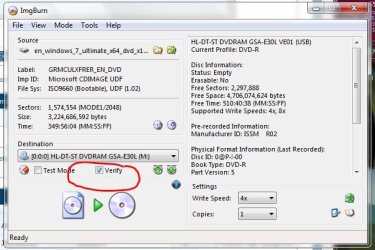
As the previous poster stated, burn the ISO image file to a blank DVD at 4X speed - no faster! Use ImgBurn, it's free and it will also verify the burn against the original ISO image file. The x64 Windows 7 Professional image is 3.02GB in size, so verify that your ISO file is the same!

Do a clean install, it's the best way to install Windows 7. Yes, you can use your "Upgrade" key to do a clean install. Sounds like you went to Paul Thurrott's website for the Clean Install from Windows 7 Upgrade tutorial. IT WORKS! I've used it several times, most of the time the Method #1 worked. Only twice did I have to do Method #2.

If you need to download the Windows 7 Professional x64 ISO again, go to this link:[FONT=&quot]
64-bit Windows 7 Professional x64 ISO[/FONT]
[FONT=&quot] http://msft-dnl.digitalrivercontent..../X15-65805.iso[/FONT]
 

My Computer My Computer

At a glance

Windows 7 Professional X64 Build 7600.16385 (...Intel Core 2 Duo E8400 Wolfdale 3.0GHz 6MB L2...Mushkin Enhanced Blackline PC8500 DDR2 6 GB (...XFX Radeon HD 5770 1 GB DDR5
Computer Manufacturer/Model Number
Custom Build by Nibiru2008 Computer Shop
OS
Windows 7 Professional X64 Build 7600.16385 (win7_rtm.090713-1255)
CPU
Intel Core 2 Duo E8400 Wolfdale 3.0GHz 6MB L2 Cache
Motherboard
Gigabyte GA-EP45-UD3R F12 BIOS
Memory
Mushkin Enhanced Blackline PC8500 DDR2 6 GB (2x2GB & 2x1GB)
Graphics Card(s)
XFX Radeon HD 5770 1 GB DDR5
Sound Card
Onboard Realtek Azalia HD Audio
Monitor(s) Displays
ViewSonic VX2250wm 22" Widescreen LED Backlight LCD
Screen Resolution
1920 X 1080p HD
Hard Drives
OCZ Vertex 2 60GB SSD, Samsung F3 HD502HJ 500GB, Samsung F1 HD502IJ 500GB, Samsung HD102SJ 1TB, Western Digital WD500AAKS 500GB
PSU
Bgears B-Tarantula 550 watt with Pigtail Modular Cabling
Case
Lian Li PC-7F Black Anodized All Aluminum bottom PSU mount
Cooling
Xigmatek Nepartak S983 3-Pipe HDT CPU Cooler & 92mm PWM Fan
Keyboard
KeyTronic Lifetime Series Model: LT Designer Black Full Size
Mouse
Logitech Wireless Trackman Wheel
Internet Speed
30 Mbps Down 2 Mbps Up Turbo RoadRunner
Other Info
G DATA Internet Security
Using ImgBurn, do i write iso file to disk or add as a file?
 

My Computer My Computer

At a glance

Windows 7 64-Bit
OS
Windows 7 64-Bit
ImgBurn does not give me a 4X option, the lowest is 31X.
 

My Computer My Computer

At a glance

Windows 7 64-Bit
OS
Windows 7 64-Bit
After burning the file I got an error message: "There were errors burning your ISO disk." & Error Message: "error reading from disk." I chose "Write ISO to disk" and at 31X speed because that was the lowest offered to me. The choices for speed were either (Max) or 31X. Please help me, had I know this would have been so much trouble I wouldn't have even bothered.
 

My Computer My Computer

At a glance

Windows 7 64-Bit
OS
Windows 7 64-Bit
After burning the file I got an error message: "There were errors burning your ISO disk." & Error Message: "error reading from disk." I chose "Write ISO to disk" and at 31X speed because that was the lowest offered to me. The choices for speed were either (Max) or 31X. Please help me, had I know this would have been so much trouble I wouldn't have even bothered.


there is no way imgburn can burn a dvd at 31X, cd sure but not dvd.

How about you use the built in snipping tool (type snipping in search) to make a screenshot and the attachment icon (shaped like a paperclip) in the reply form?

Ken J+ see pics
 
Last edited:

My Computer My Computer

At a glance

Win 8 Release candidate 8400[email protected]4 gigsNvidia 9600M
Computer Manufacturer/Model Number
HP Pavillion dv-7 1005 Tx
OS
Win 8 Release candidate 8400
CPU
[email protected]
Memory
4 gigs
Graphics Card(s)
Nvidia 9600M
Sound Card
HD built-in
Monitor(s) Displays
17" Wxga
Screen Resolution
1440x900
Cooling
none
Internet Speed
45Mb down 5Mb up
I went back to see if I downloaded the wrong program and sure enough I did. I am re-downloading the ISO file and have definitely downloaded ImgBurn, the correct ImgBurn. I am not sure but I am thinking I clicked download out of frustration. I am hoping that this does the trick. I've been at this since last night.
 

My Computer My Computer

At a glance

Windows 7 64-Bit
OS
Windows 7 64-Bit
I went back to see if I downloaded the wrong program and sure enough I did. I am re-downloading the ISO file and have definitely downloaded ImgBurn, the correct ImgBurn. I am not sure but I am thinking I clicked download out of frustration. I am hoping that this does the trick. I've been at this since last night.


I will pop back in later let us know how it goes


Ken J+
 

My Computer My Computer

At a glance

Win 8 Release candidate 8400[email protected]4 gigsNvidia 9600M
Computer Manufacturer/Model Number
HP Pavillion dv-7 1005 Tx
OS
Win 8 Release candidate 8400
CPU
[email protected]
Memory
4 gigs
Graphics Card(s)
Nvidia 9600M
Sound Card
HD built-in
Monitor(s) Displays
17" Wxga
Screen Resolution
1440x900
Cooling
none
Internet Speed
45Mb down 5Mb up
I went back to see if I downloaded the wrong program and sure enough I did. I am re-downloading the ISO file and have definitely downloaded ImgBurn, the correct ImgBurn. I am not sure but I am thinking I clicked download out of frustration. I am hoping that this does the trick. I've been at this since last night.


I will pop back in later let us know how it goes


Ken J+


Will do, thank you. I am hoping this finally works. I am looking forward to using Win 7.
 

My Computer My Computer

At a glance

Windows 7 64-Bit
OS
Windows 7 64-Bit
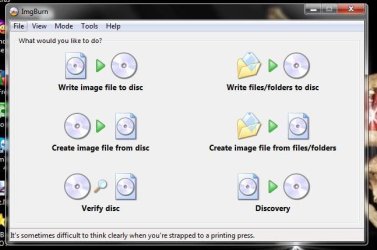
ImgBurn 4x & verify checked !


" Doc "
 

Attachments

  • ImgBurn.JPG
    ImgBurn.JPG
    40.3 KB · Views: 145
  • ImgBurn_Verify.JPG
    ImgBurn_Verify.JPG
    54.5 KB · Views: 11

My Computer My Computer

At a glance

Win7 Enterprise, Win7 x86 (Ult 7600), Win7 x6...AMD fx8350 4ghz, AMD-32 2400mhz, AMD-64 3200m...2gb, 4gb on the Ult 7600, 4gb on Technet RTM,...Draw my own Graphics, several nVidia cards
Computer type
PC/Desktop
Computer Manufacturer/Model Number
Built them myself, Science Experiments !
OS
Win7 Enterprise, Win7 x86 (Ult 7600), Win7 x64 Ult 7600, TechNet RTM on AMD x64 (2.8Ghz)
CPU
AMD fx8350 4ghz, AMD-32 2400mhz, AMD-64 3200mhz, AMDx64 2.8G
Motherboard
SIS 755, ECS-K8M890M-M (Ult 7600), GigaByte & others
Memory
2gb, 4gb on the Ult 7600, 4gb on Technet RTM, 32gb on FX8350
Graphics Card(s)
Draw my own Graphics, several nVidia cards
Sound Card
on motherboard
Monitor(s) Displays
19" flat scr, 28" I-Inc widescr,22" Emprex Widescr, 23" Acer
Screen Resolution
1280 x 1024, 1440 x 900, 1920 x 1080
Hard Drives
6 pata Ide HD's & 2 Sata HD's
added 80gb external on Ult 7600 computer,
numerous extra 1tb, 2TB, 3Tb SATA HD's
A collection of ext HD Docks w/ HDs
PSU
430w, 550w, 600w, 700, 800, etc
Case
All Generic Full Towers
Cooling
Open Air & a few fans, some w/ colored LEDs
Keyboard
Compaq & Dell recycled from GoodWill
Mouse
Made in China Optical Wired Mouse
Internet Speed
Fast Cable InterNet
Antivirus
AVG Free on 24 different Desktops, NO Problems!
Browser
IE 8 is preferred, but use FireFox sometimes
Other Info
Linksys Routers, switches, & Hubs
Too Many USB Flash Drives to count, Biggest is 64GB !
Eight computers in my home network.
Sixteen computers at my business network.
Linked via TeamViewer !
Lots of old used spare computer parts everywhere!
Hello:
Okay. Win 7 is downloaded and working but I have no sound. Any ideas? I know I have a soundblaster but I am not sure which one. I will look for my invoice.
 

My Computer My Computer

At a glance

Windows 7 64-Bit
OS
Windows 7 64-Bit
Hello:
Okay. Win 7 is downloaded and working but I have no sound. Any ideas? I know I have a soundblaster but I am not sure which one. I will look for my invoice.

Hi, Welcome to SF,

This Creative Knowledge Base should help you in finding which card

Creative Worldwide Support

To get the drivers we have a Sticky thread under Sound and Audio session which you should be able to find the appropriate drivers

http://www.sevenforums.com/sound-audio/21804-creative-sound-cards.html
 

My Computer My Computer

At a glance

Windows 7 Ultimate - 64-bit | Windows 8 Pro -...Intel® Core™ i7 Processor 3,610QM (2.30Hz, 6M...8 GBNVIDIA® GeForce® GT 650M 2GB Graphics, Optimu...
Computer Manufacturer/Model Number
Samsung NP550P5C-S02IN
OS
Windows 7 Ultimate - 64-bit | Windows 8 Pro - 64-bit
CPU
Intel® Core™ i7 Processor 3,610QM (2.30Hz, 6MB L3 Cach
Memory
8 GB
Graphics Card(s)
NVIDIA® GeForce® GT 650M 2GB Graphics, Optimus™ techno
Sound Card
SoundAlive™ JBL 3 Speakers (With sub-Woofer)
Monitor(s) Displays
39.62cm (15.6) SuperBright 300nit HD+ LED Display
Screen Resolution
1,600 x 900, Anti-Reflective
Hard Drives
1TB S-ATA II Hard Drive (5,400RPM)
Hello:
The sound is working and my video card is updated but the fonts seem a little fuzzy, any idea on if I could get rid of the fuzziness?
 

My Computer My Computer

At a glance

Windows 7 64-Bit
OS
Windows 7 64-Bit
Is your Screen Resolution set to native (highest) resolution? Right click desktop.
 
Back
Top