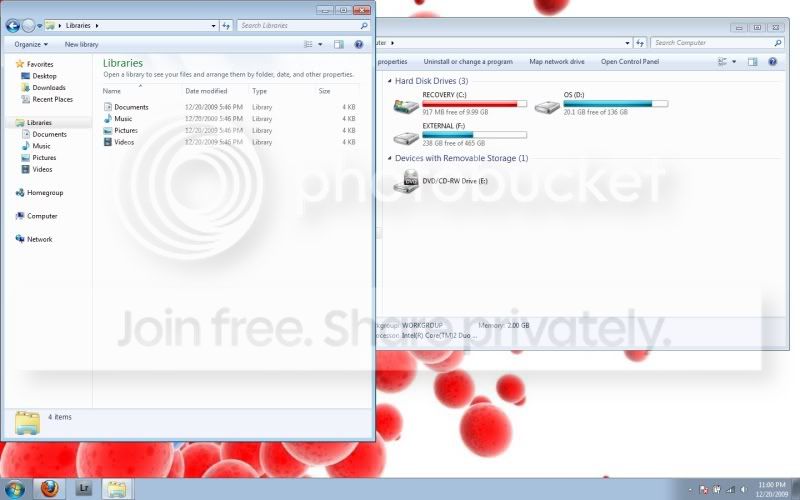
Full hard drive. where's it all at?

jakejjs

New member
Local time
4:32 AM
Messages
3
I just installed 7 today. I kind of figured it would be like reformatting xp where it just wipes the hard drive clean and you start from scratch. All of my folders are empty but my HD only has 20G of free space i don't know whats taking it all up?

I was counting on having an almost empty HD when it was all installed. Sorry if this is a re-post. i'm in a bit of a rush
 

My Computer My Computer

OS
windows 7
See if you have a windows.old folder, if so, you can run disk cleanup and delete it..
 

My Computer My Computer

Computer type
PC/Desktop
Computer Manufacturer/Model Number
LENOVO K450 @3.0GHZ
OS
64-bit Windows 8.1 Pro
CPU
Core(TM) i5 CPU 4330 Haswell @ 3.20GHz
Motherboard
LENOVO
Memory
12.00 GB
Graphics Card(s)
Intel(R) HD Graphics
Sound Card
Intel HD integtrated
Monitor(s) Displays
HP 25' ISP Monitor
Screen Resolution
1900/1020
Hard Drives
(1) ST1000DM003-1CH162 (2) Generic STORAGE DEVICE USB Device (3) Generic STORAGE DEVICE USB Device
Internet Speed
100mb down/10mb up
Well how big a harddrive did you have to start with? Just the Windows installation takes up over 10GB of space...

You have to pay attention during the installation, as well. If memory serves me correctly, the default option is to do an "upgrade" which attempts to keep all your files and programs in tact. It's better to do a fresh install. For this you should choose "advanced", "custom" or "expert" installation option. Delete the old partition, create a new one that takes up the entire harddrive. This will maximize the efficiency of the space used.
 

My Computer My Computer

OS
Windows 7 Ultimate 64-bit, Windows Server 2008
See if you have a windows.old folder, if so, you can run disk cleanup and delete it..

That was on the recovery partition so i erased it. only 800MB in it


What could be taking up over 100Gigs of space on my OS partition? are my music, videos and photo files still hiding in it?

Untitled-6.jpg
 

My Computer My Computer

OS
windows 7
Backup your files to the external, unplug it, boot from the Win7 DVD, select Custom install, then use Advanced drive tools to delete all partitions, create new as you wish, then format before installing Win7 on the first partition.
 
Back
Top