Full picture preview in folder icon possible?

pauleckstein

New member
Local time
4:57 AM
Messages
1
hey,
i am a user from germany and switched some time ago from xp to win7.
as a die-hard music lover i managed my mp3 collection with xp in a really intuitive way with cover pictures displayed in the folder:

musikordner.gif


i want to continue this same way in win7, but dunno how. i am not really satisfied with the folder solution there.
any ideas?

greets
 

My Computer

OS
Windows 7 Ultimate
Welcome to Seven Forums pauleckstein. It takes some doing, but it is possible to do something very similar:

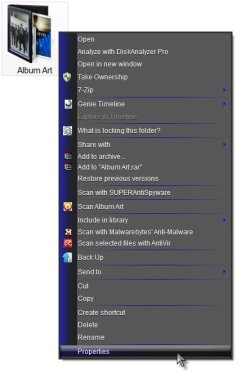
Right click on a Folder> Properties

1.jpg

Properties> Select Customize

2.jpg

Under Folder pictures> Choose File ( the cover art you want to display, a jpg file)

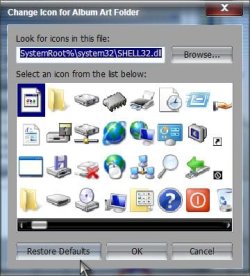
Under Folder icons> Change Icon> Restore Defaults

3.jpg

Apply and OK your way out

This is how it looks on mine, but I am using custom folder icons. On the default yellow folders the picture appears to be on the inside of the opened folder with the majority of the picture showing (I enlarged it a bit so you can see).

Folder.jpg

That's it, repeat for each folder. You can store all pictures in 1 folder, or the particular picture in the individual folder it is for. Either way, navigate to that place when you change the Choose File in Folder Pictures.

A Guy
 

My Computer

Computer type
PC/Desktop
OS
Windows 10 Home x64
CPU
INTEL Core i5-750 Quad-Core 3.37GHz
Motherboard
ASUS P7P55D
Memory
HyperX Fury Black Series 8GB (2 x 4GB) 1866Mhz
Graphics Card(s)
EVGA GeForce GTX 750 Superclocked 1GB 128-Bit GDDR5
Monitor(s) Displays
LG 32MA68HY 32" IPS
Screen Resolution
1920 x 1080
Hard Drives
Samsung 840 Evo 120GB, SEAGATE 500GB Barracuda® 7200.12, SATA 3 Gb/s, 7200 RPM, 16MB cache
PSU
ANTEC TruePower New TP-550, 80 PLUS, 550W
Case
ANTEC Three Hundred Illusion
Cooling
COOLER MASTER Hyper 212 Plus, 4 x 120mm 1 x 140mm Noctua's
Internet Speed
85 + Mbps
Antivirus
Avast
Browser
Vivaldi
Back
Top