Solved Full Screen Games no full screen on Windows Seven

warlocklw

New member
Local time
6:50 AM
Messages
4
Full screen game will full screen when I use Vista and XP. When I use Seven, the side will become dark.

Like this:
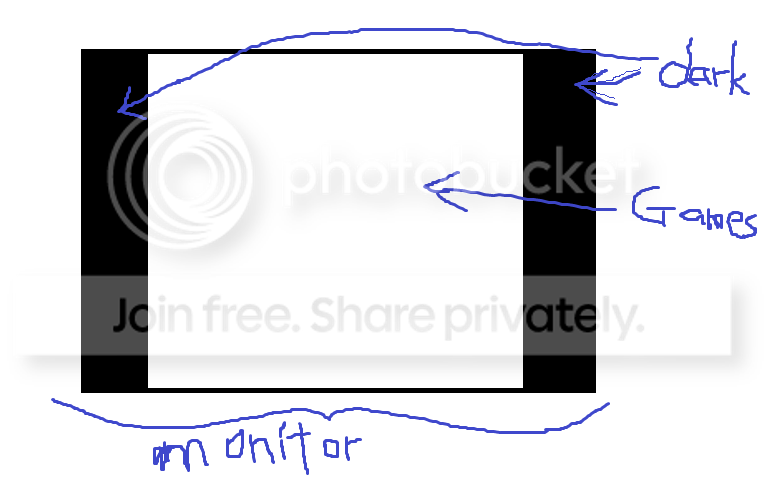
seven.png


But when I use fraps to take screenshot, it appears to be full screen image. So, i have to draw it out. Any idea?

Information: Nvidia Geforce 9300M GS
Dell Inspiron 1427, Intel Core2Duo T6600
Windows Se7en Ultimate build 7600
 

My Computer My Computer

At a glance

Windows Seven build 7600Intel Core 2 Duo T66002GBNVIDIA Geforce 9300M GS
Computer Manufacturer/Model Number
DELL
OS
Windows Seven build 7600
CPU
Intel Core 2 Duo T6600
Memory
2GB
Graphics Card(s)
NVIDIA Geforce 9300M GS
Ok what is going on here is your screen is set to a smaller size in game then in windows.
If you check your windows settings you will see something like 1440x900 then look at the setting in game it may end up being 800x600. See the difference.
Also what game are you trying to play, I know that most steam games you need to enable the widescreen support in game then you can change the resolution to the correct size for your screen.
 

My Computer My Computer

At a glance

Windows 7 Ultimate x64 SP1AMD Phenom II 1090 3.2 six core16 gig DDR3MSI R6950 2gig
Computer Manufacturer/Model Number
Custom Build
OS
Windows 7 Ultimate x64 SP1
CPU
AMD Phenom II 1090 3.2 six core
Motherboard
MSI 890FXA-GD65
Memory
16 gig DDR3
Graphics Card(s)
MSI R6950 2gig
Sound Card
on board
Monitor(s) Displays
Acer 23inch led
Screen Resolution
1900x1080 widescreen
Hard Drives
Seagate 1tb SATA6
2x 1tb HITACHI Deskstar
PSU
CORSAIR Enthusiast Series TX750 V2 750W
Case
CoolMaster HAF 922
Cooling
Box AMD Heatsink/Fan
Internet Speed
Cable 12Mbps/3Mbps
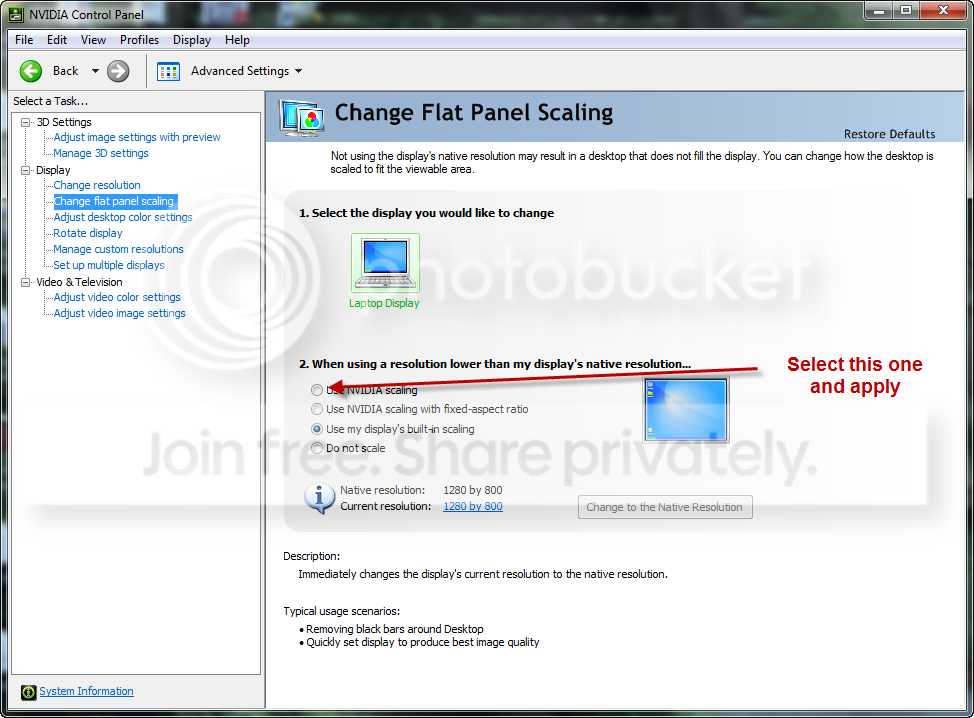
Thanks. I check NVIDIA control panel and do some settings. It fixed my problems. :)

9-2-200911-14-49PM.png
 

My Computer My Computer

At a glance

Windows Seven build 7600Intel Core 2 Duo T66002GBNVIDIA Geforce 9300M GS
Computer Manufacturer/Model Number
DELL
OS
Windows Seven build 7600
CPU
Intel Core 2 Duo T6600
Memory
2GB
Graphics Card(s)
NVIDIA Geforce 9300M GS
Glad you got it working. Thanks for posting the fix. :)
 

My Computer My Computer

At a glance

Windows 8.1 PRO3rd Generation Intel Core i7‐3612QM CPU @ 2.1...8GB DDR3NVIDIA GeForce GT 525M (128 bit), 1GB Grpahics
Computer type
PC/Desktop
Computer Manufacturer/Model Number
DELL VOSTRO 3650
OS
Windows 8.1 PRO
CPU
3rd Generation Intel Core i7‐3612QM CPU @ 2.10GHZ
Memory
8GB DDR3
Graphics Card(s)
NVIDIA GeForce GT 525M (128 bit), 1GB Grpahics
Screen Resolution
1920X1080
Hard Drives
750GB 5400RPM
Solved...:thumbsup:
 

My Computer My Computer

At a glance

OS
OS
OS
Hi!!! ...
Thanks for this post
Even my graphics card being ATI i went to basic definitions settings and find that option that helped me a lot ... I was thinking I had to install windows Vista again...
:D .... thanks again
 

My Computer My Computer

At a glance

Windows 7
OS
Windows 7
I fix this issues differently... I have however NVIDIA 8500GT and LG 22" widescreen monitor. For some reason, W7 does not detect proper monitor timings and i have only maximum resolution functional without shrinking. Just go on add custom resolution and don't leave automatic timing selection but try to choose one of the options. Add for instance, 1280x768 @ 75 Hz and try some other timing like GTF, DMT, CVT. A little experimentation is needed. When you find right timing, add custom resolution for your game resolution as well and problem solved ;)
 

My Computer My Computer

At a glance

Windows 7 / XPAMD Athlon 5600+ Dual CoreTranscend DDRII 800 MhzGainward 8500GT Golden Sample
OS
Windows 7 / XP
CPU
AMD Athlon 5600+ Dual Core
Motherboard
Biostar TF570 SLI
Memory
Transcend DDRII 800 Mhz
Graphics Card(s)
Gainward 8500GT Golden Sample
Sound Card
Realteck
Monitor(s) Displays
LG Flatron L22WS
Hard Drives
WD 320 & 360 Gb
PSU
Cooler Master 430W Silent
how i make it on ATI PLS
 

My Computer My Computer

At a glance

sdfHP 6730s4GBati 3430 hd mobility
Computer Manufacturer/Model Number
...
OS
sdf
CPU
HP 6730s
Motherboard
...
Memory
4GB
Graphics Card(s)
ati 3430 hd mobility
Sound Card
...
Monitor(s) Displays
15.6
Hard Drives
320 sata
PSU
..
Case
..
Cooling
..
Could someone PLEASE post the instructions for doing this with an ATI Card? I have the 4570 in a laptop. Someone mentioned basic definitions, but there's no option for that. I really dislike ATI's control panel because it doesn't have as many options as NVIDIA's does.

Could the previous person who got this to work with an ATI card please tell us exactly how they did it?

None of the games I have work in widescreen and changing it in the game options does not work.

These are games such as Portal, StepMania, Touhou games... really ANY game that uses full screen. And you see for a split second that the desktop bounces into a lower reslution too and I can't figure out how to get it back to normal while the game is running.

Thanks.
 

My Computer My Computer

At a glance

Windows 7
OS
Windows 7
There should be an option for display or scaling.
 

My Computer My Computer

At a glance

Windows 7 Ultimate x86-64[email protected] 1066MHz FSB6GB DDR3 1066MHz9300M GS 256MB Dedicated (Speed) + Intel4500M...
Computer Manufacturer/Model Number
Sony Vaio Z46GDU
OS
Windows 7 Ultimate x86-64
CPU
[email protected] 1066MHz FSB
Motherboard
Sony branded
Memory
6GB DDR3 1066MHz
Graphics Card(s)
9300M GS 256MB Dedicated (Speed) + Intel4500MHD (Stamina)
Sound Card
Realtek HD Audio
Monitor(s) Displays
13.1' WXGA
Screen Resolution
1600x900
Hard Drives
320GB 7200RPM w/ 16MB cache
Internet Speed
1MB/s
Alright I got it fixed. Turns out changing the aspact ration ingame helped... I just hope it works for other games as well. Thanks.

I don't see why it's not doing it automatically though.

PS: This was tested using the game, Portal.
 

My Computer My Computer

At a glance

Windows 7
OS
Windows 7
i also have the same problem and have dell inspiron 1420, dont have the graphics card but only inbuilt 965 express chipset
the game use to run full screen in vista and xp but not in win7
i searched all around for adjusting resolution but it didn't made any difference !
 

My Computer My Computer

At a glance

windows 7
OS
windows 7
To add some info, this only works on laptop driver panel. Desktop driver panel don't give user to select that option.
 

My Computer My Computer

At a glance

Windows Seven build 7600Intel Core 2 Duo T66002GBNVIDIA Geforce 9300M GS
Computer Manufacturer/Model Number
DELL
OS
Windows Seven build 7600
CPU
Intel Core 2 Duo T6600
Memory
2GB
Graphics Card(s)
NVIDIA Geforce 9300M GS
You know I'm starting to think that this is a problem with Windows 7, NOT the gfx card itself. Hopefully this is fixed in the final version.

Are all of you using the RC (release candidate) release? If that's the case, this may be why it's glitching? Matybe it's just a problem in the OS.

I'd say you can try going in the game and changing the resolution to a widescreen one. Although I konw some games don't have this option.

And just so you know, the ATI catalyst has options for Desktop and Display and Display in regards to resolutions and those don't help. NVIDIA's control panel is much more useful for things like this... so anyhow, try changing in game. I konw that doesn't sound like much help, but I'm going to give it a try on some other games and see if it works.
 

My Computer My Computer

At a glance

Windows 7
OS
Windows 7
You know I'm starting to think that this is a problem with Windows 7, NOT the gfx card itself. Hopefully this is fixed in the final version.

Are all of you using the RC (release candidate) release? If that's the case, this may be why it's glitching? Matybe it's just a problem in the OS.

I'd say you can try going in the game and changing the resolution to a widescreen one. Although I konw some games don't have this option.

And just so you know, the ATI catalyst has options for Desktop and Display and Display in regards to resolutions and those don't help. NVIDIA's control panel is much more useful for things like this... so anyhow, try changing in game. I konw that doesn't sound like much help, but I'm going to give it a try on some other games and see if it works.

Not a Win7 "problem." Win7 and drivers are behaving correctly and precise.
 

My Computer My Computer

At a glance

7600.20510 x86P4 550 3.4 GHz HT running at 3.5 GHzOCZ 2 GB(2x1GB) DDR400mHz running @ 414 mHzHIS Radeon HD 3850 IceQ 3 Turbo HDMI Dual DL-...
Computer Manufacturer/Model Number
self built
OS
7600.20510 x86
CPU
P4 550 3.4 GHz HT running at 3.5 GHz
Motherboard
MSI PM8M3-V (MS-7211 v1.x) Micro-ATX mainboard
Memory
OCZ 2 GB(2x1GB) DDR400mHz running @ 414 mHz
Graphics Card(s)
HIS Radeon HD 3850 IceQ 3 Turbo HDMI Dual DL-DVI AGP
Sound Card
MOTU Traveler firewire studio interface 192 kHz 24 bit
Monitor(s) Displays
22" widescreen Acer X223W LCD, 17" Compaq P75 CRT
Screen Resolution
1680x1050 and 1280x1024
Hard Drives
SATA I x2 WD, 400 GB and 120 GB, SATA 2 WD Caviar Black 1 TB
PSU
350W generic
Case
Cybertronpc, it glows blue
Cooling
stock cpu fan, Ice-Q 3 gpu and system, many case fans
Keyboard
Logitch Classical Keyboard 200
Mouse
Logitech Mediaplay cordless
Internet Speed
1792/448 kbits/sec
Other Info
SATA II PCI fake RAID adapter, 1 GB Readyboost, original ATI Remote Wonder (even works with WMC perfectly), Logitech Rumblepad 2 game controller x2
If that weere the case, this thread wouldn't exist.
 

My Computer My Computer

At a glance

Windows 7
OS
Windows 7
Yes Dreamcube, you are really correct. :o All of the thousands, possibly millions (by now) of people running Win 7 smoothly for up to a year must have done so by mistake somehow.

You have no clue what you are doing, talking about or why the black bars are even "correctly" there. If you learned about aspect ratios, you might feel better about why it's happening.
 

My Computer My Computer

At a glance

7600.20510 x86P4 550 3.4 GHz HT running at 3.5 GHzOCZ 2 GB(2x1GB) DDR400mHz running @ 414 mHzHIS Radeon HD 3850 IceQ 3 Turbo HDMI Dual DL-...
Computer Manufacturer/Model Number
self built
OS
7600.20510 x86
CPU
P4 550 3.4 GHz HT running at 3.5 GHz
Motherboard
MSI PM8M3-V (MS-7211 v1.x) Micro-ATX mainboard
Memory
OCZ 2 GB(2x1GB) DDR400mHz running @ 414 mHz
Graphics Card(s)
HIS Radeon HD 3850 IceQ 3 Turbo HDMI Dual DL-DVI AGP
Sound Card
MOTU Traveler firewire studio interface 192 kHz 24 bit
Monitor(s) Displays
22" widescreen Acer X223W LCD, 17" Compaq P75 CRT
Screen Resolution
1680x1050 and 1280x1024
Hard Drives
SATA I x2 WD, 400 GB and 120 GB, SATA 2 WD Caviar Black 1 TB
PSU
350W generic
Case
Cybertronpc, it glows blue
Cooling
stock cpu fan, Ice-Q 3 gpu and system, many case fans
Keyboard
Logitch Classical Keyboard 200
Mouse
Logitech Mediaplay cordless
Internet Speed
1792/448 kbits/sec
Other Info
SATA II PCI fake RAID adapter, 1 GB Readyboost, original ATI Remote Wonder (even works with WMC perfectly), Logitech Rumblepad 2 game controller x2
Actually YES I do know what I'm talking about... that was pretty harsh.

I know what aspect ratios are. yes I got the drivers and everything working but why does it NOT hold a 16:9 (or 10 in some cases) aspect ratio when it goes into full screen like Vista and XP? Why do we have to go and manually set it to this? Yes I know NVIDIA's panel has a thing for it and it might be hidden somewhere in ATI's as well but the fact that I have to go in the options and reconfigure it is what I'm talking about.

Also, some games don't even have options for this in the game... sure it may be hidden in a config file somewhere but still.

Could it be that the ATI drivers for the mobile cards is still in Beta? Is that why it's not able to automatically pull it to 16:9 instead of always bouncing into 4:3 unless we set it in game?
 

My Computer My Computer

At a glance

Windows 7
OS
Windows 7
Ya, I apologize. Re-reading it, it sounds much harsher than I intended when writing.

Vista uses the WDDM 1.0 driver model, while 7 uses 1.1.

1.1 actually works they way the cards are meant and supposed to.

It's simple. If you use a resolution/aspect ratio other than your monitor's native, there are going to be black bars. If the black bars were not there, you'd have a square on the screen appearing as a rectangle instead.

So, 1.1 model behaves well and how it's supposed to, without distortion from stretching or altering aspect ratio.

See here for more explanation with visual description: http://www.sevenforums.com/gaming/36861-games-black-bars-ati-hd2400.html#post365642
 

My Computer My Computer

At a glance

7600.20510 x86P4 550 3.4 GHz HT running at 3.5 GHzOCZ 2 GB(2x1GB) DDR400mHz running @ 414 mHzHIS Radeon HD 3850 IceQ 3 Turbo HDMI Dual DL-...
Computer Manufacturer/Model Number
self built
OS
7600.20510 x86
CPU
P4 550 3.4 GHz HT running at 3.5 GHz
Motherboard
MSI PM8M3-V (MS-7211 v1.x) Micro-ATX mainboard
Memory
OCZ 2 GB(2x1GB) DDR400mHz running @ 414 mHz
Graphics Card(s)
HIS Radeon HD 3850 IceQ 3 Turbo HDMI Dual DL-DVI AGP
Sound Card
MOTU Traveler firewire studio interface 192 kHz 24 bit
Monitor(s) Displays
22" widescreen Acer X223W LCD, 17" Compaq P75 CRT
Screen Resolution
1680x1050 and 1280x1024
Hard Drives
SATA I x2 WD, 400 GB and 120 GB, SATA 2 WD Caviar Black 1 TB
PSU
350W generic
Case
Cybertronpc, it glows blue
Cooling
stock cpu fan, Ice-Q 3 gpu and system, many case fans
Keyboard
Logitch Classical Keyboard 200
Mouse
Logitech Mediaplay cordless
Internet Speed
1792/448 kbits/sec
Other Info
SATA II PCI fake RAID adapter, 1 GB Readyboost, original ATI Remote Wonder (even works with WMC perfectly), Logitech Rumblepad 2 game controller x2
AH ok! So it's not a glitch or something. I guess I'm used to things always beigng stretched.

Now that I think about it, that is pretty useful. So things are working correctly. Ok thanks for clearing that up. I guess if games weren't suppose to display widescreen they just won't now.

But now I wonder if for example I go in the config for StepMania and tell it to display at 1360x768 will it automatically fit it to the screen or keep bthe bars and just sort of stretch it... I guess with what you're saying, it won't and it'll just fit it in the box at which the resolution is set. ... even though things might be ovally then.
 

My Computer My Computer

At a glance

Windows 7
OS
Windows 7
Back
Top