Further simplifying servicing models for Windows 7 and Windows 8.1

Status
Not open for further replies.

Brink

Administrator
Staff member
Local time
6:39 PM
Messages
74,848
Location
Oklahoma
In our announcement earlier in May, we introduced a Convenience Rollup update for Windows 7 SP1 and a shift to monthly rollups of non-security updates for Windows 7 SP1 and Windows 8.1. Based on your feedback, today we’re announcing some new changes for servicing Windows 7 SP1 and Windows 8.1. These changes also apply to Windows Server 2008 R2, Windows Server 2012, and Windows Server 2012 R2. (Note: A rollup is multiple patches rolled together into a single update.)

Why we’re introducing Windows servicing changes

Historically, we have released individual patches for these platforms, which allowed you to be selective with the updates you deployed. This resulted in fragmentation where different PCs could have a different set of updates installed leading to multiple potential problems:
  • Various combinations caused sync and dependency errors and lower update quality
  • Testing complexity increased for enterprises
  • Scan times increased
  • Finding and applying the right patches became challenging
  • Customers encountered issues where a patch was already released, but because it was in limited distribution it was hard to find and apply proactively
By moving to a rollup model, we bring a more consistent and simplified servicing experience to Windows 7 SP1 and 8.1, so that all supported versions of Windows follow a similar update servicing model. The new rollup model gives you fewer updates to manage, greater predictability, and higher quality updates. The outcome increases Windows operating system reliability, by eliminating update fragmentation and providing more proactive patches for known issues. Getting and staying current will also be easier with only one rollup update required. Rollups enable you to bring your systems up to date with fewer updates, and will minimize administrative overhead to install a large number of updates. (Note: Several update types aren’t included in a rollup, such as those for Servicing Stack and Adobe Flash.)

Monthly Rollup

From October 2016 onwards, Windows will release a single Monthly Rollup that addresses both security issues and reliability issues in a single update. The Monthly Rollup will be published to Windows Update (WU), WSUS, SCCM, and the Microsoft Update Catalog. Each month’s rollup will supersede the previous month’s rollup, so there will always be only one update required for your Windows PCs to get current. i.e. a Monthly Rollup in October 2016 will include all updates for October, while November 2016 will include October and November updates, and so on. Devices that have this rollup installed from Windows Update or WSUS will utilize express packages, keeping the monthly download size small.

Over time, Windows will also proactively add patches to the Monthly Rollup that have been released in the past. Our goal is eventually to include all of the patches we have shipped in the past since the last baseline, so that the Monthly Rollup becomes fully cumulative and you need only to install the latest single rollup to be up to date. We encourage you to move to the Monthly Rollup model to improve reliability and quality of updating all versions of Windows.

We are planning to add these previously shipped patches over the next year and will document each addition so IT admins know which KBs have been included each month.

Security-only updates

Also from October 2016 onwards, Windows will release a single Security-only update. This update collects all of the security patches for that month into a single update. Unlike the Monthly Rollup, the Security-only update will only include new security patches that are released for that month. Individual patches will no longer be available. The Security-only update will be available to download and deploy from WSUS, SCCM, and the Microsoft Update Catalog. Windows Update will publish only the Monthly Rollup – the Security-only update will not be published to Windows Update. The security-only update will allow enterprises to download as small of an update as possible while still maintaining more secure devices.

Update documentation changes

To bring consistency to the release notes model introduced with Windows 10, we will also be updating our down-level documentation to provide consolidated release notes with the Rollups for all supported versions of Windows. We’ll extend and provide release notes for monthly rollup updates and also the security-only updates that will be introduced from October 2016.

Microsoft Update Catalog

The Microsoft Update Catalog website is being updated to remove the ActiveX requirement so it can work with any browser. Currently, Microsoft Update Catalog still requires that you use Internet Explorer. We are working to remove the ActiveX control requirement, and expect to launch the updated site soon.

.NET Framework Monthly Rollup

The .NET Framework will also follow the Monthly Rollup model with a monthly release known as the .NET Framework Monthly Rollup. The monthly .NET Framework Monthly Rollup will deliver both security and reliability updates to all versions of the .NET Framework as a single monthly release, targeting the same timing and cadence as Windows. It is important to note that the rollup for the .NET Framework will only deliver security and quality updates to the .NET Framework versions currently installed on your machine. It will not automatically upgrade the base version of the .NET Framework that is installed. Additionally, the .NET Framework team will also release a security-only update on Microsoft Update Catalog and Windows Server Update Services every month.

We hope these changes further simply your patching of Windows 7 & 8.1 systems.


Read more: Further simplifying servicing models for Windows 7 and Windows 8.1
 
Last edited:

My Computer My Computer

Computer type
PC/Desktop
Computer Manufacturer/Model Number
Self built custom
OS
64-bit Windows 11 Pro for Workstations
CPU
Intel i7-8700K OC'd to 5 GHz
Motherboard
ASUS ROG Maximus XI Formula Z390
Memory
64 GB (4x16GB) G.SKILL TridentZ RGB DDR4 3600 MHz
Graphics Card(s)
ASUS ROG-STRIX-GTX1080TI-O11G-GAMING
Sound Card
Integrated
Monitor(s) Displays
2 x Samsung Odyssey G7 27"
Screen Resolution
2560x1440
Hard Drives
1TB Samsung 990 PRO M.2,
4TB Samsung 990 PRO PRO M.2,
TerraMaster F8 SSD Plus NAS
PSU
Seasonic Prime Titanium 850W
Case
Thermaltake Core P3
Cooling
Corsair Hydro H115i
Keyboard
Logitech wireless K800
Mouse
Logitech MX Master 4
Internet Speed
2 Gb/s Download and 100 Mb/s Upload
Antivirus
Malwarebyte Anti-Malware Premium
Browser
Google Chrome
Other Info
Logitech Z625 speaker system,
Logitech BRIO 4K Pro webcam,
HP Color LaserJet Pro MFP M477fdn,
APC SMART-UPS RT 1000 XL - SURT1000XLI,
Galaxy S23 Plus phone
Unfortunately this means that there will be no choice any more as to which updates you install, so if one bricks users' machines you're also stuck with it unless you opt out altogether - which some may do. You won't simply be able to miss the offending month's update as it will be included in the next month's one.

It isn't quite as simple as it sounds, it is more than one single update each month as there will be a separate one for the combined .Net Framework updates as well as one for any e.g. Windows Updates upgrade.

Much in my view will depend not only on whether the combined updates do cause problems but also on whether we are still able long-term to choose whether and when to install each update (as opposed to the forced updating of Windows 10).

The full announcement is here:-

https://blogs.technet.microsoft.com...ervicing-model-for-windows-7-and-windows-8-1/
 

My Computer My Computer

Computer type
PC/Desktop
Computer Manufacturer/Model Number
Custom build by PC Specialist
OS
Windows 7 Home Premium 64
CPU
AMD Phenom II X4 955
Motherboard
Asus M4A78T-E
Memory
8GB Corsair XMS3 DDR3
Graphics Card(s)
Gigabyte Geforce GTX 960 2GB
Sound Card
SB Audigy
Monitor(s) Displays
BenQ 24"
Screen Resolution
1920 x 1080
Hard Drives
500GB Serial ATA
PSU
1010W Quiet Quad Rail
Case
Antec 900
Cooling
Fenrir
Keyboard
Corsair
Mouse
Logitech
Internet Speed
20mbps
Antivirus
MSE plus MBAM 2.x Free
Browser
Chrome
Other Info
Second desktop different spec but similar level.
Seffrid It does give you a choice if I am reading the site correctly. In October or later. You can choose to take the normal monthly roll-up or download just the security roll up updates and install them.
 

My Computer My Computer

Computer type
PC/Desktop
Computer Manufacturer/Model Number
Dell All in one Inspiron 2020
OS
W10 32 bit, XUbuntu 18.xx 64 bit
CPU
Intel(R) Celeron(R) CPU G1620T @ 2.40GHz, 2400 Mhz
Motherboard
Dell
Memory
4GB
Graphics Card(s)
Intel HD graphics
Sound Card
High Definition Audio Device
Monitor(s) Displays
20 inch Screen
Screen Resolution
W7=1280 x 720 & Linux Mint Xfce=1360 x 768
Hard Drives
500 GB hard drive
Keyboard
Usb
Mouse
Usb
Internet Speed
High-Speed
Antivirus
MSE
Browser
Main Browser Firefox
Other Info
I have done a clean install of Windows 7 using Dell re-installation disk (Dell sent me one). I also use Free Macrium reflect backup and restore.
Yes but that security-only roll-up won't be offered under the basic WU service, you'll have to go looking for it and you still won't have more control over which elements of it you can install.
 

My Computer My Computer

Computer type
PC/Desktop
Computer Manufacturer/Model Number
Custom build by PC Specialist
OS
Windows 7 Home Premium 64
CPU
AMD Phenom II X4 955
Motherboard
Asus M4A78T-E
Memory
8GB Corsair XMS3 DDR3
Graphics Card(s)
Gigabyte Geforce GTX 960 2GB
Sound Card
SB Audigy
Monitor(s) Displays
BenQ 24"
Screen Resolution
1920 x 1080
Hard Drives
500GB Serial ATA
PSU
1010W Quiet Quad Rail
Case
Antec 900
Cooling
Fenrir
Keyboard
Corsair
Mouse
Logitech
Internet Speed
20mbps
Antivirus
MSE plus MBAM 2.x Free
Browser
Chrome
Other Info
Second desktop different spec but similar level.
Hi,
I don't believe I've had any issues with only important updates and is about all I install

If issues happen that is what system images are for :)
 

My Computer My Computer

Computer type
PC/Desktop
Computer Manufacturer/Model Number
Custom assembled by me :}
OS
Win-7-Pro64bit 7-H-Prem-64bit
CPU
i7-5930K 2nd i9-9940x both water blocked VRM's too
Motherboard
ASUS SABERTOOTH X99 2nd ASUS x299 Apex
Memory
Trident-z 3200C14 2nd Trident-z 3600C16
Graphics Card(s)
EVGA 1080ti ftw3 2nd Titan Xp both water blocked
Sound Card
Built-in Realtek
Monitor(s) Displays
1-AOC G2460PG 24"G-Sync 144Hz/ 2nd 1-ASUS VG248QE 24" 144Hz
Screen Resolution
1920 x 1080 144Hz
Hard Drives
2-Samsung M.2 Evo & Evo Plus
2-Samsung 850 EVO 500GB SSD's/ 3-2.5 W.D. Black 1tb-&3-1tb/3-3.5 WD Black 1tb hdd's
PSU
EVGA SuperNOVA 1000-P2 2nd 1200-P2
Case
2-Corsair Obsidian Series 450D Black ATX Mid Tower
Cooling
Custom water loops
Keyboard
Logitech G710+/ 2nd Logitech G910
Mouse
2-RedDragon M901 Perdition 16400 dpi Gaming mouse = wired
Internet Speed
Comcast Ping 19ms 89.31mbps download speed 6.12mbps upload
Antivirus
Malwarebytes Pro/ Superantispyware Pro
Browser
FireFox & Pale moon
Other Info
2nd ASUS X299 Apex/Intel i9-9940x with Custom water loop/7H-Prem-x64/Corsair 450D case/Ram Trident-z 3600C16 4x8gb / Samsung970Evo plus 500gb SSD/Dual ssd EZ swap evo/PSU EVGA SuperNova 1200w-P2 80+Platinum/GPU Titan Xp /8-ML-140 on push-pull on 2-280GTX rads
It's going to be fun finding out what's causing an issue with an update now.
So, for people getting all their updates from WU, who then have an issue with that update, they then have to uninstall all that months security updates too? :confused:
 

My Computer My Computer

Computer type
PC/Desktop
Computer Manufacturer/Model Number
Custom Build
OS
Win 7 Ultimate, Win 8.1 Pro, Linux Mint 19 Cinnamon (All 64-Bit)
CPU
Intel i5 4690K
Motherboard
Gigabyte Z97X-UD3H
Memory
Corsair Vengeance LP 32GB DDR3
Graphics Card(s)
MSI GTX 1060 GAMING X 6GB
Sound Card
Onboard
Hard Drives
Samsung 850 EVO 250GB SSD (x2)
Samsung 860 EVO 1TB SSD (x2)
Crucial MX300 525GB SSD
WD Blue 2TB 5400rpm Intellipark Disabled (x2)
PSU
Corsair HX750i
Case
Phanteks Enthoo Pro
Cooling
CM Hyper 212 EVO on CPU, Noctua Redux NF-P14S 1500rpm (x6)
Keyboard
Corsair K70 RGB LUX
Mouse
Corsair Sabre RGB
Antivirus
Avast Free, MalwareBytes, SAS & CryptoPrevent
Browser
Chrome
Other Info
StarTech PEXESAT322I 2 Port PCI-E SATA Card
ASUS PCE-AC56 Dual-band AC1300 Wireless Card
Akasa FC.Six Manual Fan Controller
And a Partridge in a Pear Tree!
It's going to be fun finding out what's causing an issue with an update now.
So, for people getting all their updates from WU, who then have an issue with that update, they then have to uninstall all that months security updates too? :confused:

Well, there will only be the one main update to uninstall so you will lose everything, but the component parts will all be installed again the following month as part of that month's cumulative/combined update so uninstalling it will only be a short-term solution until MS fix any issues.

As long as we have a choice over whether and when to install the updates there shouldn't be a problem, as from October it will be even more sensible than it already is to hold off on the updates until the dust has settled and it's clear whether there are any issues.

System images are fine for fixing systems broken by updates, but they're not for everyone. Best really to sit tight on updates for a couple of weeks, there's rarely any urgency about them.
 

My Computer My Computer

Computer type
PC/Desktop
Computer Manufacturer/Model Number
Custom build by PC Specialist
OS
Windows 7 Home Premium 64
CPU
AMD Phenom II X4 955
Motherboard
Asus M4A78T-E
Memory
8GB Corsair XMS3 DDR3
Graphics Card(s)
Gigabyte Geforce GTX 960 2GB
Sound Card
SB Audigy
Monitor(s) Displays
BenQ 24"
Screen Resolution
1920 x 1080
Hard Drives
500GB Serial ATA
PSU
1010W Quiet Quad Rail
Case
Antec 900
Cooling
Fenrir
Keyboard
Corsair
Mouse
Logitech
Internet Speed
20mbps
Antivirus
MSE plus MBAM 2.x Free
Browser
Chrome
Other Info
Second desktop different spec but similar level.
Yep, definitely a good idea to hold out for a few days before installing. I do that anyway, but even more reason to do it now.

I'm considering just manually installing those Security Update rollups instead, as I've skipped a lot of recommended updates anyway.
 

My Computer My Computer

Computer type
PC/Desktop
Computer Manufacturer/Model Number
Custom Build
OS
Win 7 Ultimate, Win 8.1 Pro, Linux Mint 19 Cinnamon (All 64-Bit)
CPU
Intel i5 4690K
Motherboard
Gigabyte Z97X-UD3H
Memory
Corsair Vengeance LP 32GB DDR3
Graphics Card(s)
MSI GTX 1060 GAMING X 6GB
Sound Card
Onboard
Hard Drives
Samsung 850 EVO 250GB SSD (x2)
Samsung 860 EVO 1TB SSD (x2)
Crucial MX300 525GB SSD
WD Blue 2TB 5400rpm Intellipark Disabled (x2)
PSU
Corsair HX750i
Case
Phanteks Enthoo Pro
Cooling
CM Hyper 212 EVO on CPU, Noctua Redux NF-P14S 1500rpm (x6)
Keyboard
Corsair K70 RGB LUX
Mouse
Corsair Sabre RGB
Antivirus
Avast Free, MalwareBytes, SAS & CryptoPrevent
Browser
Chrome
Other Info
StarTech PEXESAT322I 2 Port PCI-E SATA Card
ASUS PCE-AC56 Dual-band AC1300 Wireless Card
Akasa FC.Six Manual Fan Controller
And a Partridge in a Pear Tree!
Hi,
Imaging is for everyone or at least should be it's so freaking easy to do now days :)
 

My Computer My Computer

Computer type
PC/Desktop
Computer Manufacturer/Model Number
Custom assembled by me :}
OS
Win-7-Pro64bit 7-H-Prem-64bit
CPU
i7-5930K 2nd i9-9940x both water blocked VRM's too
Motherboard
ASUS SABERTOOTH X99 2nd ASUS x299 Apex
Memory
Trident-z 3200C14 2nd Trident-z 3600C16
Graphics Card(s)
EVGA 1080ti ftw3 2nd Titan Xp both water blocked
Sound Card
Built-in Realtek
Monitor(s) Displays
1-AOC G2460PG 24"G-Sync 144Hz/ 2nd 1-ASUS VG248QE 24" 144Hz
Screen Resolution
1920 x 1080 144Hz
Hard Drives
2-Samsung M.2 Evo & Evo Plus
2-Samsung 850 EVO 500GB SSD's/ 3-2.5 W.D. Black 1tb-&3-1tb/3-3.5 WD Black 1tb hdd's
PSU
EVGA SuperNOVA 1000-P2 2nd 1200-P2
Case
2-Corsair Obsidian Series 450D Black ATX Mid Tower
Cooling
Custom water loops
Keyboard
Logitech G710+/ 2nd Logitech G910
Mouse
2-RedDragon M901 Perdition 16400 dpi Gaming mouse = wired
Internet Speed
Comcast Ping 19ms 89.31mbps download speed 6.12mbps upload
Antivirus
Malwarebytes Pro/ Superantispyware Pro
Browser
FireFox & Pale moon
Other Info
2nd ASUS X299 Apex/Intel i9-9940x with Custom water loop/7H-Prem-x64/Corsair 450D case/Ram Trident-z 3600C16 4x8gb / Samsung970Evo plus 500gb SSD/Dual ssd EZ swap evo/PSU EVGA SuperNova 1200w-P2 80+Platinum/GPU Titan Xp /8-ML-140 on push-pull on 2-280GTX rads
Updates Smupdates

The fact you can't choose what to install, tells me they now can add the win 10 updates and you have no say. It is getting closer to rejecting all updates.
 

My Computer My Computer

Computer Manufacturer/Model Number
BGC (Bob's Garage Crew)
OS
win 7 X64 Ultimate SP1
CPU
I3770K
Motherboard
Asus P8Z77-V Deluxe
Memory
G Skill F3-14900CL9-4GBXL x 4
Graphics Card(s)
NVIDIA GeForce GTX670 + Intel 4000
Sound Card
Realtek HD 5.1 (MOB)
Monitor(s) Displays
Asus VW224T (1)
Screen Resolution
1920 x 1080
Hard Drives
SATA Corsair Force GT 2.5" 180GB (System) Sata 3
OCZ Vertex3 120GB
OCZ Vertex 2 120GB 2.5" SATA II
ST31000524AS 1000.2GB
WD15EARS (External)
PSU
CoolerMaster 1000 Watt
Case
CoolerMaster HAF X
Cooling
CPU -- CoolerMaster 520N
Keyboard
MS Wireless 3000 V2
Mouse
MS Wireless 3000 V2
Internet Speed
Cable
Antivirus
Norton Internet Security
Browser
IE9
Other Info
AMI Bios 1805
OC'd 3%
Hi,
Imaging is for everyone or at least should be it's so freaking easy to do now days :)

I've looked at various guides here and elsewhere over the last year or two and have found it incomprehensible really. If I recall correctly they started by saying I had to have a certain type of format and I don't have a clue whether I do or don't! I have two home computers with nothing that needs backing up other than the system files which aren't separately partitioned. At least being retired I have sufficient time available but a lot of ordinary computer users don't simply share my lack of knowledge, they don't have the time to make it a priority either.
 

My Computer My Computer

Computer type
PC/Desktop
Computer Manufacturer/Model Number
Custom build by PC Specialist
OS
Windows 7 Home Premium 64
CPU
AMD Phenom II X4 955
Motherboard
Asus M4A78T-E
Memory
8GB Corsair XMS3 DDR3
Graphics Card(s)
Gigabyte Geforce GTX 960 2GB
Sound Card
SB Audigy
Monitor(s) Displays
BenQ 24"
Screen Resolution
1920 x 1080
Hard Drives
500GB Serial ATA
PSU
1010W Quiet Quad Rail
Case
Antec 900
Cooling
Fenrir
Keyboard
Corsair
Mouse
Logitech
Internet Speed
20mbps
Antivirus
MSE plus MBAM 2.x Free
Browser
Chrome
Other Info
Second desktop different spec but similar level.
It's no wonder I refer to MS' CEO (Crazy Exasperating Officer) as Sadist Nutella. I'm so fed up with MS screwing around with Win 7. It's like if MS can't make us want Win 10, it will try to sneak it onto us. Since that failed, now the misbegotten lowlifes are trying to screw up Win 7 to make it more like Win 10. A pox on the control freaks of questionable parentage running the show (this post is the cleaned up version of my true feelings).
 

My Computer My Computer

Computer type
PC/Desktop
Computer Manufacturer/Model Number
Custom Build
OS
Win 7 Ultimate 64 bit
CPU
Intel i7-3930K
Motherboard
ASUS P9X79 WS
Memory
Kingston HyperX Genesis 32GB Kit (8x4GB Modules) 1600MHz DDR
Graphics Card(s)
MSI R7850 Twin Frozr 2GD5/OC Radeon HD 7850 2GB 256-bit GDDR
Sound Card
Asus Xonar Essence STX
Monitor(s) Displays
3x Asus VG248QE 24", Vizio 32" TV
Screen Resolution
1920 x 1080, ?
Hard Drives
Samsung 128GB 840 Pro SSD (1),
Samsung 4TB 850 EVO SSDs (4)
Samsung 4TB 850 EVO SSDs (16) external backup drives used in 2.5" hot swap bays in the computer.
PSU
Corsair HX750w
Case
Antec Two Hundred v2 (modified)
Cooling
Cooler Master GeminII S524 120mm (fan replaced with a 140mm)
Keyboard
Logitech G510s
Mouse
Logitech M525 (two in use)
Internet Speed
=< 32Mbps down, 8Mbps up
Antivirus
AVAST!, MBAM, SAS, Spybot S&D (all but MBAM free) Glary Util
Browser
IE11
Other Info
LSI 9211-8i HBA card (8 SATA III ports), 2.5" & 3.5" Hot Swap Bays, HooToo HT-CR001 PCI-E to USB 3.0 Internal Hub + 6 Slot Card Reader, and LG Model CH12LS28 BD-ROM Optical Drive. Also, ScanSnap S1500 ADF duplexing scanner, Canon 9000F flat bed scanner, Corsair SP2500 2.1 speakers, Samsung CLP 415nw laser color printer, Cyberpower PP2200SW UPS
Exactly what I was thinking Lady F.

Seems like they couldn't get enough users on to Windows 10 during the free year, so now they're bringing "Windows as a service" to users of 7 & 8.1 too.

I'm not feeling overly excited about this!

What I don't understand is the part where it says: "Based on your feedback".

Who are they getting this feedback from? Windows 10 insiders? :sarc:
 

My Computer My Computer

Computer type
PC/Desktop
Computer Manufacturer/Model Number
Custom Build
OS
Win 7 Ultimate, Win 8.1 Pro, Linux Mint 19 Cinnamon (All 64-Bit)
CPU
Intel i5 4690K
Motherboard
Gigabyte Z97X-UD3H
Memory
Corsair Vengeance LP 32GB DDR3
Graphics Card(s)
MSI GTX 1060 GAMING X 6GB
Sound Card
Onboard
Hard Drives
Samsung 850 EVO 250GB SSD (x2)
Samsung 860 EVO 1TB SSD (x2)
Crucial MX300 525GB SSD
WD Blue 2TB 5400rpm Intellipark Disabled (x2)
PSU
Corsair HX750i
Case
Phanteks Enthoo Pro
Cooling
CM Hyper 212 EVO on CPU, Noctua Redux NF-P14S 1500rpm (x6)
Keyboard
Corsair K70 RGB LUX
Mouse
Corsair Sabre RGB
Antivirus
Avast Free, MalwareBytes, SAS & CryptoPrevent
Browser
Chrome
Other Info
StarTech PEXESAT322I 2 Port PCI-E SATA Card
ASUS PCE-AC56 Dual-band AC1300 Wireless Card
Akasa FC.Six Manual Fan Controller
And a Partridge in a Pear Tree!
...What I don't understand is the part where it says: "Based on your feedback".

Who are they getting this feedback from? Windows 10 insiders? :sarc:

I suspect they may be referring to the lack of feed back due to people blocking telemetry updates, thus the lack of feedback occurring and they are putting spin on it to make it look like we requested through feedback the combined updates.
 

My Computer My Computer

Computer type
PC/Desktop
Computer Manufacturer/Model Number
Custom Build
OS
Win 7 Ultimate 64 bit
CPU
Intel i7-3930K
Motherboard
ASUS P9X79 WS
Memory
Kingston HyperX Genesis 32GB Kit (8x4GB Modules) 1600MHz DDR
Graphics Card(s)
MSI R7850 Twin Frozr 2GD5/OC Radeon HD 7850 2GB 256-bit GDDR
Sound Card
Asus Xonar Essence STX
Monitor(s) Displays
3x Asus VG248QE 24", Vizio 32" TV
Screen Resolution
1920 x 1080, ?
Hard Drives
Samsung 128GB 840 Pro SSD (1),
Samsung 4TB 850 EVO SSDs (4)
Samsung 4TB 850 EVO SSDs (16) external backup drives used in 2.5" hot swap bays in the computer.
PSU
Corsair HX750w
Case
Antec Two Hundred v2 (modified)
Cooling
Cooler Master GeminII S524 120mm (fan replaced with a 140mm)
Keyboard
Logitech G510s
Mouse
Logitech M525 (two in use)
Internet Speed
=< 32Mbps down, 8Mbps up
Antivirus
AVAST!, MBAM, SAS, Spybot S&D (all but MBAM free) Glary Util
Browser
IE11
Other Info
LSI 9211-8i HBA card (8 SATA III ports), 2.5" & 3.5" Hot Swap Bays, HooToo HT-CR001 PCI-E to USB 3.0 Internal Hub + 6 Slot Card Reader, and LG Model CH12LS28 BD-ROM Optical Drive. Also, ScanSnap S1500 ADF duplexing scanner, Canon 9000F flat bed scanner, Corsair SP2500 2.1 speakers, Samsung CLP 415nw laser color printer, Cyberpower PP2200SW UPS
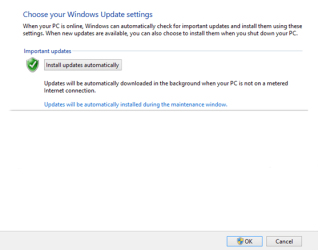
I wonder if Windows Update will look like this in 6 months time:

2068.040513_1952_UpdatesandM8.png

:sick: :sick: :sick:
 

My Computer My Computer

Computer type
PC/Desktop
Computer Manufacturer/Model Number
Custom Build
OS
Win 7 Ultimate, Win 8.1 Pro, Linux Mint 19 Cinnamon (All 64-Bit)
CPU
Intel i5 4690K
Motherboard
Gigabyte Z97X-UD3H
Memory
Corsair Vengeance LP 32GB DDR3
Graphics Card(s)
MSI GTX 1060 GAMING X 6GB
Sound Card
Onboard
Hard Drives
Samsung 850 EVO 250GB SSD (x2)
Samsung 860 EVO 1TB SSD (x2)
Crucial MX300 525GB SSD
WD Blue 2TB 5400rpm Intellipark Disabled (x2)
PSU
Corsair HX750i
Case
Phanteks Enthoo Pro
Cooling
CM Hyper 212 EVO on CPU, Noctua Redux NF-P14S 1500rpm (x6)
Keyboard
Corsair K70 RGB LUX
Mouse
Corsair Sabre RGB
Antivirus
Avast Free, MalwareBytes, SAS & CryptoPrevent
Browser
Chrome
Other Info
StarTech PEXESAT322I 2 Port PCI-E SATA Card
ASUS PCE-AC56 Dual-band AC1300 Wireless Card
Akasa FC.Six Manual Fan Controller
And a Partridge in a Pear Tree!
Exactly what I was thinking Lady F.

Seems like they couldn't get enough users on to Windows 10 during the free year, so now they're bringing "Windows as a service" to users of 7 & 8.1 too.

I'm not feeling overly excited about this!

What I don't understand is the part where it says: "Based on your feedback".

Who are they getting this feedback from? Windows 10 insiders? :sarc:

The trouble is that if a lot of people post on forums that they hate the update system that requires them to vet every single update before installing it because malware from MS has become a bigger threat than malware from any other source, so why do they have to go through this monthly rigmarole, MS can legitimately say that simplifying the update system so we only need to install one update each month is merely responding to the feedback they've received ;)!
 

My Computer My Computer

Computer type
PC/Desktop
Computer Manufacturer/Model Number
Custom build by PC Specialist
OS
Windows 7 Home Premium 64
CPU
AMD Phenom II X4 955
Motherboard
Asus M4A78T-E
Memory
8GB Corsair XMS3 DDR3
Graphics Card(s)
Gigabyte Geforce GTX 960 2GB
Sound Card
SB Audigy
Monitor(s) Displays
BenQ 24"
Screen Resolution
1920 x 1080
Hard Drives
500GB Serial ATA
PSU
1010W Quiet Quad Rail
Case
Antec 900
Cooling
Fenrir
Keyboard
Corsair
Mouse
Logitech
Internet Speed
20mbps
Antivirus
MSE plus MBAM 2.x Free
Browser
Chrome
Other Info
Second desktop different spec but similar level.
Depends on the user, personally, I like to pick and choose what goes on each of my systems. But then again, I'm not running in a huge enterprise environment.

I just don't like the idea of all updates being lumped into one. And even less so when it's both Security and Recommended updates.

The one upside is that at least we're not having to endure the forced automatic updates. That's one of the big reasons a lot of people chose not to move to 10. Forcing that on people might lead to a few shaky fists in MS direction!

In all honesty though, I can live without the recommended updates anyway and my systems all run fine with a lot of them skipped. I can happily just stick to installing Security Update rollups, after a delay of a week or two.
 

My Computer My Computer

Computer type
PC/Desktop
Computer Manufacturer/Model Number
Custom Build
OS
Win 7 Ultimate, Win 8.1 Pro, Linux Mint 19 Cinnamon (All 64-Bit)
CPU
Intel i5 4690K
Motherboard
Gigabyte Z97X-UD3H
Memory
Corsair Vengeance LP 32GB DDR3
Graphics Card(s)
MSI GTX 1060 GAMING X 6GB
Sound Card
Onboard
Hard Drives
Samsung 850 EVO 250GB SSD (x2)
Samsung 860 EVO 1TB SSD (x2)
Crucial MX300 525GB SSD
WD Blue 2TB 5400rpm Intellipark Disabled (x2)
PSU
Corsair HX750i
Case
Phanteks Enthoo Pro
Cooling
CM Hyper 212 EVO on CPU, Noctua Redux NF-P14S 1500rpm (x6)
Keyboard
Corsair K70 RGB LUX
Mouse
Corsair Sabre RGB
Antivirus
Avast Free, MalwareBytes, SAS & CryptoPrevent
Browser
Chrome
Other Info
StarTech PEXESAT322I 2 Port PCI-E SATA Card
ASUS PCE-AC56 Dual-band AC1300 Wireless Card
Akasa FC.Six Manual Fan Controller
And a Partridge in a Pear Tree!
Brds7t7

I really cant see Microsoft making windows 7 sp1 & 8.x forced automatic update the reason extended supports ends for both windows 7 & 8.x in a few years.
 

My Computer My Computer

Computer type
PC/Desktop
Computer Manufacturer/Model Number
Dell All in one Inspiron 2020
OS
W10 32 bit, XUbuntu 18.xx 64 bit
CPU
Intel(R) Celeron(R) CPU G1620T @ 2.40GHz, 2400 Mhz
Motherboard
Dell
Memory
4GB
Graphics Card(s)
Intel HD graphics
Sound Card
High Definition Audio Device
Monitor(s) Displays
20 inch Screen
Screen Resolution
W7=1280 x 720 & Linux Mint Xfce=1360 x 768
Hard Drives
500 GB hard drive
Keyboard
Usb
Mouse
Usb
Internet Speed
High-Speed
Antivirus
MSE
Browser
Main Browser Firefox
Other Info
I have done a clean install of Windows 7 using Dell re-installation disk (Dell sent me one). I also use Free Macrium reflect backup and restore.
No, I know the forced updates won't happen. I was being sarcastic about that. :D

I don't think it would be possible anyway, as they would have to make significant changes to the update system within the OS.
 

My Computer My Computer

Computer type
PC/Desktop
Computer Manufacturer/Model Number
Custom Build
OS
Win 7 Ultimate, Win 8.1 Pro, Linux Mint 19 Cinnamon (All 64-Bit)
CPU
Intel i5 4690K
Motherboard
Gigabyte Z97X-UD3H
Memory
Corsair Vengeance LP 32GB DDR3
Graphics Card(s)
MSI GTX 1060 GAMING X 6GB
Sound Card
Onboard
Hard Drives
Samsung 850 EVO 250GB SSD (x2)
Samsung 860 EVO 1TB SSD (x2)
Crucial MX300 525GB SSD
WD Blue 2TB 5400rpm Intellipark Disabled (x2)
PSU
Corsair HX750i
Case
Phanteks Enthoo Pro
Cooling
CM Hyper 212 EVO on CPU, Noctua Redux NF-P14S 1500rpm (x6)
Keyboard
Corsair K70 RGB LUX
Mouse
Corsair Sabre RGB
Antivirus
Avast Free, MalwareBytes, SAS & CryptoPrevent
Browser
Chrome
Other Info
StarTech PEXESAT322I 2 Port PCI-E SATA Card
ASUS PCE-AC56 Dual-band AC1300 Wireless Card
Akasa FC.Six Manual Fan Controller
And a Partridge in a Pear Tree!
It's no wonder I refer to MS' CEO (Crazy Exasperating Officer) as Sadist Nutella. I'm so fed up with MS screwing around with Win 7. It's like if MS can't make us want Win 10, it will try to sneak it onto us. Since that failed, now the misbegotten lowlifes are trying to screw up Win 7 to make it more like Win 10. A pox on the control freaks of questionable parentage running the show (this post is the cleaned up version of my true feelings).
Agree 100% I have turned off automatic updates on all three of my computers running W7, and telling all my friends to do the same. MS is just screwing with W7 users. Why give W10 for free? Must be a lot more $ in it for MS. I seriously believe that there is intent on the part of MS to make W7 users' life pure Hell, in hopes that they will jump on W10. Thank you, NO, not now, not ever!
 

My Computer My Computer

Computer type
PC/Desktop
Computer Manufacturer/Model Number
Custom
OS
Windows 7 Home Premium 64 bit
CPU
Intel I5-4440 3.10
Motherboard
Asus
Memory
4 GB
Graphics Card(s)
AMD Radeon HD 6900
Hard Drives
one, 500GB, 7200 RPM
Antivirus
MS Security Essentials
Browser
IE 11, Chrome
Status
Not open for further replies.
Back
Top