Gadget problem

donmal

New member
Local time
7:55 AM
Messages
2
I have a new Sony Vaio laptop which I have updated to Ultimate Windows. When I right click on a blank space and then
click on GADGETS I get APPLICATION NOT FOUND, If I search GADGETS and click on GET MORE GADGETS ON LINE, I get WINDOWS CANNOT FIND C PROGRAM. Some of the gadgets eg CLOCK will appear but only as non working icons (apart from the Calculator which does function)? How do I get to use gadgets?
Thanks to Mike for advice eg Control Panel etc but appropriate gadgets box WAS already ticked but I still have the same responses...Any other ideas?
(Have solved prob myself.. and posted solution under "donmal")
 
Last edited:

My Computer

Computer Manufacturer/Model Number
Sony vaio
OS
Windows 7 ultimate x64
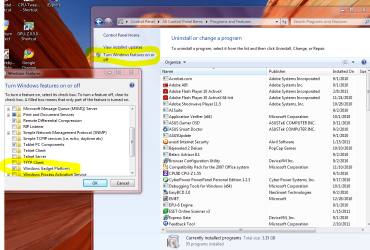
Go to Control Panel click it then click Programs and Features.
Click Turn Windows Features on and off at top left.
The above blue is a link to the tutorial I didn't know we had.

New window check mark Windows Gadget Platform.
Picture below shows both with yellow circle.

Also you will see Games etc. listed. Good to remember for future use. :D

Bonus tutorial how to use gadgets once you turn it on.
http://www.sevenforums.com/tutorials/286-gadgets-add-remove-desktop.html

Mike

Click the picture below to enlarge.
 

Attachments

  • Gadgets.PNG
    Gadgets.PNG
    116.6 KB · Views: 138

My Computer

Computer Manufacturer/Model Number
Hopalong/ Godzilla
OS
Windows7 Pro 64bit SP-1; Windows XP Pro 32bit
CPU
Intel Core i7-870 Lynnfield 2.93GHz LGA 1156 95W Quad-Core
Motherboard
ASUS P7P55D-E PRO
Memory
8GB@1400MHz Crucial Ballistix DDR3-1600 4x2GB
Graphics Card(s)
ASUS ENGTX460 DirectCU/2DI/1GD5 1GB 256-bit GDDR5
Sound Card
VIA Onboard
Monitor(s) Displays
Asus VS248H-P 24"; Samsung SyncMaster 941BW 19"ws
Screen Resolution
1920x1080; 1440x900
Hard Drives
Samsung 830 120GB SSD
Intel 320 120GB SSD
Western Digital Caviar Black WD7501AALS 750GB 7200 RPM SATA 3.0Gb/s
Western Digital Caviar Black WD6401AALS 640GB 7200 RPM SATA 3.0Gb/s
PSU
COOLER MASTER Silent Pro RS850-AMBAJ3-US 850W Modular
Case
COOLER MASTER HAF 932 RC-932-KKN5-GP Black
Cooling
Scythe "Mugen-2 Rev.B" (2 ScytheKaze-Jyuni PWM fans)
Keyboard
Logitech K-320
Mouse
Kensington
Antivirus
Avast Inernet Suite
Browser
IE 9 ; Chrome
donmal

This is a solution to my own posted problem which I myself accidentally found..... Go to CONTROL PANEL, followed by PROGRAMS AND FEATURES, then go to .. TURN WINDOWS FEATURES ON AND OFF, now remove tick from WINDOWS GADGET PLATFORM (which in my case WAS ticked but apparently not functioning??? ) and immediately retick it. This straight away for some mysterious reason solved the problem!!!
 

My Computer

Computer Manufacturer/Model Number
Sony vaio
OS
Windows 7 ultimate x64
Back
Top