
Solved Gadgets broken

Bumpkin

New member
Guru
Local time
12:49 PM
Messages
290
Location
Dahlonega, GA
I installed the update for Internet Explorer 11 this morning and gave it a quick look, then went on with my day. Got back on my computer later and noticed my CPU Meter gadget on the desktop had a new look. I exited the CPU Meter and opened it again with the same results.

The Weather, Headline Feeds and Currency gadgets are broken also.

A System Restore to a time before the IE11 install failed.

The only gadget I use is the CPU Meter so it's not a big deal, but I like for things to work properly. Is it possible that IE11 broke my gadgets?
 

Attachments
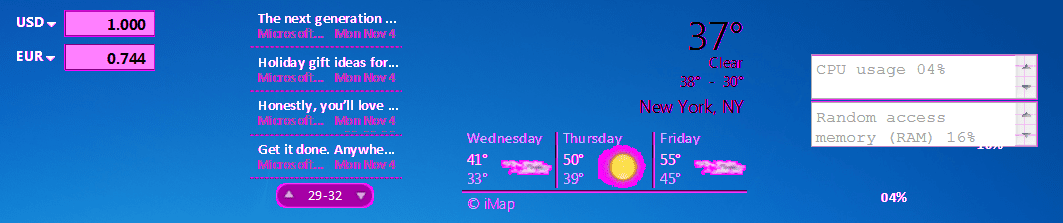
  • Capture.PNG
    Capture.PNG
    151.2 KB · Views: 0

My Computer

Computer Manufacturer/Model Number
HP p6370t
OS
Windows 7 Home Premium 64bit
CPU
i3-530
Motherboard
MSI - IONA
Memory
8 Gb
Graphics Card(s)
onboard
Sound Card
onboard
Monitor(s) Displays
Dell ST2400
Screen Resolution
1920x1080
Hard Drives
Intell 520 SSD 120Gb, WD6400AAKS, 640Gb & WD USB MyBook 1Tb
Internet Speed
1.5 Mmbps, Hughes Satellite

My Computer

Computer type
Laptop
Computer Manufacturer/Model Number
Sager NP9170
OS
Win 7 Pro x64 / Win 10 Pro
CPU
Intel(R) Core(TM) i7-3630QM CPU @ 2.40GHz
Motherboard
CLEVO P170EM
Memory
12 GB
Graphics Card(s)
(1) Intel(R) HD Graphics 4000 (2) NVIDIA GeForce GTX 675M
Sound Card
(1) Realtek High Definition Audio (2) Intel(R) Display Aud
Monitor(s) Displays
17.3
Screen Resolution
1920x1080
Hard Drives
(1) Samsung 860 EVO 500GB(OS) (1) Samsung 860 EVO 500GB(Data)
Keyboard
Backlite
Antivirus
MSE, Malwarebytes Pro
Browser
Firefox
Other Info
DESKTOP: Custom-built.
OS: Win 10 Pro x64.
CASE: Rosewill R5.
CPU: Intel I5 4670K CPU @ 3.40GHz.
CPU COOLER: Cool Master Hyper 212 EVO.
MOTHERBOARD: Asus Z87-A.
MEMORY: Kingston HyperX 2x4 GB.
GPU: Nvidia Geforce 650 TI.
PSU: Corsair TX750.
DRIVES: (1) Samsung 840 120 GB SSD (2) Western Digital blue 500 GB 7200 RPM.
Thanks for the quick reply Jerry!

Looks like MS is serious about doing away with gadgets!

Good to know the problem is not just mine!
 

My Computer

Computer Manufacturer/Model Number
HP p6370t
OS
Windows 7 Home Premium 64bit
CPU
i3-530
Motherboard
MSI - IONA
Memory
8 Gb
Graphics Card(s)
onboard
Sound Card
onboard
Monitor(s) Displays
Dell ST2400
Screen Resolution
1920x1080
Hard Drives
Intell 520 SSD 120Gb, WD6400AAKS, 640Gb & WD USB MyBook 1Tb
Internet Speed
1.5 Mmbps, Hughes Satellite

My Computer

Computer type
Laptop
Computer Manufacturer/Model Number
Sager NP9170
OS
Win 7 Pro x64 / Win 10 Pro
CPU
Intel(R) Core(TM) i7-3630QM CPU @ 2.40GHz
Motherboard
CLEVO P170EM
Memory
12 GB
Graphics Card(s)
(1) Intel(R) HD Graphics 4000 (2) NVIDIA GeForce GTX 675M
Sound Card
(1) Realtek High Definition Audio (2) Intel(R) Display Aud
Monitor(s) Displays
17.3
Screen Resolution
1920x1080
Hard Drives
(1) Samsung 860 EVO 500GB(OS) (1) Samsung 860 EVO 500GB(Data)
Keyboard
Backlite
Antivirus
MSE, Malwarebytes Pro
Browser
Firefox
Other Info
DESKTOP: Custom-built.
OS: Win 10 Pro x64.
CASE: Rosewill R5.
CPU: Intel I5 4670K CPU @ 3.40GHz.
CPU COOLER: Cool Master Hyper 212 EVO.
MOTHERBOARD: Asus Z87-A.
MEMORY: Kingston HyperX 2x4 GB.
GPU: Nvidia Geforce 650 TI.
PSU: Corsair TX750.
DRIVES: (1) Samsung 840 120 GB SSD (2) Western Digital blue 500 GB 7200 RPM.
Wow! Setting the DPI to 100% fixed the gadgets.

I normally have the DPI at 125% because of my tired old eyes.
 

My Computer

Computer Manufacturer/Model Number
HP p6370t
OS
Windows 7 Home Premium 64bit
CPU
i3-530
Motherboard
MSI - IONA
Memory
8 Gb
Graphics Card(s)
onboard
Sound Card
onboard
Monitor(s) Displays
Dell ST2400
Screen Resolution
1920x1080
Hard Drives
Intell 520 SSD 120Gb, WD6400AAKS, 640Gb & WD USB MyBook 1Tb
Internet Speed
1.5 Mmbps, Hughes Satellite
The same IE11 update killed my Gadgets too and setting text to 100% makes them re-appear -- as well as the 6 other clocks I added when I was trying to fix it. Thanks for the workaround !! :D


With fonts set to 100% the onscreen type's pretty small. So I'm stuck with choosing between legible onscreen text and having the Clock and Weather gadget. While the gadget issue is minor, I wonder what else the IE11 update might be causing problems with.

Anyone know of a registry hack that will enlarge the UI type while not affecting the Gadgets?

Let's hope it's a problem that extends beyond Gadget display and Microsoft will issue an update to correct whatever's misbehaving.

Russell
 

My Computer

Computer type
PC/Desktop
Computer Manufacturer/Model Number
Custom build
OS
Win 10 Pro
CPU
Intel Core i7-6900K
Motherboard
Asus X99-DELUXE II
Memory
32GB DDR4-2133
Graphics Card(s)
Gforce GTX 750 Ti
Monitor(s) Displays
2x Dell U2413
Screen Resolution
1920 x 1200
Hard Drives
Samsung 850 Pro 256 GB SSD
WD600GLFS
WD300GLFS
PSU
Corsair AX750
Case
Lian Li PC-B10
Cooling
Nochua N1
Keyboard
Das Keyboard Pro (Cherry MX blue w/O-Ring Mod)
Mouse
Logitech MX-610 Laser w/Teflon pads
Found the Reg key:

HKEY_CURRENT_USER\Control Panel\Desktop, Name=LogPixels and tried setting it to 120 (=125%) and the symptom returned.

I've settled on using a custom setting of 110% which still has the desktop Gadgets appearing but causes a small purple smear to appear on the tip of the clock's minute hand. I can live with that for now and the type size is better than the teeny tiny type displayed at the 100% setting.

Is this really the best place on this forum to post this bug?

Russell
 

My Computer

Computer type
PC/Desktop
Computer Manufacturer/Model Number
Custom build
OS
Win 10 Pro
CPU
Intel Core i7-6900K
Motherboard
Asus X99-DELUXE II
Memory
32GB DDR4-2133
Graphics Card(s)
Gforce GTX 750 Ti
Monitor(s) Displays
2x Dell U2413
Screen Resolution
1920 x 1200
Hard Drives
Samsung 850 Pro 256 GB SSD
WD600GLFS
WD300GLFS
PSU
Corsair AX750
Case
Lian Li PC-B10
Cooling
Nochua N1
Keyboard
Das Keyboard Pro (Cherry MX blue w/O-Ring Mod)
Mouse
Logitech MX-610 Laser w/Teflon pads
The problem is indeed caused by the DPI settings of the PC. Gadgets appear incorrectly if the DPI value is set above 100%, although one may use a custom value of 110% and gadgets seem to appear almost correctly. The reason for the problem is that the default gadgets in Windows 7 have a DPI-locking tag. So there are two ways to resolve this issue:
1. Set the DPI value to 100-110% as mentioned above.
2. The second one requires some basic XML editing skills. One has to delete the locking tag from the XML file completely as setting the value to auto will not resolve it. I am not sure, but this however, might be against Microsoft's policy. In case someone wants to try this one, please, at least make a backup copy of the original file.
 

My Computer

Computer type
PC/Desktop
Computer Manufacturer/Model Number
Custom
OS
Windows 7 Ultimate x64 & Windows 8.1 Pro Dual Boot
CPU
Intel i7-4770k
Motherboard
Asus Maximus VI Extreme
Memory
32 GB Kingston HyperX Beast & EVO Cyclone Memory Cooling
Graphics Card(s)
nVidia
Sound Card
Asus Xonair
Monitor(s) Displays
SONY HS-75P
Screen Resolution
1280x1024
Hard Drives
2 TB Seagate HDD & Intel 240GB S3500 SSD
PSU
Fortron Aurum Pro 1200
Case
Corsair Obsidian 750D
Cooling
Corsair Hydro H100i
Keyboard
Logitech G19s
Mouse
Logitech G700s
Internet Speed
150 mbps
Antivirus
Kaspersky Internet Security 2014
Browser
IE11, Aurora, Opera, Chrom, Safari

My Computer

Computer type
Laptop
Computer Manufacturer/Model Number
Sager NP9170
OS
Win 7 Pro x64 / Win 10 Pro
CPU
Intel(R) Core(TM) i7-3630QM CPU @ 2.40GHz
Motherboard
CLEVO P170EM
Memory
12 GB
Graphics Card(s)
(1) Intel(R) HD Graphics 4000 (2) NVIDIA GeForce GTX 675M
Sound Card
(1) Realtek High Definition Audio (2) Intel(R) Display Aud
Monitor(s) Displays
17.3
Screen Resolution
1920x1080
Hard Drives
(1) Samsung 860 EVO 500GB(OS) (1) Samsung 860 EVO 500GB(Data)
Keyboard
Backlite
Antivirus
MSE, Malwarebytes Pro
Browser
Firefox
Other Info
DESKTOP: Custom-built.
OS: Win 10 Pro x64.
CASE: Rosewill R5.
CPU: Intel I5 4670K CPU @ 3.40GHz.
CPU COOLER: Cool Master Hyper 212 EVO.
MOTHERBOARD: Asus Z87-A.
MEMORY: Kingston HyperX 2x4 GB.
GPU: Nvidia Geforce 650 TI.
PSU: Corsair TX750.
DRIVES: (1) Samsung 840 120 GB SSD (2) Western Digital blue 500 GB 7200 RPM.
How to fix gadgets broken by IE 11 when desktop magnification is higher than 100%.

[You have to be a local admin to do this]
1. Copy the original gadget.xml file from C:\Program Files\Windows Sidebar\Gadgets\[Gadget you want to fix]\gadget.xml to a temporary folder of your choice. Open it with notepad.
2. Find & entirely delete the row containing the tag:
(autoscaleDPI)(!--_locComment_text="{Locked}"--)true(/autoscaleDPI)
Do not leave an empty row in the script, just delete the whole row that has that tag.
3. Reboot and strike the F8 key during reboot to get to the Safe Mode screen.
4. Choose 'Repair my computer'.
5. Log on with an administrative account.
6. Choose 'Command Prompt' from the bottom of the list of recovery options.
7. Now copy your edited gadget.xml file to C:\Program Files\Windows Sidebar\Gadgets\[Gadget you want to fix]\gadget.xml (example syntax: Copy c:\temp\gadget.xml "C:\Program Files\Windows Sidebar\Gadgets\Clock.Gadget\en-US\gadget.xml")
8. Reboot and you should be seeing the gadgets once again.
I was very pleased to get my clocks back!!!!!!!!!
 

My Computer

Computer type
PC/Desktop
OS
7 pro x64
Back
Top