
Gadgets moving after restart

Dark Link

New member
Local time
4:35 PM
Messages
3
Hi,

I have moved my taskbar to the left of my screen and placed a gadget in the bottom right corner. My problem comes after a reboot.

The gadget moves, I think its because it tries to move it from under where the taskbar would be if I had it on the bottom. If anybody can help me fix this please post back.
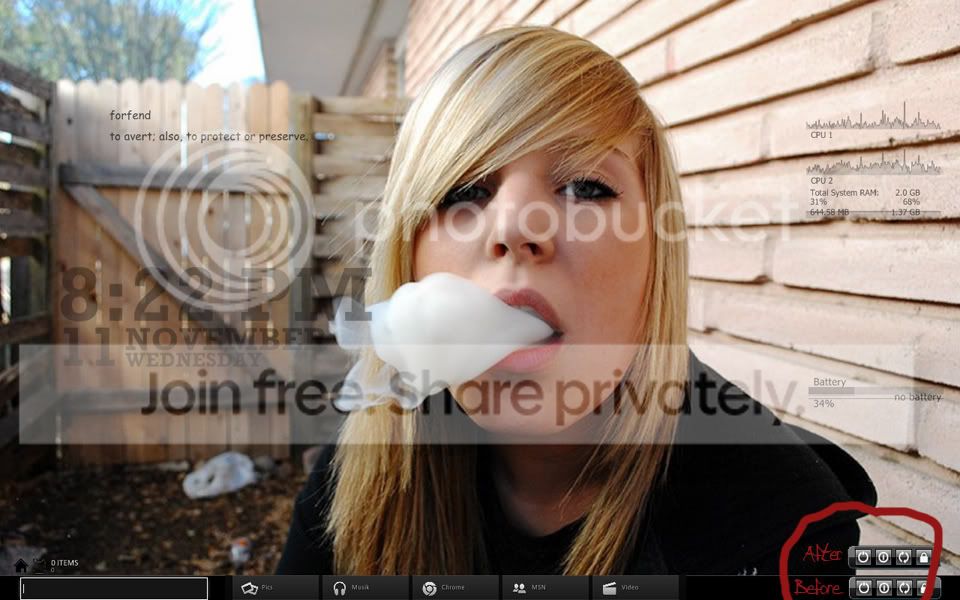
background.jpg


Thanks in advance

Dark Link


OS = windows 7 Ultimate
 

My Computer

OS
Windows 7
remove the sidebar folder and re-set your gadgets

C:\Users\your user name\AppData\Local\Microsoft\Windows Sidebar
 

My Computer

Computer Manufacturer/Model Number
XPS M1710
OS
WIN 7
CPU
T7600G
Memory
4GB
Graphics Card(s)
9750GTX
Sound Card
Creative X-FI
Screen Resolution
1920X1200
Hard Drives
320
Mouse
G7
remove the sidebar folder and re-set your gadgets

C:\Users\your user name\AppData\Local\Microsoft\Windows Sidebar

Tried, and didn't seem to help.
If anyone else has an idea please post.

Dark Link
 

My Computer

OS
Windows 7
Guys, I made a small simple gadget for text editing. You can download and try the installation for it on my website (of course, for free):
SideBar gadgets for Windows 7
Please, write me your ideas and suggestions about creating of gadgets or software you need =).
 

My Computer

OS
Windows 7 Ultimate x64
CPU
AMD Athlon II 215
Motherboard
Gygabyte
Memory
2GB
Graphics Card(s)
Radeon
Sound Card
integrated
Monitor(s) Displays
21.5"
Hard Drives
300GB
I'm suffering from the same problem. I believe it's because I use an external monitor with my laptop at work. The screen resolution automatically changes depending on which monitor/TV I connect it to. This tends to screw up the gadget location. I'm still searching for a fix. Let me know if you find one.
 

My Computer

OS
Windows 7 Professional (32bit)
Back
Top