Game Crashes.

phil76

New member
Local time
7:47 PM
Messages
9
Hi, wonder if anyone has any ideas, but some of my games crash too often.

Portal 2, Microsoft Flight X, and Anno 2070 occasionally. Trying to play portal 2 atm but it crashes every 5mins and needs reboot :rolleyes:

When they crash theres no message, just a weird repeating sound and im back to desktop as normal... With the repeating sound.

I also play BF3, Skyrim and many other games and these ones don't crash on me...

Would anyone know if this is Hardware linked or to do with the actual games themselves.

Updated my Nvidia drivers recently, think my hardware is listed in profile. but from memory its i5 2500k, asus 2gb twin frozr, 8gb corsair venegence ram.

Also I tried in portal 2 to reduce everything graphic to a minimum, but it still crased :(

Any help or advice very welcome...
 

My Computer

OS
Windows 7 Ultimate x64
CPU
Intel I5 2500k @ 4.1Ghz
Motherboard
Gigabyte Z68AP-D3
Memory
Corsair Vengence 8Gb@1866Mhz
Graphics Card(s)
MSi GTX 560ti 2Gb
Sound Card
Asus Xonar DG
Monitor(s) Displays
Iiyama PL E2475HDS
Screen Resolution
1920x1080
Hard Drives
Seagate Barracuda 500Gb
Seagate (Ext) 1Tb
PSU
700W OCZ ModXStream Pro Modular
Case
Xigmatek Midgard
Cooling
Stock
Keyboard
Logitech
Mouse
Coolermaster Inferno Storm
Internet Speed
40Mb
Portal 2, Microsoft Flight X, and Anno 2070 occasionally. Trying to play portal 2 atm but it crashes every 5mins and needs reboot :rolleyes:

When they crash theres no message, just a weird repeating sound and im back to desktop as normal... With the repeating sound.

I also play BF3, Skyrim and many other games and these ones don't crash on me...

How old is the build? Do you have any other issues outside of gaming? ie freezing,sound problems etc.


Software wise, have you updated your sound drivers and installed the latest directX run times?

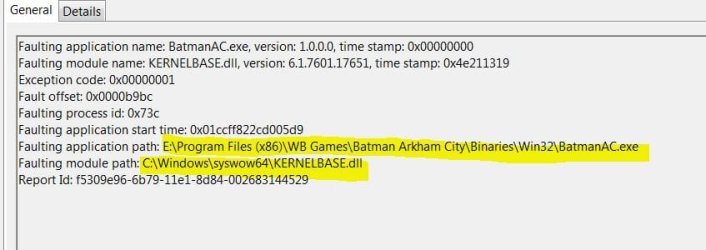
Have a look in the event viewer logs to see if there is a common 'faulting module path'

(type Event in the start menu and select 'view event logs' Custom Views>Administrative Events)

Have a look for the Application error and see if it consistently points to a particular file in faulting module path. it might give a clue as to what's triggering the crashes.

ie:

Faulting module.JPG


Did you update your video drivers via Windows update or from the nvidia site directly?


It could be something as simple as a driver (ie sound driver, or it could be indicative of an underlying hardware issue ie RAM, despite other games working fine).
 

My Computer

Computer type
PC/Desktop
Computer Manufacturer/Model Number
Systems by SmartEyeball
OS
8 Pro x64
CPU
i7 3770K 4.6GHz
Motherboard
ASUS P8Z77 WS
Memory
16GB G.Skill Trident X 2666mhz
Graphics Card(s)
x2 EVGA 780 Ti Superclocked SLI
Sound Card
SB X-FI Surround 5.1 PRO USB / ATH-AD900 Headphones
Monitor(s) Displays
x3 Dell U2410 / 58" Samsung
Screen Resolution
5760*1200/ 1920*1200
Hard Drives
2x Intel 520 240GB (RAID 0) * 2x WD Caviar Blacks 2TB (RAID 0) * 2TB WD Caviar Black * Sony Optirac DVD
PSU
Silverstone Strider Evolution 1200W
Case
Thermaltake Level 10 GT Snow Edition
Cooling
Noctua NH-D14
Keyboard
Topre Realforce // Ducky Shine MX Black // Filco Ninja TKL
Mouse
Thermaltake Theron (Highly Recommended) + Razer Imperator
Antivirus
MSE
Browser
IE, FF, WaterFox
Other Info
GT Extreme V2 Sim Racing Cockpit + 40" LCD and K/B Mouse stand ▼
Fanatec CSR Elite Wheel + Clubsport V1 Pedals + CSR shifter/7G-H ▼Saitek X52 Pro ▼ TrackIR 5 Pro
Buttkicker v2 Seat Rumbler with Dedicated 5.1 and Sub Woofer attached to frame ▼
=
Bloody Big Grin
Hi, thanks for taking the time to reply.

I have been working at issue, but am still no closer to resolution.

Built PC in December past, so its fairly new. Also I don't have any issues, apart from in the few games where these crashes to desktop accur.

Uninstalled/reinstalled nvidia drivers (from nvidia site). Updated sound card drivers, using dx 11, disabled realtek and nvidia hd audio drivers, changed ram frquency from 1866 to 1600 in bios. Also used some seagate diagnostic software to check my harddrive, since i had a couple of disk errors in event logger, but this 'passed' the drive. No errors.

Event logger doesnt show anything for when crash happens. I had a few issues logged when booting up, but managed to fix most of these.

I still have one event log which appears every start-up: wininit; which points to this (an nvidia dll)

- <EventData>
<Data Name="StringCount">1</Data>

<Data Name="String">C:\Windows\system32\nvinitx.dll</Data>

</EventData>


Atm I'm baffled :confused:
 

My Computer

OS
Windows 7 Ultimate x64
CPU
Intel I5 2500k @ 4.1Ghz
Motherboard
Gigabyte Z68AP-D3
Memory
Corsair Vengence 8Gb@1866Mhz
Graphics Card(s)
MSi GTX 560ti 2Gb
Sound Card
Asus Xonar DG
Monitor(s) Displays
Iiyama PL E2475HDS
Screen Resolution
1920x1080
Hard Drives
Seagate Barracuda 500Gb
Seagate (Ext) 1Tb
PSU
700W OCZ ModXStream Pro Modular
Case
Xigmatek Midgard
Cooling
Stock
Keyboard
Logitech
Mouse
Coolermaster Inferno Storm
Internet Speed
40Mb
I still have one event log which appears every start-up: wininit; which points to this (an nvidia dll)

- <EventData>
<Data Name="StringCount">1</Data>

<Data Name="String">C:\Windows\system32\nvinitx.dll</Data>

</EventData>


Atm I'm baffled :confused:

Do you have the iGPU (the GPU on the CPU) enabled at all?

Have a setting in the BIOS for virtu-i or virtu-d? Installed Lucid Logix software?

That particular file has been connected to Optimus technology which switches the iGPU to dedicated GPU depending on load. If you have Virtu enabled, it 'could be' switching to and from the iGPU to the dedicated GPU causing the crashes.
 

My Computer

Computer type
PC/Desktop
Computer Manufacturer/Model Number
Systems by SmartEyeball
OS
8 Pro x64
CPU
i7 3770K 4.6GHz
Motherboard
ASUS P8Z77 WS
Memory
16GB G.Skill Trident X 2666mhz
Graphics Card(s)
x2 EVGA 780 Ti Superclocked SLI
Sound Card
SB X-FI Surround 5.1 PRO USB / ATH-AD900 Headphones
Monitor(s) Displays
x3 Dell U2410 / 58" Samsung
Screen Resolution
5760*1200/ 1920*1200
Hard Drives
2x Intel 520 240GB (RAID 0) * 2x WD Caviar Blacks 2TB (RAID 0) * 2TB WD Caviar Black * Sony Optirac DVD
PSU
Silverstone Strider Evolution 1200W
Case
Thermaltake Level 10 GT Snow Edition
Cooling
Noctua NH-D14
Keyboard
Topre Realforce // Ducky Shine MX Black // Filco Ninja TKL
Mouse
Thermaltake Theron (Highly Recommended) + Razer Imperator
Antivirus
MSE
Browser
IE, FF, WaterFox
Other Info
GT Extreme V2 Sim Racing Cockpit + 40" LCD and K/B Mouse stand ▼
Fanatec CSR Elite Wheel + Clubsport V1 Pedals + CSR shifter/7G-H ▼Saitek X52 Pro ▼ TrackIR 5 Pro
Buttkicker v2 Seat Rumbler with Dedicated 5.1 and Sub Woofer attached to frame ▼
=
Bloody Big Grin
could be the age of your game

I too had a devil of a time getting my FSX to run properly. I bought it the very first day it bacame available, so many years ago (it seems). A lot of searching brought me to the realization that the early builds are just not compatible with 64 bit.
Disgusted at the thought of having to buy a new edition, I came to MS, and found that a new edition of FSX gold was compatible and was being sold for only 24 bucks. I would like to think that MS understands what the game means to those of us who love it, and thus the reduced price. Anyway, I reinstalled FS2004 which they said was compatible, and it flew off the chart(fps wise) I installed all of my addons and they worked too after tweaking them with the compatibility utility. it will do until my new copy of FSX arrives tomorrow. If you have a very old copy of FSX, consider replacing it with an updated version. Good luck.
 

My Computer

OS
windows home premium 7-64
Back
Top