Game Doesn't Display Properly

Michelle Brown

New member
Local time
2:05 PM
Messages
5
I just downloaded a game (Clue Accusations and Alibis) and it starts perfectly. It has a full screen mode and a windowed mode. The max screen resolution for my computer is 1024x600. The game in either windowed or full screen cuts off vital portions of the game on all sides. I have made sure that all my drivers are up to date, went through the compatibility wizard, changed my aspect ratio settings, and tried to reload the game...nothing is working to show the whole game. Can someone please help me?
Thank you so much :0) Michelle
 

My Computer

OS
Windows 7 Starter
I'm afraid I can't address that game specifically, but it sounds like the game is just bigger than 1024x600. That resolution is abnormal (specific to netbooks) and fairly new, a lot of games can't scale to that size.
 

My Computer

Computer Manufacturer/Model Number
Alienware X51
OS
Windows 7 Home Premium x64
CPU
Intel Core i7-2600 @3.40GHz
Memory
8.00GB DDR3
Graphics Card(s)
NVIDIA GeForce GTX 555 w/1.0GB RAM
Monitor(s) Displays
BenQ XL2420TX
Screen Resolution
1920x1080@120Hz
Hard Drives
1TB
PSU
330-watt
Keyboard
Logitech Wireless Illuminated Keyboard K800
Mouse
Razer Orochi
Internet Speed
Campus Internet
BCXtreme, Thank you so much for your reply...I still can't figure it out and it is frustrating :0( I thought if I put the game in windows mode I might be able to adjust the game to fit the window but I'm finding that to not be the case. Yes, I do have a netbook Compaq Mini and I love this little thing so I'm not complaining too loud about the gaming issues. Well, If you think of a solution for me I would love to hear it. Thanks again...Michelle
 

My Computer

OS
Windows 7 Starter
I also think it's just that the game doesn't support the resolution of your screen. The resolution of those netbooks is indeed fairly new and older games don't support it ofc... The only thing you can try to do is trying different resolution within the game to try and make it fit your screen as best as possible or you'll have to connect an external screen with compatible resolution with the game.

Good luck and if you find a way to fix this yourself, pls post here too so it might help other ppl on the forum.

regards, steph.
 

My Computer

OS
windows 7 32 bits
CPU
AMD athlon 64 3800+
Motherboard
MSI K8N Neo4 platinum
Memory
2 GB DDR
Graphics Card(s)
NVIDIA Gforce 7800 GTX
Sound Card
Creative Sound Blaster Audigy 2 ZS
Monitor(s) Displays
Philips 190S 19"
Case
Antec Black Tower
Cooling
Zalman, Arctic cooling, phapst, ...
I also think it's just that the game doesn't support the resolution of your screen. The resolution of those netbooks is indeed fairly new and older games don't support it ofc... The only thing you can try to do is trying different resolution within the game to try and make it fit your screen as best as possible or you'll have to connect an external screen with compatible resolution with the game.

Good luck and if you find a way to fix this yourself, pls post here too so it might help other ppl on the forum.

regards, steph.

Unfortunately, a lot of games like this one don't actually have resolution settings. They have fullscreen, and a windowed mode where the window size is constant.
 

My Computer

Computer Manufacturer/Model Number
Alienware X51
OS
Windows 7 Home Premium x64
CPU
Intel Core i7-2600 @3.40GHz
Memory
8.00GB DDR3
Graphics Card(s)
NVIDIA GeForce GTX 555 w/1.0GB RAM
Monitor(s) Displays
BenQ XL2420TX
Screen Resolution
1920x1080@120Hz
Hard Drives
1TB
PSU
330-watt
Keyboard
Logitech Wireless Illuminated Keyboard K800
Mouse
Razer Orochi
Internet Speed
Campus Internet
If I find a solution (haven't given up yet) I will be sure to post it on this forum pronto. Thanks for the input I really do appreciate it very much. Michelle
 

My Computer

OS
Windows 7 Starter
Could you post a list of the files in the game's program folder? There is sometimes a file that can be edited to use a custom resolution.
 

My Computer

Computer Manufacturer/Model Number
Alienware X51
OS
Windows 7 Home Premium x64
CPU
Intel Core i7-2600 @3.40GHz
Memory
8.00GB DDR3
Graphics Card(s)
NVIDIA GeForce GTX 555 w/1.0GB RAM
Monitor(s) Displays
BenQ XL2420TX
Screen Resolution
1920x1080@120Hz
Hard Drives
1TB
PSU
330-watt
Keyboard
Logitech Wireless Illuminated Keyboard K800
Mouse
Razer Orochi
Internet Speed
Campus Internet
Could you post a list of the files in the game's program folder? There is sometimes a file that can be edited to use a custom resolution.

If that is the case, that would be awesome ofc ;)
 

My Computer

OS
windows 7 32 bits
CPU
AMD athlon 64 3800+
Motherboard
MSI K8N Neo4 platinum
Memory
2 GB DDR
Graphics Card(s)
NVIDIA Gforce 7800 GTX
Sound Card
Creative Sound Blaster Audigy 2 ZS
Monitor(s) Displays
Philips 190S 19"
Case
Antec Black Tower
Cooling
Zalman, Arctic cooling, phapst, ...
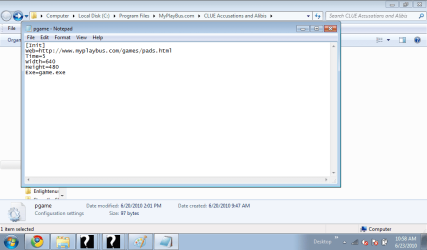
Hi Guys...here is the screen shot of the files...I'm not sure which one you want to see but I opened up the pgame file and also attached the screen shot. If I should open up another file just let me know and I will post....Thank you for your help.
 

Attachments

  • Screen shot 1.png
    Screen shot 1.png
    34.4 KB · Views: 28
  • Screen Shot 2.png
    Screen Shot 2.png
    25.9 KB · Views: 24

My Computer

OS
Windows 7 Starter
When you went through the Compatibility Wizard earlier, did you (or it) try the option that runs the game in 640x480?
 

My Computer

Computer Manufacturer/Model Number
Alienware X51
OS
Windows 7 Home Premium x64
CPU
Intel Core i7-2600 @3.40GHz
Memory
8.00GB DDR3
Graphics Card(s)
NVIDIA GeForce GTX 555 w/1.0GB RAM
Monitor(s) Displays
BenQ XL2420TX
Screen Resolution
1920x1080@120Hz
Hard Drives
1TB
PSU
330-watt
Keyboard
Logitech Wireless Illuminated Keyboard K800
Mouse
Razer Orochi
Internet Speed
Campus Internet
Hi BCXtreme....I did try the different settings and it made my screen size smaller but the game size stayed the same....I went into those settings for pgame and changed the settings it said that I wasn't allowed permission to change. Bummer :0(
 

My Computer

OS
Windows 7 Starter
Hi BCXtreme....I did try the different settings and it made my screen size smaller but the game size stayed the same....I went into those settings for pgame and changed the settings it said that I wasn't allowed permission to change. Bummer :0(

That's because Windows 7, by default, won't let you change files that are in the Program Files folder. There's an easy way around it. First, copy the pgame file into your Documents folder twice. Your Documents folder should now have a "pgame" and a "pgame - Copy". Go into the one that's just called "pgame" and change the 640 to 1024, and the 480 to 600. Then save the file. Now take that file, and copy it back to the program folder, overwriting/replacing the existing file. (Leave the "pgame - Copy" file in your Documents folder). Now try the game and let me know if it works, or if it changes anything at all.
 

My Computer

Computer Manufacturer/Model Number
Alienware X51
OS
Windows 7 Home Premium x64
CPU
Intel Core i7-2600 @3.40GHz
Memory
8.00GB DDR3
Graphics Card(s)
NVIDIA GeForce GTX 555 w/1.0GB RAM
Monitor(s) Displays
BenQ XL2420TX
Screen Resolution
1920x1080@120Hz
Hard Drives
1TB
PSU
330-watt
Keyboard
Logitech Wireless Illuminated Keyboard K800
Mouse
Razer Orochi
Internet Speed
Campus Internet
Back
Top