Game running at 1/4 of screen

mulambo

New member
Member
VIP
Local time
6:12 AM
Messages
110
Immagine.jpg
Sorry for the screen pretty "dark", in fact the game I was trying to play is called Dark Vengeance and it goes well at 640x480, while it just goes on a quarter of the screen for any higher resolution (the "loading" text refers in fact to the previous menu, which appears correctly, then goes sorta frenzy when I pause the game, once the game is loaded). I tried dx8dll and swiftshader, plus the lnk "-w" or "-windowed" mode, compatibility modes, etc... they seem not to work. Maybe is there any utility to force the game to run windowed or other fixes to make it work right at fullscreen?
 

My Computer My Computer

At a glance

Windows 7, 64bit pro
Computer type
PC/Desktop
OS
Windows 7, 64bit pro
For a different game but try what's mentioned here
 

My Computer My Computer

At a glance

Windows 7 Ultimate x64
Computer type
PC/Desktop
OS
Windows 7 Ultimate x64
For a different game but try what's mentioned here
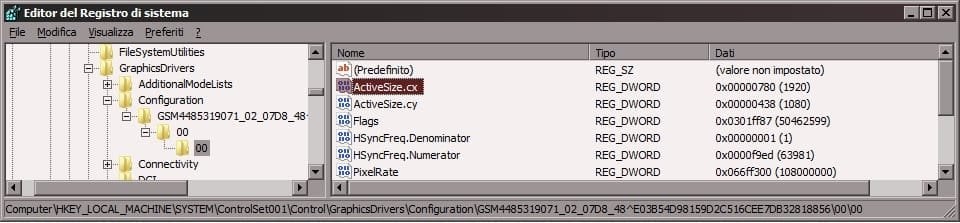
Unfortunely, it doesn't work. Tried the solutions which were posted (at least the ones which weren't specific for that other game) but they didn't solve (as the only featured video modes are D3D and RGB-8bit which is unbearably ugly). The problem in that forum's case is the screen being moved (while appearently showing all the contents), in my case the screen is cropped to the top-left corner. I found a video on Youtube saying that it's something to edit in the registry, but it still doesn't work as I set 1920x1080 on those values (max monitor resolution). I don't know what else to change, or if there's a program (not a virtual machine, I hope) I can run "to run" the game under specific environment (like a window). Immagine.jpg
 

My Computer My Computer

At a glance

Windows 7, 64bit pro
Computer type
PC/Desktop
OS
Windows 7, 64bit pro
Do you have a link to this game? Is there any kind of editable ini file in the game install or AppData folder?

You might try going into the game's options when the game is loaded and try to select a screen resolution or winnowed mode if available and see if that works. You can then try compatibility mode again.

Post that YouTube link.
 

My Computer My Computer

At a glance

Windows 7 Ultimate x64
Computer type
PC/Desktop
OS
Windows 7 Ultimate x64
This is main .ini of the game, and I've already tried changing something... but it doesn't look like it has anything more than the in-game menu, "window size" refers to some sort of scaling option of the game in fullscreen anyway
Code:
; PREFS 
CHARACTER = "TRICKSTER" 
DIFFICULTY = 1 
GORE_LEVEL = 0 
DEMO_COUNTDOWN = 20 
SOUND_VOLUME = 6 
MUSIC_VOLUME = 4 
SOUND_CHANNELS = 0 
AUDIO_RATE = 44100 
AUDIO_16BIT = TRUE 
SOUND_3DACTIVE = TRUE 
MUSIC_STEREO = TRUE 
MUSIC_INTERPOLATED = TRUE 
MUSIC_REVERB = TRUE 
SOUND = TRUE 
MUSIC = TRUE 
HARDWARE = D3D 
LOW_QUALITY = FALSE 
RENDER_LINFILTER = TRUE 
RENDER_MIPMAPS = TRUE 
RENDER_TRIFILTER = TRUE 
RENDER_COLOREDLIGHT = TRUE 
EZFIGHT_ACTIVE = TRUE 
HUD_DIMMED = FALSE 
HUD_ACCUMTEXT = TRUE 
HUD_SHOW_WEAPONS = TRUE 
HUD_SHOW_MANA = TRUE 
HUD_SHOW_UNIQUES = TRUE 
HUD_SHOW_EFFECTS = TRUE 
HUD_SHOW_KEYS = TRUE 
HUD_SHOW_MPSCORES = TRUE 
HUD_SHOW_MPITEMS = TRUE 
SCREEN_SIZE = 600 
SCREEN_DEPTH = 1 
SCREEN_BUFFERS = 1 
SCREEN_DEVICE = 1 
SCREEN_MONITOR = 1 
VIEW_SIZE = 2 
WINDOW_SIZE = 1 
GAMMA_ADJUST = 2 
FX_QUALITY = 2 
TEX_QUALITY = 1 
CD_PATH = "" 
USE_MOUSE = TRUE 
INVERT_MOUSE = TRUE 
USE_JOYSTICK = FALSE 
ANALOG_INPUT = FALSE 

; NETCLIENTPREFS 
CLIENT_NAME = "DV User" 
CLIENT_TEAM_ID = 1 
CLIENT_MULTI_COLORING = "0, 0, 0, 0" 
CLIENT_SHOW_MULTI_COLORING = TRUE 
CLIENT_SHOW_HALOS = FALSE 
CLIENT_SHOW_SKINS = TRUE 
CLIENT_SKIN_NAME = "" 
CLIENT_NET_CONNECTION = 0 
CLIENT_PROTOCOL = 0 
CLIENT_SERVER_IP = "192.0.2.1" 
CLIENT_SERVER_PORT_OVERRIDE = 0 
CLIENT_SERVER_PORT = 6217 

; NETSERVERPREFS 
SERVER_NAME = "DV-Net Arena" 
SERVER_NET_CONNECTION = 0 
SERVER_MODERATOR_SELECTION = 0 
SERVER_PROTOCOL = 0 
SERVER_PORT_OVERRIDE = 0 
SERVER_PORT = 6217 
SERVER_MAX_PLAYERS = 32 
SERVER_MAX_VOYEURS = 64 
SERVER_DEFAULT_PLAYING = 1 
SERVER_DOWNLOAD_SKINS = 1 
SERVER_RANDOM_COLORS = 0 
SERVER_RANDOM_TEAMS = 0 
SERVER_ALLOW_JUMPIN = 0 
SERVER_ALLOW_VOYEURS = 1 
SERVER_AUTOSTART_CLIENTS = 0 
SERVER_MAX_DATARATE = 30 
SERVER_ALLOW_SKIN_OVERRIDES = TRUE 
SERVER_TEAM_SKIN_OVERRIDES = TRUE 
SERVER_TEAM_COLOR_OVERRIDES = TRUE 
SERVER_ALLOW_SELF_DAMAGE = TRUE 
SERVER_ALLOW_TEAM_DAMAGE = FALSE 
SERVER_TEAM1_COLOR = "16, 255, 16, 16" 
SERVER_TEAM2_COLOR = "64, 16, 16, 200" 
SERVER_TEAM3_COLOR = "37, 16, 160, 16" 
SERVER_TEAM4_COLOR = "24, 224, 224, 0" 
SERVER_TEAM1_SKIN = "" 
SERVER_TEAM2_SKIN = "" 
SERVER_TEAM3_SKIN = "" 
SERVER_TEAM4_SKIN = "" 

; NETGAMEPREFS 
GAME_LEVEL = "NetLev02.mis" 
GAME_STYLE = 1 
GAME_TEAMPLAY = 0 
GAME_OBJECTIVE = 1 
GAME_OBJECTIVE_COUNT = 10 
GAME_PLAYER_RESTORE = 1 
GAME_ENEMIES = 1 
GAME_ENEMY_RESTORE = 2 
GAME_OBJECTS = 1 
GAME_OBJECT_RESTORE = 1 
GAME_PLAYER_EXPERIENCE_LEVEL = 8

This it YT video I was talking about


This is a game demo, I hope it's lecit to post it because it's not the full version.
Dark Vengeance GAME DEMO - download | gamepressure.com
 

My Computer My Computer

At a glance

Windows 7, 64bit pro
Computer type
PC/Desktop
OS
Windows 7, 64bit pro
Okay, let me run this and I'll see what's going on.
 

My Computer My Computer

At a glance

Windows 7 Ultimate x64
Computer type
PC/Desktop
OS
Windows 7 Ultimate x64
Back
Top