Gamepad is not working

aakshat

Stay Calm
Power User
Local time
8:16 PM
Messages
129
Location
India
first I am sory if its the wrong place to post this probleam.
yesterday i have bought a gamepad ( Frontech. model no:- JIL-1741)
i am unable to play any game with it. gamepads buttens are working but it's not
responding in any game. plz can anyone help me with it.
 

My Computer My Computer

At a glance

Windows 7 Ultimate x64i3 M380 2.53GHz4 Gbintel HD
Computer type
Laptop
Computer Manufacturer/Model Number
Dell Insperon N5010
OS
Windows 7 Ultimate x64
CPU
i3 M380 2.53GHz
Motherboard
TOSHIBA MK5076GSX
Memory
4 Gb
Graphics Card(s)
intel HD
Sound Card
IDT
Screen Resolution
1366x768
Keyboard
Standerd PS2
Antivirus
ESET Smart Security 7
Browser
Google Chrome
Have you told the game to use a gamepad instead of the keyboard/mouse? If not, you need to do that in the game's options. However, they don't always work the way you want them too (for example, Oblivion does NOT map the left joystick at all, so I have to use an external mapping program called JoyToKey to get that to work). Good luck.
 

My Computer My Computer

At a glance

7 Ultimate x64 SP1Core 2 Duo T6600 @ 2.20GHz4GB SDRAM DDR2 667ATI Mobility Radeon 4570HD 512MB VDDR3 (2.25G...
Computer Manufacturer/Model Number
Acer Aspire 5738PG-6306
OS
7 Ultimate x64 SP1
CPU
Core 2 Duo T6600 @ 2.20GHz
Motherboard
Acer JV50 | Intel PM45 Chipset | BIOS Phoenix v1.21
Memory
4GB SDRAM DDR2 667
Graphics Card(s)
ATI Mobility Radeon 4570HD 512MB VDDR3 (2.25GB HyperMemory)
Sound Card
Integrated Dolby Home Theater HD Audio Support
Monitor(s) Displays
15.6" LED backlight HD/WS CineCrystal w/ Multi-Touch
Screen Resolution
Notebook: 1366x768 | Syncmaster P2370HD: 1920x1080
Hard Drives
Primary internal: 320GB WD3200BEVT-22ZCT0 @ 5400 RPM | Secondary external 1: 2TB Cavalry CAXB3702T0 @7200 RPM (USB 2.0) | Secondary external 2: 500GB Calvary CAUM @7200 RPM (USB 2.0).
PSU
AC Adapter
Case
Blue Clam shell
Cooling
OEM Bult-in.
Keyboard
Microsoft Wireless 3000 (USB)
Mouse
Logitech V220 (USB)
Internet Speed
31Mbps DL/25Mbps UL - Verizon fiOs/Netgear WNDR37AV
Other Info
EXTERNAL DISPLAY: 23" Samsung Syncmaster P2370HD | EXTERNAL SOUND: 300 Watt MX-KB30 JVC Stereo (AUX) | ROUTER: Netgear WNDR37AV 802.11a/b/g/n Dual-Band Gigabit | Satechi 12-Port USB 2.0 Hub | GAME PAD: SteelSeries 3GC USB 2.0 (JoyToKey Mapping) | DETAILED SYSTEM SPECIFICATIONS: http://www.tigerdirect.com/applications/SearchTools/item-details.asp?EdpNo=5265887&CatId=4938
yes i chacked all the settings in the game but nothing happen.
any more sugestions. plz help yar
 

My Computer My Computer

At a glance

Windows 7 Ultimate x64i3 M380 2.53GHz4 Gbintel HD
Computer type
Laptop
Computer Manufacturer/Model Number
Dell Insperon N5010
OS
Windows 7 Ultimate x64
CPU
i3 M380 2.53GHz
Motherboard
TOSHIBA MK5076GSX
Memory
4 Gb
Graphics Card(s)
intel HD
Sound Card
IDT
Screen Resolution
1366x768
Keyboard
Standerd PS2
Antivirus
ESET Smart Security 7
Browser
Google Chrome
So it's working in so much as the buttons are being read by the PC, but just not working in games? I'm not sure how that's possible for the controller to not work at all if you've told the game in the options menu to use a gamepad/joystick instead of the keyboard/mouse. In fact, I've never heard of that happening.

Are you sure the gamepad is working correctly (the buttons are actually being recognized by the OS - have you tested that with a mapping program/the driver utility that shows you what buttons you pressed to confirm that)? And are it's drivers even supported for Windows 7? Does the game itself actually support the use of a gamepad? Did you set the buttons up in the game's joystick options? And which game(s) are we talking about here?


Worst case scenario, I'd recommend that you give JoyToKey a try to map the controller independently of the drivers and the games themselves, to check it actually works if nothing else. That will always work if you leave it running in minimized mode in the system tray while gaming (this is what I do because the game's mapping doesn't always work properly). You can get it here (it's 100% free and safe).

Just note, the left and right joysticks are a slight pain to configure in there. I can help you with that if you want to try it out.
 

My Computer My Computer

At a glance

7 Ultimate x64 SP1Core 2 Duo T6600 @ 2.20GHz4GB SDRAM DDR2 667ATI Mobility Radeon 4570HD 512MB VDDR3 (2.25G...
Computer Manufacturer/Model Number
Acer Aspire 5738PG-6306
OS
7 Ultimate x64 SP1
CPU
Core 2 Duo T6600 @ 2.20GHz
Motherboard
Acer JV50 | Intel PM45 Chipset | BIOS Phoenix v1.21
Memory
4GB SDRAM DDR2 667
Graphics Card(s)
ATI Mobility Radeon 4570HD 512MB VDDR3 (2.25GB HyperMemory)
Sound Card
Integrated Dolby Home Theater HD Audio Support
Monitor(s) Displays
15.6" LED backlight HD/WS CineCrystal w/ Multi-Touch
Screen Resolution
Notebook: 1366x768 | Syncmaster P2370HD: 1920x1080
Hard Drives
Primary internal: 320GB WD3200BEVT-22ZCT0 @ 5400 RPM | Secondary external 1: 2TB Cavalry CAXB3702T0 @7200 RPM (USB 2.0) | Secondary external 2: 500GB Calvary CAUM @7200 RPM (USB 2.0).
PSU
AC Adapter
Case
Blue Clam shell
Cooling
OEM Bult-in.
Keyboard
Microsoft Wireless 3000 (USB)
Mouse
Logitech V220 (USB)
Internet Speed
31Mbps DL/25Mbps UL - Verizon fiOs/Netgear WNDR37AV
Other Info
EXTERNAL DISPLAY: 23" Samsung Syncmaster P2370HD | EXTERNAL SOUND: 300 Watt MX-KB30 JVC Stereo (AUX) | ROUTER: Netgear WNDR37AV 802.11a/b/g/n Dual-Band Gigabit | Satechi 12-Port USB 2.0 Hub | GAME PAD: SteelSeries 3GC USB 2.0 (JoyToKey Mapping) | DETAILED SYSTEM SPECIFICATIONS: http://www.tigerdirect.com/applications/SearchTools/item-details.asp?EdpNo=5265887&CatId=4938
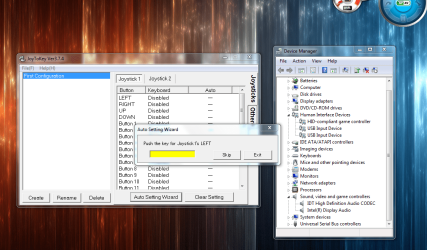
first thank you soo much for healping me. i've download joyTokey. but stll nothing happen.:(

Are you sure the gamepad is working correctly (the buttons are actually being recognized by the OS - have you tested that with a mapping program/the driver utility that shows you what buttons you pressed to confirm that)? And are it's drivers even supported for Windows 7?

:confused:can you please tell me how can i find out that gamepad is working or not, and other things.coz on the shop when i tested it, its responding when i'am pressing the buttens but now i dont know what happns to this stupid gamepad. plz plz plz help me how can i make it work on my pc.:cry::cry::cry::cry:
 

Attachments

  • Capture.PNG
    Capture.PNG
    178.6 KB · Views: 656

My Computer My Computer

At a glance

Windows 7 Ultimate x64i3 M380 2.53GHz4 Gbintel HD
Computer type
Laptop
Computer Manufacturer/Model Number
Dell Insperon N5010
OS
Windows 7 Ultimate x64
CPU
i3 M380 2.53GHz
Motherboard
TOSHIBA MK5076GSX
Memory
4 Gb
Graphics Card(s)
intel HD
Sound Card
IDT
Screen Resolution
1366x768
Keyboard
Standerd PS2
Antivirus
ESET Smart Security 7
Browser
Google Chrome
Control Panel > Devices and Printers > Generic USB Joystick [it’ll have a picture of a gamepad] > Left-click > “Controller Settings” > “Properties”. Now press all 12 Buttons and use the D-Pad and both joysticks. If they’re all working the buttons will light up and the directional axis indicators will move around.


If it’s working, then go ahead and open JoyToKey and:

Click on “Blank” then “File(F)” and select “Create new configuration file(N)” after that, type in “Oblivion” to name the new configuration file.

From there, switch the tab on the far right named “Others” and:

Number of joysticks to configure (Max 16) [2 ]

Emulation method
[Check] Default (recommended)
[Blank] Try it only if default doesn’t work.

[Check] Use Axes other than X and Y.
[Blank] Handle diagonal input as special case
[Check] Use POV switches

Threshold input (Useful for analog devices)
Leave this slider at 0%


Now, go back to the “Joysticks” tab on the far right. You need to double-click on each of these to set each of the controls. Just switch the tabs in the new window to any which device you want the controller to act as – the choices are: Disable; Keyboard; Mouse; Command; Special (we’ll only be needing Keyboard and Mouse on this for Oblivion).

Set everything on your Oblivion settings just like this (BTW these settings are as close to the PS3 controller default settings as you’re ever going to get on a PC):

Button: Keyboard: Auto:

AxisX(<0) A OFF
AxisX(>0) W OFF
AxisY(<0) S OFF
AxisY(>0) D OFF
Axis3(<0) Mouse: Horizontal(-75) ---
Axis3(>0) Mouse: Horizontal(75) ---
Axis4(<0) Disabled ---
Axis4(>0) Disabled ---
Axis5(<0) Disabled ---
Axis5(>0) Disabled ---
Axis6(<0) Mouse: Vertical(75) ---
Axis6(>0) Mouse: Vertical(-75) ---
Slider1(<0) Disabled ---
Slider1(>0) Disabled ---
Slider2(<0) Disabled ---
Slider2(>0) Disabled ---
POV1: UP Disabled ---
POV1: RIGHT Disabled ---
POV1: DOWN Disabled ---
POV1: LEFT Disabled ---
POV2: UP Disabled ---
POV2: RIGHT Disabled ---
POV2: DOWN Disabled ---
POV2: LEFT Disabled ---
Button 1 E OFF
Button 2 Tab OFF
Button 3 Space OFF
Button 4 F OFF
Button 5 Z OFF
Button 6 C OFF
Button 7 Alt OFF
Button 8 Mouse: Left OFF
Button 9 T OFF
Button 10 Escape OFF
Button 11 Ctrl OFF
Button 12 R OFF

[Leave buttons 13 – 32 blank]


But, we’re not done here just yet. Now you have to go into Oblivion and to Settings > Controls. From here, you MUST click on the yellow “<” or “>” on either side of the “Keyboard” header until it says “Joystick”. Once you do that, change the buttons to reflect what we put into the JoyToKey file for this game (otherwise the buttons will try and do both at the same time – there’s no known way to clear these in the game so they are completely blank, which means we need to set them both (the game's and JoyToKey's buttons and functions) to the same keys on the controller, but note you won’t be able to put Esc and other buttons like that in the game's buttons so leave those alone for JoyToKey to handle). I would take a screenshot of this, but right now my Oblivion game is claiming it’s lost the .exe file and is having the dual-monitor crashing problem (since I changed my monitor config to display two different screens) and I don’t feel like screwing around with it right now.


Also, if your gamepad has a “Mode” button (as 98% of these 12-button ones tend too), press it once every time after you plug it in so that the (typically) green indicator light turns red (this will unlock the left joystick so you can move your character around (WASD), otherwise you won’t be able to move without physically pressing WASD on your keyboard – stupid design, but that’s how it is). And, I don’t know for sure how to program the D-Pad to function with keyboard buttons yet (to use the hot-keys and etc.) so you’re on your own for that one (Likely POV1 or POV 2). Feel free to mess around with it if using the D-Pad for whatever reason is important to you.


Hope all of this helped somewhat. But I really think the reason your gamepad isn't functioning in Oblivion, is because you didn't tell the game in it's control settings to use the Joystick (remember: click on the yellow "<" or ">" in the settings and controls in Oblivion to change the control device from "<Keyboard>" to "<Joystick>").
 

My Computer My Computer

At a glance

7 Ultimate x64 SP1Core 2 Duo T6600 @ 2.20GHz4GB SDRAM DDR2 667ATI Mobility Radeon 4570HD 512MB VDDR3 (2.25G...
Computer Manufacturer/Model Number
Acer Aspire 5738PG-6306
OS
7 Ultimate x64 SP1
CPU
Core 2 Duo T6600 @ 2.20GHz
Motherboard
Acer JV50 | Intel PM45 Chipset | BIOS Phoenix v1.21
Memory
4GB SDRAM DDR2 667
Graphics Card(s)
ATI Mobility Radeon 4570HD 512MB VDDR3 (2.25GB HyperMemory)
Sound Card
Integrated Dolby Home Theater HD Audio Support
Monitor(s) Displays
15.6" LED backlight HD/WS CineCrystal w/ Multi-Touch
Screen Resolution
Notebook: 1366x768 | Syncmaster P2370HD: 1920x1080
Hard Drives
Primary internal: 320GB WD3200BEVT-22ZCT0 @ 5400 RPM | Secondary external 1: 2TB Cavalry CAXB3702T0 @7200 RPM (USB 2.0) | Secondary external 2: 500GB Calvary CAUM @7200 RPM (USB 2.0).
PSU
AC Adapter
Case
Blue Clam shell
Cooling
OEM Bult-in.
Keyboard
Microsoft Wireless 3000 (USB)
Mouse
Logitech V220 (USB)
Internet Speed
31Mbps DL/25Mbps UL - Verizon fiOs/Netgear WNDR37AV
Other Info
EXTERNAL DISPLAY: 23" Samsung Syncmaster P2370HD | EXTERNAL SOUND: 300 Watt MX-KB30 JVC Stereo (AUX) | ROUTER: Netgear WNDR37AV 802.11a/b/g/n Dual-Band Gigabit | Satechi 12-Port USB 2.0 Hub | GAME PAD: SteelSeries 3GC USB 2.0 (JoyToKey Mapping) | DETAILED SYSTEM SPECIFICATIONS: http://www.tigerdirect.com/applications/SearchTools/item-details.asp?EdpNo=5265887&CatId=4938
Well hello
i think that it will be useful if we might say
try downloading the joypad driver either by the internet
or by the cd which must come with the joypad i think this will make your pc
recognize the device
bye;););)
 

My Computer My Computer

At a glance

windows 7
Computer type
Laptop
Computer Manufacturer/Model Number
dell
OS
windows 7
Hard Drives
wd
joystick
Antivirus
kaspersky
Browser
google
first i am sory if its the wrong place to post this probleam.
Yesterday i have bought a gamepad ( frontech. Model no:- jil-1741)
i am unable to play any game with it. Gamepads buttens are working but it's not
responding in any game. Plz can anyone help me with it.

try downloading the driver from internet or cd which must come with the pad

bye bye
 

My Computer My Computer

At a glance

windows 7
Computer type
Laptop
Computer Manufacturer/Model Number
dell
OS
windows 7
Hard Drives
wd
joystick
Antivirus
kaspersky
Browser
google

My Computer My Computer

At a glance

Windows 8 Pro Media Centre Edition 64Bit, Win...AMD Bulldozer Quad Core Unlocked EditionKingston Hyper xBlu 1600Mhz 8GB 2x4gb DDR3XFX Radeon HD4850 1024MB 256Bits
Computer type
PC/Desktop
Computer Manufacturer/Model Number
Foxconn desktop , Advent Laptop
OS
Windows 8 Pro Media Centre Edition 64Bit, Windows 8 Home Premium 64bit
CPU
AMD Bulldozer Quad Core Unlocked Edition
Motherboard
Gigabyte 78LMT-USB3
Memory
Kingston Hyper xBlu 1600Mhz 8GB 2x4gb DDR3
Graphics Card(s)
XFX Radeon HD4850 1024MB 256Bits
Sound Card
Creative Sound-blaster
Monitor(s) Displays
SamsungSyncemaster 923nw 19inch
Screen Resolution
1440x900 :)
Hard Drives
WD caviar se 320GB
Verbatim 1TB Slave SaTa
PSU
Antec 500watts Modular
Case
Icute Server/Gamer case
Cooling
Fan cooled, tT , Akasa
Keyboard
Logitech ultra flat
Mouse
Blue lazer mouse
Internet Speed
Virgin Media Fibre
Antivirus
AVG Pro
Browser
Chrome
Download a program called Xpadder

i use it for all of my controllers works with most controllers including xbox controllers and ms sindwinders etc you can map custom profile for buttons for every game and even use it for your mouse and everything in windows not only games

'Illegal torrent link'

Don't post pirated software. Xpadder costs money and this is an illegal torrent. There is a freeware version, but this is not that version. It is a pirated version of the full retail edition and not only against forum rules, but also illegal. We do not condone or support piracy of any kind here.

I can chalk this one up as an honest mistake as there is a freeware version out there and there might have been some confusion. You should be careful though as most forums see posting this sort of thing as a good reason for banning a user. Honestly, I've yet to actually see anyone ever attempt to post an actual legal torrent download here. If it's a torrent, it's a good sign you shouldn't be posting it on message boards because it's most likely an illegal download. Torrents are also a common source of malware and viruses even when they contain legal software and I don't recommend using them if it can be avoided anyway.

Here is the real legal link: The official Xpadder website

Here is a legal freeware version that only supports one profile: http://www.freewarefiles.com/Xpadder_program_21789.html

Honestly, the freeware version should be fine as you'll probably really only need to make one profile of common game controls. Most games allow button mapping meaning you can change the mapping in game rather than constantly adjusting Xpadder to fit a particular game. Having multiple profiles is much more convenient though, so I do recommend the retail version over the freeware version. Being able to set up several common control schemes and having the ability to select one from a drop down list is worth the $10 to me.

It's a great program, but buy it from the official site. It's only $9.99 and has an easy to use and understand UI. You can also download it as many times as you like from the official site once you purchase it.

I use it myself and recommend it. It's hassle free and probably the simplest and easiest keymapping program to use. There are several free alternatives to Xpadder, but their GUIs are usually a little more complicated. There's no excuse for stealing this software. It's inexpensive to begin with and there are plenty of free alternatives if you don't want to buy it.

If you don't want to pay for Xpadder, here are some free and legal programs for download to map your gamepad controls:

http://glovepie.org/glovepie.php <---supports Kinetic, Wiimote, and all sorts of odd stuff. Probably the most versatile program I know of.

Rejoystick - Free your joystick!

Gamepad Keyboard Emulator

 
Last edited:

My Computer My Computer

At a glance

Windows 7 Home premiumI7 3770 3.4Corsair Vengance ddr3 8gb x2 1600 [@ 2400]AMD 7970 6GB x3 [currently x2 until x3 is act...
Computer type
PC/Desktop
Computer Manufacturer/Model Number
Home built
OS
Windows 7 Home premium
CPU
I7 3770 3.4
Motherboard
Republic of Gamers Maximus V
Memory
Corsair Vengance ddr3 8gb x2 1600 [@ 2400]
Graphics Card(s)
AMD 7970 6GB x3 [currently x2 until x3 is actually useful]
Sound Card
N/A
Monitor(s) Displays
Visio 47" 3D/Acer 27" 3D
Screen Resolution
1920x1080 120mhz Passive 3D
Hard Drives
Samsung 830 series SSD 512gb x2
Seagate 2tb x2
Segate 750 Gb
PSU
1500w
Case
Coolermaster
Cooling
Noctua D14
Keyboard
Logitech g10
Mouse
Naga Razer
Internet Speed
30mb Cable
Antivirus
Like I'd tell.
Browser
Waterfox mostly.
Wow surprised to see this thread up again.
Well this thread is almost two year's old.
and in this period i have learned a lot grate things coz of this forum.

And i want to tell you that I've already solved that problem.
(Finding Joystick drivers online dint work.)
Seance then i am using JoyToKey and its working grate yet.
And Sorry that i din't mention how i solved this.
 

My Computer My Computer

At a glance

Windows 7 Ultimate x64i3 M380 2.53GHz4 Gbintel HD
Computer type
Laptop
Computer Manufacturer/Model Number
Dell Insperon N5010
OS
Windows 7 Ultimate x64
CPU
i3 M380 2.53GHz
Motherboard
TOSHIBA MK5076GSX
Memory
4 Gb
Graphics Card(s)
intel HD
Sound Card
IDT
Screen Resolution
1366x768
Keyboard
Standerd PS2
Antivirus
ESET Smart Security 7
Browser
Google Chrome
Download a program called Xpadder

i use it for all of my controllers works with most controllers including xbox controllers and ms sindwinders etc you can map custom profile for buttons for every game and even use it for your mouse and everything in windows not only games

'Illegal torrent link'

Don't post pirated software. Xpadder costs money and this is an illegal torrent. There is a freeware version, but this is not that version. It is a pirated version of the full retail edition and not only against forum rules, but also illegal. We do not condone or support piracy of any kind here.

I can chalk this one up as an honest mistake as there is a freeware version out there and there might have been some confusion. You should be careful though as most forums see posting this sort of thing as a good reason for banning a user. Honestly, I've yet to actually see anyone ever attempt to post an actual legal torrent download here. If it's a torrent, it's a good sign you shouldn't be posting it on message boards because it's most likely an illegal download. Torrents are also a common source of malware and viruses even when they contain legal software and I don't recommend using them if it can be avoided anyway.

Here is the real legal link: The official Xpadder website

Here is a legal freeware version that only supports one profile: Xpadder 5.3 (Last Freeware Version) Freeware Download - Freeware Files.com - Games Category

Honestly, the freeware version should be fine as you'll probably really only need to make one profile of common game controls. Most games allow button mapping meaning you can change the mapping in game rather than constantly adjusting Xpadder to fit a particular game. Having multiple profiles is much more convenient though, so I do recommend the retail version over the freeware version. Being able to set up several common control schemes and having the ability to select one from a drop down list is worth the $10 to me.

It's a great program, but buy it from the official site. It's only $9.99 and has an easy to use and understand UI. You can also download it as many times as you like from the official site once you purchase it.

I use it myself and recommend it. It's hassle free and probably the simplest and easiest keymapping program to use. There are several free alternatives to Xpadder, but their GUIs are usually a little more complicated. There's no excuse for stealing this software. It's inexpensive to begin with and there are plenty of free alternatives if you don't want to buy it.

If you don't want to pay for Xpadder, here are some free and legal programs for download to map your gamepad controls:

http://glovepie.org/glovepie.php <---supports Kinetic, Wiimote, and all sorts of odd stuff. Probably the most versatile program I know of.

Rejoystick - Free your joystick!

Gamepad Keyboard Emulator


Sorry about that i knew you couldnt post illegal torrents but i thought i would have been fine for one that was freeware my bad :o
 

My Computer My Computer

At a glance

Windows 8 Pro Media Centre Edition 64Bit, Win...AMD Bulldozer Quad Core Unlocked EditionKingston Hyper xBlu 1600Mhz 8GB 2x4gb DDR3XFX Radeon HD4850 1024MB 256Bits
Computer type
PC/Desktop
Computer Manufacturer/Model Number
Foxconn desktop , Advent Laptop
OS
Windows 8 Pro Media Centre Edition 64Bit, Windows 8 Home Premium 64bit
CPU
AMD Bulldozer Quad Core Unlocked Edition
Motherboard
Gigabyte 78LMT-USB3
Memory
Kingston Hyper xBlu 1600Mhz 8GB 2x4gb DDR3
Graphics Card(s)
XFX Radeon HD4850 1024MB 256Bits
Sound Card
Creative Sound-blaster
Monitor(s) Displays
SamsungSyncemaster 923nw 19inch
Screen Resolution
1440x900 :)
Hard Drives
WD caviar se 320GB
Verbatim 1TB Slave SaTa
PSU
Antec 500watts Modular
Case
Icute Server/Gamer case
Cooling
Fan cooled, tT , Akasa
Keyboard
Logitech ultra flat
Mouse
Blue lazer mouse
Internet Speed
Virgin Media Fibre
Antivirus
AVG Pro
Browser
Chrome
Sorry about that i knew you couldnt post illegal torrents but i thought i would have been fine for one that was freeware my bad :o

The freeware program would be fine. I posted a link to that version myself. The link you posted originally was a torrent for the full paid version though. It also included several extras which you would need a paid account to get to.

The program doesn't need a password or crack when you 'unlock' it. Xpadder is DRM free software. It just gives you a password to their forums where a download link is in one of the threads that allows you to download the full edition.

Posting links to freeware is perfectly fine, just make sure it's the freeware version and not a crack or torrent of the full edition first. ^_^
 

My Computer My Computer

At a glance

Windows 7 Home premiumI7 3770 3.4Corsair Vengance ddr3 8gb x2 1600 [@ 2400]AMD 7970 6GB x3 [currently x2 until x3 is act...
Computer type
PC/Desktop
Computer Manufacturer/Model Number
Home built
OS
Windows 7 Home premium
CPU
I7 3770 3.4
Motherboard
Republic of Gamers Maximus V
Memory
Corsair Vengance ddr3 8gb x2 1600 [@ 2400]
Graphics Card(s)
AMD 7970 6GB x3 [currently x2 until x3 is actually useful]
Sound Card
N/A
Monitor(s) Displays
Visio 47" 3D/Acer 27" 3D
Screen Resolution
1920x1080 120mhz Passive 3D
Hard Drives
Samsung 830 series SSD 512gb x2
Seagate 2tb x2
Segate 750 Gb
PSU
1500w
Case
Coolermaster
Cooling
Noctua D14
Keyboard
Logitech g10
Mouse
Naga Razer
Internet Speed
30mb Cable
Antivirus
Like I'd tell.
Browser
Waterfox mostly.
Back
Top