Games Explorer

Bare Foot Kid

R.I.P. August 13th 2014
I just got this from this article ...

http://www.winsupersite.com/faq/windows_7.asp

Games Explorer. Windows 7 will include an updated version of the Games Explorer and will now optionally scan for game updates and notify the user when they're available. You will also be able to manually look for individual game updates by right-clicking the game's icon in Games Explorer and choosing "Scan for Update."
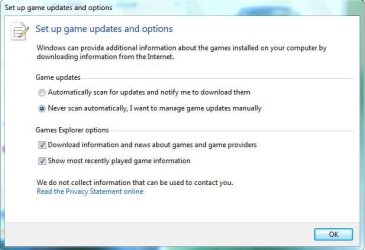
Games Explorer_W7.JPG

Later :) Ted
 

Attachments

  • 1829.jpg
    1829.jpg
    21.2 KB · Views: 0

My Computer

Computer Manufacturer/Model Number
* BFK Customs *
OS
W 7 64-bit Ultimate
CPU
Intel Q9550 Yorkfield
Motherboard
ASUS P5Q Pro
Memory
8GB Dominator 8500C5D
Graphics Card(s)
ATI : XFX 5870
Sound Card
Realtek HD Audio 7-1
Monitor(s) Displays
1x 47" LCD HDMI & 3x 26" LCD HDMI
Screen Resolution
1920x1080P & 1920x1200
Hard Drives
1x 80GB Intel X25-M G2 SSD : 1x 500GB & 1x 640GB WD Caviar Black(s)
PSU
Corsair 620HX
Case
Cooler Master RC-690
Cooling
Tuniq Tower 120, 2x 140mm and 3x 120mm case fans
Keyboard
Microsoft 500
Mouse
Razer Diamondback 3G
Internet Speed
14 Mb/s
Other Info
1x Koutech 3Gb/s SATA HDD Hot Swap Rack
Sweet now you won't have to actually look for updates on the net.
 

My Computer

Computer Manufacturer/Model Number
HP Compaq Presario/SR5113WM
OS
Windows 7 Ultimate x64/ Windows Vista Ultimate x64
CPU
AMD Athlon 64 X2 3600+ 1.9Ghz
Motherboard
Asus M2N68-LA
Memory
PNY Optima Memory DDR2 2GB 2x1 kit
Graphics Card(s)
PNY Nvidia 8400 GS 256MB
Sound Card
On board RealTek
Monitor(s) Displays
Acer X163W LCD
Screen Resolution
1366x768
Hard Drives
Western Digital 160 GB SATA 3G (3.0Gb/sec)
7200 rpm
Western Digital 160 GB IDE
PSU
Dynex 400w
Case
Nothin Special
Cooling
Stock
Keyboard
Standard 102 key with volume and sleep buttons
Mouse
Wireless Logitech LX7
Internet Speed
Comcrap 10mb cable
Other Info
Insignia 2.1 speakers, wireless Xbox 360 controller w/plug n play charger, Belkin wireless G + mimo usb network adapter.
Hi All,

I think I have done something wrong with the Games Exporer. But I dont know what I did. The result is that I am not able to open any game from the Games Explore, be it Chess Titans or Heart or any other game.

Whenever I try to open Chess titan, it displays following message:
"Could not Initialize Direct3D. You may want to check that the latest version of DirectX is correctly installed on your system. Also make sure that this program was compiled with header files that match the installed DirectX DLLs."
When I try to open any online game like Internet checkers or Internet Backgammon etc. I get the following message:
"An error occurred...
The application closed because an error occurred. The error's number is -2147467259 (0x80004005)."
And when I try to open other games like Heart, Freecell, Purble Place, Solitaire, Spider Solitaire by double clicking on their icons in Games Explorer window nothing happens, i.e. neither I get any error messages nor the applications run.

I donot know what to do know. But I am very fond of playing those games, particularly Chess Titans.

Please help me to do the necessary remedies.
 

My Computer

Computer Manufacturer/Model Number
Dell Studio XPS 1640
OS
Windows 7
CPU
Intel® Core™ 2 Duo P8600 (3MB cache/2.4GHz/1066Mhz FSB)
Memory
4 GB
Graphics Card(s)
512MB ATI Mobility RADEON HD 3670
Sound Card
Soundblaster X-Fi Hi Def Audio - Software Enabled
Monitor(s) Displays
16 inch Edge-to-Edge HD Widescreen WLED LCD (1366x768) W/2.0
Hard Drives
500 GB SATA Hard Drive (5400 RPM)
PSU
BATTERY, PRIMARY, 85WHR, 9C, SAMSUNG POWER DIVISION
Cooling
Fan
Back
Top