
Games not running on full screen.

awaisagha

Banned
Local time
3:47 AM
Messages
22
i am running windows7 ultimate x64 but my problem is,that when i run doom3,it does not come in full screen,it has 1inch border left from both left side and right side...it does never come on full screen.i even changed option to use highe resolution,full screen but it didnt solve problem,then somewhere on net i read,hit alt+enter,i did this too.but still problem didnt solve.
i am using dell studio laptop 1737,and it has intel GMA 4500MHD vga,i hav downloaded the driver which is latest for it even for windows 7 (from dell...i couldn't find it on intel)
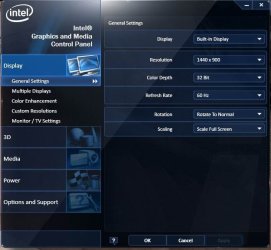
lately i installed NFS most wanted,then NFS carbon..both had same problem as doom3.they are not using full screen.but in my intel vga properties,it says that it is using full screen.i have attached the image of my vga panel.
 

Attachments
  • Untitled.jpg
    Untitled.jpg
    38.4 KB · Views: 793

My Computer

Computer Manufacturer/Model Number
Dell Studio 1737
OS
windows 7 ultimate x64
CPU
2.18ghz DC
Memory
4GB
Graphics Card(s)
1674MB
Monitor(s) Displays
1440*900
Hard Drives
320+500
This is a resolution issue. the game is running at 1024x769 and your screen is running at 1440x900 which is widescreen. you have to enable widescreen support in the game. you might have to googel doom3 + widescreen to find the answer here. Im currently at work so a lot of the sites get blocked I will try to help more once i get home if no one else pops in here.
 

My Computer

Computer Manufacturer/Model Number
Custom Build
OS
Windows 7 Ultimate x64 SP1
CPU
AMD Phenom II 1090 3.2 six core
Motherboard
MSI 890FXA-GD65
Memory
16 gig DDR3
Graphics Card(s)
MSI R6950 2gig
Sound Card
on board
Monitor(s) Displays
Acer 23inch led
Screen Resolution
1900x1080 widescreen
Hard Drives
Seagate 1tb SATA6
2x 1tb HITACHI Deskstar
PSU
CORSAIR Enthusiast Series TX750 V2 750W
Case
CoolMaster HAF 922
Cooling
Box AMD Heatsink/Fan
Internet Speed
Cable 12Mbps/3Mbps
Select widescreen resolution
If Doom 3 doesn't list your widescreen resolution you can try to set it manually like this:
r_mode -1 - custom resolutions on
r_customwidth 1440 - custom screen width
r_customheight 900 - custom screen height
 

My Computer

Computer type
PC/Desktop
Computer Manufacturer/Model Number
Custom
OS
Windows 7 64bit
CPU
Intel I7 4770k @4.5
Motherboard
Asus z87-pro
Memory
16GB corsair Vengence
Graphics Card(s)
EVGA GTX 980 TI SC acx2.0
Sound Card
XFI fatality gamer
Monitor(s) Displays
Samsung
Screen Resolution
1920 x 1080
Hard Drives
OCZ ssd Baracuda 1tb x2
PSU
Corsair 1200 watt
Case
NZXT Noctis 450
Cooling
Kraken X61
Keyboard
Logitech G510
Mouse
Razer naga
Internet Speed
100 down 25 up
Other Info
Nzxt Hue +
Similar Problem - How I solved it

I had a similar problem, with many programs not working correctly...
But how I solved it:
(Note, this particular method may only apply to those with similar computers)

Screen Resolution > Advanced Settings > Intel Graphics and Media Control Panel > Scaling > SET TO: "Scale Full Screen" (if it isn't already) > OK

What did NOT work:
Adjusting program settings (inside programs)
Setting programs to administrator
Adjusting screen resolution
Disabling visual themes / desktop composition / scaling on high DHP settings
 

My Computer

Computer Manufacturer/Model Number
Lenovo Thinkpad X201 Tablet 2985-C5U
OS
Windows 7 Professional 32 bit
CPU
Intel i7-640LM(2.13GHz)
Memory
4 GB RAM
Graphics Card(s)
Intel HD Graphics
Monitor(s) Displays
12.1" 1280x800 LCD
Hard Drives
320GB 7200rpm HD
Suggestion Worked

Thanks a lot. It indeed worked
 

My Computer

OS
Windows 7
Had the same problem with a different game. Try right clicking on the game then select run as administrator. That solved the problem for me.
 

My Computer

Computer type
PC/Desktop
OS
Win 7 x64
Back
Top