
Games off the Orb Menu

CJW

New member
Power User
VIP
Local time
10:34 AM
Messages
439
Is there a way to change the icons on this menu? The icons for BS5 & Shanghai: 2nd Dynasty are not showing correctly for some reason, Google Pacman actually goes to a HTML page to play & Popcap Game Collection is actually a shortcut to a folder full of game shortcuts.

I know how to edit the names of games in this menu by going through the registry, but I cannot figure out
how to change the icons.
 

Attachments
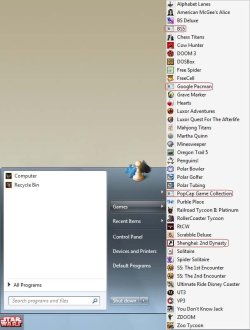
  • Games Menu.jpg
    Games Menu.jpg
    54.3 KB · Views: 19

My Computer

Computer type
PC/Desktop
Computer Manufacturer/Model Number
Self built comfuser
OS
10 Pro. 64Bit
CPU
AMD FX 4100, 4-Core Black Edition. Socket AM3+ ~ 3.60GHz
Motherboard
ASUS M5A97 LE R2.0
Memory
2x 4GB Kingston HyperX DDR3-1866 (PC3-14900) - 8GB Total
Graphics Card(s)
ASUS Radeon HD 6670-2GD3
Sound Card
Onboard High Definition Audio Device
Monitor(s) Displays
HP 2009m LCD
Screen Resolution
1600x900, True Color (32bit), 60Hertz
Hard Drives
WD Blue - 1TB, 3D NAND - SATA SSD
PSU
XFX Pro 450W Core Edition - Fully Wired
Case
Antec Super Lanboy
Cooling
Stock CPU fan + 2 (1 front, 1 back) 120mm Antec fans
Keyboard
Logitech MK700/MK710
Mouse
Logitech M705
Internet Speed
Frontier FiOS 50/50
Antivirus
Windows Security
Browser
Vivaldi
Other Info
1x ASUS DRW-24B1ST Multi-DVD Rewriter
1x RocketFish AIO Media Card Reader
1x WD 1TB Passport USB External Drive
Hi CJW .... if you right click on the game icon is there a properties option at the bottom of the context menu ?

If so, click on it . It should open in the shortcut tab. Is there a change icon button ? Can you post a screenshot of the shortcut tab of the programs properties ?
 

My Computer

Computer type
PC/Desktop
Computer Manufacturer/Model Number
Self Assembled
OS
Microsoft Windows 10 Pro Insider Preview 64-bit
CPU
Intel(R) Core(TM) i3-4130 CPU @ 3.40GHz
Motherboard
Gigabyte Technology Co., Ltd. B85M-D3H
Memory
Corsair Vengence 4GB x2 (8.00GB Dual-Channel DDR3 @ 798MHz)
Graphics Card(s)
2047MB GeForce GTS 450 (ZOTAC International)
Sound Card
Onboard (Realtek High Definition Audio)
Monitor(s) Displays
LG Flatron E2040T
Screen Resolution
1600x900
Hard Drives
Western Digital 1 TB
Seagate 500 GB
PSU
Corsair VS550
Case
Cooler Master K380
Cooling
Cooler Master Seidon 120V Plus
Keyboard
Logitech MK260r
Mouse
Logitech MK260r
Internet Speed
PMPL Broadband
Antivirus
Windows Defender + MBAM
Browser
Firefox
Other Info
Dell Studio 15" Laptop
No Properties button on BS5, Google Pacman or Popcap Game Collection. I did get the correct icon showing on Shanghai; I just opened the Games folder, R-clicked & removed shortcut & dragged a new one to the folder. But didn't work for the others.
 

My Computer

Computer type
PC/Desktop
Computer Manufacturer/Model Number
Self built comfuser
OS
10 Pro. 64Bit
CPU
AMD FX 4100, 4-Core Black Edition. Socket AM3+ ~ 3.60GHz
Motherboard
ASUS M5A97 LE R2.0
Memory
2x 4GB Kingston HyperX DDR3-1866 (PC3-14900) - 8GB Total
Graphics Card(s)
ASUS Radeon HD 6670-2GD3
Sound Card
Onboard High Definition Audio Device
Monitor(s) Displays
HP 2009m LCD
Screen Resolution
1600x900, True Color (32bit), 60Hertz
Hard Drives
WD Blue - 1TB, 3D NAND - SATA SSD
PSU
XFX Pro 450W Core Edition - Fully Wired
Case
Antec Super Lanboy
Cooling
Stock CPU fan + 2 (1 front, 1 back) 120mm Antec fans
Keyboard
Logitech MK700/MK710
Mouse
Logitech M705
Internet Speed
Frontier FiOS 50/50
Antivirus
Windows Security
Browser
Vivaldi
Other Info
1x ASUS DRW-24B1ST Multi-DVD Rewriter
1x RocketFish AIO Media Card Reader
1x WD 1TB Passport USB External Drive
Back
Top