Solved games resolution prob..cut off prob

avi

Banned
Local time
6:04 AM
Messages
11
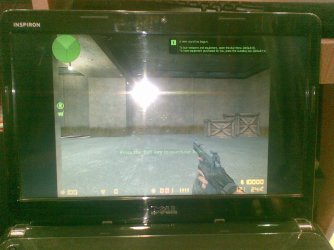
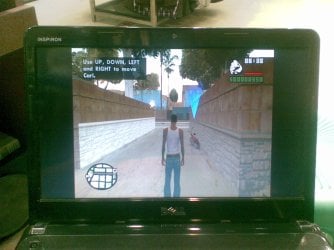
when i start my games like nfs most wanted ,gta san andreas ,counter strike ,prince of persia -the sand of times....my screen is cut off from both the sides...
am having out 64 bit windows 7 plz help sort this prob....i tried everthing bt nothing works..:cry::(
 

My Computer

Computer Manufacturer/Model Number
dell /inspiron n4030
OS
windows 7 64 bit
CPU
i 3 processor
Graphics Card(s)
ati radon 5430
Monitor(s) Displays
14 inch
Screen Resolution
1366*768
Hard Drives
320 gb hard disl
4 gb ram
Hmm...

Could you please provide your native resolution? You're probably not running games in full resolution or in a wide resolution. From what you've expained, it seems like you have a Widescreen monitor as only 4:3 ratio monitors don't have cut off sides when running full screen games.

What's your native resolution?
 

My Computer

Computer Manufacturer/Model Number
Dell Inspiron 1545
OS
Windows 7 Ultimate x64
CPU
Celeron(R) Dual-Core CPU T3500 @ 2.10GHz
Motherboard
Dell Motherboard Model 0G848F
Memory
4.00GB
Graphics Card(s)
Mobile Intel® 4 Series Express Chipset Family (4500MHD)
Sound Card
IDT Hight Definition Audio
Monitor(s) Displays
Generic PnP Monitor
Screen Resolution
1366 x 768
Hard Drives
WDCW WD1600BEVT-75ZCT2 150GB ATA Device
Keyboard
Standard PS/2 Keyboard
Mouse
Wireless Optical Mouse
Internet Speed
48.0Mpbs
when i start my games like nfs most wanted ,gta san andreas ,counter strike ,prince of persia -the sand of times....my screen is cut off from both the sides...
am having out 64 bit windows 7 plz help sort this prob....i tried everthing bt nothing works..:cry::(
hi avi, can you describe the issue with a bit more detail? the screen cut off, are you talking about black bars like this:
IMG_0858[1].JPG
IMG_0859[1].JPG

you can solve this by going to catalyst control center and turning off or scaling with fixed aspect ratio or enabling full screen scaling :)
GPU-68_Image1.JPG

MrNeeds
 

My Computer

Computer type
PC/Desktop
Computer Manufacturer/Model Number
Custom Build
OS
Windows 7 Ultimate x64 SP1
CPU
Intel Q6600 @ 2.6Ghz
Motherboard
Evga NF78-CK-132-A 3-Way SLI
Memory
4Gb DDR2 Corsair Dominator @ 800Mhz 5-5-5-15
Graphics Card(s)
EVGA 560 GTX SC FTW 1GB
Sound Card
Realtek HD 7.1 Audio, Plantronics GameCom780 7.1 Headset
Monitor(s) Displays
Dell S2409W
Screen Resolution
1920 x 1080
Hard Drives
SanDisk SDSSDHII-120G-G25 120GB SSD
Samsung 7200RPM 750Gb SATA
Samsung 850 EVO 120GB SSD
Western Digital Green 1TB 7200RPM
PSU
Xigmatek 750W Quad sli quad core 80% eff
Case
Antec 900 Gaming Case
Cooling
Zalman CNPS9700-NT NVIDIA Tritium
Keyboard
Logitech generic keyboard, MS wireless keyboard
Mouse
Razor Lachesis Banshee V2 Blue, 4000DPI, MS wireless mouse
Internet Speed
152Mb Virgin Media Fibre Optic
Antivirus
Microsoft Security Essentials
Browser
Google Chrome
Other Info
Wireless Gaming Receiver for Windows, Wireless Xbox 360 Pad
well my screen resolution is 1366*768
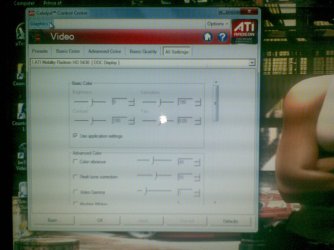
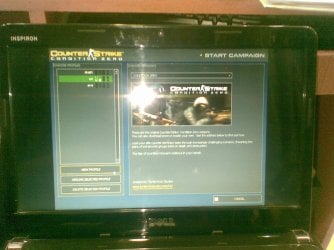
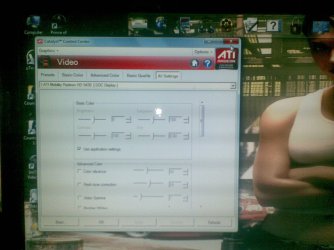
and mr needs here are certain pics that may help u understand ma problem....and sorry i am unable to find any such option in my ati catalyst and there are certain games that run in full screen mode like fifa 11 ,prince of persia the forgotten sands and crysis etc......
plz help sort it out
and 1 more thing each time i changed my wallpaper i have to go to control panel and change it in appearence from centre to stretch isn't there a permanet way so that it will everytime occur in stretch mode
 

Attachments

  • 20062011(001).jpg
    20062011(001).jpg
    211.7 KB · Views: 65
  • 20062011(002).jpg
    20062011(002).jpg
    270.7 KB · Views: 31
  • 20062011(003).jpg
    20062011(003).jpg
    271.3 KB · Views: 30
  • 20062011(004).jpg
    20062011(004).jpg
    243.8 KB · Views: 35
  • 20062011.jpg
    20062011.jpg
    218 KB · Views: 54
Last edited:

My Computer

Computer Manufacturer/Model Number
dell /inspiron n4030
OS
windows 7 64 bit
CPU
i 3 processor
Graphics Card(s)
ati radon 5430
Monitor(s) Displays
14 inch
Screen Resolution
1366*768
Hard Drives
320 gb hard disl
4 gb ram
well my screen resolution is 1366*768
and mr needs here are certain pics that may help u understand ma problem....and sorry i am unable to find any such option in my ati catalyst and there are certain games that run in full screen mode like fifa 11 ,prince of persia the forgotten sands and crysis etc......
plz help sort it out
and 1 more thing each time i changed my wallpaper i have to go to control panel and change it in appearence from centre to stretch isn't there a permanet way so that it will everytime occur in stretch mode

Hi avi, you need to set scaling to off, this will solve the black bars at either side of the screen, to get to it follow this step by step guide:

1. Open up catalyst control center
2. Switch to Advanced mode if you are not there already
3. Click dropdown menu Graphics in the top right
4. Select Desktops and Displays
5. Right Click your currently activated display under ‘Please Select a Display’ on the bottom right
6. Select Configure
7. Go to the attributes tab and uncheck the GPU scaling option.

I guarantee this will stop the black bars from appearing.

MrNeeds
 

My Computer

Computer type
PC/Desktop
Computer Manufacturer/Model Number
Custom Build
OS
Windows 7 Ultimate x64 SP1
CPU
Intel Q6600 @ 2.6Ghz
Motherboard
Evga NF78-CK-132-A 3-Way SLI
Memory
4Gb DDR2 Corsair Dominator @ 800Mhz 5-5-5-15
Graphics Card(s)
EVGA 560 GTX SC FTW 1GB
Sound Card
Realtek HD 7.1 Audio, Plantronics GameCom780 7.1 Headset
Monitor(s) Displays
Dell S2409W
Screen Resolution
1920 x 1080
Hard Drives
SanDisk SDSSDHII-120G-G25 120GB SSD
Samsung 7200RPM 750Gb SATA
Samsung 850 EVO 120GB SSD
Western Digital Green 1TB 7200RPM
PSU
Xigmatek 750W Quad sli quad core 80% eff
Case
Antec 900 Gaming Case
Cooling
Zalman CNPS9700-NT NVIDIA Tritium
Keyboard
Logitech generic keyboard, MS wireless keyboard
Mouse
Razor Lachesis Banshee V2 Blue, 4000DPI, MS wireless mouse
Internet Speed
152Mb Virgin Media Fibre Optic
Antivirus
Microsoft Security Essentials
Browser
Google Chrome
Other Info
Wireless Gaming Receiver for Windows, Wireless Xbox 360 Pad
well already gone there and under attribute tab there is only 2 things that is
PANEL INFO
AND SCALING OPTION
AND I CAN' edit the scaling option as it has too suboptions full screen and centred both of which are dull in contrast that is cant be edited and the already selected one is full screen..i will try to upload the pic in the evening
 

My Computer

Computer Manufacturer/Model Number
dell /inspiron n4030
OS
windows 7 64 bit
CPU
i 3 processor
Graphics Card(s)
ati radon 5430
Monitor(s) Displays
14 inch
Screen Resolution
1366*768
Hard Drives
320 gb hard disl
4 gb ram
when i start my games like nfs most wanted ,gta san andreas ,counter strike ,prince of persia -the sand of times....my screen is cut off from both the sides...
am having out 64 bit windows 7 plz help sort this prob....i tried everthing bt nothing works..:cry::(
hi avi, can you describe the issue with a bit more detail? the screen cut off, are you talking about black bars like this:
View attachment 159844
View attachment 159845

you can solve this by going to catalyst control center and turning off or scaling with fixed aspect ratio or enabling full screen scaling :)
GPU-68_Image1.JPG

MrNeeds
Change your screen to the same resolution but not recommended and go to ati catalyst again should be working :D
 

My Computer

Computer Manufacturer/Model Number
Asus
OS
Window 7 Ultimate X64
CPU
Intel Core2Quad Q8600
Motherboard
Asus P5P41C
Memory
8GB DDR3
Graphics Card(s)
Asus GTX 560 DCII OC
Sound Card
Realtek
Monitor(s) Displays
Acer P223w
Hard Drives
Maxtor 500GB 7200 rpm
Case
Cooler master
Cooling
cooler master
Back
Top