Solved Games won't launch on my new Windows 7 32-bit partition on an iMac.

Rear Windows

New member
Local time
7:05 PM
Messages
31
Hey guys, I'll preface this by saying I have an iMac Snow Leopard with a high end graphics card, but for gaming purposes I partitioned a Windows Vista to play a few video games. If you don't know what this is it means it runs just like Vista but on a iMac screen.

This worked well (for gaming) the past few years, but in order to advance my system I installed a Windows 7 32-bit over the Vista. As you know this means I have to reinstall (and replay) my games. There was no problem installing these older games such as Far Cry 2 and MW3, but once they install the games won't launch and begin like they did on Vista, I can hear the computer make noise like it's about to run but nothing happens.

Despite this I am still extremely pleased with my Windows 7 in every other aspect, but gaming is the main reason I have it so being able to launch games is really the only thing I NEED the Windows 7 32-bit to do.

Is there anyone who can help me resolve this problem? Thank you.
 

My Computer My Computer

At a glance

Windows 7 32 bit
OS
Windows 7 32 bit
Is there anyone out there who can help me?
 

My Computer My Computer

At a glance

Windows 7 32 bit
OS
Windows 7 32 bit
When you run the game do you get any message at ALL? Can you run a SINGLE game?

Please update your system specs, if you do not know how or what you have you can use this tool made by one of the members from seven forurms.
http://www.sevenforums.com/tutorials/180324-system-info-see-your-system-specs.html

One common thing i can think of is drivers not installed or update.

Have you tried going into the program files folder and finding the game, launching from it instead of the desktop shortcut?
 

My Computer My Computer

At a glance

Windows 8 64 bit PROAMD Phenom X4 9100e2GB X2 DDR2Sapphire HD 6850
Computer type
PC/Desktop
Computer Manufacturer/Model Number
Gateway / Slight Modifications
OS
Windows 8 64 bit PRO
CPU
AMD Phenom X4 9100e
Motherboard
Gateway RS780
Memory
2GB X2 DDR2
Graphics Card(s)
Sapphire HD 6850
Sound Card
Integrated
Monitor(s) Displays
Gateway 19" + Dell 19"
Screen Resolution
1440X900 sometimes 2880 by 900
Hard Drives
WD 80GB
WD 640GB
WD 1,000GB
PSU
Antec BP 550watts
Case
Antec 300
Cooling
Stock Cooling
Keyboard
Saitek Eclipse II
Mouse
Gigabyte GM-M6800
Internet Speed
D: 30Mbps U:4Mbps
Antivirus
Avast version 8
Browser
Internet Explorer ver 10 64 bit
Other Info
This is my work computer.
I have another laptop running Windows 7 64 bit.
Another PC running Windows 8 64 bit pro.
Total of 3

My Computer My Computer

At a glance

Windows 7 Ultimate SP1 64-BitIntel Core i7 870 @ 2.93GHz8Gb Dual-Channel DDR3 @ 664MHznVidia GeForce GTX 460 1024MB dedicated RAM
Computer Manufacturer/Model Number
HP Pavilion Elite 495UK
OS
Windows 7 Ultimate SP1 64-Bit
CPU
Intel Core i7 870 @ 2.93GHz
Motherboard
MSI 2A9C (CPU1)
Memory
8Gb Dual-Channel DDR3 @ 664MHz
Graphics Card(s)
nVidia GeForce GTX 460 1024MB dedicated RAM
Sound Card
Realtek HD Audio
Monitor(s) Displays
HP2310i
Screen Resolution
1920 x 1080
Hard Drives
1x1954GB Hitachi HDS22020ALA 330 (RAID), 1x1954GB Hitachi External for backup and storage
PSU
460W
Case
HP Elite
Cooling
Air cooled
Keyboard
Logitech K750 solar-powered keyboard
Mouse
Logitech Wireless M180 mouse
Internet Speed
2Mb
Other Info
Pure Avanti Flow Internet Radio with iPod Dock, 64Gb iPod, HP USB Speakers, Sony MDR-V500 Headphones, Sony Vaio F-Series Laptop
To chris1neji,
1. I get no messages when I try to run the game
2. I'll admit I haven't installed every game of mine but I've installed about 5 and I get the same outcome each time so as of now no single game will run
3. What would I need to do to update my drivers as it has been difficult to find compatible drivers for an iMac
4. Yes, I've tried going into the computers files to launch the game, but no luck

To seavixen32
1. I'm sure these games are compatible for Windows 7, but thank you for the tip.
2. What would I need to do to update my drivers for an iMac
3. Lastly, I'm using Boot Camp to partition
 
Last edited:

My Computer My Computer

At a glance

Windows 7 32 bit
OS
Windows 7 32 bit
You shouldnt be looking for drivers for your Imac OS.

You should be looking for drivers for your Windows 7 32 bit OS.
Windows can check for updates itself as long as it is connected to the internet. By default it's set to automatically check for updates.

However please check to see if any updates are pending.

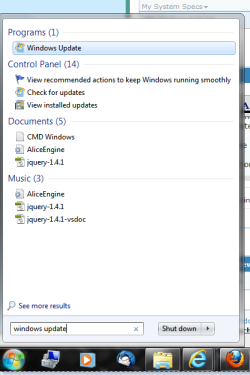
Click the start orb button in the search bar type in "Windows Update" and click on it to open it.
See attachment one if confused.
Click optional updates, a lot of the drivers especially from graphics are placed under optional updates.

Do you have any updates pending?
 

Attachments

  • type it.PNG
    type it.PNG
    21.3 KB · Views: 12

My Computer My Computer

At a glance

Windows 8 64 bit PROAMD Phenom X4 9100e2GB X2 DDR2Sapphire HD 6850
Computer type
PC/Desktop
Computer Manufacturer/Model Number
Gateway / Slight Modifications
OS
Windows 8 64 bit PRO
CPU
AMD Phenom X4 9100e
Motherboard
Gateway RS780
Memory
2GB X2 DDR2
Graphics Card(s)
Sapphire HD 6850
Sound Card
Integrated
Monitor(s) Displays
Gateway 19" + Dell 19"
Screen Resolution
1440X900 sometimes 2880 by 900
Hard Drives
WD 80GB
WD 640GB
WD 1,000GB
PSU
Antec BP 550watts
Case
Antec 300
Cooling
Stock Cooling
Keyboard
Saitek Eclipse II
Mouse
Gigabyte GM-M6800
Internet Speed
D: 30Mbps U:4Mbps
Antivirus
Avast version 8
Browser
Internet Explorer ver 10 64 bit
Other Info
This is my work computer.
I have another laptop running Windows 7 64 bit.
Another PC running Windows 8 64 bit pro.
Total of 3
Thanks I'll try that. Also, sorry for all the questions, but would drivers be a problem on Windows 7 even if they weren't on Vista?
 

My Computer My Computer

At a glance

Windows 7 32 bit
OS
Windows 7 32 bit
Apologies, but I just installed all the important and optional updates on Windows Update but still no progress. Is there any other problem I may be overlooking? Thank you.
 

My Computer My Computer

At a glance

Windows 7 32 bit
OS
Windows 7 32 bit
Still no success, is there anything else I can do to make games launch on my Windows 7 32 bit?
 
Last edited:

My Computer My Computer

At a glance

Windows 7 32 bit
OS
Windows 7 32 bit
From what I've seen here so far, you haven't posted any messages you get when trying to run a game. Can you tell us what happens when you try to run a game? An error message can help us figure out what's wrong.
 

My Computer My Computer

At a glance

Windows 8 Professional 64-bitIntel Core i3-21004GBGeForece GTX 550 Ti
Computer Manufacturer/Model Number
Custom
OS
Windows 8 Professional 64-bit
CPU
Intel Core i3-2100
Motherboard
ASRock Intel Z68M/USB3
Memory
4GB
Graphics Card(s)
GeForece GTX 550 Ti
Screen Resolution
1680 x 1050
PSU
750w
That's the point! There is no error message! You go to launch the game and you can hear the computer begin activity but nothing else happens. Sorry if I didn't make that clear.
 

My Computer My Computer

At a glance

Windows 7 32 bit
OS
Windows 7 32 bit

My Computer My Computer

At a glance

Windows 8 64 bit PROAMD Phenom X4 9100e2GB X2 DDR2Sapphire HD 6850
Computer type
PC/Desktop
Computer Manufacturer/Model Number
Gateway / Slight Modifications
OS
Windows 8 64 bit PRO
CPU
AMD Phenom X4 9100e
Motherboard
Gateway RS780
Memory
2GB X2 DDR2
Graphics Card(s)
Sapphire HD 6850
Sound Card
Integrated
Monitor(s) Displays
Gateway 19" + Dell 19"
Screen Resolution
1440X900 sometimes 2880 by 900
Hard Drives
WD 80GB
WD 640GB
WD 1,000GB
PSU
Antec BP 550watts
Case
Antec 300
Cooling
Stock Cooling
Keyboard
Saitek Eclipse II
Mouse
Gigabyte GM-M6800
Internet Speed
D: 30Mbps U:4Mbps
Antivirus
Avast version 8
Browser
Internet Explorer ver 10 64 bit
Other Info
This is my work computer.
I have another laptop running Windows 7 64 bit.
Another PC running Windows 8 64 bit pro.
Total of 3
Also make sure to download DirectX. That's the essential you need for gaming. DirectX also comes with each PC version of the game that you can, and in most cases, NEED to install in order for the game to work.

The most important driver to update is, of course, the graphics driver, that's the only piece of hardware you must NOT keep on a generic driver from Windows Update. I assume the mac has an nVidia GPU, so just go to GeForce.com and search for the driver according to your graphics card and OS. If you use a 32bit Win7, you need the 32bit driver; naturally, if you have a 64bit Win7 you need the 64bit driver.

If you're not sure which one you installed, just right click the Computer icon and go to Properties. A window that will open will show you which version you have, so download the driver accordingly (and if the driver setup asks you to restart the computer, you definitely should).
 

My Computer My Computer

At a glance

Windows 7 Home Premium x64Intel Core i5 2500K8GB DDR3nVidia GeForce GTX650 Ti BOOST
Computer type
Laptop
Computer Manufacturer/Model Number
Custom
OS
Windows 7 Home Premium x64
CPU
Intel Core i5 2500K
Motherboard
MSI MS-7750
Memory
8GB DDR3
Graphics Card(s)
nVidia GeForce GTX650 Ti BOOST
Sound Card
Realtek
Monitor(s) Displays
21' Philips
Screen Resolution
Full HD
Hard Drives
1TB
PSU
500W
Sound Card - (1) AMD High Definition Audio Device (2) High Definition Audio Device

Graphics Card - Standard VGA Graphics Adapter

Other apps work, I'm using Steam, and the updates didn't work however I'm about to update a new round of them.
 

My Computer My Computer

At a glance

Windows 7 32 bit
OS
Windows 7 32 bit
From where did you get the sound/graphics card info? It looks like something I would read from the Device Manager...

If you're not sure which graphics card you have, go back to Apple and see if you can find the GPU according to the model you bought. You can't download the driver from nVidia until you know which graphics card you have... or, if it turns out you have an AMD/ATI Radeon, from ATI.
 

My Computer My Computer

At a glance

Windows 7 Home Premium x64Intel Core i5 2500K8GB DDR3nVidia GeForce GTX650 Ti BOOST
Computer type
Laptop
Computer Manufacturer/Model Number
Custom
OS
Windows 7 Home Premium x64
CPU
Intel Core i5 2500K
Motherboard
MSI MS-7750
Memory
8GB DDR3
Graphics Card(s)
nVidia GeForce GTX650 Ti BOOST
Sound Card
Realtek
Monitor(s) Displays
21' Philips
Screen Resolution
Full HD
Hard Drives
1TB
PSU
500W
Gornot thanks for quickly replying, at least much faster than i do anyways.
Like he said you need to learn or figuere out what Specific Apple Model you have. We need to learn what graphics you have because at the moment your running basic drivers.
 

My Computer My Computer

At a glance

Windows 8 64 bit PROAMD Phenom X4 9100e2GB X2 DDR2Sapphire HD 6850
Computer type
PC/Desktop
Computer Manufacturer/Model Number
Gateway / Slight Modifications
OS
Windows 8 64 bit PRO
CPU
AMD Phenom X4 9100e
Motherboard
Gateway RS780
Memory
2GB X2 DDR2
Graphics Card(s)
Sapphire HD 6850
Sound Card
Integrated
Monitor(s) Displays
Gateway 19" + Dell 19"
Screen Resolution
1440X900 sometimes 2880 by 900
Hard Drives
WD 80GB
WD 640GB
WD 1,000GB
PSU
Antec BP 550watts
Case
Antec 300
Cooling
Stock Cooling
Keyboard
Saitek Eclipse II
Mouse
Gigabyte GM-M6800
Internet Speed
D: 30Mbps U:4Mbps
Antivirus
Avast version 8
Browser
Internet Explorer ver 10 64 bit
Other Info
This is my work computer.
I have another laptop running Windows 7 64 bit.
Another PC running Windows 8 64 bit pro.
Total of 3
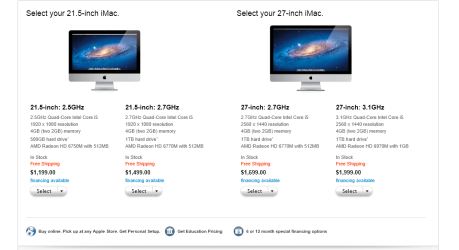
He mentioned that it was an iMac. Going to Apple's website, all the GPUs I saw were ATIs, that is, AMDs, whatever xD
But still, we need a confirmation from the OP.
 

My Computer My Computer

At a glance

Windows 7 Home Premium x64Intel Core i5 2500K8GB DDR3nVidia GeForce GTX650 Ti BOOST
Computer type
Laptop
Computer Manufacturer/Model Number
Custom
OS
Windows 7 Home Premium x64
CPU
Intel Core i5 2500K
Motherboard
MSI MS-7750
Memory
8GB DDR3
Graphics Card(s)
nVidia GeForce GTX650 Ti BOOST
Sound Card
Realtek
Monitor(s) Displays
21' Philips
Screen Resolution
Full HD
Hard Drives
1TB
PSU
500W
You went to Apple's website eeeew!
I would never go there:P
Just kidding

Seems like he has HD 6XXX series
If Apple has been selling these same models at whatever time the OP bought it.
 

Attachments

  • Imac.PNG
    Imac.PNG
    29.5 KB · Views: 5

My Computer My Computer

At a glance

Windows 8 64 bit PROAMD Phenom X4 9100e2GB X2 DDR2Sapphire HD 6850
Computer type
PC/Desktop
Computer Manufacturer/Model Number
Gateway / Slight Modifications
OS
Windows 8 64 bit PRO
CPU
AMD Phenom X4 9100e
Motherboard
Gateway RS780
Memory
2GB X2 DDR2
Graphics Card(s)
Sapphire HD 6850
Sound Card
Integrated
Monitor(s) Displays
Gateway 19" + Dell 19"
Screen Resolution
1440X900 sometimes 2880 by 900
Hard Drives
WD 80GB
WD 640GB
WD 1,000GB
PSU
Antec BP 550watts
Case
Antec 300
Cooling
Stock Cooling
Keyboard
Saitek Eclipse II
Mouse
Gigabyte GM-M6800
Internet Speed
D: 30Mbps U:4Mbps
Antivirus
Avast version 8
Browser
Internet Explorer ver 10 64 bit
Other Info
This is my work computer.
I have another laptop running Windows 7 64 bit.
Another PC running Windows 8 64 bit pro.
Total of 3
Well, good, Californian helper, since you have an ATI GPU as well you'll definitely point the OP towards the drivers easier than me. As an nVidia fanboy I've never even seen the ATI website in my life xD
It's not that I don't want to help, it's just that it's ATI lol

It's been a long night and I have right to make myself laugh :p ;)
 

My Computer My Computer

At a glance

Windows 7 Home Premium x64Intel Core i5 2500K8GB DDR3nVidia GeForce GTX650 Ti BOOST
Computer type
Laptop
Computer Manufacturer/Model Number
Custom
OS
Windows 7 Home Premium x64
CPU
Intel Core i5 2500K
Motherboard
MSI MS-7750
Memory
8GB DDR3
Graphics Card(s)
nVidia GeForce GTX650 Ti BOOST
Sound Card
Realtek
Monitor(s) Displays
21' Philips
Screen Resolution
Full HD
Hard Drives
1TB
PSU
500W
Trying to find all the info you guys asked for, thank you.

It is worth noting I went to the control panel and through a series of windows I arrived at a place which sole purpose was to find and update your graphics drivers, that being said the update service said I had the latest graphics drivers for my card.

Also, on my Windows Performance Index in the Control Panel my ratings on "graphics" and "gaming graphics" are bot 1.0 (the worst possible) all the other specs are very high. It hasn't told me how to improve my score so if you know how that would be helpful. I think it's safe to assume if those 2 score were improved to 5.0 the games would run.

Keep in mind all my games ran fine when I was partitioned with a Vista and my lowest performance score was 5.0.

P.S. I purchased this computer around late 2010 with Snow Leopard already installed.
 

My Computer My Computer

At a glance

Windows 7 32 bit
OS
Windows 7 32 bit
Back
Top