I have a problem with several games that when a cutscene comes the movie is very laggy and the sound lags very badly. But this isn`t with the start of the game it`s like after about 30-60 minutes of play time. And it only gets laggy with cutscene`s after the cutscene I can play further normally.
I have this problem with several games the ones that gave the moest problems are:
Prototype
Skyrim
Starcraft 2
With starcraft 2 the movies don`t lag very much but the sound lags and after that it stays behind.
Very annoying playing games like this.
My specs of my PC are:
OS: Windows 7 Ultimate (64-bit)
RAM: 8 GB
CPU: Intel core i7 860 @ 2.80 GHz
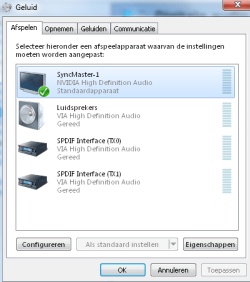
Sound Card: Syncmaster-1 (Nvidia High Defin | SPDIF interface (TX0) | SPDIF interface (TX1) | VIA High Definition
Screen Resolution: 1680 x 1050
HDD: 120 GB SSD (On this disk the OS is installed and the games in question)
HDD: 2x 1 TB Hard disk
Motherboard: ASUSTeK Computer INC. Maximus III GENE
If I put my sound options on SPDIF interface (TX0) or (TX1) I don`t have any sound. It should be an extra sound card in my computer.
All the drivers I have updated as much as I can.
I hope someone can help me cause I`m getting desperate.
Last edited:
My Computer
Computer type
PC/Desktop
Computer Manufacturer/Model Number
Custom build
OS
Windows 7 Ultimate Edition (64-bit) Service Pack 1
Thanks for the soon reaction I have googled to Directx runtime and come on the microsoft website the newest version it says there is version 9.29.1974 from 4-18-2011.
When I try to install I get the notification you have a newer or the same version already installed.
Do you have any more idea`s/suggestions?
My Computer
Computer type
PC/Desktop
Computer Manufacturer/Model Number
Custom build
OS
Windows 7 Ultimate Edition (64-bit) Service Pack 1
if it is not direct x giving you a issue try a better driver for your GPU ussually that fixes the issue or even go back to a driver that is better then the one you have now
This issue is common amounst drivers and recently people have been having your issue as well try a different driver
My Computer
Computer type
PC/Desktop
Computer Manufacturer/Model Number
CoreI7-6700K MrFingerIII Special Builds
OS
Windows 10 Home Premium 64bit sp1
CPU
Intel I7-6700K @ 4.6 Ghz 1.344 volts everyday OC
Motherboard
Asrock Fatality K6 Z170 Socket 1151
Memory
32GB G-Skill TridentZ 3200mhz 16-18-18-38 DDR4
Graphics Card(s)
Sli Gigabyte Windforce GTX 980 G1
Sound Card
AC97 Creative Rage Tactic 3D Headphones Bluetooth
Monitor(s) Displays
27" Asus ROG Swift PG278Q G-Sync 48" Vizio Smart HD TV
Screen Resolution
2560x1440p 27"- 48" Currently Gaming at 2560x1440p Res 2K
I have myself noticed that..sometimes, "unfortunately" older drivers work better than newer drivers..and what graphics card do you have..it matters on that too.
oh I`m sorry I see now that I forget to put my graphic card there it`s a NVIDIA Geforce GTX 560 Ti.
I installed all the drivers that came out cause this problem is actually going on for some time now. I think I installed like 3-4 maybe 5 drivers since I have this PC.
Should I still try to downgrade it to an older version?
My Computer
Computer type
PC/Desktop
Computer Manufacturer/Model Number
Custom build
OS
Windows 7 Ultimate Edition (64-bit) Service Pack 1
oh I`m sorry I see now that I forget to put my graphic card there it`s a NVIDIA Geforce GTX 560 Ti.
I installed all the drivers that came out cause this problem is actually going on for some time now. I think I installed like 3-4 maybe 5 drivers since I have this PC.
Should I still try to downgrade it to an older version?
oh my god..we are using the same card!!! well Try downgrading it. and see if it works..! and with ur config and the card, the lagging is not expected! iv played 'em all nt with 560 though...with 260..!
At the moment i downloaded and installed the latest beta driver I will test this tonight.
If this gives the same issue's I will try to downgrade and let you know what the results are.
My Computer
Computer type
PC/Desktop
Computer Manufacturer/Model Number
Custom build
OS
Windows 7 Ultimate Edition (64-bit) Service Pack 1
Same was the case with my NVIDIA graphics driver a year ago. I had downgraded it actually and it solved my problem. That happens sometimes because of some unstability with an update I guess.
Just my 2 cents
I have contacted NVIDIA about this issue and tried 2 different types of drivers the 306.97 (the latest driver) and the 304.79 (Older Beta type driver).
Both the drivers gave the same issue as noted before.
NVIDIA said the problem is not in the Graphic card and I should look at the BIOS.
So I did BIOS is up-to-date.
However I may have found a simalarity between the problems while I was talking to my brother.
The problems occur with Prototype, Starcraft 2 and Skyrim all of these games I play off-line no internet connection involved.
However I also play Diablo III and Guild Wars 2 both are pretty though games in the same class as starcraft 2 and Skyrim, but Diablo III and Guild Wars 2 are both played on-line and don`t give any problems during the game.
Does this help in anyway where the problems come from as I never seen it this way the other way around is a slow internet connection but good with internet connection and bad without is weird to me.
Or is this just concidence?
My Computer
Computer type
PC/Desktop
Computer Manufacturer/Model Number
Custom build
OS
Windows 7 Ultimate Edition (64-bit) Service Pack 1
you said the cut scenes lag only after sometimes of playing right? well the sound card you have its like a on-board one? that SyncMaster-1 (NVIDIA High Definition)? if it is a on board one well it could be the reason of the lagging..
The sound card you see the Syncmaster is my monitor Syncmaster P2270HD.
The guy that build this computer said that he has put some sound card in but I can`t see that he did...
The options I see on my computer for sound are SPDIF TX0 and SPDIF TX1 and of course the Syncmaster-1 (Monitor).
But when I put it on the SPDIF TX0 or SPDIF TX1 I don`t have any sound.
The cable I use between my computer and monitor is an HDMI cable.
Could this add to the problem?
what sound card would work for my system?
And a sound card I don`t know alot about it to be honest is it a sound card on the motherboard of do I have to connect the sound card to my monitor to work?
So maybe use DVI-D cable with an audio cable?
Attachments
Sound options.png
13.3 KB
· Views: 3
Last edited:
My Computer
Computer type
PC/Desktop
Computer Manufacturer/Model Number
Custom build
OS
Windows 7 Ultimate Edition (64-bit) Service Pack 1
Yes I exidently solved my problem.
I thought my graphic crd wasn`t using it`s full memory.
I saw that it used 1024 MB of the 4 GB that it has.
So I read that this was changable in the BIOS.
Wanted to give a try but came across the following in the BIOS.
Under Advanced-> Onboard Devices Configuration.
By SPDIF out mode setting.
I have 2 options there 1 is SPDIF the other is HDMI.
As I`m using an HDMI cable I thought put it on HDMI and see what happend.
Just played Starcraft 2 for a few hours no problems at all.
This problem is now SOLVED!
My Computer
Computer type
PC/Desktop
Computer Manufacturer/Model Number
Custom build
OS
Windows 7 Ultimate Edition (64-bit) Service Pack 1
Yes I exidently solved my problem.
I thought my graphic crd wasn`t using it`s full memory.
I saw that it used 1024 MB of the 4 GB that it has.
So I read that this was changable in the BIOS.
Wanted to give a try but came across the following in the BIOS.
Under Advanced-> Onboard Devices Configuration.
By SPDIF out mode setting.
I have 2 options there 1 is SPDIF the other is HDMI.
As I`m using an HDMI cable I thought put it on HDMI and see what happend.
Just played Starcraft 2 for a few hours no problems at all.
This problem is now SOLVED!
PS: as your using the HDMI cable and on board soundcard its all good..! but i would suggest to buy a stand alone sound card..! cause few years back..i dealt with similar problems..and HDMI wasnt mainstream that time...well i did not have a sound card at all...and was running on the on board one..and..the games came pretty messed up..! video lags and all..!
so just giving you a heads up!
Well to bad I was to soon with my judgements.
Problem isn`t solved just yet.
It now only takes longer before the laggings begins and the lags are less severe.
But if I keep playing the game will still freeze up.
So I will try a seperate sound card just to give it a shot.
But what sound card can be suggested for my computer?
I found this on conrad.
Would it be a good one for my computer? http://www.conrad.nl/ce/nl/product/873781/Asus-Xonar-DG-51-geluidskaart-PCI
Any other suggestions about a sound card would be great.
Would be nice if it is isn`t a jackpot price card.
Last edited:
My Computer
Computer type
PC/Desktop
Computer Manufacturer/Model Number
Custom build
OS
Windows 7 Ultimate Edition (64-bit) Service Pack 1
"Sound Blaster X-Fi Xtreme Audio" im using this..and its pretty old..you'll get great performances with this..try something with X-fi look around
and that asus card well, i cant say anything for sure..other than this is pretty old like the one im using now!
I really can`t figure this one out.
In the attached foto you can see all the space I have left on my motherboard.
and if I`m correct it`s a PCI slot.
Every card I can find that is better has a PCIe or PCIe x1 connector.
That is not going to work on my motherboard.
The card can also not be to big as my graphic card will be in the way.
Can someone find a sound card that would fit in my computer that will be good enough for my problems to be fixed and around €70,- or less in price?
Would be greatly appreciated for any suggestion or help on this.
Attachments
DSC_0153.jpg
130.3 KB
· Views: 11
My Computer
Computer type
PC/Desktop
Computer Manufacturer/Model Number
Custom build
OS
Windows 7 Ultimate Edition (64-bit) Service Pack 1



 well Try downgrading it. and see if it works..! and with ur config and the card, the lagging is not expected! iv played 'em all nt with 560 though...with 260..!
 good luck!