Gamma Issue

jaycustom

New member
Local time
6:37 PM
Messages
16
Location
Chicago
I have an issue on my 7260 build (and a few before it) with my gamma. When I change the wallpaper from the personalize screen (I usually just r click a pic in my folder and apply it tho)....8 out of 10 times my gamma goes wacky. I have to log off and back on for it to correct itself. Any ideas?
 

My Computer

Computer Manufacturer/Model Number
Gateway GT5220
OS
XP,Seven,Ubuntu
CPU
AMD Athlon 64x2 3800+ 2.01GHz
Motherboard
NVIDIA GeForce 6150 AM2 uBTX 1394 Motherboard
Memory
3 GB kingston DDR2
Graphics Card(s)
Onboard GeForce 6150LE
Monitor(s) Displays
LCM22W3 22" westinghouse
Screen Resolution
1680x1050
Sounds like either a video driver issue or the monitor driver that windows is using for your display. You can try to download a driver is one exists for the Vista for that monitor.

If your using ATI catalyst drivers you might need to change the 3d settings to basic and turn them down. I had this issue (sorta) and that fixed it on windows 7201
 

My Computer

OS
Windows 7 7264
CPU
AMD Phenon X4955 Black Edition 3.2 Quad Core
Motherboard
ASUS M4A79T Deluxe AM3 DDR3 AMD 790FX ATX AMD Motherboard
Memory
8GB CORSAIR XMS3 DHX 4GB 240-Pin DDR3 SDRAM DDR3 1600
Graphics Card(s)
SAPPHIRE Radeon HD 4890 1GB 256-bit GDDR5 PCI Exp 2.0 16x
Sound Card
Onboard Asus
Monitor(s) Displays
Hanns G 28" Widscreen Baby!
Screen Resolution
1900x1200
Hard Drives
Western Digital Caviar Black WD1001FALS 1TB 7200 RPM 32MB Cache SATA 3.0Gb

Western Digital 320gb 7200 RPM 16MB Cache
PSU
CORSAIR CMPSU-750TX 750W ATX12V / EPS12V
Case
Custom Made ATX
Cooling
Air
Keyboard
Microsoft Wired for gaming
Mouse
Wired for gaming 2200
Internet Speed
Comcast 24GB
gamma issues

I have an issue on my 7260 build (and a few before it) with my gamma. When I change the wallpaper from the personalize screen (I usually just r click a pic in my folder and apply it tho)....8 out of 10 times my gamma goes wacky. I have to log off and back on for it to correct itself. Any ideas?

We could help you a lot faster if you gave us some info about you system. You could fill in the "my system specs" in user CP. If you dont know how just click on the link above my sig

Waiting for info

Ken
 

My Computer

Computer Manufacturer/Model Number
HP Pavillion dv-7 1005 Tx
OS
Win 8 Release candidate 8400
CPU
[email protected]
Memory
4 gigs
Graphics Card(s)
Nvidia 9600M
Sound Card
HD built-in
Monitor(s) Displays
17" Wxga
Screen Resolution
1440x900
Cooling
none
Internet Speed
45Mb down 5Mb up
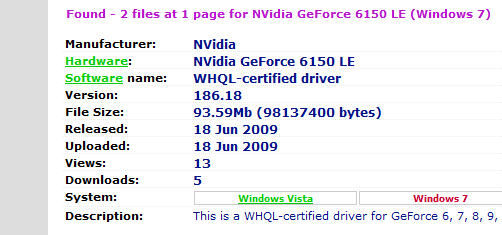
Well, I have used the default video driver that Windows 7 install gives me, but that wont allow me to play the FPS that I play (open GL problem) so I use the newest Nvidia driver, and it happens either way, making me believe it is Win 7. I have run about 7 diffrent builds, w/o issue, except this.
 

Attachments

  • driver.PNG
    driver.PNG
    6.4 KB · Views: 14

My Computer

Computer Manufacturer/Model Number
Gateway GT5220
OS
XP,Seven,Ubuntu
CPU
AMD Athlon 64x2 3800+ 2.01GHz
Motherboard
NVIDIA GeForce 6150 AM2 uBTX 1394 Motherboard
Memory
3 GB kingston DDR2
Graphics Card(s)
Onboard GeForce 6150LE
Monitor(s) Displays
LCM22W3 22" westinghouse
Screen Resolution
1680x1050
LMAO Zigzag...I just saw your avatar and it made me LOL. We are in the process of moving, and have boxes everywhere.My cat was in a box, laying on it's side, and I was sticking my face in this little whole, and my cat swatted at me and her paw shot out of the hole and ended up punching me right between my eyes!!!!
 

My Computer

Computer Manufacturer/Model Number
Gateway GT5220
OS
XP,Seven,Ubuntu
CPU
AMD Athlon 64x2 3800+ 2.01GHz
Motherboard
NVIDIA GeForce 6150 AM2 uBTX 1394 Motherboard
Memory
3 GB kingston DDR2
Graphics Card(s)
Onboard GeForce 6150LE
Monitor(s) Displays
LCM22W3 22" westinghouse
Screen Resolution
1680x1050
opengl problem

Well, I have used the default video driver that Windows 7 install gives me, but that wont allow me to play the FPS that I play (open GL problem) so I use the newest Nvidia driver, and it happens either way, making me believe it is Win 7. I have run about 7 diffrent builds, w/o issue, except this.

I know all about opengl problems. Does you vid support opengl 2.x? It could be a win 7 problem but I also was having opengl trouble with a dell driver and had to force intel's driver to run. this will not fix you but may help you diagnose it. there is a nifty utility called opengl extensions. and it runs thru the video in minute detail telling what is working and whats not.

I forgot what build of win 7 are you running?

Ken
 

My Computer

Computer Manufacturer/Model Number
HP Pavillion dv-7 1005 Tx
OS
Win 8 Release candidate 8400
CPU
[email protected]
Memory
4 gigs
Graphics Card(s)
Nvidia 9600M
Sound Card
HD built-in
Monitor(s) Displays
17" Wxga
Screen Resolution
1440x900
Cooling
none
Internet Speed
45Mb down 5Mb up
I'm running 7260, and maybe a new one monday??!! HAHA! Anyway, the open GL is fine with the Nvidia driver, I can play no prob. It's not too big of a deal, seeing as I usually browse my pics folder and apply a wall from there, but sometimes I forget, and apply from the personalize menu, and have to log off/on to fix it. It's just annoying. Oh, I remember running a "diagnostics" from command prompt before, think that might shed some light?
 

My Computer

Computer Manufacturer/Model Number
Gateway GT5220
OS
XP,Seven,Ubuntu
CPU
AMD Athlon 64x2 3800+ 2.01GHz
Motherboard
NVIDIA GeForce 6150 AM2 uBTX 1394 Motherboard
Memory
3 GB kingston DDR2
Graphics Card(s)
Onboard GeForce 6150LE
Monitor(s) Displays
LCM22W3 22" westinghouse
Screen Resolution
1680x1050
I'm running 7260, and maybe a new one monday??!! HAHA! Anyway, the open GL is fine with the Nvidia driver, I can play no prob. It's not too big of a deal, seeing as I usually browse my pics folder and apply a wall from there, but sometimes I forget, and apply from the personalize menu, and have to log off/on to fix it. It's just annoying. Oh, I remember running a "diagnostics" from command prompt before, think that might shed some light?
It might but I dont know. You not doing anything extreme, and gamma is just a setting in some ini file somewhere. If it gets annoying enough maybe try to un-install the nvid driver then re-install maybe that will set the gamma where it should be
 

My Computer

Computer Manufacturer/Model Number
HP Pavillion dv-7 1005 Tx
OS
Win 8 Release candidate 8400
CPU
[email protected]
Memory
4 gigs
Graphics Card(s)
Nvidia 9600M
Sound Card
HD built-in
Monitor(s) Displays
17" Wxga
Screen Resolution
1440x900
Cooling
none
Internet Speed
45Mb down 5Mb up
Hello and welcome Jaycustom.

Assuming you have a graphics card, open up Device Manager and select the card and do Update Graphics. Let it search the internet. This works very well in Seven and makes finding drivers TONS easier.

I just want to make sure you have the right/newest/good driver.

~Lordbob
 

My Computer

Computer Manufacturer/Model Number
Hera
OS
Windows 7 Ultimate x64, Mint 9
CPU
Intel i5-2500k
Motherboard
ASUS P8P67 Pro
Memory
2x 4Gb Corsair VENGEANCE DDR3-1600
Graphics Card(s)
NVidia GeForce N260GTX Twin Frozr
Sound Card
Realtek HD OnBoard Audio
Monitor(s) Displays
ASUS 24" Monitor
Screen Resolution
1920x1080
Hard Drives
G.SKILL Phoenix Series 60GB SATA II MLC Internal Solid State Drive (SSD)
SAMSUNG Spinpoint F3R 1TB 7200 RPM 32MB Cache SATA II
PSU
Cooler Master Real Power Pro 750W
Case
Cooler Master Haf 932
Cooling
Fans
Keyboard
Razer Tarantula
Mouse
Razer Lachesis
Internet Speed
not fast enough
Oh hey...yea, when I use the driver given to me by 7, or the newest driver manually, it does it both ways.
 

My Computer

Computer Manufacturer/Model Number
Gateway GT5220
OS
XP,Seven,Ubuntu
CPU
AMD Athlon 64x2 3800+ 2.01GHz
Motherboard
NVIDIA GeForce 6150 AM2 uBTX 1394 Motherboard
Memory
3 GB kingston DDR2
Graphics Card(s)
Onboard GeForce 6150LE
Monitor(s) Displays
LCM22W3 22" westinghouse
Screen Resolution
1680x1050
Interesting. What card do you have?

~Lordbob
 

My Computer

Computer Manufacturer/Model Number
Hera
OS
Windows 7 Ultimate x64, Mint 9
CPU
Intel i5-2500k
Motherboard
ASUS P8P67 Pro
Memory
2x 4Gb Corsair VENGEANCE DDR3-1600
Graphics Card(s)
NVidia GeForce N260GTX Twin Frozr
Sound Card
Realtek HD OnBoard Audio
Monitor(s) Displays
ASUS 24" Monitor
Screen Resolution
1920x1080
Hard Drives
G.SKILL Phoenix Series 60GB SATA II MLC Internal Solid State Drive (SSD)
SAMSUNG Spinpoint F3R 1TB 7200 RPM 32MB Cache SATA II
PSU
Cooler Master Real Power Pro 750W
Case
Cooler Master Haf 932
Cooling
Fans
Keyboard
Razer Tarantula
Mouse
Razer Lachesis
Internet Speed
not fast enough
Back
Top