Solved Gateway computer occasionally stuck on boot logo.

That BIOS update doesn't even have a full model number! I would never use some 3rd party download site with a partial model number.

You do not want to update the BIOS without knowing what you are doing or you can brick your PC. So let's start with filling in your PC specs in the bottom left corner of your post. We need your full model number.

The latest BIOS update should be listed at the official Gateway Support Downloads webpage for your exact model. Have you checked there yet? If there is a newer BIOS version you need to read the instructions carefully for updating it. There may be a ReadMe file in the download which needs extracting to read this. This should provide the instructions as well as an explanation of what the BIOS update does. You don't need to install it if it doesn't solve your exact problem.

Don't proceed until you are absolutely sure what you're doing. We have specialists here who can help you until you are certain.
 
There is a new update in fact. My BIOS version dates back to 2011 and the one they have on the Gateway website is a 2012 version.

I tried to get the full model number but all I got was "Gateway FX6860". I also filled in my system specs.

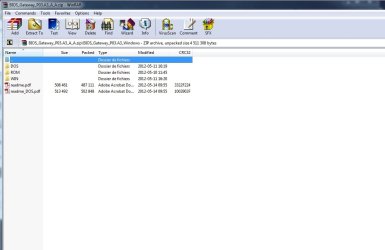
I downloaded the P03.A3 update since the other one is for Windows 8. It does come with a readme and a couple folders.
 

Attachments

  • Sans titre.jpg
    Sans titre.jpg
    44.5 KB · Views: 2
  • Sans titre2.jpg
    Sans titre2.jpg
    50 KB · Views: 2
Last edited:

My Computer My Computer

At a glance

Windows 7 Home Premium 64bit.Intel Core i7-2600 CPU @ 3.40GHz - Sandy Bridge16GB DDR3Sapphire Dual-x Radeon R9 280, 3GB.
Computer type
PC/Desktop
Computer Manufacturer/Model Number
Gateway FX6860
OS
Windows 7 Home Premium 64bit.
CPU
Intel Core i7-2600 CPU @ 3.40GHz - Sandy Bridge
Motherboard
FX6860 ef30p
Memory
16GB DDR3
Graphics Card(s)
Sapphire Dual-x Radeon R9 280, 3GB.
Hard Drives
120GB SSD and 2TB HDD
PSU
FSP750-80APG 750W
Internet Speed
25 Mbps Up & Down
Antivirus
Microsoft Security Essentials, Malwarebytes Premium
Browser
Google Chrome
The problem dissapeared for a couple of days and now it's back again. Should I update my BIOS? Is it okay if I install the update I downloaded from the Gateway website (previous post)?
 

My Computer My Computer

At a glance

Windows 7 Home Premium 64bit.Intel Core i7-2600 CPU @ 3.40GHz - Sandy Bridge16GB DDR3Sapphire Dual-x Radeon R9 280, 3GB.
Computer type
PC/Desktop
Computer Manufacturer/Model Number
Gateway FX6860
OS
Windows 7 Home Premium 64bit.
CPU
Intel Core i7-2600 CPU @ 3.40GHz - Sandy Bridge
Motherboard
FX6860 ef30p
Memory
16GB DDR3
Graphics Card(s)
Sapphire Dual-x Radeon R9 280, 3GB.
Hard Drives
120GB SSD and 2TB HDD
PSU
FSP750-80APG 750W
Internet Speed
25 Mbps Up & Down
Antivirus
Microsoft Security Essentials, Malwarebytes Premium
Browser
Google Chrome
Did you read the ReadME file or any accompanying information to the download link which explain exactly what the UEFI firmware Update is for?

Do you have Ivy Bridge as the Update specifies it's for?

As long as you're confident you understand the instructions including all precautions then we haven't seen a failed BIOS Update here yet, so I suppose the standard precautions you've been given would be enough.

If that fails to fix it I think I'd use this opportunity to do a UEFI install booting the DVD as a UEFI device and deleting all partitions on the target disk to reset the formatting to GPT. You could even use another hard drive to test a UEFI install with all other hard drives unplugged. This gives you the chance to get a perfect Clean Reinstall Windows 7 as well as possibly solve your problem.
 
I read the readme but according to CPU-Z, the code name of my CPU is Sandy Bridge...
 

My Computer My Computer

At a glance

Windows 7 Home Premium 64bit.Intel Core i7-2600 CPU @ 3.40GHz - Sandy Bridge16GB DDR3Sapphire Dual-x Radeon R9 280, 3GB.
Computer type
PC/Desktop
Computer Manufacturer/Model Number
Gateway FX6860
OS
Windows 7 Home Premium 64bit.
CPU
Intel Core i7-2600 CPU @ 3.40GHz - Sandy Bridge
Motherboard
FX6860 ef30p
Memory
16GB DDR3
Graphics Card(s)
Sapphire Dual-x Radeon R9 280, 3GB.
Hard Drives
120GB SSD and 2TB HDD
PSU
FSP750-80APG 750W
Internet Speed
25 Mbps Up & Down
Antivirus
Microsoft Security Essentials, Malwarebytes Premium
Browser
Google Chrome
I don't have Ivy Bridge... It says "Sandy Bridge". Should I perform a UEFI install as you mentioned earlier?
 

My Computer My Computer

At a glance

Windows 7 Home Premium 64bit.Intel Core i7-2600 CPU @ 3.40GHz - Sandy Bridge16GB DDR3Sapphire Dual-x Radeon R9 280, 3GB.
Computer type
PC/Desktop
Computer Manufacturer/Model Number
Gateway FX6860
OS
Windows 7 Home Premium 64bit.
CPU
Intel Core i7-2600 CPU @ 3.40GHz - Sandy Bridge
Motherboard
FX6860 ef30p
Memory
16GB DDR3
Graphics Card(s)
Sapphire Dual-x Radeon R9 280, 3GB.
Hard Drives
120GB SSD and 2TB HDD
PSU
FSP750-80APG 750W
Internet Speed
25 Mbps Up & Down
Antivirus
Microsoft Security Essentials, Malwarebytes Premium
Browser
Google Chrome
Yes, that's why I suggested two weeks ago to try that so that you get all the features of the new BIOS'. Then if it fails to help we can take another look at updating the BIOS.

If you use flash install note that the stick must be formatted exactly as shown in Option One of UEFI Bootable USB Flash Drive - Create in Windows then booted as a UEFI device using the Gateway F10 key, delete all partitions during UEFI (Unified Extensible Firmware Interface) - Install Windows 7 with - Windows 7 Forums , to change the formatting to GPT disk.

So I'd use another hard drive plugged in alone, or save a backup image of the Legacy MBR install.

If install fails we'll need to look for more UEFI, CSM, Legacy BIOS or UEFI Boot settings in the BIOS.

I'd also to do the most thorough search possible for your Gateway model + boot problems as one of those Intel features in the BIOS may need disabling before or after install to test booting without it. I've seen those cause issues solved by disabling one or more.
 
I reinstalled Windows and it's now in GPT with UEFI. So far the computer is booting correctly. I will keep you in touch.
 

My Computer My Computer

At a glance

Windows 7 Home Premium 64bit.Intel Core i7-2600 CPU @ 3.40GHz - Sandy Bridge16GB DDR3Sapphire Dual-x Radeon R9 280, 3GB.
Computer type
PC/Desktop
Computer Manufacturer/Model Number
Gateway FX6860
OS
Windows 7 Home Premium 64bit.
CPU
Intel Core i7-2600 CPU @ 3.40GHz - Sandy Bridge
Motherboard
FX6860 ef30p
Memory
16GB DDR3
Graphics Card(s)
Sapphire Dual-x Radeon R9 280, 3GB.
Hard Drives
120GB SSD and 2TB HDD
PSU
FSP750-80APG 750W
Internet Speed
25 Mbps Up & Down
Antivirus
Microsoft Security Essentials, Malwarebytes Premium
Browser
Google Chrome
The problem is still there. I had to manually restart the computer after it got stuck on the Gateway logo. Maybe I should check the BIOS settings or something?
 

My Computer My Computer

At a glance

Windows 7 Home Premium 64bit.Intel Core i7-2600 CPU @ 3.40GHz - Sandy Bridge16GB DDR3Sapphire Dual-x Radeon R9 280, 3GB.
Computer type
PC/Desktop
Computer Manufacturer/Model Number
Gateway FX6860
OS
Windows 7 Home Premium 64bit.
CPU
Intel Core i7-2600 CPU @ 3.40GHz - Sandy Bridge
Motherboard
FX6860 ef30p
Memory
16GB DDR3
Graphics Card(s)
Sapphire Dual-x Radeon R9 280, 3GB.
Hard Drives
120GB SSD and 2TB HDD
PSU
FSP750-80APG 750W
Internet Speed
25 Mbps Up & Down
Antivirus
Microsoft Security Essentials, Malwarebytes Premium
Browser
Google Chrome
You can`t carch a break :(
 

My Computer My Computer

At a glance

Windows 10 Pro x64Intel Core i7 6700KGSkill TridentZ RGB 16GB 3600 16-16-16-36EVGA GTX 980 Ti SC x2
Computer type
PC/Desktop
Computer Manufacturer/Model Number
Skylake Special #666
OS
Windows 10 Pro x64
CPU
Intel Core i7 6700K
Motherboard
Asus Sabertooth Z170 Mark 1
Memory
GSkill TridentZ RGB 16GB 3600 16-16-16-36
Graphics Card(s)
EVGA GTX 980 Ti SC x2
Sound Card
Realtek High Definition
Monitor(s) Displays
AOC G2460PG
Screen Resolution
1920 x 1080 144Hz
Hard Drives
Samsung 860 Pro 256GB, Seagate Barracuda 4TB x2
PSU
EVGA 1000 P2, EVGA White Custom Braided Cables
Case
Corsair Vengeance C70 Gunmetal Black
Cooling
Corsair H100i v2, Corsair ML120 x2, Thermal Grizzly Kryonaut
Keyboard
Logitech G910 Orion Spectrum
Mouse
Logitech G700s
Internet Speed
Verizon Fios Quantum Gateway 75/75
Antivirus
Windows Defender, Malwarebytes Free 3.8.3
Browser
Chrome
Other Info
Corsair SP120 x4, LG Blu-ray Drive, Durabrand HT-395 100 Watt Dolby Digital Amp, Corsair H2100 Wireless 7.1 Headset
Confirm the SATA controller is set to AHCI, and that you followed all other steps in Clean Reinstall Windows 7.

Do you feel confident in doing the BIOS update from Windows following closely the steps in the instructions which accompany the Download or are contained in it's ReadMe file?
 
The SATA controller is indeed set to AHCI and I followed all the other steps of the clean reinstall tutorial.

Do I have to find another BIOS update since the one from the Gateway website is for Ivy Bridge and I have Sandy Bridge?
 

My Computer My Computer

At a glance

Windows 7 Home Premium 64bit.Intel Core i7-2600 CPU @ 3.40GHz - Sandy Bridge16GB DDR3Sapphire Dual-x Radeon R9 280, 3GB.
Computer type
PC/Desktop
Computer Manufacturer/Model Number
Gateway FX6860
OS
Windows 7 Home Premium 64bit.
CPU
Intel Core i7-2600 CPU @ 3.40GHz - Sandy Bridge
Motherboard
FX6860 ef30p
Memory
16GB DDR3
Graphics Card(s)
Sapphire Dual-x Radeon R9 280, 3GB.
Hard Drives
120GB SSD and 2TB HDD
PSU
FSP750-80APG 750W
Internet Speed
25 Mbps Up & Down
Antivirus
Microsoft Security Essentials, Malwarebytes Premium
Browser
Google Chrome
No, not unless the update matches your specs.

Place the Win7 DVD in the drive and reboot the PC, tap the key shown on first screen for one-time BIOS Boot menu which is normally F10 on Gateway. Do you see a UEFI DVD drive choice?

If not reboot into BIOS setup, see if UEFI DVD choice shows up there then move it to top of the list, save changes and exit. If not then move the EFI Device choice to top and save changes. Reboot to see if DVD will boot.

If so then I'd back up the OS drive data and image, then wipe it with Diskpart Clean Command
while doing a Clean Reinstall Windows 7 from the UEFI DVD choice at boot.
 
Hi!

I do have an option "UEFI DVD drive" in the one-time BIOS Boot menu but it fails when I try to boot from the DVD.

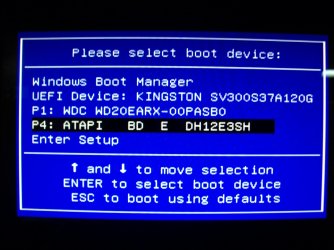
Nevertheless, in the BIOS setup, the DVD drive (E) does not indicate UEFI, but when I switch it for the "UEFI Windows Boot Manager" and then reboot, I can boot from the DVD with no problems.

Also, I don't have any device called EFI in the boot manager.
 

My Computer My Computer

At a glance

Windows 7 Home Premium 64bit.Intel Core i7-2600 CPU @ 3.40GHz - Sandy Bridge16GB DDR3Sapphire Dual-x Radeon R9 280, 3GB.
Computer type
PC/Desktop
Computer Manufacturer/Model Number
Gateway FX6860
OS
Windows 7 Home Premium 64bit.
CPU
Intel Core i7-2600 CPU @ 3.40GHz - Sandy Bridge
Motherboard
FX6860 ef30p
Memory
16GB DDR3
Graphics Card(s)
Sapphire Dual-x Radeon R9 280, 3GB.
Hard Drives
120GB SSD and 2TB HDD
PSU
FSP750-80APG 750W
Internet Speed
25 Mbps Up & Down
Antivirus
Microsoft Security Essentials, Malwarebytes Premium
Browser
Google Chrome
Is there a setting for Secure Boot in BIOS setup, normally on Security tab? If so disable it.

Look elsewhere for CSM, Legacy BIOS and any other UEFI or EFI settings to report back all choices available for each.

If it will boot as a UEFI DVD but not complete install then the problem is with a BIOS setting or the DVD, and the DVD just installed in Legacy mode, correct?

I would also study each of those Intel choices in BIOS so I know exactly what they do and whether they can be disabled long enough to see if they are causing the problem. Start with the Manual downloaded on the PC model's Support Downloads webpage, if necessary google each to read enough about each to know what it does and if it can be disabled.
 
The DVD just indeed installed in Legacy mode. As I said, it won't let me boot from the DVD in the one-time boot menu as it appear as something like "UEFI DVD drive E".

In order to boot from the Windows DVD, I have to enter the BIOS setup by pressing "Delete" and then set the DVD at the first place.

There is no other settings really. I still have the same BIOS version as before. I will check those Intel features to see if I can disable some of them.
 

My Computer My Computer

At a glance

Windows 7 Home Premium 64bit.Intel Core i7-2600 CPU @ 3.40GHz - Sandy Bridge16GB DDR3Sapphire Dual-x Radeon R9 280, 3GB.
Computer type
PC/Desktop
Computer Manufacturer/Model Number
Gateway FX6860
OS
Windows 7 Home Premium 64bit.
CPU
Intel Core i7-2600 CPU @ 3.40GHz - Sandy Bridge
Motherboard
FX6860 ef30p
Memory
16GB DDR3
Graphics Card(s)
Sapphire Dual-x Radeon R9 280, 3GB.
Hard Drives
120GB SSD and 2TB HDD
PSU
FSP750-80APG 750W
Internet Speed
25 Mbps Up & Down
Antivirus
Microsoft Security Essentials, Malwarebytes Premium
Browser
Google Chrome
Hi!

Sorry for the late reply. I'm very busy these days.

Anyhow, I read about the Intel features but they are all very useful... I could probably disable the Intel AES-NI feature but I'm not sure if it could cause a security issue. According to Intel, it accelerates the encryption of data and it gives your IT environment faster, more affordable data protection and greater security, making pervasive encryption feasible in areas where previously it was not.

Seems to me that a regular Windows user dosen't really need this feature to be enabled... Could this be related to my problem?
 

My Computer My Computer

At a glance

Windows 7 Home Premium 64bit.Intel Core i7-2600 CPU @ 3.40GHz - Sandy Bridge16GB DDR3Sapphire Dual-x Radeon R9 280, 3GB.
Computer type
PC/Desktop
Computer Manufacturer/Model Number
Gateway FX6860
OS
Windows 7 Home Premium 64bit.
CPU
Intel Core i7-2600 CPU @ 3.40GHz - Sandy Bridge
Motherboard
FX6860 ef30p
Memory
16GB DDR3
Graphics Card(s)
Sapphire Dual-x Radeon R9 280, 3GB.
Hard Drives
120GB SSD and 2TB HDD
PSU
FSP750-80APG 750W
Internet Speed
25 Mbps Up & Down
Antivirus
Microsoft Security Essentials, Malwarebytes Premium
Browser
Google Chrome
Well... I don't know what to do anymore. I can't find any other BIOS updates for my Gateway FX6860... I still have the same problem and I have to restart my computer at least one time before I can boot up correctly. It's very annoying >.<
 

My Computer My Computer

At a glance

Windows 7 Home Premium 64bit.Intel Core i7-2600 CPU @ 3.40GHz - Sandy Bridge16GB DDR3Sapphire Dual-x Radeon R9 280, 3GB.
Computer type
PC/Desktop
Computer Manufacturer/Model Number
Gateway FX6860
OS
Windows 7 Home Premium 64bit.
CPU
Intel Core i7-2600 CPU @ 3.40GHz - Sandy Bridge
Motherboard
FX6860 ef30p
Memory
16GB DDR3
Graphics Card(s)
Sapphire Dual-x Radeon R9 280, 3GB.
Hard Drives
120GB SSD and 2TB HDD
PSU
FSP750-80APG 750W
Internet Speed
25 Mbps Up & Down
Antivirus
Microsoft Security Essentials, Malwarebytes Premium
Browser
Google Chrome
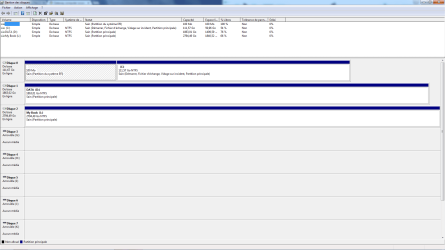
Let a see a screenshot of Disk Mgmt

What happens when you set Windows Boot Manager first in BIOS then trigger UEFI DVD with boot key?

What happens when you try a fresh ISO and DVD burned with ImgBurn at 4x speed, then flash stick formatted with Option One of UEFI Bootable USB Flash Drive - Create in Windows

What happens if you disable the Intel features only as a test?
 
When I choose the (DVD E: ) using the F12 boot menu, it starts just fine. I tried it with the Kaspersky Rescue Disk and it works fine.

It also works with the fresh ISO burned on a DVD using ImgBurn (4x speed) + with the flash stick formatted with option one of UEFI bootable USB flash drive.

I will disable the Intel features and I will try to boot several times at different intervals.
 

Attachments

  • Disk management.png
    Disk management.png
    33.6 KB · Views: 1
  • 100_2757.JPG
    100_2757.JPG
    367.9 KB · Views: 0

My Computer My Computer

At a glance

Windows 7 Home Premium 64bit.Intel Core i7-2600 CPU @ 3.40GHz - Sandy Bridge16GB DDR3Sapphire Dual-x Radeon R9 280, 3GB.
Computer type
PC/Desktop
Computer Manufacturer/Model Number
Gateway FX6860
OS
Windows 7 Home Premium 64bit.
CPU
Intel Core i7-2600 CPU @ 3.40GHz - Sandy Bridge
Motherboard
FX6860 ef30p
Memory
16GB DDR3
Graphics Card(s)
Sapphire Dual-x Radeon R9 280, 3GB.
Hard Drives
120GB SSD and 2TB HDD
PSU
FSP750-80APG 750W
Internet Speed
25 Mbps Up & Down
Antivirus
Microsoft Security Essentials, Malwarebytes Premium
Browser
Google Chrome
Back
Top