Gateway GT5644e drivers for Windows 7

Delaney64

New member
Local time
6:57 AM
Messages
3
Hello,

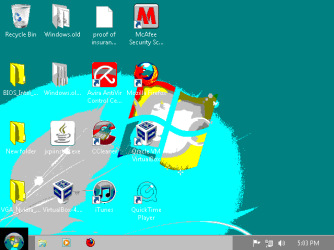
Windows 7 was provided and paid for my school in which they distributed it to student in certain majors. Of course I installed it on my home and laptop pc. I recently realized that the OS drivers are not supported by gateway, they only support vista or XP. Of course when I leave for school my family some needs the home computer fixed and I came home to the computer screen looking like the fist attachment below.

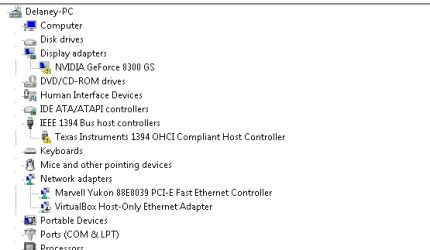
I began to think it was a simple driver fix, however I have updated the drivers from the Nvidia site correctly but with no chance of success. I also noticed that the IEEE Bus host seemed to be outdated and was not working properly, as shown in the second attachment.

I concluded the video card is working fine since I can boot into linux from a live cd perfectly fine.

All in all, I was wondering if anyone could point me in the right direction to obtain these drivers for windows 7 for a Gateway GT5644e and/or instruct me on what to do next. (System reformat?)
 

Attachments
  • Capture.PNG
    Capture.PNG
    14 KB · Views: 11
  • drivers.PNG
    drivers.PNG
    4.6 KB · Views: 11

My Computer My Computer

OS
Windows 7 64 bit
Hi Delaney64, Welcome to the forums, download the graphic driver here NVIDIA DRIVERS 285.62 WHQL its a self installing executable file ,so just follow the screen prompts will search for the bus controller now
 

My Computer My Computer

Computer type
PC/Desktop
Computer Manufacturer/Model Number
self build
OS
win 7 ultimate32bit, Win8.1pro wmc 32bit
CPU
amd phenom x4 9600
Motherboard
asus m2n32-sli deluxe
Memory
corsair twinxs 2x2gb
Graphics Card(s)
2x nvidia 1gb 8500gt
Sound Card
onboard
Monitor(s) Displays
23" PB Viseo 233d
Screen Resolution
1920x1080
Hard Drives
maxtor sata 500gb
maxtor sata 320gb
fujitsu sata200gb
PSU
oryxx tornado 750w
Case
thermaltake xaser lll
Cooling
artic freezer64 pro + 7 case fans

My Computer My Computer

Computer type
PC/Desktop
Computer Manufacturer/Model Number
self build
OS
win 7 ultimate32bit, Win8.1pro wmc 32bit
CPU
amd phenom x4 9600
Motherboard
asus m2n32-sli deluxe
Memory
corsair twinxs 2x2gb
Graphics Card(s)
2x nvidia 1gb 8500gt
Sound Card
onboard
Monitor(s) Displays
23" PB Viseo 233d
Screen Resolution
1920x1080
Hard Drives
maxtor sata 500gb
maxtor sata 320gb
fujitsu sata200gb
PSU
oryxx tornado 750w
Case
thermaltake xaser lll
Cooling
artic freezer64 pro + 7 case fans
I'm sorry I should have clarified that it was a 64 bit OS, I cannot install these drivers. Could you redirect me to the 64bit drivers?
 

My Computer My Computer

OS
Windows 7 64 bit
I'm sorry I should have clarified that it was a 64 bit OS, I cannot install these drivers. Could you redirect me to the 64bit drivers?

delaney on the link I posted look at the drop down menu for operating system and choose win 7 64bit :)
 

My Computer My Computer

Computer type
PC/Desktop
Computer Manufacturer/Model Number
self build
OS
win 7 ultimate32bit, Win8.1pro wmc 32bit
CPU
amd phenom x4 9600
Motherboard
asus m2n32-sli deluxe
Memory
corsair twinxs 2x2gb
Graphics Card(s)
2x nvidia 1gb 8500gt
Sound Card
onboard
Monitor(s) Displays
23" PB Viseo 233d
Screen Resolution
1920x1080
Hard Drives
maxtor sata 500gb
maxtor sata 320gb
fujitsu sata200gb
PSU
oryxx tornado 750w
Case
thermaltake xaser lll
Cooling
artic freezer64 pro + 7 case fans

My Computer My Computer

Computer type
PC/Desktop
Computer Manufacturer/Model Number
self build
OS
win 7 ultimate32bit, Win8.1pro wmc 32bit
CPU
amd phenom x4 9600
Motherboard
asus m2n32-sli deluxe
Memory
corsair twinxs 2x2gb
Graphics Card(s)
2x nvidia 1gb 8500gt
Sound Card
onboard
Monitor(s) Displays
23" PB Viseo 233d
Screen Resolution
1920x1080
Hard Drives
maxtor sata 500gb
maxtor sata 320gb
fujitsu sata200gb
PSU
oryxx tornado 750w
Case
thermaltake xaser lll
Cooling
artic freezer64 pro + 7 case fans
I installed the Nvida and it did not seem to fix my resolution file and the Nvida control panel states there is no such Nvida GPU attached. I could not figure out how to install bus driver (I attempted changing its compatibility but it did not work). I recently attempted to boot into linux again this time the screen was very messed up and unreadable once the desktop was loaded however the pre-loading screen that states "ubuntu 10.10 " with the 4 dashes seemed booted fine.

I ran out the possibility of viruses; I ran malewarebytes. Ccleaner, and combo fix. I am currently checking for system corruption using check disc and sfc scans, so far with no sign of OS failure (ugh the last check disc is still running...this will take a while lol) .

I am beginning to think it is hardware failure :(, but I am uncertain if it is the PCI slot, video card, or the motherboard bus. Judging from the IEEE host driver and the video-card driver being unable to work, I have a strong feeling it might be the PCI. Does anyone know of any diagnostics I could preform?

Update: I forgot there were VGA output integrated into my motherboard as well. Both my video card and the integrated card are the same messy output as shown in the first attachment. Does this mean its my motherboard?
 
Last edited:

My Computer My Computer

OS
Windows 7 64 bit
Back
Top