Gateway Notebook, windows update error 80080005

ARGal34

New member
Local time
12:14 PM
Messages
3
I have a Gateway Notebook here which is running Windows 7 Starter. I went to do "check for updates" when i got the error 8008005. I have tried to run FixIt and follow many other instructions from google. I have also tried to delete the SoftwareDistribution folders and stop and restart Windows Update. Any help on fixing this would be appreciated.
 

My Computer

Computer type
Laptop
Computer Manufacturer/Model Number
Gateway
OS
Windows 7 Starter 32 bit
Memory
1024 MB
Graphics Card(s)
Intel(R) Graphics Media Accelerator 3600 Series
Antivirus
Microsoft Security Essentials
Browser
Google Chrome
Hi ARGal34 & welcome to the forum. :)
Please follow Windows Update Posting Instructions

error messages ending in 0005 are often 'access denied' errors - try this first.....

Open Windows Update
click on Change Settings
select 'Never check for updates' in the dropdown - click OK
Exit Windows Update
now go back to Windows Update
Click on Change Settings
Select 'Install Updates Automatically'
Click OK
now try manually checking for updates.
 
Last edited:

My Computer

Computer type
Laptop
OS
Win 7 Home Premium x64/Linux Lite 2.6 x64
Tried this and still got the error code 80080005. I also ran my malware and used the system update readiness tool to no avail.
 

My Computer

Computer type
Laptop
Computer Manufacturer/Model Number
Gateway
OS
Windows 7 Starter 32 bit
Memory
1024 MB
Graphics Card(s)
Intel(R) Graphics Media Accelerator 3600 Series
Antivirus
Microsoft Security Essentials
Browser
Google Chrome
As the CheckSur log is clean this normally indicates an issue with the TEMP location for WU downloads, it is just a case of clearing it out.

Software Distribution rename


  • Click Start -> Type in CMD in the search -> Right click on cmd.exe and choose Run as Administrator
  • Copy & paste in the following commands:
    net stop wuauserv
    ren %SystemRoot%\SoftwareDistribution\Download DL.bak
    ren %SystemRoot%\SoftwareDistribution\DataStore DS.bak
    net start wuauserv


Once completed please try and run windows update again.
 

My Computer

Computer type
Laptop
OS
Win 7 Home Premium x64/Linux Lite 2.6 x64
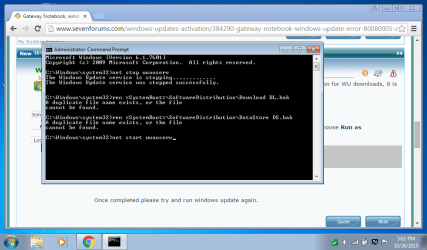
I copy and pasted the above into cmd and got this: Untitled.png
 

My Computer

Computer type
Laptop
Computer Manufacturer/Model Number
Gateway
OS
Windows 7 Starter 32 bit
Memory
1024 MB
Graphics Card(s)
Intel(R) Graphics Media Accelerator 3600 Series
Antivirus
Microsoft Security Essentials
Browser
Google Chrome
Did Windows Update Service start successfully?

C:\Windows\System32>net start wuauserv
The Windows Update service is starting.
The Windows Update service was started successfully.

Did you try windows update again?
 

My Computer

Computer type
Laptop
OS
Win 7 Home Premium x64/Linux Lite 2.6 x64
Still having update issue...

This can be a Winsock problem.....

Open an Elevated Command Prompt window, and run the following command

NETSH WINSOCK RESET

you'll be advised to reboot - do so, and try again.
 

My Computer

Computer type
Laptop
OS
Win 7 Home Premium x64/Linux Lite 2.6 x64
Back
Top