Geforce 8400M GS problem

minamfm

New member
Local time
4:54 PM
Messages
16
i recently upgraded to windows 7 RC 7100 and after installing the video card driver from windows update and restarting i get something wierd when i change the resolution or even try to open any game with resolution less then 1280x800

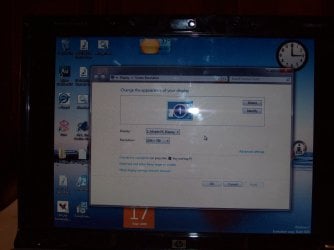
Attached is a screenshot of what's happening at 1024x768 (i had to take it with a camera cuz it won't appear correctly with prt screen)

Do you see the Big Black Margins at the sides of the screen??

Specs:
2 GB DDR2 Memory
Intel Core 2 duo 2.2 GHz 4 mb cache
Nvidia Geforce 8400M GS
 

Attachments
  • 100_0988.JPG
    100_0988.JPG
    724.5 KB · Views: 2,082

My Computer

Computer Manufacturer/Model Number
HP pavilion dv6580ee
OS
Windows 7
CPU
Intel Core2duo 2.2 Ghz 4mb l2 cache
Memory
2 GB DDR2
Graphics Card(s)
Nvidia Geforce 8400M GS
Screen Resolution
1280x800
Hard Drives
225 GB
Internet Speed
512 kbps
Hi minamfm,

Did you clean-install W7, or did you upgrade from a prior version of Windows by running the disk from that version?

What driver version have you got installed? Here are the latest WHQL versions from NVidia for the 8M series:

32-bit GeForce Release 185
64-bit GeForce Release 185
 

My Computer

Computer type
PC/Desktop
Computer Manufacturer/Model Number
Dwarf Dwf/11/2012 r09/2013
OS
Windows 8.1 Pro RTM x64
CPU
Intel Core-i5-3570K 4-core @ 3.4GHz (Ivy Bridge) (OC 4.4GHz)
Motherboard
ASRock Z77 Extreme4-M
Memory
4 x 4GB DDR3-1600 Corsair Vengeance CMZ8GX3M2A1600C9B (16GB)
Graphics Card(s)
MSI GeForce GTX770 Gaming OC 2GB
Sound Card
Realtek High Definition on board solution (ALC 898)
Monitor(s) Displays
ViewSonic VA1912w Widescreen (VGA)
Screen Resolution
1440x900
Hard Drives
OCZ Agility 3 SSD 120GB SATA III x2 (RAID 0)
Samsung HD501LJ 500GB SATA II x2
Hitachi HDS721010CLA332 1TB SATA II
Iomega 1.5TB Ext USB 2.0
WD 2.0TB Ext USB 3.0
PSU
XFX Pro Series 850W Semi-Modular
Case
Gigabyte IF233
Cooling
1 x 120mm Front Inlet 1 x 120mm Rear Exhaust
Keyboard
Microsoft Comfort Curve Keyboard 3000 (USB)
Mouse
Microsoft Comfort Mouse 3000 for Business (USB)
Internet Speed
NetGear DG834Gv3 ADSL Modem/Router (Ethernet) ~4.0 Mb/s (O2)
Antivirus
Avast! 8.0.1497
Browser
IE 11
Other Info
Optical Drive: HL-DT-ST BD-RE BH10LS30 SATA Bluray
Lexmark S305 Printer/Scanner/Copier (USB)
WEI Score: 8.1/8.1/8.5/8.5/8.25
Asus Eee PC 1011PX Netbook (Windows 7 x86 Starter)
yes a clean install, in fact i tried reinstalling when it didn work n still no luck

im using the 185.85 driver previously 185.81 n both had the same prob

however the 179 didn have any problems so i guessed it's a driver prob
 

My Computer

Computer Manufacturer/Model Number
HP pavilion dv6580ee
OS
Windows 7
CPU
Intel Core2duo 2.2 Ghz 4mb l2 cache
Memory
2 GB DDR2
Graphics Card(s)
Nvidia Geforce 8400M GS
Screen Resolution
1280x800
Hard Drives
225 GB
Internet Speed
512 kbps
Hi minamfm,

It is possible that it is a bug in the driver. Sometimes, fixing an existing bug in a driver can uncover hidden ones.

I suggest that you provide feedback about the issues you are having to NVidia:

Feedback Form for NVIDIA Notebook Drivers
 

My Computer

Computer type
PC/Desktop
Computer Manufacturer/Model Number
Dwarf Dwf/11/2012 r09/2013
OS
Windows 8.1 Pro RTM x64
CPU
Intel Core-i5-3570K 4-core @ 3.4GHz (Ivy Bridge) (OC 4.4GHz)
Motherboard
ASRock Z77 Extreme4-M
Memory
4 x 4GB DDR3-1600 Corsair Vengeance CMZ8GX3M2A1600C9B (16GB)
Graphics Card(s)
MSI GeForce GTX770 Gaming OC 2GB
Sound Card
Realtek High Definition on board solution (ALC 898)
Monitor(s) Displays
ViewSonic VA1912w Widescreen (VGA)
Screen Resolution
1440x900
Hard Drives
OCZ Agility 3 SSD 120GB SATA III x2 (RAID 0)
Samsung HD501LJ 500GB SATA II x2
Hitachi HDS721010CLA332 1TB SATA II
Iomega 1.5TB Ext USB 2.0
WD 2.0TB Ext USB 3.0
PSU
XFX Pro Series 850W Semi-Modular
Case
Gigabyte IF233
Cooling
1 x 120mm Front Inlet 1 x 120mm Rear Exhaust
Keyboard
Microsoft Comfort Curve Keyboard 3000 (USB)
Mouse
Microsoft Comfort Mouse 3000 for Business (USB)
Internet Speed
NetGear DG834Gv3 ADSL Modem/Router (Ethernet) ~4.0 Mb/s (O2)
Antivirus
Avast! 8.0.1497
Browser
IE 11
Other Info
Optical Drive: HL-DT-ST BD-RE BH10LS30 SATA Bluray
Lexmark S305 Printer/Scanner/Copier (USB)
WEI Score: 8.1/8.1/8.5/8.5/8.25
Asus Eee PC 1011PX Netbook (Windows 7 x86 Starter)
Hi there,

First of all sorry about my poor english, i try to be most understandable (is it a real word?) that i can.

The case:
I "clean" Installed Windows7 RC 32-bit to my HP DV9888eo laptop which has GeForce 8400M GS card in it. Windows itself installed fine but I havent managed to install any drivers for graphic card. I tried the drivers that nvidia has published (185.81 32-bit). Sometimes it installs like it should but after reboot device manager stills says that it uses standard vga graphics driver, sometimes when installing the drivers it says that: "The Nvidia Setup Program could not locate any drivers that are compatible with your current hardware"... when trying to update with WindowsUpdate-program the graphics drivers i get message "access is denied". What is wrong with my graphic card driver installations?
 

My Computer

OS
Windows 7
Hi there,

First of all sorry about my poor english, i try to be most understandable (is it a real word?) that i can.

The case:
I "clean" Installed Windows7 RC 32-bit to my HP DV9888eo laptop which has GeForce 8400M GS card in it. Windows itself installed fine but I havent managed to install any drivers for graphic card. I tried the drivers that nvidia has published (185.81 32-bit). Sometimes it installs like it should but after reboot device manager stills says that it uses standard vga graphics driver, sometimes when installing the drivers it says that: "The Nvidia Setup Program could not locate any drivers that are compatible with your current hardware"... when trying to update with WindowsUpdate-program the graphics drivers i get message "access is denied". What is wrong with my graphic card driver installations?

Hello Jerzy, and welcome to Seven Forums :)
Right click on the NVIDIA driver setup and select: Run as administrator and run the stup. If that doesn't work then log on to the built-in admin account and try to update from there. See here
 
Last edited:

My Computer

Computer type
Laptop
Computer Manufacturer/Model Number
Samsung
OS
Windows 8 x64
CPU
Intel Core i7 3630QM
Motherboard
Intel HM76
Memory
Samsung 8 GB DDR3 800 Mhz
Graphics Card(s)
ATI Radeon HD Graphics 7670M + Intel HD Graphics 4000
Screen Resolution
1366x768
Hard Drives
SAMSUNG Spinpoint M8 1TB
Internet Speed
4 Mb/sDownload Speed, 2 Mb/s Upload Speed
Antivirus
avast!
Is this difficult or what!

Installation as a administrator doesnt work. And using the built in admin account gives me the same answer when trying to update graphic driver: "Access is denied"...

I try one more time to download the latest drivers from NVidia and if that yet doesnt work then i cry some more:cry:
 

My Computer

OS
Windows 7
Another person here in the forums had the same problem and it seems that his problem was solved. Try the methods posted in this thread and see if you can fix it. See here

Hope this helps :)
 

My Computer

Computer type
Laptop
Computer Manufacturer/Model Number
Samsung
OS
Windows 8 x64
CPU
Intel Core i7 3630QM
Motherboard
Intel HM76
Memory
Samsung 8 GB DDR3 800 Mhz
Graphics Card(s)
ATI Radeon HD Graphics 7670M + Intel HD Graphics 4000
Screen Resolution
1366x768
Hard Drives
SAMSUNG Spinpoint M8 1TB
Internet Speed
4 Mb/sDownload Speed, 2 Mb/s Upload Speed
Antivirus
avast!
There were plenty of things that were similar with my case. But as I ran Everest-program i`ve got my graphic card information right. I wondered that it cannot be bios problem then? Everest gave me this information of my motherboard and BIOS: Motherboard - Quanta 30DA. Chipset: NVidia MCP65M, AMD Hammer. BIOS Type: Phoenix (04/24/08)...

If anybody has any suggestions to fix my problem give it a shot, im about to go back to XP...

By the way i got a failure code when i was trying to update my driver by device manager. It is Code80070005... if somebody knows more about it?

One more thing (dont know if its important), when i am updating driver by device manager browsing my computer for driver software and picking them from a list i got 3 different versions of Nvidia GeForce 8400M GS drivers. Everytime when i pick one of them and trying to update i get "access denied" even if trying as administrator...
 

My Computer

OS
Windows 7
For the windows update; try this following method-
1. Start -> Control Panel -> Administrative Tools -> Local Security Policy
2. Navigate to Security\Local Policies\Security Options
a. Network Access: Let everyone permissions apply to anonymous users - Set to Enabled
 

My Computer

Computer type
Laptop
Computer Manufacturer/Model Number
Samsung
OS
Windows 8 x64
CPU
Intel Core i7 3630QM
Motherboard
Intel HM76
Memory
Samsung 8 GB DDR3 800 Mhz
Graphics Card(s)
ATI Radeon HD Graphics 7670M + Intel HD Graphics 4000
Screen Resolution
1366x768
Hard Drives
SAMSUNG Spinpoint M8 1TB
Internet Speed
4 Mb/sDownload Speed, 2 Mb/s Upload Speed
Antivirus
avast!
For the windows update; try this following method-
1. Start -> Control Panel -> Administrative Tools -> Local Security Policy
2. Navigate to Security\Local Policies\Security Options
a. Network Access: Let everyone permissions apply to anonymous users - Set to Enabled

Still wont work. Probably doesnt work if reinstalled whole Windows7:sarc:. Is this general problem or is it just whit me?
 

My Computer

OS
Windows 7
It's a general prob ;). But don't worry, we people here will try to get you a solution. :)
 

My Computer

Computer type
Laptop
Computer Manufacturer/Model Number
Samsung
OS
Windows 8 x64
CPU
Intel Core i7 3630QM
Motherboard
Intel HM76
Memory
Samsung 8 GB DDR3 800 Mhz
Graphics Card(s)
ATI Radeon HD Graphics 7670M + Intel HD Graphics 4000
Screen Resolution
1366x768
Hard Drives
SAMSUNG Spinpoint M8 1TB
Internet Speed
4 Mb/sDownload Speed, 2 Mb/s Upload Speed
Antivirus
avast!
I was wondering if its chipset driver problem. I installed nVidia nForce AR Chipset drivers but Everest-program says the chipset is MCP65M... Where can i found drivers for that if those nForce chipset drivers are false?

I found interesting little discussion with same problems that i have. That problem considered about Vista but i believe its the same problem. I just cant understand the solution. Can someone explanate to me in common sense how its done (if it works with windows7)
 

My Computer

OS
Windows 7
I was wondering if its chipset driver problem. I installed nVidia nForce AR Chipset drivers but Everest-program says the chipset is MCP65M... Where can i found drivers for that if those nForce chipset drivers are false?

I found interesting little discussion with same problems that i have. That problem considered about Vista but i believe its the same problem. I just cant understand the solution. Can someone explanate to me in common sense how its done (if it works with windows7)
If it works with Vista, it should work with Win7. Try the method in that post and reply ASAP. :)
 

My Computer

Computer type
Laptop
Computer Manufacturer/Model Number
Samsung
OS
Windows 8 x64
CPU
Intel Core i7 3630QM
Motherboard
Intel HM76
Memory
Samsung 8 GB DDR3 800 Mhz
Graphics Card(s)
ATI Radeon HD Graphics 7670M + Intel HD Graphics 4000
Screen Resolution
1366x768
Hard Drives
SAMSUNG Spinpoint M8 1TB
Internet Speed
4 Mb/sDownload Speed, 2 Mb/s Upload Speed
Antivirus
avast!
OK case solved. I reinstalled whole win7 but now I didnt install any chipset or other drivers. When installation was finished I just updated my system with WindowsUpdate-program and thats it. Everything is now on right place. So it was likely chipset driver problem?

Thank you "The Cool Guy" for help, it is nice that we noobs wont get despaired!
 

My Computer

OS
Windows 7
It was likely in the case that it was a driver problem before, windows update or even a driver corruption. Happy to know that your problem has been solved :). I guess I wasn't any help though.... :(
 

My Computer

Computer type
Laptop
Computer Manufacturer/Model Number
Samsung
OS
Windows 8 x64
CPU
Intel Core i7 3630QM
Motherboard
Intel HM76
Memory
Samsung 8 GB DDR3 800 Mhz
Graphics Card(s)
ATI Radeon HD Graphics 7670M + Intel HD Graphics 4000
Screen Resolution
1366x768
Hard Drives
SAMSUNG Spinpoint M8 1TB
Internet Speed
4 Mb/sDownload Speed, 2 Mb/s Upload Speed
Antivirus
avast!
i recently upgraded to windows 7 RC 7100 and after installing the video card driver from windows update and restarting i get something wierd when i change the resolution or even try to open any game with resolution less then 1280x800

Attached is a screenshot of what's happening at 1024x768 (i had to take it with a camera cuz it won't appear correctly with prt screen)

Do you see the Big Black Margins at the sides of the screen??

Specs:
2 GB DDR2 Memory
Intel Core 2 duo 2.2 GHz 4 mb cache
Nvidia Geforce 8400M GS

I had the EXACT same problem... only happens when I really push it... and only when running eDrawings... :huh:
 

My Computer

Computer type
PC/Desktop
Computer Manufacturer/Model Number
Own build
OS
Windows 7 x64 Professional
CPU
Intel Core i7-870 Lynnfield 2.93 GHz
Motherboard
Intel Whitesburg P55 LGA1156
Memory
Kingston Hyper X 1333MHz DDR3 4x4Gb
Graphics Card(s)
Nvidia GTS 250
Monitor(s) Displays
AOC Q3279VWF 31.5"
Screen Resolution
2560x1440
Hard Drives
Western Digital 1000GB Hard Drive (SATA 3.0Gb/s, 7200rpm, 32MB Cache)
Verbatim 500GB (External)
PSU
650W
Case
Coolermaster HAF 912
Cooling
Stock
Keyboard
Logitech
Mouse
Logitech
Antivirus
Avira
Browser
Firefox
Other Info
LG OptDrive 24x SATA DVDRW Lightscribe
I was having the same problems and now I have no idea what's going on....?? I'm attaching a screen pic bc I don't know if the 3D is working properly.... Do you have any advice on if this looks right? There is very little options that I can do to the resolution. The best that it will let me go is 1280 x 800 and I can't do too much with the taskbar.

Also, I'm trying to figure out what chipset driver to download, any advice on how to figure that out? I have a Dell Vostro 1500.
 

Attachments

  • ScreenHunter_10 Aug. 01 16.55.jpg
    ScreenHunter_10 Aug. 01 16.55.jpg
    97.2 KB · Views: 160

My Computer

OS
Windows 7
Graphics Card(s)
nVidia GeForce 8400M
I was having the same problems and now I have no idea what's going on....?? I'm attaching a screen pic bc I don't know if the 3D is working properly.... Do you have any advice on if this looks right? There is very little options that I can do to the resolution. The best that it will let me go is 1280 x 800 and I can't do too much with the taskbar.

Also, I'm trying to figure out what chipset driver to download, any advice on how to figure that out? I have a Dell Vostro 1500.
Task bar: right click on task bar ---> properties ---> check 'use small icons'
As to the other thing, I assume you're refering to the black bars on either side? When exactly does that happen?
 

My Computer

Computer type
PC/Desktop
Computer Manufacturer/Model Number
Own build
OS
Windows 7 x64 Professional
CPU
Intel Core i7-870 Lynnfield 2.93 GHz
Motherboard
Intel Whitesburg P55 LGA1156
Memory
Kingston Hyper X 1333MHz DDR3 4x4Gb
Graphics Card(s)
Nvidia GTS 250
Monitor(s) Displays
AOC Q3279VWF 31.5"
Screen Resolution
2560x1440
Hard Drives
Western Digital 1000GB Hard Drive (SATA 3.0Gb/s, 7200rpm, 32MB Cache)
Verbatim 500GB (External)
PSU
650W
Case
Coolermaster HAF 912
Cooling
Stock
Keyboard
Logitech
Mouse
Logitech
Antivirus
Avira
Browser
Firefox
Other Info
LG OptDrive 24x SATA DVDRW Lightscribe
Thanks so much for the taskbar tips! I hadn't found that option yet... :-(

I don't have black bars on either side...I was just hoping to get the resolution set to a smaller size so I could get more in the screen... I think I may have gotten the right driver but I'm still not sure, the 3D is looking better now. Does those screen shots look right to you?
 

My Computer

OS
Windows 7
Graphics Card(s)
nVidia GeForce 8400M
Back
Top